

Hello, When I Share posts manually/using sharing buttons on my website https://thestudymaterials.com/ , featured images are not showing in any case (Fb,Twitter,Pinterest etc..)
Please help.

Yoast plugin, the Facebook metadata can be enabled from SEO -> Social -> Facebook:
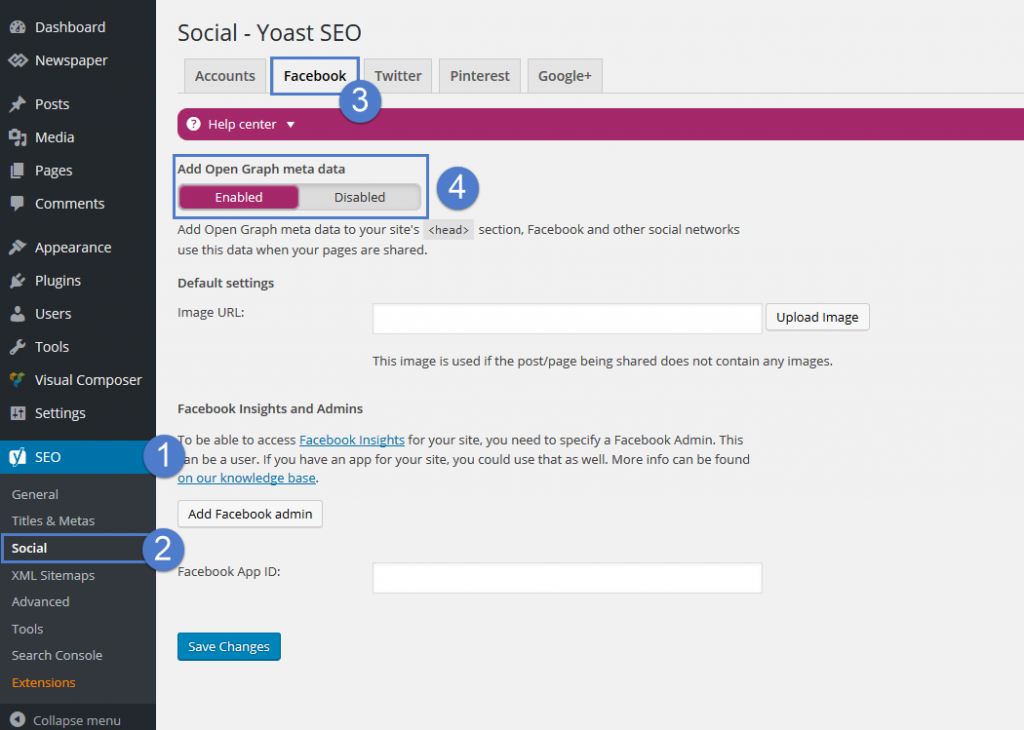
P.S. You should not have allowed to copy content through the right mouse button.
First, it is easy to do, for example, in the Firefox view the page source code: Tools – Web development – Page Source code (Ctrl+U).
Secondly, it lowers the behavioral factors of the whole site.
Thanks for your answer. Done everything as per your instruction but still getting these errors in Facebook debugger:
Note: Pinterest sharing now working fine.
1. Inferred Property.
The provided ‘og:image’ properties are not yet available because new images are processed asynchronously. To ensure shares of new URLs include an image, specify the dimensions using ‘og:image:width’ and ‘og:image:height’ tags. Learn More
2. Missing Properties
The following required properties are missing: og:url, og:type, og:title, og:description, fb:app_id

Hi,
From what I can see there are no featured images set for your posts. The posts seems to be built with the elementor builder, maybe that is not a problem in this matter. But there is no featured image set so there will be none when sharing as well
– https://forum.tagdiv.com/featured-image-or-video/
Try to set a featured image for the posts and check again
– https://developers.facebook.com/tools/debug/og/object/
Thanks
Hello Sir,
Each and every post has featured image of size greater than 200*200, I have taken care of all these things from my side. Also, elementor is working fine on my another website with Newspaper theme, the problem is only with this site.
Still getting the same error, is there any setting inside theme/plugin to correct these errors?
I tested further, it seems there is an og image in the page source and it is seen by Facebook
– https://www.screencast.com/t/hzDFQte0
– https://www.screencast.com/t/glK9XdxTEj
But the URL to the image is inaccessible from what I can see
– https://www.screencast.com/t/eYkNcMivzVZ
So I believe Facebook does not have access to the image URL on your server for some reason.

@desteenie Replied in the other topic – https://forum.tagdiv.com/topic/facebook-share-not-showing-featured-image/

I am having the same issue on my site (www.traveldew.com). I followed the recommendations suggested here as well as the Yost suggestions with no success. Previously I tried updating the PHP from version 5.6 to version 7.2 and increased the memory limit. I also tried deactivating all but the TagDiv plugins and the issue persists. Could you take a look?

Hi,
Hi,
Maybe your featured images don’t have the adequate size. In this topic I found there are some recommendations in terms of size, which Facebook recommends
– https://louisem.com/3838/facebook-link-thumbnail-image-sizes
Test with bigger images if possible.
Use the debugger to see how the shared post looks
– https://www.wpbeginner.com/wp-tutorials/how-to-fix-facebook-incorrect-thumbnail-issue-in-wordpress/
Please make sure that you set correctly the Cloudflare (CDN) -> https://forum.tagdiv.com/cloudflare-cdn/
Also you can deactivate lazyload from Newspaper>Theme panel>Template Settings
https://www.screencast.com/t/zDxt8d921eG1
Let me know the results.
Thank you.
