

The latest version of TD Standard Pack suddenly started producing a massive number of SQL queries. The issue came to my attention when the team reported very slow website, particularly during media uploads.
Inspection showed mysqld process being over 100% CPU constantly, often above 200%. After eliminating the usual culprits such as Yoast SEO, it turned out that it was TD Standard Pack. When deactivated, mysqld returns to normal levels.
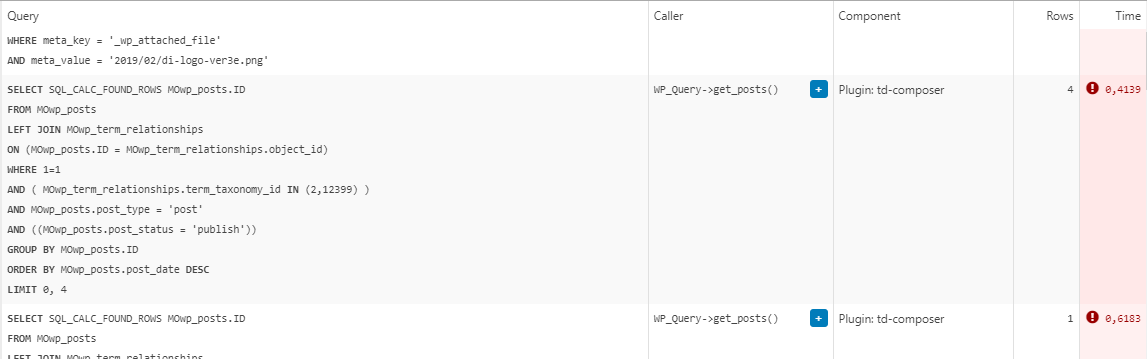
The queries in question are all “SELECT post_id, meta_value FROM MOwp_postmeta WHERE meta_key = ‘_wp_attached_file’ AND meta_value = (…)”. They seem to be constantly running and, as far as I can tell, are called from the header template.
The site is running on a solid VPS and latest versions of theme and required plugins.
We are in a process of migrating to a completely cloud templates built site which might resolve the problem because we will not need the Standard Pack anymore, but in the meantime, any ideas?
Example from Query Monitor:

Hello!
This issue has been discussed already here: https://forum.tagdiv.com/topic/td-composer-creates-27-slow-db-queries-on-every-page-load/
I recommend you to have the latest version of the PHP, WordPress, theme and plugins(11.3.1).
Thank you!
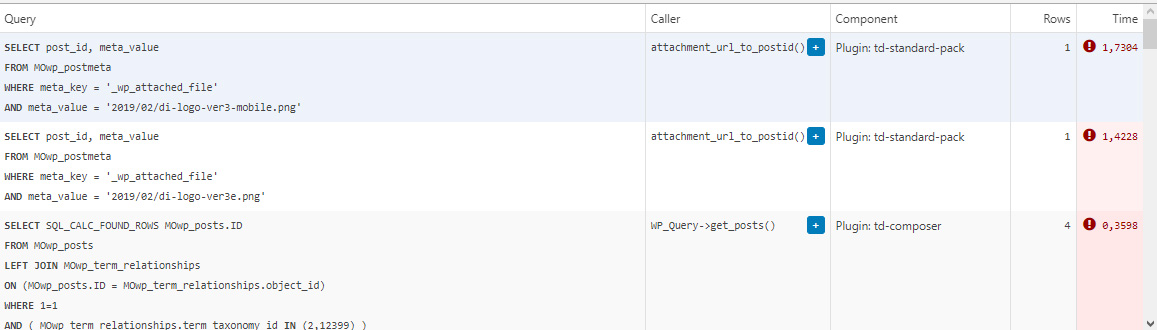
Thank you for the quick response, but that’s not quite it. Yes, TD Composer has a lot of queries and we live with it, but this was caused by a single (double, actually) repeating query from TD Standard Pack apparently fetching the site logo, using what seems to be a highly inefficient function:
attachment_url_to_postid()
And it was doing it twice, once for the desktop and once for the mobile logo, on every single page load. This caused mysqld to spike to 200% and above.
I see now that I have posted the wrong screenshot above, sorry. Here’s the correct one:
This morning I managed to patch up the problem, it’s a crude solution but may help someone. In header template I found that it was loading the logos from
plugins/td-standard-pack/Newspaper/parts/header/header-menu-h1.php
(yours may be different of course)
There I simply removed the PHP block fetching the logos and hardcoded the HTML for the logos in. As soon as I did that, the SQL spike went away. So I’d say it’s a bug, or inefficient code at least.
To be clear, we’re running the latest versions of WP, PHP, MySQL, the theme & plugins, all on a solid VPS. Yes there is quite a bit of SQL load, we’re working to optimize it with new blocks and Cloud Templates, but this was something else. Could be related to the latest Standard Pack update, don’t know, team didn’t report it before.
-
This reply was modified 4 years by
menneskedyr.
Hello!
We recommend to use cloud/PRO templates in order to have the possibility to edit them with the TagDiv Composer which contains a lot of functions and features, please check our tutorial here: https://forum.tagdiv.com/tagdiv-composer-tutorial/
Documentation here:
– https://forum.tagdiv.com/cloud-library-templates/
– https://forum.tagdiv.com/design-post-pages-using-cloud-library-templates/
– https://forum.tagdiv.com/cloud-library-category-templates/
Check also our video tutorials here: https://www.youtube.com/c/tagdivThemes/videos
The Standard Pack plugin is an old one with old features with default templates. We do not recommend it anymore.
Thank you for understanding!
Thanks again. Yes, I’m aware of that and we’re working on a new, Cloud Templates-based website. Standard Pack is discontinued then, I guess. Note that this was not always there, this bug appeared after the latest update. Until then, Standard Pack worked fine.
With that in mind, there are probably still people out there that have had Newspaper powering their websites for 5+ years and many are still using old designs, with old Newspaper templates. Maybe this helps someone.
It could also be useful for debugging if a site is running Standard Pack and experiences massive SQL spikes.
Have a good day 🙂
-
This reply was modified 4 years by
