

Hey, I hope all is well. I am in the process of building a website using one of the pre-built templates. What I am doing is modifying what is there to fit my style. I am currently using the “Chained News” theme for the site. The issue is when I shrink down the window to activate the mobile view of the template. When I shrink down the window to, say, 767 px wide, the name of the template will be displayed and not the name of the site. I have looked in the theme panel under “Mobile Header” and typed in the name of the site. I have also added an image that has the name of the site to it.
Also, under the mobile theme, in the “Newspaper – Theme panel,” i have done the same thing there. Adding images/name of the site but it still comes out the same…meaning the site goes from name of the site to “Chained News”.
The question I have is where in the wide, wide world of sports is this located? I have even looked, when I edited the header, to see if there is any reference to “chained news” and could not find anything.
Any suggestions/help would be great. Thank you.

Hi,
The Chained News PRO is made using tagDiv Composer and cloud templates and it can be edited using the theme builder.
– https://forum.tagdiv.com/tagdiv-composer-tutorial/
– https://forum.tagdiv.com/header-manager/
– https://forum.tagdiv.com/tagdiv-cloud-library-plugin/
-> https://i.imgur.com/9ioGHfF.png – https://i.imgur.com/4ZZ7tTo.png also the logo from that demo is an SVG, so you need to remove the SVG from the logo tab.
Thank you!
Good day,
Thank you for getting back with me on this issue. It is appreciated. I did go through the tutorials that you suggested (thank you). I also made sure that the SVG was removed from all the header information…to be honest, that was my first thought, that I missed something.
However, my apology for not mentioning this, but as for the header itself, I am not using the header Chained News. I downloaded another header from the sample prebuilt. I am using the “Pulse Pro” header instead. (I wish there was a way to show you exactly what i am seeing in a screenshot.)
Any other suggestions?
Thank you for your time and help.
Hi,
I have one question: Do you use the tagDiv Mobile theme plugins?
Can you use a tool to create screenshots? Like lightshot or greenshot?
Thank you!
Good day, and thank you again for your help. Yes, I am currently using the tagDiv Mobile plugin. I can create a screenshot, but I am not sure if I can send it or add it to the post.
Again, thank you for your help in this matter.
Not sure if this will work but here are a couple of screenshots


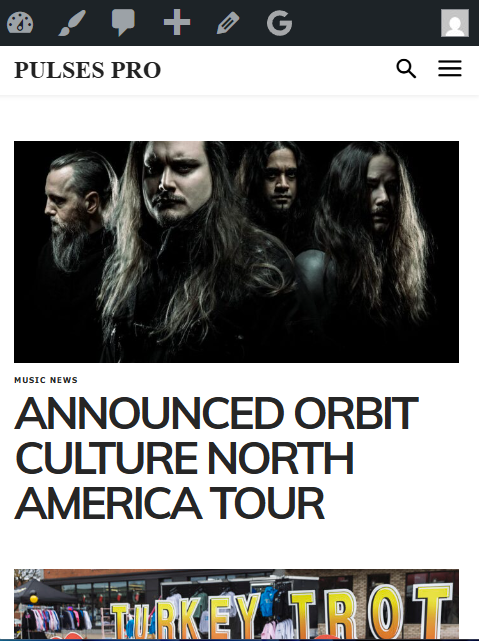
Hi,
If the tagDiuv Mobile theme plugin is enabled, then this will override the responsive version of the theme (the one edited with tagDiv Composer); therefore, if you want the responsive version, you should disable the tagDiv Mobile theme plugin. Also, the mobile theme cna be configured using only the theme panel settings:
– The Newspaper Mobile Theme: Introduction
– The Mobile Theme
Thank you!
Good day,
Thank you for getting back with me on this issue. I have done what you suggested and came up with the same results. The conclusion that I have come up with is that there is a bug in the theme. I am going to see if I can find where the theme is referencing “td_header_logo” in the database and see if I can change it there. Thank you for your help and time.
Hi,
I checked your website, and it appears you have the tagDiv Mobile theme plugin. Also, the cache used does not have the option for a separate mobile cache version, so the mobile version is displaying on desktop.
Please go to plugins and disable the tagDiv Mobile theme plugin, after that clear all cache and the responsive version will be used.
Thank you!


