Andrei L.
 Buna
Te rog trimite-ne un email la contact@tagdiv.com incluzand un link la aceasta conversatie. In cursul zile de luni vom verifica site-ul tau si setarile pe care lea-i facut pana acum si vom gasi o solutie la problema cu cate te confrunti.
Sa ai un weekend placut!
Multumesc pentru intelegere!
Andrei L. Hi
To avoid posts from Press Releases category being displayed on front page you need to edit it and ad its ID in post loop settings > multiple category filters: http://screencast.com/t/3hivCJYoRh8g
If this is not what you mean please provide more details.
Thanks!
Andrei L. Hi
This issue occurred after WordPress released V 4.4.1 but we updated the theme and now the pagination works fine. Try to update the theme at the current version available on themeforest, V2.3.5: https://forum.tagdiv.com/newsmag-how-to-update-the-theme/ deactivate all plugins except Visual Composer, clear all caches and test again.
Let me know how it goes.
Thanks!
Andrei L. Buna
Am explicat in mesajul precedent ca acel link e generat de codul din spotul Article Bottom Ad. Acel cod cheama o imagine inexistenta pe server. Optiunile pe care le ai sun doua in principiu: fie schimbi actualul url al imaginii cu al unei imagine exsitente pe server, fie stergi acel code din ad-spot: http://screencast.com/t/wIufe4XKm
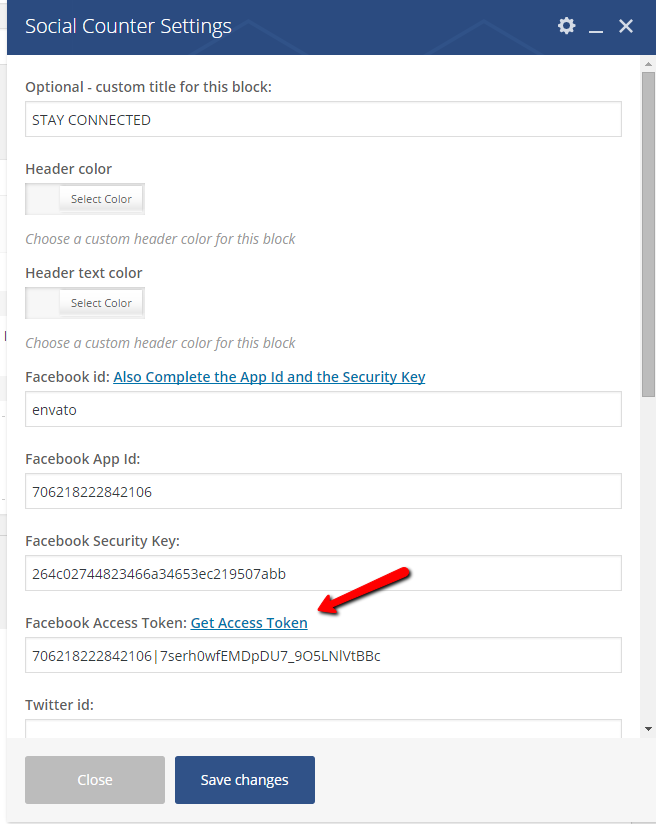
Referitor la Social Counter asigurate ca ai setat informatiile cerute de plugin in mod corespunsator: https://forum.tagdiv.com/wp-content/uploads/2015/07/td_facebook_on_vc.png
Daca nu reusesti sa obtii rezultatul dorit trimite un email la contact@tagdiv.com incluzand detaille de loagre pentru site-ul tau si un link la acest topic iar noi vom inspecta aceasta problema in cel mai sucrt timp.
Multumesc.
Andrei L. Hi
I’ve checked the menu and indeed there can’t be added new items to the main menu.
Try to increase max_execution_time at least at 300 and the max_input_vars should be bigger than 2000. Those values are set in php.ini file so try to access it but note that some hosts may restrict the access at this file, if you don’t have access to it contact your host provider and let him know about this situation. Also check the WP_MEMORY_LIMIT from wp-config.php file, here it’s a guide regrading this
http://codex.wordpress.org/Editing_wp-config.php#Increasing_memory_allocated_to_PHP
Let me know how it goes!
Thanks!
Andrei L. Hi
There is no ideal size, but for best graphic results you could use a full hd image (1920x1080px), make sure you compress it, you don’t want a large file, it will slow page loading speed. Also make sure you upload the full size image, not a thumb: http://screencast.com/t/JbU8WOOf6
I hope this helps.
Thank you!
Andrei L. Hi
The php code for login widget it’s located in top-menu.php file: http://screencast.com/t/ee5P6ZJDH You can use this code in a different file depending by where you want to display the login widget. Note that moving the code in a different file may require some adjustments and this is not an easy task.
If you’re not aware of the steps you need to take in this regard please consider hiring a developer or a freelancer to do this for you as we can’t offer customization services at the moment.
Thanks!
Andrei L. Hi
To load a different banner for a specific page you can add a condition in the file corresponding with the header style used. For example if you’re using header style 7 the file that must bee edited is header-style-7.php and the code should look like here: http://screencast.com/t/ryRhn07c25
<?php
                if (is_page(page-id)){
                    echo do_shortcode('[td_block_ad_box spot_id="custom_ad_1"]');
                }
                else{
                    locate_template('parts/header/ads.php', true);
                }
                 ?>
Replace the page-id with the numeric id of the page where you want to load a different ad. To get the page id follow this link: http://screencast.com/t/9V7zgx6WK
I used custom ad 1 in this example but you can use any of the custom ads, just update the number from shortcode. Ex: for custom ad 4 the shortcode will be [td_block_ad_box spot_id="custom_ad_4"]
If you want to hide the logo on a specific page just add this condition here: http://screencast.com/t/iT9p861gnJ
 <?php
            if(!is_page(page-id)){
                locate_template('parts/header/logo.php', true);
            }
            ?>
Let me know how it goes.
Thanks!
-
This reply was modified 10 years by Andrei L..
Andrei L. Hi
This can be achieved only by modifying the code which generate the subcategories list: http://screencast.com/t/lLz4wMBb This is a complex task which require good coding skills and also many customizations in theme’s code.
If you need this and you’re not aware of the steps you need to take in this regard please consider hiring a developer or a freelancer to do this for you we can’t offer customization services at the moment.
Thanks!
Andrei L. Hi
Your css does not generate a white color. In order to achieve that the property should be like this:
color: #fff;
Try this code in theme panel > custom code > custom css: http://screencast.com/t/tgMgvgaXxB
.wpb_revslider_heading {

color: #fff!important;

}
Let me know how it goes and if this not what you mean please provide more details.
Thanks!
-
This reply was modified 10 years by Andrei L..
Andrei L. Hi
Thanks @Chris for your feedback!
@giovanni114 I suppose that your widgets are generated by some plugins and in this case we can’t guarantee theirs functionality. You have to read plugins documentation to see how they works then yo’ll need to find a proper way to include the widgets generated by those plugins on the page. Some plugins may require custom modifications in order to work with our theme. If this is the case with one of your plugins then my advice is to look for someone which can help you or hire a freelancer to do this for you as we can’t offer custom services at the moment.
Thanks!
Andrei L. Hi
You can change that title from translation part here: http://screencast.com/t/zP8rSFRVDorA http://screencast.com/t/qbMyjEnYC7
Thanks!
Andrei L. Hi
Please make sure that you didn’t set any offset in block’s settings where it suppose to show the most popular articles, also try to deactivate all plugins except Visual Composer, clear all caches and test again.
Let us know how it goes and if you still can’t manage to solve this provide wp-access so we can have a look and send us your wp admin credentials via email at contact@tagdiv.com and include a link to this tread into your message.
Thanks!
Andrei L. Hi
Please note that is a public forum and any one can see the information posted here, so I removed your login details.
I’ve checked your site and all menu items set under Appearance > Menus are displayed fine on front-end. If you still have this issue please provide more details about the missing menu items from menu so I can inspect this closer. Also I’ve noticed that the max_input_vars have a smaller value then the recommended one. We recommend to set this directive at a value above 2000 otherwise it may appear some issues, especially with the menus: http://screencast.com/t/wW2Hxvw141
Thanks!
Andrei L. Hi
The error is generated by article bottom ad code which calls a missing image: http://screencast.com/t/s079YAkLbKO7 Please check the code and make sure that you add a proper image url in it.
Please make sure that you added the proper information in Social Counter fields because checking your site I’ve noticed that the facebook id is not added correct: http://screencast.com/t/7amy1OFy Also make sure that you’re using the latest version of Social Counter, 3.1.
Thanks!
Andrei L. Hi
Try this css in theme panel > custom cod > custom css: http://screencast.com/t/eUfrbmHYWQv
.td-header-sp-ads{

    margin-top: 35px;

}
You can modify the margin valuer as you want.
Let me know how it goes.
Thanks!
Andrei L. Hi
The theme uses thumbs to reduce the page size and speed up page loading time. From each image uploaded are generated thumbs for each thumb size used by the theme. Basically when a post it’s displayed on the page in a block, the featured image displayed is not the one which you uploaded in media file, it’s a thumb cropped from the original image at precise dimension.
You can see where each thumb it’s used in theme panel > thumbs on module & blocks: http://screencast.com/t/6ny0JTMsR For example this thumb: 300 X 160 it’s used for modules 1,2 and blocks 3,4. If you’re nut using those modules or blocks on your site then this thumb can be deactivated. In order to those changes take effect you need to regenerate the thumbnails: https://forum.tagdiv.com/existing-content/
Hope this help.
Thanks!
Andrei L. Hi
Please provide your site url so I can inspect this closer and get back to you with a proper solution.
Thanks!
Andrei L. Hi
By setting the primary category for the post the breadcrumbs will look like this: http://screencast.com/t/V0HcVw6KD – http://screencast.com/t/oyTpPq0pIquw
Thanks!
Andrei L. Hi
The thread will remain here on the forum but we will consider it as closed.
Thanks!
Andrei L. Hi
The theme is tested and the sidebars are displyed fine on any post or page.
I’ve checked all indicated posts and the sidebar it’s displayed fine: http://screencast.com/t/Vxd8Usbbk If you still have this issue try to clear the cache memory and test again.
Let me know how it goes and if you still have this issue please provide more details so I can duplicate it on my side and get back to you with a more accurate answer.
Thanks!
Andrei L. Hi
I’ve checked your site and the problem seams to be related with the css code which apply only on home over the sub-menu item. Try to deactivate all plugins except Visual Composer, clear all caches also disable any minify options for css/js if you’re using, clear all caches and test again.
Let me now how it goes.
Thanks!
Andrei L. Hi
The theme display at breadcrumb the primary category set at post settings: http://screencast.com/t/9aP3eXa6UR or if this is not set will display the first category of that post in alphabetical order.
I am not sure how do you want to change the breadcrumb’s structure so please provide more details about this so I can inspect this closer and maybe I can help.
Thanks!
Andrei L. Hi
We didn’t had any report like this before and I am not sure why this happens. Try to deactivate all plugins except Visual Composer, clear all caches and test again.
Let us know how it goes and if the problem persist please send us an email at contact@tagdiv.com with your login credentials and we will inspect this issue as soon as possible, also include a link to this topic.
Thanks!
Andrei L. Hi
The theme is tested on different browsers and also different devices like iPhone, iPad tablet and works fine. Also the file structure it’s made to respect the google standards regarding the data structure.
I also looked over the indicated report but there are no explanations for those results or any errors related with the theme. This http://screencast.com/t/ltQGBfaeII warnings reefers to a time out which usually it’s a server side problem.
Thanks!