

 Breinblik Breinblik Breinblik
 In my code (shortcode) on the page i see shortcodes starting with “vc”. Is this from Visual composer? How is it possible it’s there? I didn’t change anything so why wasn’t it causing errors when the website was stil on the subdomain and it’s causing errors now.. How do i remove these shortcodes from the TagDiv shortcodes?
Breinblik Hey Bettina,
I wasn’t talking about a specific page. What i ment was in general. Every time a change is made to a page the mobile page needs to be changed to right? It won’t update automatically? Is there a more clever way to do this without having to change both the normal page and the mobile page?
Breinblik Ok,.. what is the mail address?
Breinblik Is this problem solved? Can you share the solution?
Breinblik Also.. what dimensions should the images i use as background in the stretched rows be? What min width and what min height ?
Breinblik Thanks for the help! I’m having the same issue with the header. Why is it greyed out when i want to choose it from the menu?

Breinblik Thank you! That helped
Breinblik When wil this problem be solved?
Breinblik Suddenly my footer disappeared, i don’t if this happend because i assigned a ‘Mobile Page’ to my homepage.. i see the footer when i open the TagDiv composer but i don’t see it when testing live.. Please help:
https://test.circulaireconsumptiegoederen.nl/
Breinblik Breinblik Hi! I’m stil not able to add shortcodes, what am i doing wrong?
I’m using the raw HTML element now. The element called “column text” is not available in my elements panel.
Breinblik Ok but why is this section in the theme panel? This gives me the impression i’m able to assign a template to my custom post type. Is this something the developers left in that shouldn’t be there because it’s not working?

Breinblik But i don’t get it.. you offer support for CPT in the Newspaper Theme panel but you can’t edit them with TagDiv Composer? It doesn’t seem logical.. Are you sure there isn’t another work around we can try to get this to work? All i want is my CPT’s to have the same layout as my default posts. Is there another way how i can achieve this without using TagDiv composer?
Breinblik ok thank you!
“It is like that: single-icoonprojecten.php”
This one i got figured out.. i was asking about the others: single_template_1.php to single_template_11.php. I think i should rename these as well because i assume then i’ll be able to attach these templates to my custom post types
Breinblik Please answer
Breinblik Please answer
Breinblik I’m beginning to question if we are fully understanding each other. It seems to me like i’m not asking for something ‘very’ advanced. I’ve created multiple Post types which behave exactly like the default posts. I just want them to have the same layout and be editable with TagDiv composer, that’s it.
Breinblik Found it thanks! And how should i rename them?
My custom post type = icoonprojecten
So should i rename these “single_template_icoonprojecten_1.php” etc?
Breinblik Also i tried assigning a module to my Custom Post types
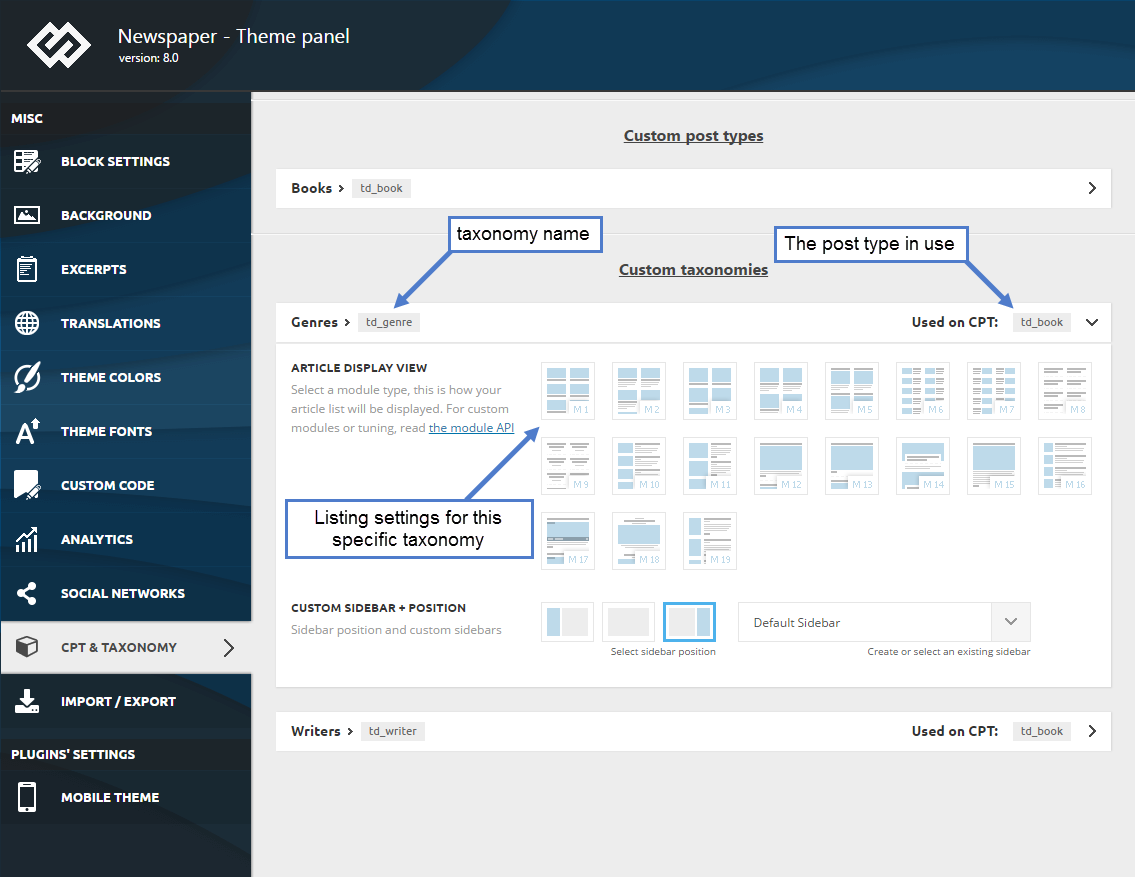
but after saving these changes i made in the theme panel i don’t see any changes in the frontend, it seems like these changes aren’t coming trough. What steps can i take to debug this and find the solution?
Breinblik Your colleague already pointed me to this page: https://forum.tagdiv.com/custom-post-type-support/ and thank you but it doesn’t help me. Also i suspect the info on this page is outdated because i can’t find these files:
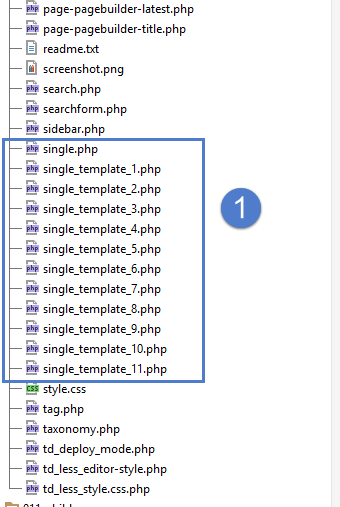
It looks like the root of the Newspaper theme but i don’t see these files in my theme folder, where are the located?
I would like to disable/uninstall WP Bakery pagebuilder but i first need to be sure that TagDiv Composer can offer me the same solutions.
-
This reply was modified 5 years by
Breinblik.
Breinblik Is there a way i can do it by modifying the PHP files? There must be a way right?
I’m being forced now to use the TagDiv composer and it doesn’t offer me a solution for this problem. The WP Bakery PageBuilder does.. but it’s not an option because then i have to rebuild all the pages again..
Breinblik I’m trying to modify templates/pages of my custom post types but they are not editable by TagDiv Composer why is that and is there a way of enabling this?
Breinblik changeData Error: Element model id is not in $refEl data! Current state has involved an issue. You could try an UNDO operation (CTRL+Z / CTRL+SHIFT+Z)
