

 Edward
 Technical support ensures that the Theme works only with tested plugins:
WordPress SEO – SEO plugin
WP Super Cache – caching plugin
Contact form 7 – used to make contact forms
WooCommerce – eCommerce solution
bbPress – forum plugin
BuddyPress- social network plugin
Font Awesome 4 Menus- icon pack, supported in the theme menus
Wp User Avatar – Change users avatars
Jetpack – plugin with lots of features *it may slow down your site
As a regular user we work for example with such an event calendar (the plugin is paid): https://codecanyon.net/item/eventon-wordpress-event-calendar-plugin/1211017?s_rank=3
Maybe one of the users will give more examples…
Edward Edward  Edward
 Try to Top Header Menu add Custom Link with the follow parameters (for example):
URL: #
Navigation Label: Tel. 0123456789
Also for e-mail item…
Edward Your link is not available.
Edward Provide screenshot or URL please…
Edward By the way, do not work shortcuts in the footer of AMP version, check please…

Edward Check your system status parameters: http://screencast.com/t/bpnfaltKJ and try to get them all green by following this tutorial: https://forum.tagdiv.com/system-status-parameters-guide/
Edward 1. Section MORE FROM AUTHOR you can replace for example to READ ALSO (just to replace field in the Theme panel -> Translation).
2. You can hide this section by entering this code in Theme panel -> Custom CSS
/* Hide More From Author */

.td_block_related_posts .td-related-right {

display:none;

}
3. Either by commenting or removing this line of code from this file
– https://www.screencast.com/t/iAwsEsRPXyu
Edward Next question:
Breadcrumbs on the category page.
By analogy with the display of the title of the article in breadcrumbs,

is it possible to remove the display of the category name on the category page?
Needed to remove duplicate item – the last item of the breadcrumbs:

Thank you!
P.S. Just be patient, I have very few questions. 🙂
Edward Edward  Edward
 P.S. You should not have allowed to copy content through the right mouse button.
First, it is easy to do, for example, in the Firefox view the page source code: Tools – Web development – Page Source code (Ctrl+U).
Secondly, it lowers the behavioral factors of the whole site.
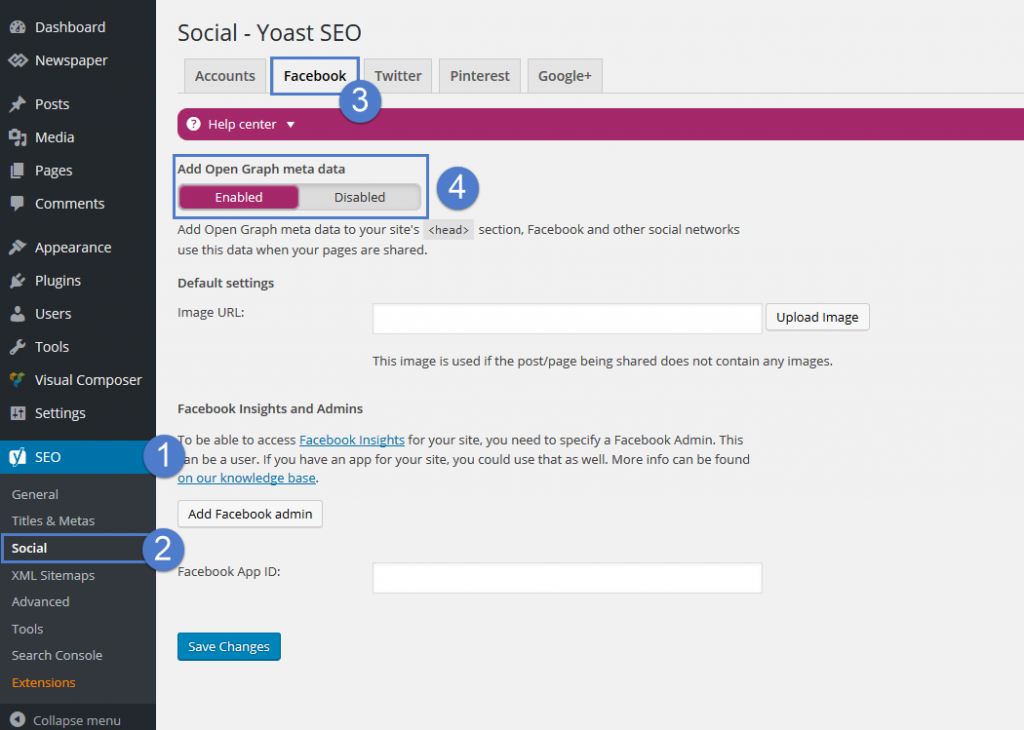
Edward Yoast plugin, the Facebook metadata can be enabled from SEO -> Social -> Facebook:
Edward My site is about news and I’d like to have a thing like “30 minutes ago” instead of the day.
Try to check the following topic here -> https://forum.tagdiv.com/topic/changing-the-date-to-x-time-ago/
Edward You can place that code here – https://www.screencast.com/t/iGefS9jwHpKJ in the
header.php
file found in the main theme folder.
Edward Hi Simion!
Your advice helps me a lot, thank you!
Move on and next question:
I can set up separately the parameters for this links (add the “nofollow” parameter) in the modules in the footer?

In my case: is it a block that displays new publications from all categories, and a block that displays the publications popular for the last 7 days.
Thank you!
Edward  Edward
 https://forum.tagdiv.com/how-to-update-the-theme-2/
Also read A. Update the theme via FTP section.
Do not forget about backup the files and the database, in case something goes wrong with the server you could use the backup to revert to the previous state.
Edward > Is their any option that I don’t have 2 times the same postings displayed?
https://forum.tagdiv.com/unique-articles/
https://forum.tagdiv.com/offset-feature/
Edward Check this points:

Edward Try this code:
/* Comments Bubble Color */

.td-module-comments a{

background-color:Red;

}

.td-module-comments a:after{

border-color: red transparent transparent transparent;

}
Edward Hi Simion! Thanks!
Sorry, it doesn’t work until the end. Also modified the string 361.
Was:
$buffy .='href . '" rel="bookmark" title="' . $this->title_attribute . '">';
Became:
$buffy .='href . '" rel="bookmark">';

Edward  Edward
 Thank you Simion!
First of all I want to note that I understand that all changes will be lost in case of theme update.
Add the “nofollow” parameter categories links – Done!
If anyone is interested: in this file https://www.screencast.com/t/qYbyDrCDyzA add parameter rel=”nofollow”.
Was / Became


