efaq
efaq Hi thanks for reply! Can you tell me the code, how it is possible to underline the thext in footer area?
http://www.w3schools.com/tags/tag_u.asp
I tried to use this code in CSS but it didn’t work.
2. https://abload.de/img/unbenannt0dk31.png
This area should have the some colour like the code in css. It appears, if I scroll up. It is not possible to put in the “background gradient color” in menu.
3. How can I edit the scroll-up button? https://abload.de/img/unbenannt00jmf.png
Thanks!
Thanks
efaq Hi,
if I just fit in the code it will works. But it is not possible to use the theme colour function any more. Because If I want to make the text colour in sub footer black, suddenly other colours will be shown.
Why?
How can I solve this problem?
efaq Works!Thanks!!
Is this possible to receive the code also for top menu, footer and sub-footer?
efaq 1) I do not get, what you are explaining. Sorry. Is it possible, to make a short video where you can show how to do this? And is this custom .td-menu-blocks-custom predefined?
2) Yes I know what you mean, that thumbs are not shown because of deactivating. But instead of the picture another thumb is shown to me : http://www.travelisfun.de/ –> watch the first row with those three pictures. So instead of the post picture the thumb picture is shown to me. Where is the advantage of this? I mean, for google a picture is still load, isn’t it? Hope you understand, what I mean.
3) Why are the pictures are not shown in the footer area “recent posts” ? http://www.travelisfun.de/
Thanks a lot 🙂
efaq Hi,
1) okay thanks but first of all I have to put in in CSS the class before I add my own menu, right? Because I added a menu, but which of those three options should I click? Top Header, Header menu or footer? I think Header menu. But in your sreen you’ve produced a page http://screencast.com/t/i834fsDw . So , do you chose this in menu abd make it a page menu ? Or what is this “custom menu” http://screencast.com/t/WWt2yabWiMv
So, again. I create a menu. Then? Do I pick a page to have this been crated: http://screencast.com/t/7Mtx3fdFGNRd or what do you mean? Excuse me I don’t get this :/
2)Okay, but what is the sense of it? To show not the pictures but only the demo picture (Logo with size) For what do I need those features? What are they good for? If I deactive a module. What advantage do I have from that? This is what I don’t understand.
3) How can I edit these links in the footer section: http://abload.de/img/unbenanntltkmh.png
It is not in the widget area (or footer area) Where can edit this content?
Thanks a lot!
efaq Hi,
thanks for reply.
1) Okay, but why is the block tabs are shown in the demo version?
2) https://forum.tagdiv.com/theme-thumbs/ I don’t get what you are trying to explain with the modules and blocks. What if I disable in “block settings” the funtions? I dont get that. It it only the function not to load the pictures? What for an advantage do I have, if instead of the post picture another picture is shown?
3) Do you provide a tagDIV Funtion, where I can list some links in footer? Like a blogroll?
Thanks 🙂
efaq Thanks for reply 🙂
1. No, I mean these sub categories: http://abload.de/img/unbenannto5psu.png
2. Okay, I will have a look on the homepage building.
3. Is the pagination tab function that menu with a lot of buttons? Like here:
http://abload.de/img/unbenannto4uth.png
Thanks
efaq Edit:
http://demo.tagdiv.com/newspaper_travel/
Blocks in the text: How can I activate the function to skip left or right as I can do it in the menu under “Destinations” ? There you can click on right or left to show new content.
efaq Edit:
I wanted to replicate the homepage. But the background image is still not shown. Watch here: http://gefrierschrank24.net/testhomepage/
I followed this guide: https://forum.tagdiv.com/topic/how-to-stop-top-header-image-from-stretching/ (except copying the code, because it cannot be copied from a image”http://screencast.com/t/SUt9ItUc” )
But everything is the same. Also td travel code is set, as it should be. Why is the background image not shown? watch here: http://abload.de/img/unbenanntj3q9q.png
Thanks for helping 🙂
efaq Thank you very much.
I saw, that in http://demo.tagdiv.com/newsmag/ the sub-categories are listed in horizontal way. In The travel demo it is listed vertically.
How can I change that option?
2) http://demo.tagdiv.com/newsmag/ watch the point editor picks. How is it possible to edit the categories as you can see in the attachment? Is this also a mega menu with sub categories?
http://abload.de/img/unbenannt42bj1.png
Thanks 🙂
efaq Hello,
thank you very much! Helped a lot!
Now it is possible to activate a mega menum which shows up different categories with posts. But how can I add a page into that mega menu which already includes categories (www.travelisfun.de –> Orte) Under the point “USA” I want to add just a page.
2. https://forum.tagdiv.com/menus-newsmag/
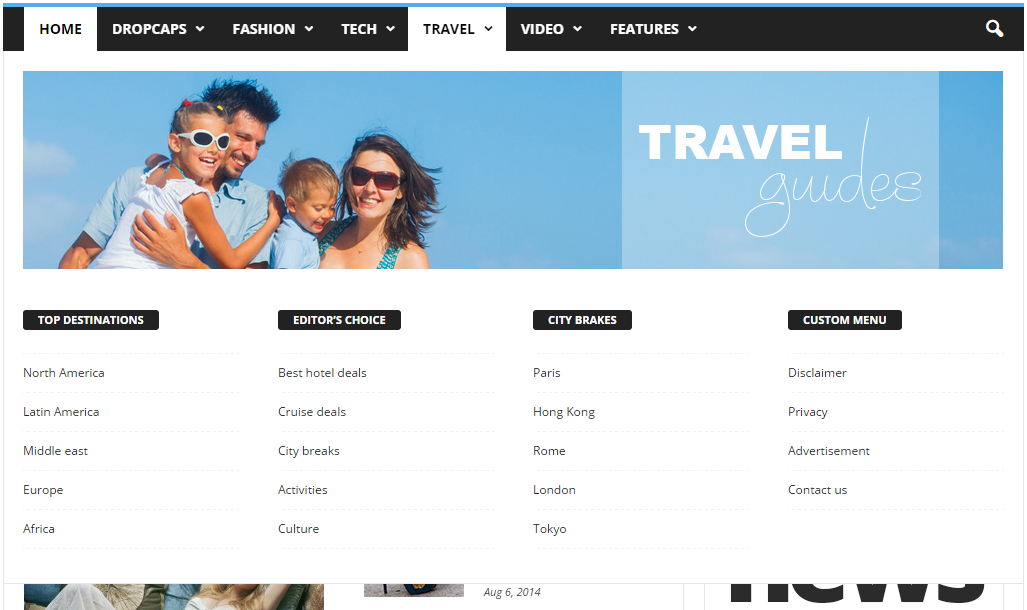
I do not understand how point C is made? Do you have maybe a short video, where you can explain how to make that page menu grid? Because in the descprition it says, that I should add the page ID. But this is only one page id. I want to add a grid system, where more than one pages are listet. like here: https://forum.tagdiv.com/wp-content/uploads/2014/10/page-menu.png ( Top Destinations, Editors choice… Under these categories the pages are listed. How can I do this?)
And could you provide me that html code for your demo page menu like in that picture?
3. The ajax filter in the blocks: Is it only possible to show content, which is categorized? Or can I show specific posts? And if yes, can I show more than one specific post? And is it also possible, to show the page?
Thanks a lot! Have a nice weekend! 🙂
efaq Edit:
http://www.travelisfun.de/414-2
I wanted to built the same page like the homepage. Why is the background image here not shown like the homepage ? I just copied the identical functions. But here the backgrund image of the first row is not shown.
efaq Edit;
http://demo.tagdiv.com/newspaper/block-5/
What do you mean by 2 columns ( Block 5 on 2 columns) What do you mean by this and how is it possible to configurate this?
efaq Hi,
thanks so far for you help.
But I Don’t received an answer for the topic above 😉
” to 2) Yes i saw that different styles. But it is not possible to colorize the hover of the background and stuff like that. Only few options are possible in “Theme Colours”. How can I activate Background color of menu points? For Hover and if you have clicked on that symbol.
Like here: https://www.travelicia.de/
Also I want to now, how can I decide, which part of that picture should be shown, when I set it as a background: http://www.travelisfun.de
–> Right now only a blue background is shown. But not the whole picture.
”
and: how can I increase the font size?
Thanks 🙂
efaq Edit:
1.) How can I make the content more wider?
2) https://forum.tagdiv.com/excerpts-introduction/ What are these text blocks? And what are the modules? Where can I customize them? Why are there different Modules?
efaq Thank you for your reply.
to 2) Yes i saw that different styles. But it is not possible to colorize the hover of the background and stuff like that. Only few options are possible in “Theme Colours”. How can I activate Background color of menu points? For Hover and if you have clicked on that symbol.
Like here: https://www.travelicia.de/
Also I want to now, how can I decide, which part of that picture should be shown, when I set it as a background: http://www.travelisfun.de
–> Right now only a blue background is shown. But not the whole picture.
Thanks
-
This reply was modified 10 years by
efaq.
efaq Hello,
1) To 5a) The colour box is not shown to me. Why? Watch here, please: http://abload.de/img/unbenanntp7uai.png
2) http://www.travelisfun.de/ How can i activate a background hover color.? If I hold the mouse over a specific point on the menu, it is only shown a small gray colour to me. I want a full coloured hover background. Watch here: https://www.was-tun-gegen-schwitzen.net/
3 to 9: I still do not know how to do that funtion like here: http://abload.de/img/unbenannt1bjgw.png
How can I fix that picture while scrolling down. Like here: http://indietravel.net/
If you scroll down the picture at “Become a Indienblogger” is fixed. It scrolls not down. Only the content scrolls down. How can I do this?
Thanks for reply 🙂
-
This reply was modified 10 years by
efaq Edit:
Wich social Plugin is used for the sidebar “stay connected” Do you also provide that design of social sharing?
efaq One edit: How is it possible to change the background picture in the footer (the mountain transparent picture in travel mode) ?
Thanks 🙂
efaq Hello Catalin,
first of all thank you very much for your reply! Some few points still are not clear.
5a) Okay via CSS. Are these buttons here also coloured via CSS? http://demo.tagdiv.com/newspaper/td-post-26-most-anticipated-hotel-openings-in-2016/ (Lifestyle, Travel)
9b. No i Dont’t mean the smooth scroll. What I want to know is, how can the picture can be fixed while I scroll until it is not seen anymore.
Watch here http://abload.de/img/unbenannt1bjgw.png
———————————-
How can i create a page menu correctly ? I tried it with your guide but it looks not right.. Watch here: http://www.gefrierschrank24.net the menu point “page content” . the whole page content is shown instead of a short excerpt.
How is it possible to have two different sidebars at one page? Like here:
http://demo.tagdiv.com/newspaper/
Thank you very much!
-
This reply was modified 10 years by
efaq I have to thank you! Great support.
efaq Hello,
thanks for your answer! .
I’ve get few questions more:
1. In Row Settings. What is the difference between “General Settings” and “Design Settings” . In both you can put in the picture?
2. http://abload.de/img/unbenanntnxuq9.png
Why do I have to activate those plugins? I dont want to have an commercial shop? Is it not possible to ignore those messages?
Thanks for replay! 🙂