Hi,
i wrote some questions down, which I now want to ask you.
1. How can I edit the sidebar in catogory?
2. How can I make the theme update full automatically?
3. How is the menu build? How cann I put in the different categories with posts in the menu nav? I do not know how to edit the mega menu. in wordpress -> design- -> menu it is not possible.
4. What is the difference betwenn mobile and retina mobile ? both are not working. although I put in pictures. Watch hier attach: http://abload.de/img/unbenanntczsyj.png
5. http://gefrierschrank24.net/deniz/
Here you can see two buttons called “Über” and “Quelle”.
a) How can i make the buttons coloured? Example: http://demo.tagdiv.com/newspaper/td-post-26-most-anticipated-hotel-openings-in-2016/ at the top of the post called “Lifesstyle and Travel”
b) Why is Quelle shown to me? How can i edit this? Is it a category?
c) Is it only possible, to make one source?
d) How can I cateorize in more buttons? Like here http://demo.tagdiv.com/newspaper/td-post-26-most-anticipated-hotel-openings-in-2016/ . At Tag there are more than just one button (awesome, beauty, boys..)
6. The filter function. How is it possible, just to display one specific post. I only can choose which category I want to show. But how can i choose a specific post?
7. Where can I find the child theme? Don’t you provide a child theme?
8. Why is this picture pixelated? Like here in footer: http://mein-testgelaende.de/
What size should the picture have?
9. On my other site: http://www.meinetestdomain.com/index.php/home-page-2/ visual composer is also activated. In the middle you can see a picture ( man ) at the faq section. Here you can see this: http://abload.de/img/unbenannt17wsx8.jpg
You can see, that if you sroll down, the pictures comes fluently. So from row to row it is a fluent transition. Here two questions:
a) How can I set that background image? Why is it on my other site possible and at the newspaper site with visual composer it is not possible? Although the settings are the same?
b) How can i make that fluent transition? I tried it here, bur it is not possible.
http://www.travelisfun.de/317-2
A lot of questions 🙂
Thanks for reply 🙂
-
This topic was modified 10 years by
efaq.

Hello efaq,
1)Please notice that all the settings for the sidebar in the category you can find in your Theme panel. Please check the Category section for your panel and there you can find what I mean. Please notice that you have control about global category settings and per category settings, like this -> http://screencast.com/t/lqcuKZlsgtcn -> http://screencast.com/t/OiexOKCJDhj and then, the sidebar you can customize as you wish from Widgets area, like this -> http://screencast.com/t/TlH4iy7Fm For more information about this, please do not omit to read our documentation here -> https://forum.tagdiv.com/sidebars-tutorial/
2)If you want to make the theme update full automatically, please check this tutorial here ->>
https://forum.tagdiv.com/how-to-automatically-update-newspaper-theme/
3)You can customize your menu, only from the panel. In order to achieve as you wish, please try to read our documentation here -> https://forum.tagdiv.com/main-menu/ -> https://forum.tagdiv.com/mega-menu/ because there you can find all the steps to configure the menu.
4)Please notice that the retina logo is only for devices that have this option, for example, Apple devices. The retina logo is used to offers you a high quality for your mobile devices while the logo mobile is a normal logo which is used for normal devices that do not have retina logo integrated. As you can see in our documentation, the header style 9,10,11 do not use the logo mobile. For more information about these settings, please check the documentation here -> https://forum.tagdiv.com/logo-favicon/
5) a)As you can see, these are additional customizations and you can change the color only with some Custom CSS code. For example, you can use the following code and place it in Theme panel->Custom CSS Area.
The code is ->
.td-category li:nth-child(1) a{

background-color:red!important;

}

.td-category li:nth-child(2) a{

background-color:blue!important;

}
The result -> http://screencast.com/t/k8Hr4KNDbB
b)These buttons are VIA/SOURCE/TAGS and you can have control over these only for panel, when editing the post, like this -> http://screencast.com/t/uc6Mb7uAw
c)You can edit from your panel as I said you above
d)Also, you can create your own tags only for the panel as you can see in the above screenshot
6)If you want to display a specific post, you have to get the post ID, using the inspector like this -> http://screencast.com/t/iqRwXivKt7 For more information about Block settings and filter option, please check our documentation here -> https://forum.tagdiv.com/block-settings-tutorial/
7)The child theme come bundled with our theme and you can find it in Code file, like this -> http://screencast.com/t/P2jEwZ5L
8)Please check here what is the standard size for the footer logo. For more information about Footer section, please check our documentation here -> https://forum.tagdiv.com/footer-templates/
9)a)If you want to set the background image, you can do that from Theme panel->Background section. Please check the documentation here -> https://forum.tagdiv.com/background-introduction/
b)If you want to have the smooth effect for your scroll, please try to use our Smoot scroll feature from Theme panel. For more information, please check here -> https://forum.tagdiv.com/smooth-scroll/
Hope this helps!
Thanks.
Hello Catalin,
first of all thank you very much for your reply! Some few points still are not clear.
5a) Okay via CSS. Are these buttons here also coloured via CSS? http://demo.tagdiv.com/newspaper/td-post-26-most-anticipated-hotel-openings-in-2016/ (Lifestyle, Travel)
9b. No i Dont’t mean the smooth scroll. What I want to know is, how can the picture can be fixed while I scroll until it is not seen anymore.
Watch here http://abload.de/img/unbenannt1bjgw.png
———————————-
How can i create a page menu correctly ? I tried it with your guide but it looks not right.. Watch here: http://www.gefrierschrank24.net the menu point “page content” . the whole page content is shown instead of a short excerpt.
How is it possible to have two different sidebars at one page? Like here:
http://demo.tagdiv.com/newspaper/
Thank you very much!
-
This reply was modified 10 years by
Edit:
Wich social Plugin is used for the sidebar “stay connected” Do you also provide that design of social sharing?
Hello efaq,
5) a) Here is talking about category template. If you want to change the color for each category/subcategory tag you have to use this type of category template -> http://screencast.com/t/hnXb9dRJkt -> http://screencast.com/t/bgwIAQqrnW
9)Please provide more details about that exactly you want to achieve in this case.
If you want to create a page menu, please try to implement it according to our documentation here -> https://forum.tagdiv.com/page-menu/ Also, please check this topic here -> https://forum.tagdiv.com/topic/mega-menu-with-grid-columns/ because maybe will be useful for you.
If you want to have more than one different widgets for your side, you have to use Widgetised Sidebar from Visual Composer, like this -> http://screencast.com/t/IiE977SX
As you can see here -> http://screencast.com/t/790Nmrmx64 the footer section for Travel demo is a custom one. This is a transparent image applied to the background with background-image for a light background.
That social counter does not come from our theme. If you want to have the same effect you will need to use some plugins with this functionality and see how it works for you.
Thank you for the message!
Hello,
1) To 5a) The colour box is not shown to me. Why? Watch here, please: http://abload.de/img/unbenanntp7uai.png
2) http://www.travelisfun.de/ How can i activate a background hover color.? If I hold the mouse over a specific point on the menu, it is only shown a small gray colour to me. I want a full coloured hover background. Watch here: https://www.was-tun-gegen-schwitzen.net/
3 to 9: I still do not know how to do that funtion like here: http://abload.de/img/unbenannt1bjgw.png
How can I fix that picture while scrolling down. Like here: http://indietravel.net/
If you scroll down the picture at “Become a Indienblogger” is fixed. It scrolls not down. Only the content scrolls down. How can I do this?
Thanks for reply 🙂
-
This reply was modified 10 years by

Hi,
5)a) The color will only show up in the per category setting. There are no colors for the general category tab. Please open the specific categories from below the general options
2) Different header styles provide different hover effects. You can see different header styles here: https://forum.tagdiv.com/header-styles/
3) Our theme has no such option to make an image scroll as a background. This will have to be made custom and we cannot offer any customization services at the moment. sorry.
Thanks.
Thank you for your reply.
to 2) Yes i saw that different styles. But it is not possible to colorize the hover of the background and stuff like that. Only few options are possible in “Theme Colours”. How can I activate Background color of menu points? For Hover and if you have clicked on that symbol.
Like here: https://www.travelicia.de/
Also I want to now, how can I decide, which part of that picture should be shown, when I set it as a background: http://www.travelisfun.de
–> Right now only a blue background is shown. But not the whole picture.
Thanks
-
This reply was modified 10 years by
Edit:
1.) How can I make the content more wider?
2) https://forum.tagdiv.com/excerpts-introduction/ What are these text blocks? And what are the modules? Where can I customize them? Why are there different Modules?
Hi,
1) The sidebar or any other element cannot be made wider as our theme uses a fixed width and all elements depend on this fixed width. in order to change you have to adapt every element to the new size and this will be no walk in the park.
2) Blocks are these content boxes that display posts: http://demo.tagdiv.com/newspaper/block-1/
We created 21 blocks so far so you can chose from a wide variety.
A module on the other hand is the base element. Basically a module is a single post element inside a block. A block is only a container for one or more modules. Here is an example of how a block is made out of modules:
http://screencast.com/t/avnmJSJxm3s A module is the base element.
You can see what block uses what modules here: http://screencast.com/t/jW3kPZ7BYLE
Hope this helps.
Thank you!
Hi,
thanks so far for you help.
But I Don’t received an answer for the topic above 😉
” to 2) Yes i saw that different styles. But it is not possible to colorize the hover of the background and stuff like that. Only few options are possible in “Theme Colours”. How can I activate Background color of menu points? For Hover and if you have clicked on that symbol.
Like here: https://www.travelicia.de/
Also I want to now, how can I decide, which part of that picture should be shown, when I set it as a background: http://www.travelisfun.de
–> Right now only a blue background is shown. But not the whole picture.
”
and: how can I increase the font size?
Thanks 🙂
Edit;
http://demo.tagdiv.com/newspaper/block-5/
What do you mean by 2 columns ( Block 5 on 2 columns) What do you mean by this and how is it possible to configurate this?
Edit:
http://www.travelisfun.de/414-2
I wanted to built the same page like the homepage. Why is the background image here not shown like the homepage ? I just copied the identical functions. But here the backgrund image of the first row is not shown.
Hi,
For the hover color of the menus, you need to change the teheme accent color from here: http://screencast.com/t/HvjDNqe4ORQW The active button will remain ‘hovered’ with the color you set in the theme panel
You can increase the font size for the menu from the fonts section here: http://screencast.com/t/oakNT1Bmbsoy
For the travel demo image, you cannot decide exactly what part of the image will show. You will have to use an image that has the appropriate dimensions. aprox: 1920 x 815.
Your image is nowhere near that aspect ratio and that size. Please use an image at least 1000 px wide and at least 500 px heigh. (but not too high, as it needs to be wide).
For the block 5 on 2 columns: this represents 2 columns: http://screencast.com/t/c3Pdo5wZc
This is done from the columns selection in visual composer: https://forum.tagdiv.com/how-to-use-visual-composer/
If you want to replicate the homepage in the travel layout please follow this topic: https://forum.tagdiv.com/topic/how-to-stop-top-header-image-from-stretching/
Important: please read the theme documentation as you will find much useful information there regarding our theme settings: https://forum.tagdiv.com/wordpress-information/
Thank you!
Hello,
thank you very much! Helped a lot!
Now it is possible to activate a mega menum which shows up different categories with posts. But how can I add a page into that mega menu which already includes categories (www.travelisfun.de –> Orte) Under the point “USA” I want to add just a page.
2. https://forum.tagdiv.com/menus-newsmag/
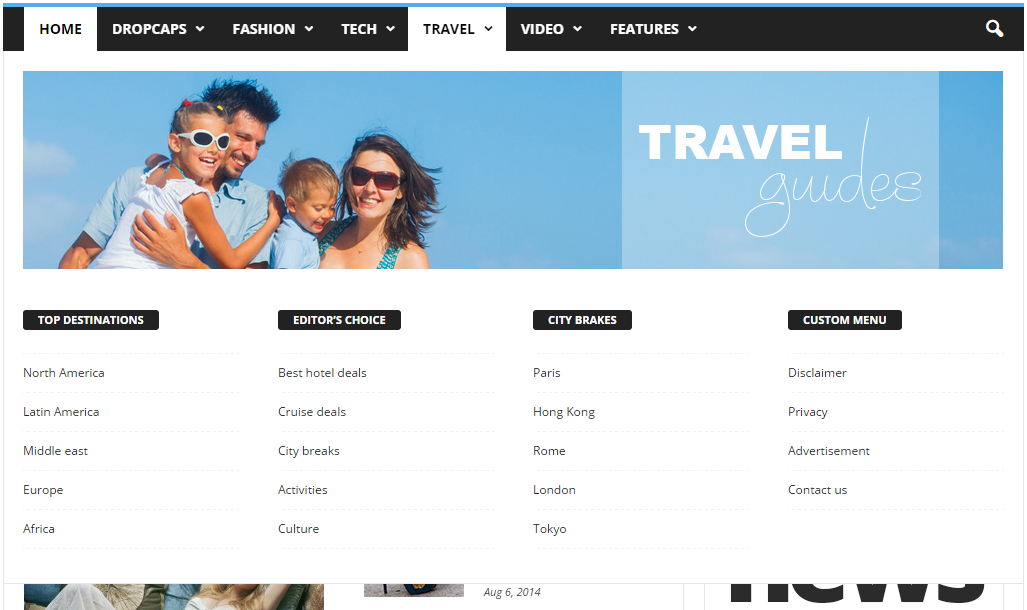
I do not understand how point C is made? Do you have maybe a short video, where you can explain how to make that page menu grid? Because in the descprition it says, that I should add the page ID. But this is only one page id. I want to add a grid system, where more than one pages are listet. like here: https://forum.tagdiv.com/wp-content/uploads/2014/10/page-menu.png ( Top Destinations, Editors choice… Under these categories the pages are listed. How can I do this?)
And could you provide me that html code for your demo page menu like in that picture?
3. The ajax filter in the blocks: Is it only possible to show content, which is categorized? Or can I show specific posts? And if yes, can I show more than one specific post? And is it also possible, to show the page?
Thanks a lot! Have a nice weekend! 🙂

Hi
You can’t set a category page as mega menu page. The theme allows you to set only a page as mega menu page. You have to create your page in Visual Composer then only add the page id as it’s indicated in our documentation.
For example this page: https://forum.tagdiv.com/wp-content/uploads/2014/10/page-menu.png is made in Visual Composer then it’s id is added in menu item.
Here is another example: this is how a page built in VC looks: http://screencast.com/t/TrlKlshc4K and this is how the same page displayed in mega menu looks: http://screencast.com/t/VRbI0pDpRzaI All page content added with Visual Composer it’s displayed in mega menu.
We can’t provide any html code as the mega menu is generated by php from dynamic content.
Please refer to our documentation for more details about block settings and how they can be used: https://forum.tagdiv.com/block-settings-tutorial/ You can also check this topic for more details about adding different post types i blocks: https://forum.tagdiv.com/topic/visual-composer-unable-to-pull-data-from-custom-content-types/
Thanks!
Thank you very much.
I saw, that in http://demo.tagdiv.com/newsmag/ the sub-categories are listed in horizontal way. In The travel demo it is listed vertically.
How can I change that option?
2) http://demo.tagdiv.com/newsmag/ watch the point editor picks. How is it possible to edit the categories as you can see in the attachment? Is this also a mega menu with sub categories?
http://abload.de/img/unbenannt42bj1.png
Thanks 🙂
Edit:
I wanted to replicate the homepage. But the background image is still not shown. Watch here: http://gefrierschrank24.net/testhomepage/
I followed this guide: https://forum.tagdiv.com/topic/how-to-stop-top-header-image-from-stretching/ (except copying the code, because it cannot be copied from a image”http://screencast.com/t/SUt9ItUc” )
But everything is the same. Also td travel code is set, as it should be. Why is the background image not shown? watch here: http://abload.de/img/unbenanntj3q9q.png
Thanks for helping 🙂
Edit:
http://demo.tagdiv.com/newspaper_travel/
Blocks in the text: How can I activate the function to skip left or right as I can do it in the menu under “Destinations” ? There you can click on right or left to show new content.
Hello efaq,
I suppose that you are referring to this layout -> http://screencast.com/t/JOJcA0Rb9 Please notice that it can be done only from panel -> https://forum.tagdiv.com/topic/write-review-from/#post-37849
Please notice that this is the ajax filter from the block which is using on Sidebar. For more information about how you can change this option, please check our documentation here -> https://forum.tagdiv.com/block-settings-tutorial/
Also, please ensure that you have correctly followed the tutorial in order to achieve the same result as Travel Demo design. You can check and this topic here -> https://forum.tagdiv.com/topic/adding-top-area-like-travel-example/
Thanks.
Thanks for reply 🙂
1. No, I mean these sub categories: http://abload.de/img/unbenannto5psu.png
2. Okay, I will have a look on the homepage building.
3. Is the pagination tab function that menu with a lot of buttons? Like here:
http://abload.de/img/unbenannto4uth.png
Thanks
Hello efaq,
1)Unfortunately, here is talking about two different styles -> Newspaper and Newsmag. Please notice that the structure of the mega menu is different because our developers have decided this. Please notice that is not a simple task to change the structure of this and if you want to achieve the similar style with the Newsmag please notice that you will have needed to do some additional customizations. If you want to display more levels in this regard and you are not aware of the steps which are needed to take in this case, please consider hiring a freelancer/developer to help you because we cannot provide customization services at the moment, sorry!
3)Unfortunately, as you can see in this screenshot -> http://screencast.com/t/jEW3ixixq7 our demo menu is custom made by our developers.
Thank you for your understanding!
Hi,
thanks for reply.
1) Okay, but why is the block tabs are shown in the demo version?
2) https://forum.tagdiv.com/theme-thumbs/ I don’t get what you are trying to explain with the modules and blocks. What if I disable in “block settings” the funtions? I dont get that. It it only the function not to load the pictures? What for an advantage do I have, if instead of the post picture another picture is shown?
3) Do you provide a tagDIV Funtion, where I can list some links in footer? Like a blogroll?
Thanks 🙂
Hello efaq,
1)As I have explained you above, the block buttons are made them with some custom rule. Also, please notice that the main element is WP Custom menu from Visual Composer, this have a custom class named .td-menu-blocks-custom Also, you have to make your own desired menu from Appearance->Menu from WP panel and then you have to use this visual Composer element with this custom class to get the Custom CSS design, like this -> http://screencast.com/t/i834fsDw -> http://screencast.com/t/Th9oEVLMM -> http://screencast.com/t/WWt2yabWiMv and as an example result -> http://screencast.com/t/7Mtx3fdFGNRd
2)So, please notice that our theme uses a lof of thumbs and sizes to display the featured images. Please check this -> http://screencast.com/t/mKgjef3g5UFF and there you can see a list with our modules and what kind of modules are used in our blocks and also, which of them are enabled or which not. Also, from the Thumbs on modules & Block, you will turn off some options for size and that size are used in some blocks that are active, the featured image will not be shown because the thumbs for this type of block are deactivated. I hope that you understand by explanation.
3)Also, if you want to add some link in our footer section, you have to use a footer template that allows you to make it as you wish, for example, the footer template style 5 and then you have to use a bit of HTML code to add a link, using this syntax -> http://www.w3schools.com/html/html_links.asp
Thank you for your understanding!