

 emmalabbe
 Hi Calin, I deactivated the plugins of my website except TagDiv plugins, and it had no effect on this issue.
I’ve been working during the last months avoiding the “Text with title” or “Column text” elements, but today I must change my website footer where there are some text elements. And the WP editor window is blank.
Do you know how to find and solve the problem ?
Thank you.
Emma
emmalabbe Hi Calin,
I have the same issue but it seems that the reason is different from what you suggested. When I try to edit the content of a column text currently used on one of my pages (and working fine), the WP editor is just blank (whereas the text exists).
I had noticed this issue a few months ago (maybe after the last Newspaper update but I’m not sure), and since then I cannot use the column text element when I create a new page. Do you think that it could be related to the “classic editor” plugin that I use ?
Thank you.
emmalabbe Hi
We made many tests during last weeks, even a server change to be sure everything is okay on our side.
But even if we’ve unlocked more “speed”, server loading time is still very high. Not from the database part (still a few miliseconds to load it all) but actions done by tagdiv plugins.
Here is an example of full profiling of a front page:
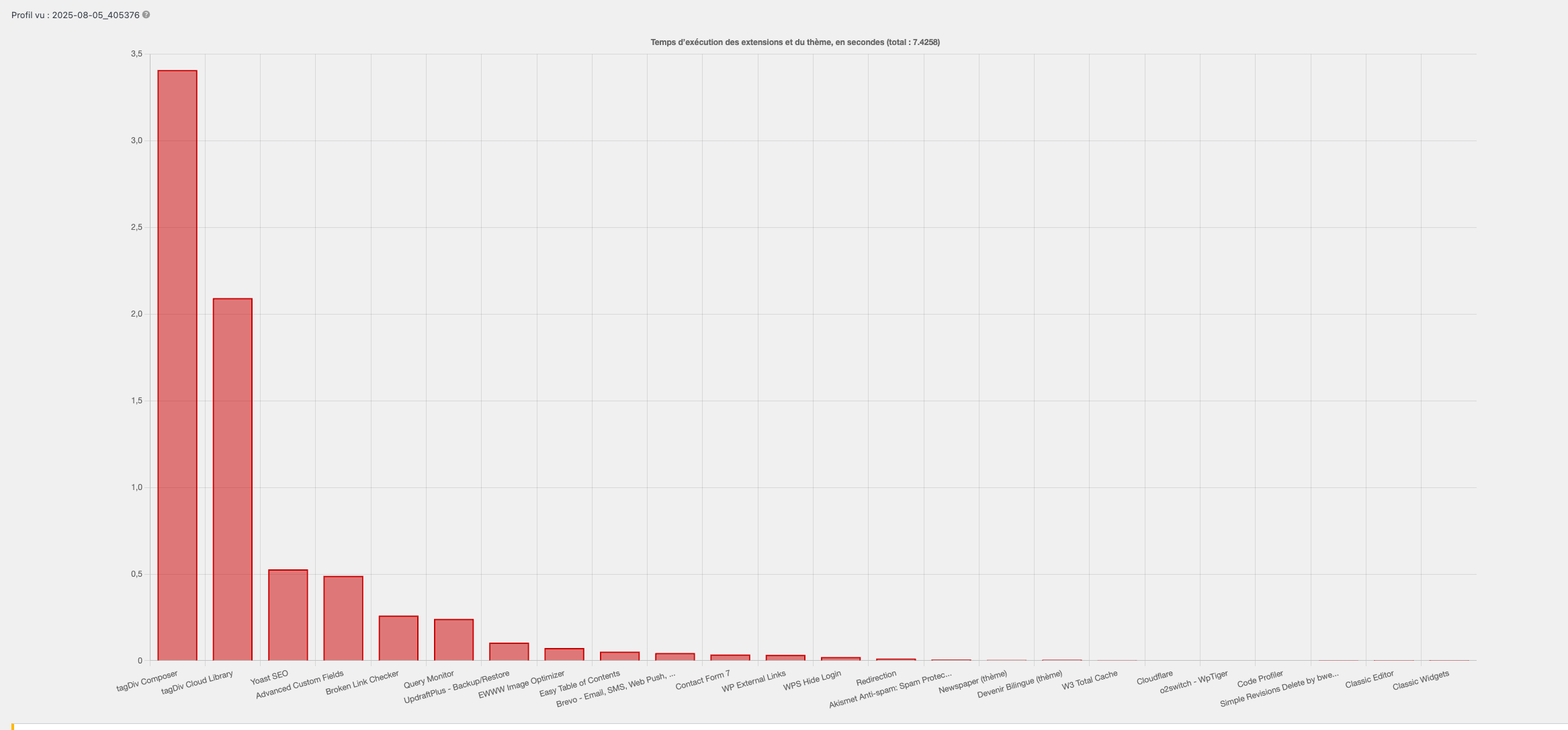
We tried everything you said:
– Rollback to php 7.4, 8.0 & 8.1
– Changing tagdiv version (last 3 versions and last major version)
I don’t know what to try more… I can give you access to the dashboard to run tests if necessary.
-
This reply was modified 1 year by
emmalabbe.
emmalabbe Hi, as I couldn’t find the vulnerability, I’m currently re-installing everything on a new subdomain. I’d like to test and copy the work that has been done since a month before transferring my website to the new one. My licence is already used for my website and a sandbox, so I can’t use it for the new test website.
Is it possible to assign temporarily my licence to a 3rd URL ?
Otherwise, I have another licence I’d bought in 2020 for another website and that is not used any more. Is it possible to use 2 licences for the same URL (3 sub-domains)? I tried but I cannot click on “assign” (theme panel > licence tab > 3rd URL), I can only click on “Buy a new licence”.
Thank you.
emmalabbe Thank you Calin, I’m gonna do that.
Regarding your notification thanks to the changelog, I was looking for it since a few months (and your screenshot doesn’t show where to find it).
Indeed, it was before easy to find through the link on Updates Tab of the plugin, but now this link always goes to your website homepage. Would you make sure the link to changelog is corrected for the next update ?
Otherwise, let me know where exactly to find it. Thank you.
emmalabbe Hello Anamaria, I did as you said but it doesn’t work :
The URL of my button is now {cf_deal_url} and the custom field is set as a URL named deal_url
However, when I click on the related button of the custom module, it goes to https://devenirbilingue.com/%7Bcf_deal_url%7D (=> error page – the page doesn’t exist) instead of the URL set for that offer.
Would you be able to help ?
Many thanks.
emmalabbe Hi,
Thanks for your answer.
The « save element » button is a part of the answer we’re looking for but not completely. The problem with this solution is that we can’t edit styles of our block and apply them to all of its implementations.
We tried a trick: create a flex block 3, save as a new element, use it in a module and then import this module in a flex block builder. With this approach, styles can be reused. But the posts list can’t be overridden due to filters and loop processed in the module part and not inside the block. So, with is, it will require duplicating our module for all its implementations and we’re back at our first problem.
https://devenirbilingue.com/wp-content/uploads/2024/12/screenshot-TagDiv.png
Are we missing something? Do you have a solution for this case we want to solve? Is there no way to do so? Let us know.
Thank you so much.
Emma
emmalabbe I know and I use it when I build my pages. However, I can’t explain why the mobile banner is blurry here whereas I did all what you mentioned : https://devenirbilingue.com/apprendre/anglais/application-logiciel/avis-duolingo-test/
emmalabbe I’d like to understand the issue, but also it would help to get a list of recommended sizes for Newspaper template. For example, I always use 700px width for images that illustrate my posts but I don’t know if this is the right format (these images take the whole width of a post with a 1/3 sidebar). Example here with the image of the boy on a computer: https://devenirbilingue.com/apprendre/anglais/cours-enfant/concours-gagnez-3-cours-langue/
Thank you.
emmalabbe Yes of course.
emmalabbe What do you mean? I uploaded the 320x100px file in the library. This file is not blurry when I open it with a Preview app, it only becomes blurry when it’s used on my website. Does the template transform the full-size image using a thumb ?
Thanks.
emmalabbe Solved !
I changed it in the Theme Panel options and it’s now unticked.
Thanks.
emmalabbe I actually succeeded to get back my website (some extensions were not updated and I didn’t see that before).
Now I’m on Newspaper V.10.3.9. Can you tell me if I should try again to update to V.11.2 directly or is it better to udapte one version after the other (start with V.10.4 and so on) ?
Thank you.
emmalabbe Hi Vlad, I updated the theme today (and by the way there was an error during the upload of the new version, I had to re-install the theme) and I was hoping that the bug with colors would be fixed.
Unfortunately it’s still the same: I cannot change any color in TagDiv Composer. Please see the screenshot: https://www.screencast.com/t/Mp2UY55MmUk
As you can see the orange color of my element doesn’t appear (blank cell) and when I click on it, I don’t have access to any color. When I write a #hex like #ffffff, nothing happens, the cell remains blank.
Please help since it has been several weeks now with this situation.
Thank you.
emmalabbe Hi, I have the exact same issue. It happened around one month ago, and I had the same issue on another website (a website using Newspaper, same version, installed more than one year ago). Then it came back on my older website (I can change the colors again) but I still have the problem on my second website which has been created this year.
Thanks for your help.
emmalabbe I was not talking about Flex blocks, I was talking about any new image that I insert in a post. All images that I imported in the library appear with this yellow border, you can see that in this post for example : http://soyons-fous.com/visiter/usa/alaska/peninsule-kenai-homer/
Thank you.
emmalabbe Hi, does the Ajax categories dropdown also work if we add a second type of filter which is a filter by tag slug ?
Let me explain :
On the first block on this page https://devenirbilingue.com/promotions-reductions-apprendre-langue/ I’d like to show all posts from multiple categories with the tag “promotion”. I used the filters ans it works. However, I tried to use “Ajax categories dropdown” with a filter by tag ID (several languages tags to offer a selection of the posts for each language). If I click on English I should see the post with the tag english, which are part of the multiple categories selected for this block, and which have also the tag Promotion. The result is different: I can see all posts with the tag English, from the multiple categories I chose, but the filter Promotion is not taken into account any more.
Is it because I cannot use the Ajax categories dropdown with multiple categories filter AND a tag filter ?
Thank you.
Emma
emmalabbe You’re right, I left the standard pack inactive because I wanted to have a fast website and I understood it was better to deactivate the standard pack.
If I activate it now to get all post content options, can I deactivate it after ? Will I lose the new font I will have chosen ?
Thanks.
emmalabbe To complete my previous message, I tried something different today : I imported a section from the library, it created a page, I customized it using only elements like column content, titles… (no block or big grid), and I renamed it within the TagDiv Composer.
It seems OK, I can find this page template among my pages.
Now, to create a new page using this template, what should I do? I clicked on “New draft” below this page template, a new page was created. I wrote a title and chose a parent page, and saved it. Then, when I edit this new page with TagDiv Composer, the same error message appears. There isn’t any problem (just the message) but I’m wondering if I understood the process to create a new page from a template.
Thanks for the clarification.
emmalabbe Yes, 100% sure that they were built with TagDiv Composer, importing a template from the Library. I think that the error message appears after I modified the page name or SEO content. I did it with the WordPress editor. I didn’t modify the content of the page, only the page title and SEO content in Yoast editor. Is it something that I should do differently ?
After importing a template from the Cloud Library, can we modify the name the same way (choosing “Modify” and doing it in WP editor)?
Thanks.
emmalabbe I just had the same issue on another page, please help !
Additional info to complete my previous post : the pages are OK when displayed on the web, but I can’t modify them anymore.
This is the page I was talking about in my previous post : https://devenirbilingue.com/apprendre-une-langue/adulte/
The first 3 blocks are mixed with the title when I edit it with TagDiv Composer.
emmalabbe All necessary plugins are activated, I use the same elements on other pages and it’s OK. I think that there was an error while saving the page the last time, because when I edit the page with TagDiv composer, I see that several blocks have been mixed with a “text with title” element : now the following code is appearing as the content of the “text with title” element. I see normally the header and the “text with title” element, except that its content is the following:
—————————————–
[vc_row_inner][vc_column_inner width="1/3"][tdm_block_column_content title_text=”QXBwbGljYXRpb25z” title_tag=”h3″ title_size=”tdm-title-sm” url=”#” image1=”3999″ description=”Q2hvaXNpc3NleiUyMGxhJTIwbWVpbGxldXJlJTIwYXBwbGljYXRpb24lMjBwb3VyJTIwbGElMjBsYW5ndWUlMjBxdWUlMjB2b3VzJTIwJUMzJUE5dHVkaWV6JTIwZXQlMjBzZWxvbiUyMHZvdHJlJTIwbml2ZWF1LiUyMEQlQzMlQTljb3V2cmV6JTIwbm90cmUlMjBiZXN0LW9mJTJDJTIwbm9zJTIwciVDMyVBOWR1Y3Rpb25zJTJDJTIwZXQlMjB0b3VzJTIwbm9zJTIwdGVzdHMuJTIw” tdc_css=”eyJhbGwiOnsicGFkZGluZy1ib3R0b20iOiIyOSIsImJhY2tncm91bmQtY29sb3IiOiJyZ2JhKDExMSwxNzksMjMyLDAuMjUpIiwiZGlzcGxheSI6IiJ9fQ==” content_align_horizontal=”content-horiz-center” images_height=”70%” image_height=”258″ image_width=”368″ tds_title1-f_title_font_family=”394″ tds_title1-f_title_font_weight=”500″ f_descr_font_size=”15″ f_descr_font_line_height=”24px” description_color=”#666666″ descr_padding=”0 20px” media_size_image_height=”326″ media_size_image_width=”634″][/vc_column_inner][vc_column_inner width="1/3"][tdm_block_column_content title_text=”UmVzc291cmNlcyUyQyUyMG0lQzMlQTl0aG9kZXMlMkMlMjBhY3Rpdml0JUMzJUE5cw==” title_tag=”h3″ title_size=”tdm-title-sm” url=”#” image1=”1372″ description=”RGVzJTIwcmVzc291cmNlcyUyMGdyYXR1aXRlcyUyMG91JTIwcGF5YW50ZXMlMjBldCUyMGRlcyUyMGlkJUMzJUE5ZXMlMjBjb25jciVDMyVBOHRlcyUyMHBvdXIlMjBwcmF0aXF1ZXIlMjB1bmUlMjBsYW5ndWUlMjBzYW5zJTIwc2UlMjBydWluZXIu” tdc_css=”eyJhbGwiOnsicGFkZGluZy1ib3R0b20iOiIyOSIsImJhY2tncm91bmQtY29sb3IiOiJyZ2JhKDIyMSw1MSw1MSwwLjI2KSIsImRpc3BsYXkiOiIifX0=” content_align_horizontal=”content-horiz-center” image_height=”258″ image_width=”368″ f_descr_font_size=”15″ f_descr_font_line_height=”24px” description_color=”#666666″ tds_title1-f_title_font_family=”394″ tds_title1-f_title_font_weight=”500″ descr_padding=”0 20px” media_size_image_height=”273″ media_size_image_width=”440″][/vc_column_inner][vc_column_inner width="1/3"][/vc_column_inner][/vc_row_inner][vc_row_inner][vc_column_inner][td_block_text_with_title custom_title=”Apprendre avec un professeur ou en passant un examen” header_color=”#dc725b”][/vc_column_inner][/vc_row_inner][vc_row_inner][vc_column_inner width="1/3"][tdm_block_column_content title_text=”Q291cnMlMjBldCUyMEF0ZWxpZXJz” title_tag=”h3″ title_size=”tdm-title-sm” url=”#” image1=”8267″ description=”RCVDMyVBOWNvdXZyZXolMjBkZXMlMjBwcmVzdGF0YWlyZXMlMjBkZSUyMGNvdXJzJTIwJUMzJUEwJTIwZGlzdGFuY2UlMjBvdSUyMGVuJTIwZmFjZS0lQzMlQTAtZmFjZSUyQyUyMGV0JTIwY29uc3VsdGV6JTIwbm9zJTIwYXZpcyUyMGV0JTIwbGVzJTIwcHJvbW90aW9ucyUyMGFjY29yZCVDMyVBOWVzJTIwJUMzJUEwJTIwbm9zJTIwbGVjdGV1cnMu” tdc_css=”eyJhbGwiOnsicGFkZGluZy1ib3R0b20iOiIyOSIsImJhY2tncm91bmQtY29sb3IiOiJyZ2JhKDE2OCwyMywxMTUsMC4yNSkiLCJkaXNwbGF5IjoiIn19″ content_align_horizontal=”content-horiz-center” image_height=”258″ image_width=”368″ tds_title1-f_title_font_family=”394″ tds_title1-f_title_font_weight=”500″ f_descr_font_line_height=”24px” description_color=”#666666″ f_descr_font_size=”15″ descr_padding=”0 20px” media_size_image_height=”404″ media_size_image_width=”350″][/vc_column_inner][vc_column_inner width="1/3"][tdm_block_column_content title_text=”Q2VydGlmaWNhdGlvbnMlMjBldCUyMGZvcm1hdGlvbnMlMjBkaXBsJUMzJUI0bWFudGVz” title_tag=”h3″ title_size=”tdm-title-sm” url=”#” image1=”10196″ description=”VG91cyUyMGxlcyUyMHRlc3RzJTIwZXQlMjBkaXBsJUMzJUI0bWVzJTIwZGUlMjBsYW5ndWUlMkMlMjBsZSUyMGQlQzMlQTl0YWlscyUyMGRlcyUyMGV4YW1lbnMlMkMlMjBldCUyMG5vcyUyMGNvbnNlaWxzJTIwcG91ciUyMGxlcyUyMHIlQzMlQTl1c3Npci4=” tdc_css=”eyJhbGwiOnsicGFkZGluZy1ib3R0b20iOiIyOSIsImJhY2tncm91bmQtY29sb3IiOiJyZ2JhKDIzMiwxOTgsMzIsMC4yNSkiLCJkaXNwbGF5IjoiIn19″ content_align_horizontal=”content-horiz-center” image_height=”258″ image_width=”368″ tds_title1-f_title_font_family=”394″ tds_title1-f_title_font_weight=”500″ f_descr_font_line_height=”24px” description_color=”#666666″ f_descr_font_size=”15″ descr_padding=”0 20px” media_size_image_height=”467″ media_size_image_width=”700″][/vc_column_inner][vc_column_inner width="1/3"][/vc_column_inner][/vc_row_inner][vc_row_inner][vc_column_inner][td_block_text_with_title custom_title=”Apprendre en voyageant” header_color=”#dc725b”][/vc_column_inner][/vc_row_inner][vc_row_inner][vc_column_inner width="1/3"][tdm_block_column_content title_text=”JUMzJTg5dHVkZXMlMjBzdXAlQzMlQTlyaWV1cmVzJTIwJUMzJUEwJTIwbCclQzMlQTl0cmFuZ2Vy” title_tag=”h3″ title_size=”tdm-title-sm” url=”#” image1=”1275″ description=”Q29tbWVudCUyMHBhcnRpciUyMGFwciVDMyVBOHMlMjBsZSUyMGJhYyUyQyUyMGV0JTIwciVDMyVBOXVzc2lyJTIwc29uJTIwYWRtaXNzaW9uJTIwZGFucyUyMHVuZSUyMHVuaXZlcnNpdCVDMyVBOSUyMCVDMyVBMCUyMGwnJUMzJUE5dHJhbmdlci4=” tdc_css=”eyJhbGwiOnsicGFkZGluZy1ib3R0b20iOiIyOSIsImJhY2tncm91bmQtY29sb3IiOiJyZ2JhKDAsOTQsMywwLjIpIiwiZGlzcGxheSI6IiJ9fQ==” content_align_horizontal=”content-horiz-center” image_height=”258″ image_width=”368″ f_descr_font_size=”15″ f_descr_font_line_height=”24px” description_color=”#666666″ tds_title1-f_title_font_family=”394″ tds_title1-f_title_font_weight=”500″ descr_padding=”0 20px” media_size_image_height=”534″ media_size_image_width=”800″][/vc_column_inner][vc_column_inner width="1/3"][tdm_block_column_content title_text=”Vm95YWdlcyUyMGxpbmd1aXN0aXF1ZXMlMjBwb3VyJTIwbGVzJTIwcGx1cyUyMGRlJTIwMTglMjBhbnM=” title_tag=”h3″ title_size=”tdm-title-sm” url=”#” image1=”6945″ description=”VG91dGVzJTIwbGVzJTIwYWx0ZXJuYXRpdmVzJTIwcG91ciUyMHBhcnRpciUyMGVuJTIwcyVDMyVBOWpvdXIlMjBjb3VydCUyMG91JTIwbG9uZyUyQyUyMGVuJTIwJUMzJUE5Y29sZSUyMGRlJTIwbGFuZ3VlJTJDJTIwQXUlMjBwYWlyJTJDJTIwUFZUJTJDJTIwZXRjLi4u” tdc_css=”eyJhbGwiOnsicGFkZGluZy1ib3R0b20iOiIyOSIsImJhY2tncm91bmQtY29sb3IiOiJyZ2JhKDAsMTExLDE5NiwwLjIpIiwiZGlzcGxheSI6IiJ9fQ==” content_align_horizontal=”content-horiz-center” image_height=”258″ image_width=”368″ f_descr_font_size=”15″ f_descr_font_line_height=”24px” description_color=”#666666″ tds_title1-f_title_font_family=”394″ tds_title1-f_title_font_weight=”500″ descr_padding=”0 20px” media_size_image_height=”680″ media_size_image_width=”1024″][/vc_column_inner][vc_column_inner width="1/3"][tdm_block_column_content title_text=”U3RhZ2VzJTIwZXQlMjBqb2JzJTIwJUMzJUEwJTIwbCclQzMlQTl0cmFuZ2Vy” title_tag=”h3″ title_size=”tdm-title-sm” url=”#” image1=”3598″ description=”Tm9zJTIwY29uc2VpbHMlMjBwb3VyJTIwdHJvdXZlciUyMHVuJTIwc3RhZ2UlMjBvdSUyMHVuJTIwam9iJTIwJUMzJUEwJTIwbCclQzMlQTl0cmFuZ2VyJTIwKHJ1YnJpcXVlJTIwZW4tY291cnMlMjBkZSUyMGQlQzMlQTl2ZWxvcHBlbWVudCku” tdc_css=”eyJhbGwiOnsicGFkZGluZy1ib3R0b20iOiIyOSIsImJhY2tncm91bmQtY29sb3IiOiJyZ2JhKDAsNTAsOTYsMC4yKSIsImRpc3BsYXkiOiIifX0=” content_align_horizontal=”content-horiz-center” image_height=”258″ image_width=”368″ f_descr_font_size=”15″ f_descr_font_line_height=”24px” description_color=”#666666″ tds_title1-f_title_font_family=”394″ tds_title1-f_title_font_weight=”500″ descr_padding=”0 20px” media_size_image_height=”680″ media_size_image_width=”1024″][/vc_column_inner][/vc_row_inner][vc_separator][/vc_column][/vc_row][vc_row][vc_column][td_block_text_with_title custom_title=”Quelles langues apprendre et comment devenir bilingue” block_template_id=”td_block_template_12″ header_text_color=”#1e73be”] Vous voulez en savoir plus sur les langues étrangères en général, leur utilité, la signification du bilinguisme ? Voici 2 rubriques qui pourront vous intéresser.
—————————————–
I probably need to rebuild the elements, but I wanted to let you understand what happened, in case there is an easy way to get it back.
Thank you.
emmalabbe I was thinking about replicating the page that I can’t edit with TagDiv Composer (since it’s a new page, no SEO yet). But I don’t know the difference between “duplicate” and “create a new draft”. What should I use to create a new page from the same template ?
Another question to help me saving time : when I create a new page, I import a block template from the Cloud Library, I change a few settings, and then I’d like to save it in order to reuse it in other pages. Is it something that we can do?
Thank you so much.
Emma
emmalabbe Thank you, your video was helpful (I was doing the same but I forgot to add the inner row). Now, after importing this section, should I see it in my own cloud library or not? Or should I import it from the Cloud library each time I use it?
Also, in order to deactivate the standard pack (after removing all the dependencies), should I use only elements imported from the cloud library when I build pages or posts templates? What I mean is : can I use also elements which are in the extended/external shortcodes? For example, to insert a video playlist or a weather widget : can I just add them from the same area as “rows/columns/inner rows…”
Thanks a lot.
Emma
emmalabbe OK I understand how to import a page and adjust small things. However as I told you :
– I need to build a new homepage from scratch (I want it simple), using several blocks and sections from the library. I don’t see how to drag and drop the “call to action-fitness pro” in a 2/3 column of my page. Should I be able to use any block or section in a different row/column size (as I am with the classic Composer)? You can see here the result when I try to drag and drop the elements: https://devenirbilingue.com/our-specialties-restro/
– I do exactly what you say to import a template, there is NOTHING in my cloud library. I can send you a screenshot, it’s not like yours, I only have 1 old import from last year.
Thank you.
Emma

