

 mouthing off magazine
 Hey Vlad,
Thank you very much! I will contact the team.
Greg
mouthing off magazine Hey Vlad,
Thank you for the help. Below I have included some screen shots as I am still finding difficulty with the header appearing. I hope that this helps!
https://www.screencast.com/t/9uKGbhAl7E99
I’ve included the home page and one of our category pages (both in and outside the composer. Here you can see that in the composer the menu is appearing but outside of it, it is not), the theme panel header settings, and the website manager screen.
Once again,
Thank you for all your help.
Greg
mouthing off magazine Hey Vlad & Alastair,
I’ve updated to the new version of the Newspaper Theme, however, this issue has still unfortunatly persisted.
If there is a solution to this that I’m missing let me know.
Thanks for all your help once again,
Greg
mouthing off magazine Hey Alastair,
I haven’t been able to sort it out either.
I’ve tried seeing if it was a caching issue but that hasn’t work, I’ve updated the Newspaper Theme and other plug-ins and deactivated them.
Can’t seem to sort it out.
If you find a solution let me know as I’m struggling to find one at this point.
Greg
mouthing off magazine Hey Vlad,
Apologies for not replying back sooner. I have been away for the last few weeks.
Unfortunatly, this hasn’t seemed to solve the problem and the images keep adding themselves to the site.
I’ve checked the sites health status and it now mentions that: ‘Transient caching of parsed stylesheets is disabled’ & ‘Persistent object caching is not enabled’ now for some reason. If I enable these, do you think that this would solve the issue and prevent our instagram widgets from adding images to our folder system?
All the best,
Greg
mouthing off magazine Cheers Vlad! Will do.
mouthing off magazine Hey Vlad,
I may be wrong here but I don’t think this has to do with the thumb settings. I’ve had a look over them and it all seems to be in check – I haven’t changed them prior to this incident occuring.
Instead, they seem directy related to our Instagram widgets that are present across the site. Everytime we post a new image to our Instagram it appears that this image is then not only shown on our site (as intended) but that it is stored directly on the site.
This does not occur for any of our article covers.
I hope this helps clarifying things.
All the best,
Greg
mouthing off magazine Dear Vlad,
Thanks for helping out. I have already deactivated the mobile theme for this page.
The issue is that the menu is now different to all my other pages. As you can see in the screenshot you sent (https://www.screencast.com/t/Rjqpn6AtGAG6) every category under each primary section (i.e. Politics & News) has been duplicated. Furthermore, if you look at the original menu (https://www.screencast.com/t/G8XddqUyuZ) The colour is now different (it’s no longer yellow).
Lastly, the footer that you can see in your screenshot (https://www.screencast.com/t/vtPA79y8y2l) is different to the one we have on every other page (https://www.screencast.com/t/EtQg1okYLeZD).
I want to deactivate the mobile theme on each gallery page but keep the same footer and menu system as the rest of our mobile theme ready pages. Does that make sense?
Thanks for all your help.
All the best,
Greg
mouthing off magazine Hey Vlad,
Thanks for sorting out that out. I will make sure to test all of this within the coming days.
I’m still having issues in regards to our mobile version.
1) I want to keep our home page and newspaper categories using the AMP/Mobile Version of the site.
2) While having our gallery pages use the scaled down version of the desktop so that the gallery can be viewed (as NextGen Galleries cannot be viewed using AMP/Mobile Version).
3) This does work (as I’ve outlined in my last message) but when viewing the gallery (click link above) it changes the mobile menu and footer. This new menu appears to have glitched as categories are being duplicated.
If there is a way to resolve this I would be extreamly grateful as we have been trying to solve this issue for a while and have been struggling to find a way forward.
All the best,
Greg
mouthing off magazine Thanks Calin,
Your an absolute hero! The gallery is now working and this has fixed the issues above.
However, this has led to a few other problems…
Every page now works perfectly, although the gallery page that I have altered now has a different footer and the menu is coloured differently. The menu also seems to be glitched and repeats certain page options.I’ve tried going through the theme panel but as far as I can see, everything seems to be in order.
If you go to this address you can see what I am talking about and compare it to the other pages which are working optimally:
https://mouthingoffmagazine.com/irene-shoshanne-carlucci/
Lastly, I’ve recently got some messages from my team members (who are using Chrome & Firefox (Developer Addition)) that are seeing the mobile version of the site rather than our desktop version while on their desktops. I’m using firefox (standard version) and see the site completly fine. Do you know why this is occuring or how to fix this issue?
Once again, thank you for all your help! This has honestly been the best support service I’ve ever recieved!
All the best,
Greg
mouthing off magazine Dear Calin,
I think I maybe didn’t explain myself well enough here.
So, what your showing, if I’m understanding your instructions correctly, is the Header for Mobile. I’ve already customised this area. What I’m trying to do is customise the Mobile Browser Address Bar which is the bar above this header used to get to and from the website.
See here: 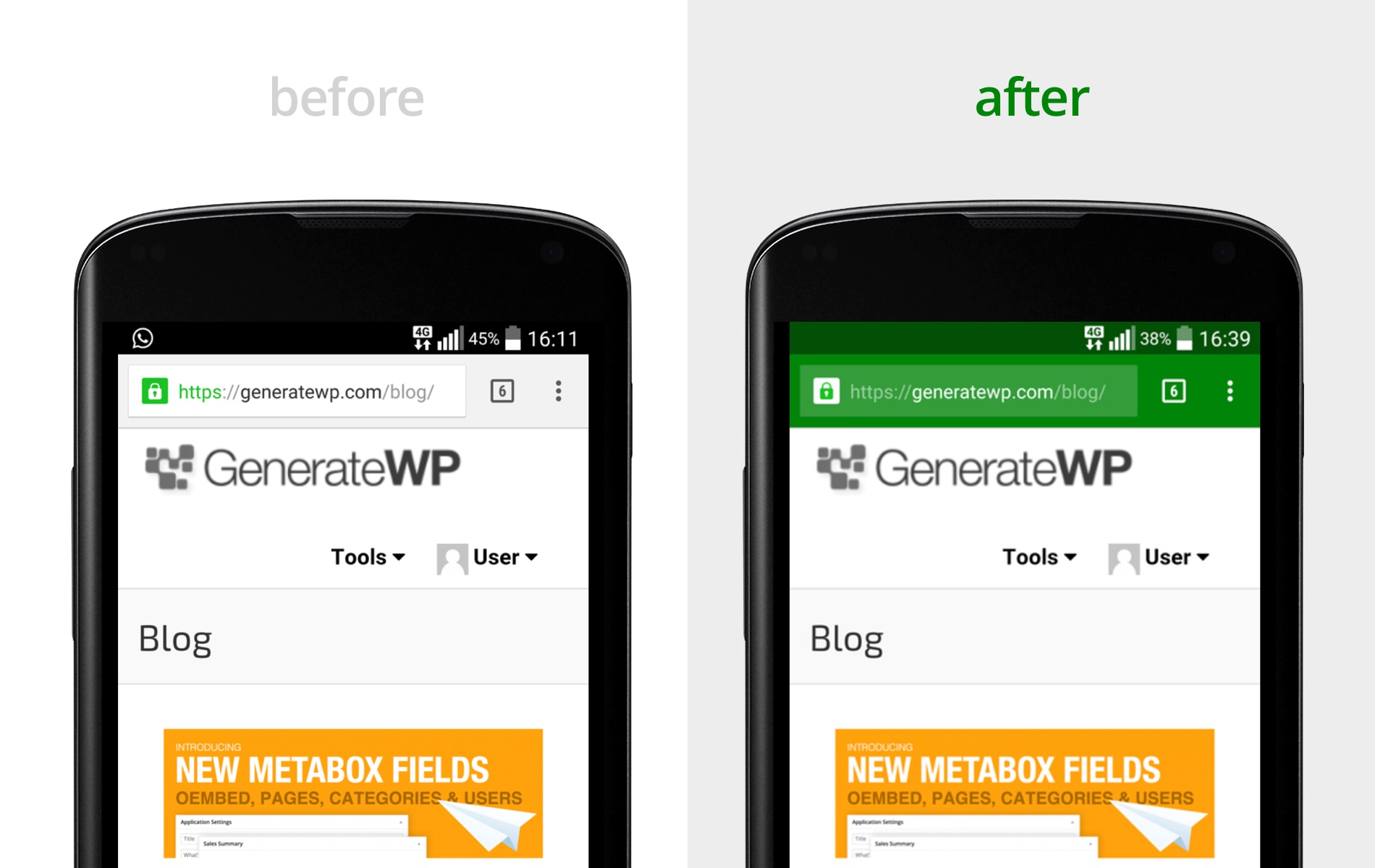
I just want to change the colouration of this bar to match with my theme. So going from white to yellow (#FFFF00) for android phone users and then white to translusent-black for iOS users.
Apologies in advance if I’ve misunderstood your instructions here.
Please let me know if you need any more details from me.
All the best,
Greg
mouthing off magazine Thanks for that Calin.
I do have another question (apologies for all my recent posts)
I’m trying to find a way of altering our Mobile Browser Address Bar Colour and I can’t seem to find an option of doing so in the theme.
I’ve read that I can alter this by adding additional code into the functions.php file
As shown here (https://generatewp.com/easy-custom-mobile-chrome-address-bar-colors-wordpress/)
However, I am a little hesitant to do so, as I have read that this could potentially cause issues either now or later down the line.
Is there an easy solution to this or have I missed something within the theme panel that would do this for me?
Thanks for all the help once again!
Greg
mouthing off magazine Hey Vlad,
Thanks for the info.
I’ll make sure to keep an eye out!
Once again, thank you for all your hard work.
Greg
mouthing off magazine Ignore!
Don’t worry I managed to solve it. I emptied my cache and it has done the job. All back and operational!
mouthing off magazine Dear Vlad,
Thanks for this. Will do this until it is fixed. Any idea on when these issues will be sorted?
All the best,
Greg
mouthing off magazine The message that appears is as follows:
tagDiv Instagram API V2
Instagram Connection Error
Failed to connect account.
Error type: access_token_verification
Error message: error_type: OAuthException error_code: 2 message: An unexpected error has occurred. Please retry your request later.
mouthing off magazine Hey Vlad,
Thankfully, I’ve managed to sort out my First Query. The Front Page is now in accordance with the rest of my pages.
However, the video component is still not showing up right on the mobile version. Here is a link to one of our video articles to check it out:
https://mouthingoffmagazine.com/mouthing-off-artists-spotlight-irene-shoshanne-carlucci/
While I’ve got you here though, there are a few more things I have noticed, that I’m having a difficulty solving.
1) In our contacts page I have placed my volunteering staff’s dedicated email addresses using the social media/mail icon. However, upon clicking the icon (which has the appropriate email attatched to it) it just comes up with a 404 error rather than opening up my mail to send an email.
Here is a link to see what I am talking about: https://mouthingoffmagazine.com/contact/
2) I have created a sidebar that I have placed for our articles. While I have changed the header style of the headers to match our theme, I have been unable to find an option to change the colour of the header to match the headers on our front/home page. (See First Link (Video) to see this sidebar)
3) I have recently minified our CSS, Javascript, HTML, etc. Using the W3 Total Cache. However, since then I have recieved AMP ‘validated URL’s’ erorr’s with the statement ‘Invalid markup removed’ occuring & my Error Index keeps having Invalid inline script errors, however, these always have the markup status of removed.
None of this seems to be causing any issues to the actual site and it appears to be in perfect working order. However, as someone who is quite new to all of this, I’m a little uneasy as whether this is just a small, insignifcant issue that sometimes occurs after minifying or whether this will cause greater issues down the line.
Apologies for all the questions & thank you for all of your help!
mouthing off magazine *Addition*
Also, I’ve just noticed that articles which use Style 10/11 (Video Related Articles) are not correctly positioned for mobile. The video stretches to the point where you cant go full screen or see half the video 🙁
Is there anyway to solve this as well?
