opinandosinanestesia
 I’ve had the mobile version disabled for several days now (since it helped me set it up a few weeks ago). How do I use the responsive version?
Thanks.
opinandosinanestesia The problem was that the URL wasn’t linking, as usual.
I don’t quite remember what I did to get it working now, but it’s great that it’s working.
On that note, this is published weekly, and I’m wondering: do I have to change the URL every week, or does the block update it automatically?
Thanks!
opinandosinanestesia opinandosinanestesia Thanks!
Unfortunately, I can’t record a video, but I’ll explain how I do it:
From Tagdiv Composer, I click on the image and go directly to Elements/Image ad. On that screen, I search for ad URL, paste the link there, and save the settings. That’s all.
opinandosinanestesia opinandosinanestesia No, it’s the “subscribe to newsletter” section. (https://opinandosinanestesia.es/wp-content/uploads/2026/03/2a95bb11-5905-4154-912a-2651a9d8346f-scaled.jpg)
Thanks!
Regards
opinandosinanestesia ¡Thanks you!
opinandosinanestesia Thank you!
But then what we wanted to do won’t work for me. We’ll continue as we are now.
opinandosinanestesia ¡De acuerdo! Muchísimas gracias. Por correo electrónico te envío toda la información.
opinandosinanestesia Yes, this problem has been ongoing for some time.
Let me explain. I want to add this page https://opinandosinanestesia.es/wp-content/uploads/2026/03/720eddf4-ba30-4002-8a65-a30bebaa47a3-scaled.jpg to the homepage, but I want each section to link to a different page.
In the podcast section, I would go to the audio file link to link directly to each file. In the settings menu, I’m setting the links to “image URL” and “button URL,” but it’s not saving. https://opinandosinanestesia.es/wp-content/uploads/2026/03/27638d70-2d02-4209-866d-37e875706527-scaled.jpg It’s currently blank because I haven’t added any files until I resolve the issue.
The “Join our newsletter” form should link to this: https://opinandosinanestesia.es/formulario-newsletter/. And it should be linked in both the “image URL” and “button URL” fields.
The “Contact us” section should link to this: https://opinandosinanestesia.es/contacto/. However, this page isn’t working either because I’ve configured all the sections identically, as you can see here, and it’s not solving the problem: https://opinandosinanestesia.es/wp-content/uploads/2026/03/9bedc4f2-e91c-4a40-a14d-42d801a77c9f-scaled.jpg. All sections are linked to email addresses, always preceded by “mailto:”.
I would appreciate it if you could reply as soon as possible, as I want to use the weekend to update the homepage.
Thank you!
opinandosinanestesia Yes, this problem has been ongoing for some time.
Let me explain. I want to add this page https://opinandosinanestesia.es/wp-content/uploads/2026/03/720eddf4-ba30-4002-8a65-a30bebaa47a3-scaled.jpg to the homepage, but I want each section to link to a different page.
In the podcast section, I would go to the audio file link to link directly to each file. In the settings menu, I’m setting the links to “image URL” and “button URL,” but it’s not saving. https://opinandosinanestesia.es/wp-content/uploads/2026/03/27638d70-2d02-4209-866d-37e875706527-scaled.jpg It’s currently blank because I haven’t added any files until I resolve the issue.
The “Join our newsletter” form should link to this: https://opinandosinanestesia.es/formulario-newsletter/. And it should be linked in both the “image URL” and “button URL” fields.
The “Contact us” section should link to this: https://opinandosinanestesia.es/contacto/. However, this page isn’t working either because I’ve configured all the sections identically, as you can see here, and it’s not solving the problem: https://opinandosinanestesia.es/wp-content/uploads/2026/03/9bedc4f2-e91c-4a40-a14d-42d801a77c9f-scaled.jpg. All sections are linked to email addresses, always preceded by “mailto:”.
I would appreciate it if you could reply as soon as possible, as I want to use the weekend to update the homepage.
Thank you!
opinandosinanestesia opinandosinanestesia Thanks!
opinandosinanestesia Problem solved.
thanks!
opinandosinanestesia opinandosinanestesia Good morning.
I’ve already implemented a page within a page, but there’s an additional problem: in the settings, as you can see here https://opinandosinanestesia.es/wp-content/uploads/2026/03/ea3ee5c1-9d3b-408e-9329-33b230e1ceec-scaled.jpg, although I previously added a link so that clicking on the image would take us to another page, after doing so and saving, the link disappears and I can’t click on it because it’s gone.
And a similar situation occurs on this website, which is the page we want to link to the “Contact Us” section.https://opinandosinanestesia.es/wp-content/uploads/2026/03/a0af5d59-65c3-4492-9446-b0725642907b-scaled.jpg
I don’t know where the problem lies, but I see that it’s a common issue.
How do I resolve these conflicts?
Thank you!
opinandosinanestesia Thank you so much!
Based on your response, I’m wondering: if I create a page using the Composer Library’s Galleries module, which will be the easiest thing for me to configure, how do I implement it directly on the website?
opinandosinanestesia Thank you!
Okay. Thank you very much.
opinandosinanestesia opinandosinanestesia 67
Thank you!
I followed your instructions, and… problem solved!
opinandosinanestesia opinandosinanestesia Thank you!
The problem I’m having is that when I try to implement a new block, it’s automatically placed at the end of the website, making it extremely difficult to move, and often impossible to move at all. This situation is causing a lot of problems. Is there a way to have new blocks implemented directly in the area of the website where we want them to appear?
opinandosinanestesia Thank you!
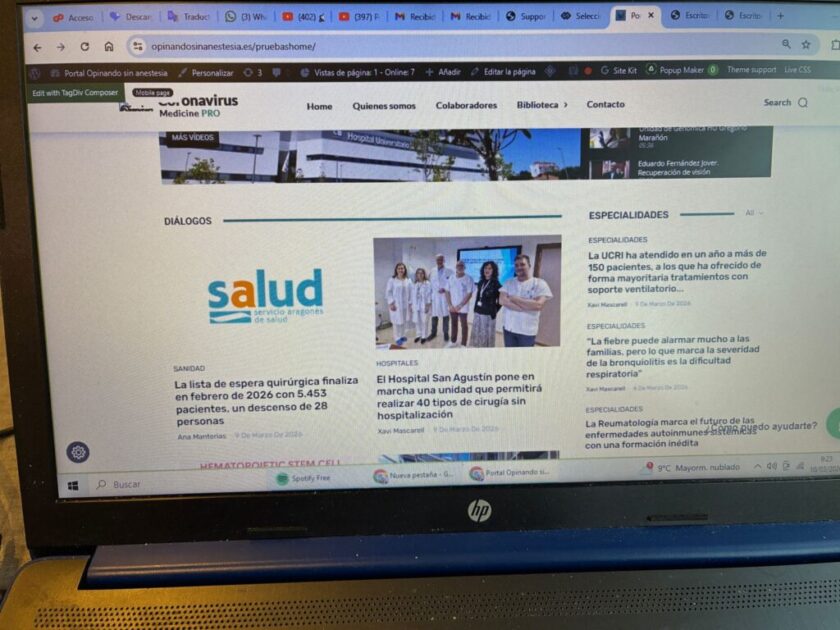
This is the page: https://opinandosinanestesia.es/pruebashome/ and the block I want to modify is this one: ” rel=”noopener” target=”_blank”>https://opinandosinanestesia.es/wp-content/uploads/2026/03/57f627cf-0e25-4596-8c74-3b7423d5ea70-scaled.jpg
. It’s under the “dialogues” category. I want to modify it so that I can change the categories and only see entries with a specific tag. I’ll send you the access link via email.
opinandosinanestesia I’m still unable to modify the category filter, and this step is crucial for us to resolve quickly because it’s the only thing left to make this page visible on the homepage. How can I fix this without messing anything else up? Thanks!
opinandosinanestesia Thanks! Yes, but how do I remove those lines? That’s the problem… I don’t know how to remove them, and I’m not very familiar with CSS either.