

 reddisl
 It is working ^^
Thank you for your help.
I really appreciate it
reddisl Hello,
Please check again the AMP screenshot you took, as you can see the search button is in the same position of menu button.
So when you click on menu button, you get the search function.
& This is why i want to remove the search button in AMP to fix this issue
reddisl Hello,
The code is working 100% and now position of ads is perfect, as well as, I fixed inline ads from the tutorial you provide me. Thank you very much, it was so helpful !
BUT STILL I HAVE THE SEARCH BUTTON ISSUE , THE BUTTON SHOW WHEN YOU ADD google xxxx.com/article/?amp
I mean in AMP pages, and the problem is 75% of my visitors use mobile so it is very important for me to fix this issue
Thank you.
reddisl Hello Sir,
this is my website: https://clipaxis.info
Looking forward for your answer :
1. Move Above Post AD a little bit to left
2. Fix ARTICLE INLINE AD not showing
3. Remove Search button in mobile theme
reddisl Perfect ! Working 100% thank you man, AMP really improved my earning in google adsense to 300%
reddisl UPDATE
After reading other AMP issues in the forum, I fixed it using this AD:
<amp-auto-ads
type=”adsense”
data-ad-client=”ca-pub-XXXXXXXXXXXXXXx”>
</amp-auto-ads>
reddisl Hello Again,
I have followed exactly the same steps you had mentioned above, but I still have the same Validation issue in all pages: The extension ‘amp-auto-ads’ was found on this page, but is unused. Please remove this extension.
I have created AMP ADS and put theme under : mobile ads
<amp-ad width=”100vw” height=320
type=”adsense”
data-ad-client=”ca-pub-XXXXXXXXXXXXXXXX”
data-ad-slot=”7705229545″
data-auto-format=”rspv”
data-full-width>
<div overflow></div>
</amp-ad>
and UNDER amp ads
<script async custom-element=”amp-ad” src=”https://cdn.ampproject.org/v0/amp-ad-0.1.js”></script>
and THE ADS are SHOWING FINE in my website .. I can see them via my phone when i add /?amp at the end
How can I fix the amp-auto-ads issue please?
reddisl Hello Sir,
Regarding the 1st question, I have done exactly what you have asked me to do, and still when I add /?amp at the end there is no amp version!
2. WordPress App support team said the issue of XML-RPC is with the theme
5. Please could explain more how I can realize that ? I mean how can I wrap the text in a div or span ?
Thank you
4.
reddisl Thank you, this is very helpful
reddisl Thank you so much for your help
I have one additional question, which I couldnt figure out the solution
take an example here :
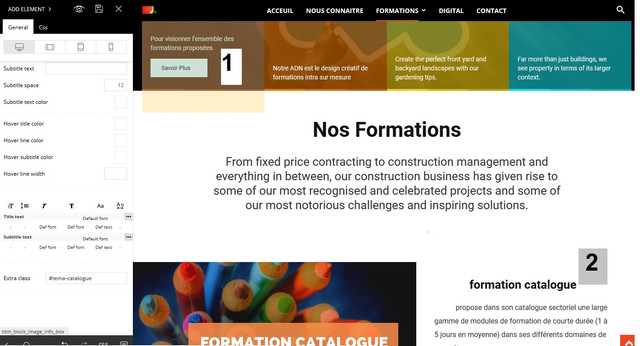
This is what I want :
When someone click on button (number1) …… the page scroll down to Title (Number2) = same as construction demo homepage when you click on something the page scroll down
I couldn’t make it function while I’m creating a page by my own.
Thank you again.
reddisl Work perfectly 100% ! Thank you Boss
Please note that Newspaper>Theme panel>Custom code> doesn’t work at all ! so I always add CSS in Theme> customization > Custom CSS
——–
Nevertheless, I’m going to submit an article about all RTL errors , so that the team can fix them, I have a feeling that NEWSPAPER 10 is going to support RTL
It makes me angry to see other RTL theme in themeforest stealing all original ideas from TAGDIV to put theme in their themes.
So I’ll help NEWSPAPER THEME to Support RTL and be the N01 RTL THEME !
Thank you again .
Best regards
reddisl Please note that the issue appears only in when I visite my website via mobile and Ps: I am NOT using the mobile theme.
Thank you in advance
reddisl Perfect, I suppose this is exactly what should I do to fix this issue as you mentioned in the screenshots
but could you please tell me which file I should edit to find that line
and add the ” ADD FLOAT: LEFT ”
Thank you
reddisl Hello,
First of all regarding question 2: I’m not using the theme mobile , please see the picture and read what I wrote to understand what is my problem.
I gave that CSS code to help NEWSPAPER theme to support RTL in next update, I’m trying to find issues with RTL and fix them. the CSS code has no relationship with my 2nd problem.
reddisl Hello ? anyhelp ? any support ??
reddisl This is the website from MOBILE! a disaster !

without additional CSS

reddisl Update: I somehow fixed facebook counter!
PS: you have to validate domain in your facebook account!
waiting for support answer for other issues!
reddisl this is the link to my website:
It is in Arabic, but I suppose as developers that doesn’t matter! because CSS, JS, Html, Php is what we speak
reddisl same problem here
