tilakmarg
 Thanks. But that would be overwritten on theme upgradation. So, instead of doing that I have written a small custom plugin to put the author box immediately after the main content. And, I have disabled the author box of the theme.
tilakmarg Thanks a lot.
tilakmarg Thanks. Will try that.
Just one query. If I manually update the (Newsmag) theme, will my customized settings in Theme Panel remain protected or I’ll have to start again customizing these settings (though I understand that custom changes made to PHP files may disappear with update)?
Regards
tilakmarg tilakmarg Though I am not from tagDiv, but let me tell you the method that I use.
I first download the original file that is to be edited. Download is done either through FTP (such as FileZilla) or by using File Manager of cPanel of the hosting account.
Thereafter, I save that original file (with some other name or at some other location on my laptop) that has been downloaded, for future use, if any (such as if things go wrong after editing).
Then, I edit a copy of that file using NotePad++ and save it with the same name as the name of the downloaded file.
Lastly, I upload this edited file to the same location (and with the same name) where the downloaded file originally resided. Then, I check the functionality and if something goes wrong, I again upload the saved original file instead of the edited file.
Hope it helps.
tilakmarg Please note that I have used Super Socializer plugin, so I have used its shortcode. To do so, in the file Newsmag/parts/header/top-menu.php, I have inserted following line at Line No. 81:
<div>'; echo do_shortcode('[TheChamp-Login title="Login with Facebook or Twitter"]') ; echo '</div>
Hope it helps.
tilakmarg Thanks for the info.
tilakmarg I have myself found the correct solution after trial and error method. I have got the desired result.
So, please ignore my previous message.
Thanks.
tilakmarg Thanks for the reply. Please see my question again. I am already aware of this option from the User Profile and I had mentioned that in my question.
I have a large number of users (may run into hundreds) and more users get added daily. What I wanted is to change the default option through change of code so that the full name of every user is displayed automatically, i.e., First Name and Last Name combined, instead of same being manually from each user’s profile? At present the default option shows the Nickname and not the full name. Thanks.
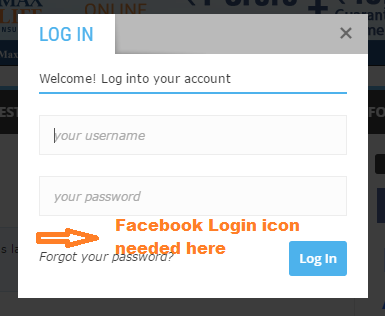
tilakmarg Thanks for the reply. However, the solution suggested by you puts the Facebook login in the top menu bar. But, what I wanted was the Facebook login in the “Sign in / Join” popup which appears when one clicks on the Sign in / Join link in the top menu. Here is the image that shows the popup for Sign in / Join where I want to place the Facebook Login icon: http://tilakmarg.com/img1/login01.png
Will be grateful if you can please provide the solution for this.
tilakmarg chauffeur,
If you want to disable author-box for all authors on posts, then there is a much simpler solution without editing the theme-code files.
On the admin side of your WordPress, click “Theme Panel” and then select “Post Settings”. Then, from the details that appear, again select “Post Settings” from the right-pane. There is an option called “Show Author Bpx”. Simply, unselect this option and the author Box will not be shown on all posts.
tilakmarg Thanks, Chris S, for your suggestion.
Thanks, Andrei L., for the solution suggested by you. It worked perfectly well. Thanks for your support.
tilakmarg Thanks. It worked perfectly.