- ApiPractical example – How to add a new Block and Module
- Apitd_api_top_bar_template::delete
- Apitd_api_top_bar_template::update_key
- Apitd_api_top_bar_template::update
- Apitd_api_top_bar_template::add
- Apitd_api_single_template::delete
- Apitd_api_single_template::update_key
- Apitd_api_single_template::update
- Apitd_api_single_template::add
- Apitd_api_footer_template::delete
- Apitd_api_footer_template::update_key
- Apitd_api_footer_template::update
- Apitd_api_footer_template::add
- Apitd_api_smart_list::delete
- Apitd_api_smart_list::update_key
- Apitd_api_smart_list::update
- Apitd_api_smart_list::add
- Apitd_api_thumb::delete
- Apitd_api_thumb::update_key
- Apitd_api_thumb::update
 hildi
hildiThe save/edit/planify functions of the backoffice for a page/an article are really really slow -2 or 3 secodns sometime more before reloading the page- (and no problem with the 8.5 version on much “smaller” server). Any idea of how to improve that (or correct) ?
To readers : Am I the only one with slowness problem in the back-office ?
THanks
ps : latest versions of the theme and the plugins already uploaded but booster and AMP not activated (because I could not actuivate them after being uploaded through ftp… Bug reported in another topic)
 Anujsharma768
I had updated newspaper theme and now Adsense ads not appears in some posts and for some pages As ads are enabled but no ads shows there. Eg Of such pages are https://www.tricksbykabir.com/get-google-adsense-approval-new-blog/ & https://www.tricksbykabir.com/best-whatsapp-status/ and many other pages
 jad
jadHi,
how can I show more than one category in breadcrumbs? I want to get all categories’s levels in breadcrumbs.
I’ve Main category – Sub category – Sub sub category and I want to display all them in breadcrumbs.
Here an example How can I show more than one category in breadcrumbs?
Home-> Main category -> Sub Category-> Sub Sub category -> Article title
or
Home-> Main category -> Sub Category-> Sub Sub category without article title?
Thanks
 Valen
Valen Sorry probably should of posted a link. – http://www.gamersgreed.com/red-dead-redemption-2-everything-need-know/amp/
Valenhi guys,
Recently upgraded to the AMP plugin and love it so far. One issue im having however, with the amp pages my homepage logo on the main menu is gone and not replacing with text. I’ve tried a custom menu for “mobile” but to no avail.
Any ideas?
thanks
 simonxyz
Hi,
I’m a newbie to wordpress and the Newspaper theme. I’ve followed the installation instructions and have successfully installed wordpress and the Newspaper theme. Now… is there a ‘Quick Setup’ guide to help me get my site ready for the public ASAP? I’m really interested in being able to tweak the Links (I think they’re called Main Menu Links) and their accompanying sub-links. I am running the Newspaper theme’s Default Demo, the menu links are: News, Fashion, Gadgets, Lifestyle, Video and Homepages.
If there exists a “Quick Setup’ guide, please direct me to the url where it can be found.
Thank you,
Simon
 denniz6
 Hi,
I fixed it, it was because of Jetpack.
Another questions:
-How can I customize share social icons to match with my site colors – sample
-Can I make paginaging icons round? not square. – sample
– Is it possbile to define images inside of the post to get as feautered image automatically?
-Images inside of a post are not on same size, is there a way to make all of tehm sam size – sample
 cahpolli
 Hello! Thanks!
Apparently it’s working
https://naturam.com.br/ubatuba/praia-das-galhetas/amp/
But when I open the URL on the mobile the AMP version does not appear.
Is this normal? Should not the mobile page appear exactly as the /amp page?
hildi My response on the dashboard :
I already read that many times (“The theme will try to update the plugin automatically but seems sometimes it fails. Try to use FTP to install the composer. Remove the previous plugin folder from the uploads folder (if present) and paste the new one from the latest theme package (unzip it first).”
Please have a look and read carefully what I wrote (the trick did it for td composer but it does not work for the td-speed-booster (AMP) and the td-mobile plugins. And of course I’m talking about the latest version of the theme (and the plugins).
We all are loosing time because of such a behaviour (automatic responses without being read carefully).
I understand that there are plenty of people on the list but please, read carefully the topics (Extract : “But this method does not work for td AMP and TD Mobile or speed-booster”). I wanted to change the name of the topics but it is impossible and I don’t want to create another topic (because of the same issue ; it does not make sense).
By the way, on my test-site, I have absolut NO problem and the theme works well (it is the 8.5 version….)
 iavinash
In the latest version 8.7 when i enable the AMP i see the pagination for a single post doesnt work.
By pagination i mean <!-nextpage-> functionality of the wordpress.
Is there any fix for this?
Thanks
 Andiviajero
 a mí tampoco me funciona, me aparece la página en blanco, como si estuviera cargando
hildi But this method does not work for td AMP and TD Mobile or speed-booster
AND last but not least, it is IMPOSSIBLE to work with a child theme that requires td-composer (it does not recognize the plugins after being uploaded the child theme and activated it).
SO WHAT IS TO DO please ? (I obviously want to work with a child theme).
 Kanuj
Kanuj Thanks Simion – the logo looks blurry – http://prntscr.com/ilwq92 we are using a size of used the 140px or 190 px but it still is blurry – what size do you recommend so it looks okay on the AMP as well the mobile site.
thanks
 Bogdan B.
 You also need to update the AMP plugin. It will not update automaticaly along with the theme. If you updated it already, please contact us on our email address at contact@tagdiv.com and provide a link to your site and wp-admin (login information and admin rights) so we can login and investigate. Please also include a link to this conversation.
Thank you!
 madworks
Hello guys,
our website 24ora.com works completely fine on desktop .. but we are having a lot of issues with mobile.
For example:
– Slider is not working correctly
– menu & search button is not clickable
– We are also having some ads issues.
We have updated to the latest version 8.7.2 but it didn’t help. We also tried the mobile theme and still the menu button or search button is not clickable
 OverheadOnline
 Hello Bogdan,
thanks for your answer.
I did use the files from the theme package and updated via FTP. I did the following:
- rename unzipped local Theme and Plugin Folders to filename-update
- uploaded the folders to the location they belong
- rename existing files to filename-old
- delete the -update – Part from uploaded folders
- delete the (…)-old Folders
I did this with the Theme and all the Plugins on this screenshot
tg-amp and tg newsletter were not active before but they are now. Error massage persists.
Is it necessary to update the child-theme too? I’m still using previous versions child-theme.
Thank you!
-
This reply was modified 8 years by
OverheadOnline.
-
This reply was modified 8 years by
Bogdan B. Hello,
This was fixed in the current version of the theme and plugin
Please update your theme by using this guide: https://forum.tagdiv.com/how-to-update-the-theme-2/ and then disable and delete your current amp plugin and then install it again from the new theme package you downloaded from envato.
Thank you!
 mexa
mexa Hi Simion,
Thanks for your reply.
Even if I edit my page with your example and configuration, the row isn’t full width.
See: https://cl.ly/3S1X033M111Z
(background from the row is light ‘grey’)
 masbocah
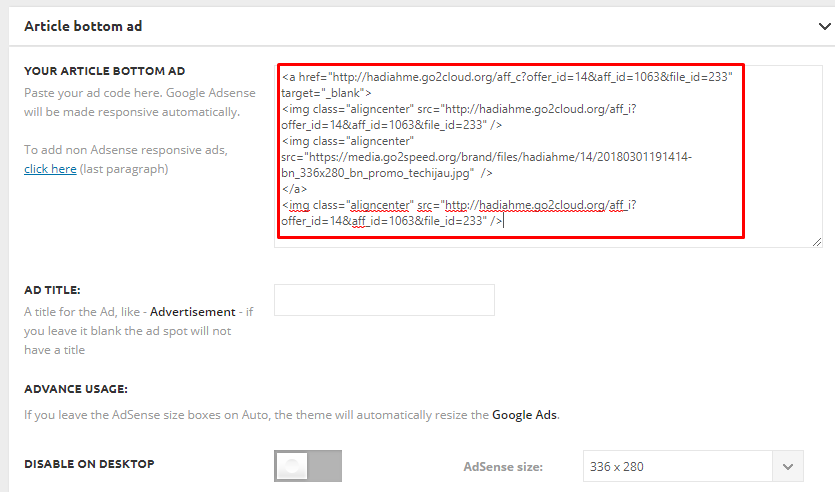
Hi, i try to put a non-adsense ad code on article bottom
https://techijau.com/wp-content/uploads/2018/03/ad-code.png
After i save the code and check my blog post from desktop, the width of the ad image(s) has turned into 640 pixel, while the real size of the images is 1×1 pixel, 336×280 pixel, and 1×1 pixel. How could i fix it?
You can see the sample page here https://techijau.com/rumor-hal-menarik-yang-bakal-kita-temukan-pada-samsung-galaxy-s9/
Bogdan B. Hello,
Each demo has it’s own custom css. There is no simple method for grabbing just parts of a demo without code modifications. You can grab the specific css and add it to your custom css box.
Here is an example:
You will have to change colors for the menu from the theme colors section and the line height from the fonts section
Thank you!
 Simion C.
 The theme does not have such effects that would apply to images. There are some image elements in tagDiv composer but they do not have such effects
– https://www.screencast.com/t/ZTji1El057ZL
You could try CSS solutions found online in this case, an example here
– https://www.w3schools.com/howto/howto_css_image_overlay.asp
 irfan.id
 Hi.. thanks for tutorial, Now I have column for menu. But, Is it possible to create header for columns? example: https://prnt.sc/ilqv5i
Thanks,
 pavel@earnware.com
Hello!
Getting this error on all AMP websites, please fix with the next update:
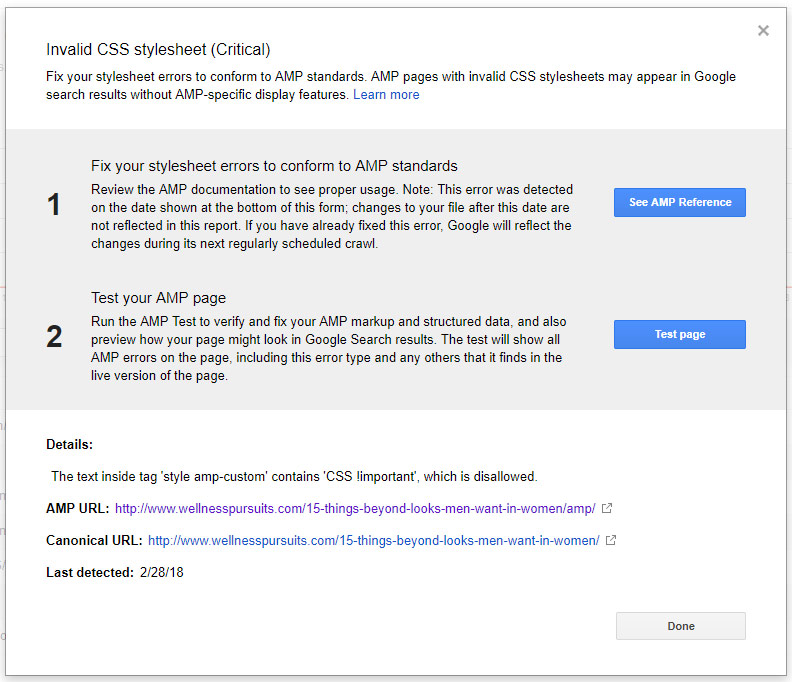
There’s a style with !important somewhere in the AMP pages, that needs to be fixed,
Thanks!!
Simion C. Our AMP plugin does not have a menu on AMP pages. This is similar to the Yoast SEO website, which is leading in SEO solutions
– https://yoast.com/social-media-optimization-with-yoast-seo/amp/
A menu might be considered in the future.
 fm001
fm001How can I change the main header hero image for Raw & Wild?