- ApiPractical example – How to add a new Block and Module
- Apitd_api_top_bar_template::delete
- Apitd_api_top_bar_template::update_key
- Apitd_api_top_bar_template::update
- Apitd_api_top_bar_template::add
- Apitd_api_single_template::delete
- Apitd_api_single_template::update_key
- Apitd_api_single_template::update
- Apitd_api_single_template::add
- Apitd_api_footer_template::delete
- Apitd_api_footer_template::update_key
- Apitd_api_footer_template::update
- Apitd_api_footer_template::add
- Apitd_api_smart_list::delete
- Apitd_api_smart_list::update_key
- Apitd_api_smart_list::update
- Apitd_api_smart_list::add
- Apitd_api_thumb::delete
- Apitd_api_thumb::update_key
- Apitd_api_thumb::update
 Anamaria
 Hi,
For example, this plugin provides a shortcode https://wordpress.org/plugins/astrology/
A shortcode can be inserted by using the element called “Column text” or “Text with title”. “Column text” and “text with title” elements have a button called “edit content” and if you click on that button, the WP Editor will open, and you can add some text/code/shortcode there. Close the WP Editor from X, save the changes from Composer and view the page to see the changes.
Thank you!
 Bettina
 Hello!
I’ve checked, and I can’t meet this issue. Can you please provide an example of when this issue is happening there?
Thank you!
 razvans
Hi there. There is a problem with the search that’s inside the header. When i click it, the box opens, i write the search term and i get results, but if i click on the search button or on the View all results button, I get an empty page, with no results for the search term that I entered there. There’s no specific problem on my website, the same does on your demo!
Please fix it and tell me what to do!
 MonkeyByte
 To be more specific, it looks like the ‘MemberPress Courses’ plugin is at issue. I I activated it, for a moment, so I could take a screen shot of what a post page looks like when active. Will attach that and I will reach out to Memberpress and let them know of the conflict.
This screen shot is with PHP updated to the latest stable offering: https://www.dropbox.com/scl/fi/f5peie9p4hnoip1444qvd/Screenshot-2024-02-20-at-11.59.16-AM.png?rlkey=2uei4hqjj3o71kuoyhgxkvybn&dl=0
 DJ Promotion
 I’m afraid we don’t understand us. The same modules & images are below and look fine. So I think it’s an issue.The Image Optimizer compressed the following sizes:
Image Size Savings
Full 58,0 KB Reduced by 8,1% (5,1 KB)
Td_265x198_retina 41,1 KB Reduced by 6,5% (2,9 KB)
Td_537x360 36,9 KB Reduced by 6,7% (2,7 KB)
Td_238x178_retina 35,4 KB Reduced by 6,9% (2,6 KB)
Td_300x194 15,1 KB Reduced by 10,8% (1,8 KB)
Td_265x198 14,3 KB Reduced by 11,7% (1,9 KB)
Td_238x178 12,3 KB Reduced by 12,7% (1,8 KB)
Td_100x75 3,4 KB Reduced by 30,4% (1,5 KB)
Td_80x60 2,4 KB Reduced by 38,3% (1,5 KB)
https://djpromotion.com.pl/djraport/
In case of the header logo I’m using 272×90 and add retina, too.
 jbwilsonjr
 Here’s another attempt at the images.
https://www.dropbox.com/scl/fi/rowqq7b3ie4jv7calnpt9/Screenshot-2024-02-20-at-10.38.47-AM.png?rlkey=9xjarcujl56uq74x2ihdkhh4o&dl=0
-
This reply was modified 2 years by
jbwilsonjr.
jbwilsonjrI’ve been using the Newspaper theme for quite some time. This morning my website at https://k5nd.net/ lost all formatting. When the site first comes up, there’s a brief glimpse of the proper layout, and then it just spews the content down the page. This happens on all pages. I’ve restored the site from a backup, but it’s still the same problem.
Here’s what the home page should look like.

Here’s how it looks at present.

 nolandolce
 Hi Anamaria,
I’m unable to activate that plug-in because it says, “The plugin is disabled because it is incompatible with this version of Newspaper.”
What do you mean by using the header live search and customizing it for mobile? The problem I’m having is that the mobile version is not mirroring the desktop version. For example, the desktop version includes only the image and title. The mobile version also includes the excerpt, the comment count, the date, and “read more” text.
Thanks
 giuseppe39
hi,
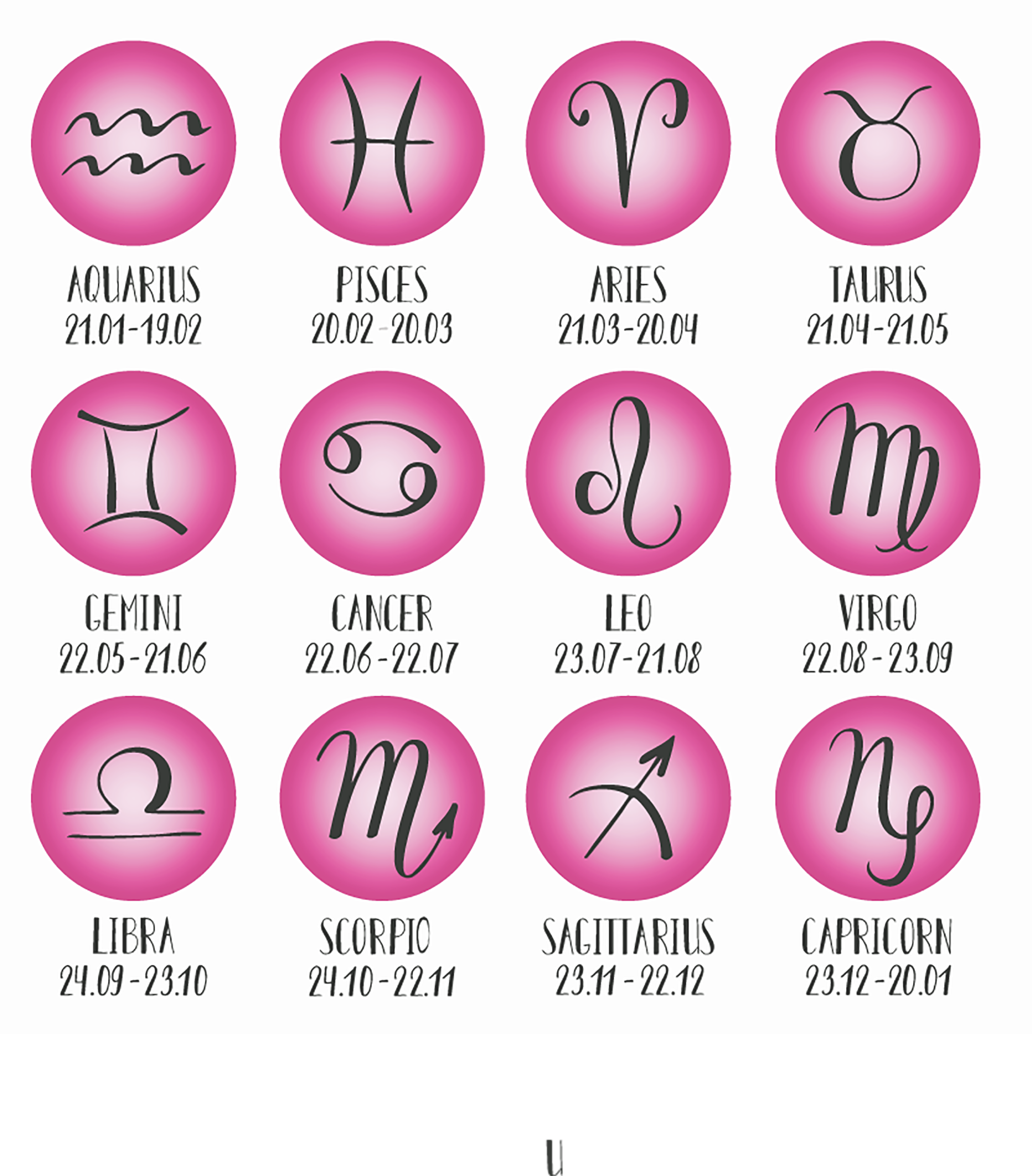
could you help me to create an astrology widget like this to put on the sidebar?
I cannot find plugins that do this.
Or maybe there are some tagdiv blocks that could be shaped to create something like that?
When I click on the single image it should go into the sub category,For example: horoscope->Aries where to find the last article page for this subcategory
thanks
Anamaria Hello,
Please check with the tagDiv Composer and disable the H1. For example, H1 from logo(header, footer, mobile, sticky): https://forum.tagdiv.com/topic/6-h1-tags-on-front-page-bing-have-deindexed-my-site/
Thank you!
Bettina Hello @waleed9!
1. You can activate or delete the AMP plugin. At the moment, you see the AMP plugin is not activated; that’s why you can’t see it on the left side with its settings. From my point of view, if you don’t use the Mobile Theme plugin, then there is no reason or benefit to AMP. Unfortunately, AMP is not working with the cloud templates because the AMP’s layout is not fully customized.
The AMP version works best with default templates and not cloud templates. That’s why we integrated it with the Mobile theme plugin.
The feedback from our clients about AMP was negative and it is not used anymore, that’s why we didn’t add more customization options.
2. If there are cloud templates, then please check the settings of that ad in the tagdiv Composer. You can see there if this is an image or a code.
Thank you!
Anamaria Hello,
For mobile theme + Amp the content need to be added in Mobile Editor -> https://www.screencast.com/t/xbgZG8kH
Please check this topic where I explained each mobile version -> https://forum.tagdiv.com/topic/mobile-version-not-working-properly-2/ -> https://forum.tagdiv.com/topic/amp-pages-not-working-well-with-this-theme/ and choose what mobile version you want.
Thank you!
 waleed9
Hello support
1- Note text Delete all data Not understood Where is this section?
see here https://prnt.sc/gQenQLVgObUH
The plugin does not appear on the left side and I cannot access it
Please explain more
Do we use the two plugins together or one because I did not understand exactly? There is talk about deleting another plugin that has been dispensed with. There is confusion.
2- There are a lot of instructions for Ad
In short, where are these ads or pictures placed and what is the code?
see here https://prnt.sc/nhdChToDB0i9 aand here https://prnt.sc/pkT4s3A3K5r2
If it is just a picture that I designed, is that different?
Thanks alot
 newspatron
 Hello ! whatever happened to the queries i posted in an earlier thread.
The main site is https://newspatron.com which is live.
Here is the test website url non amp version
https://staging-5416-newspatron.wpcomstaging.com/
As you can see it is a test website. the amp version of the test site is below
https://staging-5416-newspatron.wpcomstaging.com/?amp
I am curios to know why the home page is displayed in the amp version correctly, however the rest of the pages such as “about us” are not displayed correctly on the amp version. here are the urls for both.
The non amp version of about us on the test site
https://staging-5416-newspatron.wpcomstaging.com/about-us/
The amp version
https://staging-5416-newspatron.wpcomstaging.com/about-us/?amp
Please reply over this first so that i can raise the rest of the queries.!
Anamaria Hi,
Have you tried blocking them with wordfence? Something like this would work – https://prnt.sc/1V-dHi7xTQXk But it may take some time until all the URLs are blocked, as they keep changing most likely. Eventually they will all be blocked however and the attack will stop.
I think it could be done from cloudflare as well, if you use cloudflare. That URL can be blocked like this for example – https://community.cloudflare.com/t/possible-to-block-specific-page-access/106765/3 In case you are using cloudflare, this would be a very good solution because cloudflare will block them before they reach the website. But in case it isn’t possible to set up cloudflare, the wordfence method will work as well. Please try it as soon as possible.
Thank you!
Anamaria Hello,
Can you please provide the link to your website?
I think that a plugin adds the newsletter, like the MailPoet plugin.
If you want to delete a row, you can delete a row with the empty column using the right-click on the row icon -> https://i.imgur.com/JodWvlW.png -> https://i.imgur.com/e6bb8U5.png or using the drag and drop or you can click on the row and press the delete button from your keyboard -> https://www.screencast.com/t/Mai7iyEG The same steps are to delete the elements.
I don’t recommend using an amp because it is deprecated. Also, use cloud templates and flex blocks instead of the templates from the theme panel and blocks 1-25 or big grid blocks.
We’ve analyzed the website and observed that you have many JavaScript scripts https://i.imgur.com/Z6xRj74.png, which should be minimized to achieve a good score. To achieve this, we recommend WP Rocket to minimize the resources.
Thank you!
Anamaria Hello,
Please let me know what theme version you have.
Please update the theme to the latest version 12.6.4.
This malware infects not only theme files but also WordPress files or other plugin files. This malware was not detected only in our theme but also in many other themes and plugins https://www.bleepingcomputer.com/news/security/massive-balada-injector-campaign-attacking-wordpress-sites-since-2017 / -> https://cybernews.com/security/wordpress-malware-epidemic-balada-injector/ -> https://www.geoedge.com/balda-injectors-2-0-evading-detection-gaining-persistence /
You could consider reinstalling the WordPress version, reinstalling the theme, and checking for this plugin wp-zexit.php. It might be wise to inspect via FTP if it doesn’t appear in the WordPress -> Plugins. Additionally, using Wordfence to scan the website and remove unknown users would be prudent.
Thank you!
Anamaria Hello,
1. For About Us or Follow Us, you translate them from Theme Panel -> Translations-> Translations, or you can set a space, and then it will not be displayed.
Please check this topic where I explained each mobile version -> https://forum.tagdiv.com/topic/mobile-version-not-working-properly-2/ -> https://forum.tagdiv.com/topic/amp-pages-not-working-well-with-this-theme/ and choose what mobile version you want.
2. Unfortunately, you can’t set the sticky menu to always sticky.
Thank you!
Anamaria Hello,
You have the mobile theme plugin activated; please deactivate it.
Using our theme, you can choose from 3 mobile versions
-> mobile responsive => https://www.screencast.com/t/oJ2ShOp47
-> mobile theme plugin => https://forum.tagdiv.com/the-mobile-theme/
-> mobile page => https://tagdiv.com/newspaper-10-3-7-update-brings-customizable-and-fast-mobile-pages/ The option that you need to use.
Suppose you created the mobile pages with tagDiv Composer. In that case, when you install the Mobile Theme plugin, your pages will be overwritten by the plugin (the mobile theme comes with its templates for page, post, category, etc, so your current templates from the desktop theme will get converted to the mobile theme layout, the page content is made without builders in mobile editor => https://www.screencast.com/t/xbgZG8kH also, the options that are provided to edit the mobile theme version are limited (this keeps the things simple)).
This is a video about Responsive Newspaper Theme, AMP & Mobile Theme, Mobile Pages & Templates -> https://www.youtube.com/watch?v=SpGkOnJeNZY.
So, the mobile responsive is what you see when that you select the viewport on phone => https://www.screencast.com/t/matV17hH, so some settings may apply for each viewport(where is the border blue), and others are not(where the border is black).
The mobile page has the mobile templates from Cloud Library => https://www.screencast.com/t/YCcZ8rL8
The Mobile responsive version of the theme and the mobile page editor can be edit with tagDiv Composer, the mobile theme plugin cannot.
For example, you can have the mobile theme plugin activated and use the mobile page/mobile responsive version for the homepage/pages, but for the categories pages/404 page, you can’t use the mobile page/mobile responsive version if you have the mobile theme plugin activated.
So, if you want to design the pages with tagDiv Composer, you can use the mobile page or mobile responsive version.
Also, please check this topic https://forum.tagdiv.com/topic/amp-pages-not-working-well-with-this-theme/
Thank you!
Anamaria Hello,
You have the mobile theme plugin activated; please deactivate it.
Using our theme, you can choose from 3 mobile versions
-> mobile responsive => https://www.screencast.com/t/oJ2ShOp47
-> mobile theme plugin => https://forum.tagdiv.com/the-mobile-theme/
-> mobile page => https://tagdiv.com/newspaper-10-3-7-update-brings-customizable-and-fast-mobile-pages/ The option that you need to use.
Suppose you created the mobile pages with tagDiv Composer. In that case, when you install the Mobile Theme plugin, your pages will be overwritten by the plugin (the mobile theme comes with its templates for page, post, category, etc, so your current templates from the desktop theme will get converted to the mobile theme layout, the page content is made without builders in mobile editor => https://www.screencast.com/t/xbgZG8kH also, the options that are provided to edit the mobile theme version are limited (this keeps the things simple)).
This is a video about Responsive Newspaper Theme, AMP & Mobile Theme, Mobile Pages & Templates -> https://www.youtube.com/watch?v=SpGkOnJeNZY.
So, the mobile responsive is what you see when that you select the viewport on phone => https://www.screencast.com/t/matV17hH, so some settings may apply for each viewport(where is the border blue), and others are not(where the border is black).
The mobile page has the mobile templates from Cloud Library => https://www.screencast.com/t/YCcZ8rL8
The Mobile responsive version of the theme and the mobile page editor can be edit with tagDiv Composer, the mobile theme plugin cannot.
For example, you can have the mobile theme plugin activated and use the mobile page/mobile responsive version for the homepage/pages, but for the categories pages/404 page, you can’t use the mobile page/mobile responsive version if you have the mobile theme plugin activated.
So, if you want to design the pages with tagDiv Composer, you can use the mobile page or mobile responsive version.
Also, please check this topic https://forum.tagdiv.com/topic/amp-pages-not-working-well-with-this-theme/
Thank you!
Anamaria Hello,
You have the mobile theme plugin activated; please deactivate it.
Using our theme, you can choose from 3 mobile versions
-> mobile responsive => https://www.screencast.com/t/oJ2ShOp47
-> mobile theme plugin => https://forum.tagdiv.com/the-mobile-theme/
-> mobile page => https://tagdiv.com/newspaper-10-3-7-update-brings-customizable-and-fast-mobile-pages/ The option that you need to use.
Suppose you created the mobile pages with tagDiv Composer. In that case, when you install the Mobile Theme plugin, your pages will be overwritten by the plugin (the mobile theme comes with its templates for page, post, category, etc, so your current templates from the desktop theme will get converted to the mobile theme layout, the page content is made without builders in mobile editor => https://www.screencast.com/t/xbgZG8kH also, the options that are provided to edit the mobile theme version are limited (this keeps the things simple)).
This is a video about Responsive Newspaper Theme, AMP & Mobile Theme, Mobile Pages & Templates -> https://www.youtube.com/watch?v=SpGkOnJeNZY.
So, the mobile responsive is what you see when that you select the viewport on phone => https://www.screencast.com/t/matV17hH, so some settings may apply for each viewport(where is the border blue), and others are not(where the border is black).
The mobile page has the mobile templates from Cloud Library => https://www.screencast.com/t/YCcZ8rL8
The Mobile responsive version of the theme and the mobile page editor can be edit with tagDiv Composer, the mobile theme plugin cannot.
For example, you can have the mobile theme plugin activated and use the mobile page/mobile responsive version for the homepage/pages, but for the categories pages/404 page, you can’t use the mobile page/mobile responsive version if you have the mobile theme plugin activated.
So, if you want to design the pages with tagDiv Composer, you can use the mobile page or mobile responsive version.
Also, please check this topic https://forum.tagdiv.com/topic/amp-pages-not-working-well-with-this-theme/
Thank you!
Anamaria Hi,
Can you please provide an example of what you need? Based on my understanding, this is a request for custom development work to implement this feature.
Thank you!
Bettina Hello @kevinsikora!
Unfortunately, no. Maybe you can achieve this with the help of a plugin. For example: https://www.wpmapspro.com/docs/how-to-display-listings-below-the-map-2/
For customization and other services, you can contact our custom work team here: https://tagdiv.com/premium-customization-services/.
Thank you for understanding!
 chaywood0896
 I believe I have figured out the focus of the problem. WordPress at some point changed the link insertion popup to allow “ADD TITLE ATTRIBUTE TO LINK.” This field auto-fills, but it can be blanked out. Thus, title attributes are now usual for any link, taken from the link. My internal links usually have an “em” coding in their titles (they are book titles). This is what your theme chokes on; it appears related to the theme sometimes changing the “em” to an “&gt.” If the title attribute is removed, or does not contain “em” coding, the problem does not occur. I would focus on this for your future changes.
 ICONS
ICONSHi,
I would like to add new blocks to an existing page on https://www.waterforum.net, but whatever I do, nothing happens. So I can ‘pick up’ a block, hover above the correct location but no success whatsoever. Already updated everything and deactivated all plugins except 3 Tagdiv modules but that didn’t help either.
Thanks