
- NewspaperWP Rocket and Newspaper Theme: Optimization Guide
- TutorialsFrom WPBakery to tagDiv Composer
- TutorialsOffset Feature
- TutorialsWhat is Ajax preloading?
 AMIT
AMITHi, I want to have an animated underline under each menu item.
Like this example: http://tobiasahlin.com/blog/css-trick-animating-link-underlines/
Current demo installed: Magazine PRO
 socialengaged
 sorry, i was able to remove the small icons and to show only posts of same category.
but still, if you see example, i dont see the posts of that category, it says NO POSTS.
but all categories have posts.
can you please help? how do i display posts of that category, in the category?
thanks
e
socialengaged Hello
i write here because can’t find way to open ticket.
there is an issue with the theme:
for example here: https://www.inpugliatuttolanno.com/editoriali/
this is a category, but i see the articles in this category as small green buttons, and below the bar with articles that has nothing to do with that category
why? how can i show normally articles in each category, as per wordpress ? i dont want to show small green icons with article title, i want to show full articles.
thanks in advance
eugenio
 Bettina
 Hello!
The Posts Loops element settings are divided into 4 tabs: General, Layout, Style, and CSS. The Posts loop is a special block and doesn’t have filtering options.
Also, one of the options for pagination of the Posts Loop has the option for normal numbered and the flex blocks do not have this option.
The Posts Loop is automatically filtering the posts depending on the cloud template you set (for example on the category page there will be posted posts from that category).
Thank you!
Bettina Hello!
Please provide an example of what you need to achieve on your website.
Thank you!
 a.abraham
Hello there,
great theme with great flexibility, however, I would like to insert an ad image into a Big Grid Flex, for example right here:
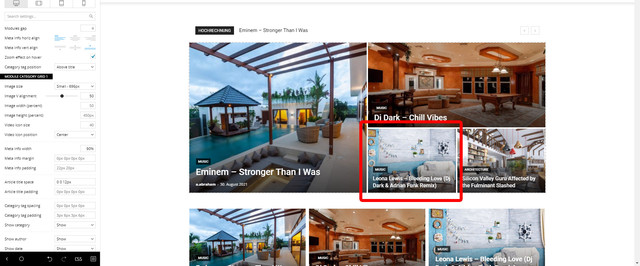
I suppose from the admin panel/composer it’s not possible, so I was checking out the template and shortcode files, but I was not able to find the corresponding code snippet for the Big Grids yet.
Can you give me any hint where I can find what I am searching for? 🙂
Thanks and best regards!
Andrej
Bettina Hello!
Please check the row width to be the same as desktop and also check in the CSS tab. It should work if no CSS code is influencing it.
The new browsers have started to prevent the videos from auto playing in pages. Unfortunately, we can not force this functionality in such cases.
If you have 2 blocks, then you need to apply some offsets and limits. For example: 1 block with the limit posts: 2 and the second one with the limit posts: 2 and offset: 2, if you would like the 3rd one then you set limit posts: 2 and offset 4, etc.
Thank you!
 karthi
Dear Support,
When we tried to install Prebuilt Template, We are getting blocked mixed content issue. Please help us to sort out
/wp-admin/admin-ajax.php?td_theme_name=Newspaper&v=11.2&step=remove_content_before_install&uid=9c085adcaedf34d5
Bettina Hello!
You can disable that functionality if you go to a page, edit it with TagDiv Composer, select a flex block for example, go to the layout tab -> article video and uncheck the option called “Enable video pop-up”. In this mode, you won’t have the modal when you click on the thumbnail.
Hope that helps you!
Thank you!
 SVPrasad
 First Edit/ Create Single post Templete >> https://i.imgur.com/no3Rsj2.png >> https://i.imgur.com/AqPmkh9.png
Now Go to Settings > General > Select Time Zone as per Requirments > Date Format Select as Custom (j M Y.g:i A.) > Then Click Save Changes >> https://i.imgur.com/JcmG4p6.png
Please Refer This Article For More Information About Date & Time Formats
If You are Using Default Template Then Change These Settings Only.
This is the Final Result: https://digiap.in/assets/support/Sc.png
 noutatearo
Hi there,
I’m creating my news website using this awesome theme but I need some tips&tricks.
On my homepage, under the header, I set a ‘Big Grid Style’ – Grid Style 6 ‘Lightsky’.
Now, I’ve seen all the filter and sort options but I have a question. Is there a way to set manually news there? Here is my example. Let’s suppose in one day it will be a breaking news and I want to be that post for 24h on the bigger window, but also I want in the right to be showed the another ones (it’s the 4 news grid style). Now, the filter will add the news by “Latest”. That means, whenever I’ll add news, my breaking news (that I want to be sticky for 24h) will be replaced from the bigger window and added beside. I also trying to create a tag system for posts to show, but still filter by the latest.
So the sample question will be. Can I manually stick news on the grid without the filters?
SVPrasadWhen I’m Try to Adding YouTube Playlist on Website Getting Error  >>
>> 
If I set Source is VideosIDs Works My Website Without Error  >>
>> 
This My Client Channel ID: https://www.youtube.com/watch?v=brJQAXhUOk4&list=PL2t4xciebhN99P0diM5dcFHYVJ6NOd_O3
 khairuljf
https://allphact.appsinception.io/wp-admin
Here is the website. I am have uploaded the logo but not showing & I am trying to modify my homepage but I can’t. Can you please see where is the problem?
Thanks
 MGatehouse
 Hi Calin,
We’ve not used the default post styles before, so I’ve just run a couple of tests. I can confirm that content locking seems to work fine using the ‘Default’ template: https://lab.org.uk/?p=20927&preview=true&public=true
However, the ‘Like this post?’ elements are never displayed on any default post styles.
Thanks!
 The Cyber Flame
 Thanks a lot!
I deactivated the Mobile Theme & Now it is Fine! Thank You.
Also, can I know why the Social Counter doesn’t show exact amounts of Followers/Likes/Subscribers?
 Anamaria
 Hello,
Seems you have the Mobile theme plugin activate => https://www.screencast.com/t/h0ohbHcJO, when you install and activate the Mobile Theme plugin, your pages will be overwritten by the plugin (the mobile theme comes with its own templates for page, post, category, etc so your current templates from the desktop theme will get converted to the mobile theme layout, the page content is made without builders in mobile editor => https://www.screencast.com/t/xbgZG8kH also, the options that are provided to edit the mobile theme version are limited (this keeps the things simple)).
Better deactivate the plugin and see the results
This is a video about Responsive Newspaper Theme, AMP & Mobile Theme, Mobile Pages & Templates -> https://www.youtube.com/watch?v=SpGkOnJeNZY
Also, if you create a mobile page, please check if is set correctly => https://tagdiv.com/newspaper-10-3-7-update-brings-customizable-and-fast-mobile-pages/
Thank you!
Anamaria Hello,
@kubazabran
The Posts Loops settings are divided into 4 tabs: General, Layout, Style, and CSS. The Posts loop is a special block and doesn’t have filtering options.
Also, one of the options for pagination of the Posts Loop has the option for normal numbered and the flex blocks do not have this option.
The Posts Loop is automatically filtering the posts depending on the cloud template you set (for example on the category page there will be posted posts from that category).
If you referring to this https://www.screencast.com/t/sQ17zOPDHDWH then can be done only with custom work.
Thank you!
Bettina Hello!
1. Check this video to understand where exactly you can find the sticky header and how you can modify it: https://www.screencast.com/t/vA8nj6T90x57
2. Unfortunately, this will require custom work which is not covered by the support team.
3. If you use for example Video Embed element edited with TagDiv Composer, then you can turn off Autoplay setting which means the video won’t run automatically with the page only if you press the button play. Also, you can check our guides here:
https://forum.tagdiv.com/video-playlist-2/
https://forum.tagdiv.com/featured-image-or-video/
Thank you!
The Cyber FlameWhy the same template doesn’t apply for both mobile & desktop versions of website? My website is unexpectedly different in mobile view! https://thecyberflame.com/
Logo, Structure, Features, Footer, Header, Body… Everything has gone wrong.
Only the Homepage is fine.
Please help me to fix this.
Thank You.
 housenest
Hello,
I tried to customize my header, however no luck with doing it the way I want. I want to make it look as example: https://ibb.co/TqSvsHd
Thank you!
housenestHello,
I’d like to know how I can apply a background so it goes through all my website. I tried using the Theme panel but the header area remains white. Also, the header is now offset from all the rows example (https://ibb.co/mFm3wsG).
Website: https://www.housenest.net/
 Calin
Calin Hi itgrcapitallink,
Usually, this situation when it is happen it happens on default themes too (if you want to can make a test), therefore, is not a problem related to our theme and it is a general problem.
There are more situations when you can get that error message when you try to save & update the post, most of theme and how to fix them can be find in this article -> https://docs.wpstackable.com/article/393-updating-failed-the-response-is-not-a-valid-json-response-error
I hope this will help you!
Calin Hi asdsawn24,
This situation it is quite strange and I say this because if should be something from the theme, I think that always should display hat error or if is a particular part of the theme, then it should display the error when you access that section.
Now this problem can be from different situations, for example it can be from a plugin conflict, for some settings or from some custom code set in the theme, theme files or .htaccess, wp-config.php or functions.php so we need to identify exactly from where it is coming the problem.
First please make sure that all theme requirements are set like in our guide -> https://forum.tagdiv.com/newsmag-requirements-for-newsmag/ (make sure that you set the wp memory limit and that you add that code in htaccess).
After that another think that need to be checked it is to make sure that the theme and theme plugins were installed correctly, for this you can reinstall the theme via FTP/cPanel and install/update the theme plugins from Newsmag > plugins.
In case that you made all above steps and the problem it is still persisting, then we need to make some deep investigations, starting with the extra plugins that you use.
Let me know the results!
 krenarthaci
 Hello..
1. How to make sticky header same size as the normal header,
https://ibb.co/8XYP2Tf
2.how to make custom layout for the writer post author ( not wordpress author),
example pages like this one
https://ibb.co/SNBRQ7Q
When i click on an author it must show me like this
https://ibb.co/KDtm4YK
3.WHEN I ADD A VIDEO TO OUR POST,IT MUST BE AUTOPLAY and then when i click to it i dont want to show me the video like a pop-up ** i want to redirect me to the post link and then i can play the video
 periodical.apartments
 Here’s another
https://community.unbounce.com/t/lightbox-on-amp-pages/20136
