
- ApiPractical example – How to add a new Block and Module
- Apitd_api_top_bar_template::delete
- Apitd_api_top_bar_template::update_key
- Apitd_api_top_bar_template::update
- Apitd_api_top_bar_template::add
- Apitd_api_single_template::delete
- Apitd_api_single_template::update_key
- Apitd_api_single_template::update
- Apitd_api_single_template::add
- Apitd_api_footer_template::delete
- Apitd_api_footer_template::update_key
- Apitd_api_footer_template::update
- Apitd_api_footer_template::add
- Apitd_api_smart_list::delete
- Apitd_api_smart_list::update_key
- Apitd_api_smart_list::update
- Apitd_api_smart_list::add
- Apitd_api_thumb::delete
- Apitd_api_thumb::update_key
- Apitd_api_thumb::update
 Simion C.
 Hi,
So you mean that the WhatsApp share button does not appear? it should appear on mobiles, on desktop it will not be visible. For example check this post page sharing buttons on desktop, then on mobile
– https://demo.tagdiv.com/newspaper_travel/8-incredible-pictures-from-the-travel-photographer/
The Whatsapp button should be visible for mobile.
Thanks
 Catalin
 Hello Ramon,
Read this documentation from here -> https://support.google.com/adsense/answer/7183212?hl=en -> https://forum.tagdiv.com/topic/info-adv-amp/
If is not what you mean, provide more details so I will be able to provide a more accurate response.
Thanks.
Simion C. Hi,
The image is set as background, so you could use background position
– https://www.w3schools.com/cssref/pr_background-position.asp
– https://developer.mozilla.org/en-US/docs/Web/CSS/background-position
This is an example where the image will have a space of 50px to the left
– https://www.screencast.com/t/ORMzR5Mym
A no repeat would also be necessary so the image will not repeat itself in the crated space.
Code used in example, it will affect all the image boxes if not made more precise
.td_block_image_box .td-custom-image a {

background-position: 50px 0px;

background-repeat: no-repeat;

}
In the advanced CSS sections you can enter it according to what is needed. For example in the phones section to make it apply only on phones.
If I misunderstand something please correct me.
Thanks
Simion C. That will be the case, the template has to be created fully in the composer screen. There a sidebar can be created in either ways as mentioned. I can’t say if this will change in the future, I believe it will not but I could be mistaken.
You could duplicate it like this. Say you created a template as you want. Create a new template, choose the blank one for example
– https://www.screencast.com/t/Qu6oMrjF2Xx
Then save it. Open the cloud library section, click edit on both the empty template and the one you have created and want to modify
– https://www.screencast.com/t/C86QxpI3
Copy the content from the created template in the blank template and remember to rename it so you can easily identify it
– https://www.screencast.com/t/60ujvU3G
– https://www.screencast.com/t/NLA1iFl8OJx
 kuaza
kuaza hi, here example: http://bit.ly/2wzp488
same error deskop and mobil version
-
This reply was modified 8 years by
kuaza.
 Nicerightnow
 Hi,
Thanks for your response, but I already added this a few days ago.
Here’s my code with edited UA#.
<amp-analytics type=”googleanalytics”>
<script type=”application/json”>
{
“vars”: {
“account”: “UA-100000000-1”
},
“triggers”: {
“trackPageview”: {
“on”: “visible”,
“request”: “pageview”
}
}
}
</script>
</amp-analytics>
 Bogdan B.
 Hi,
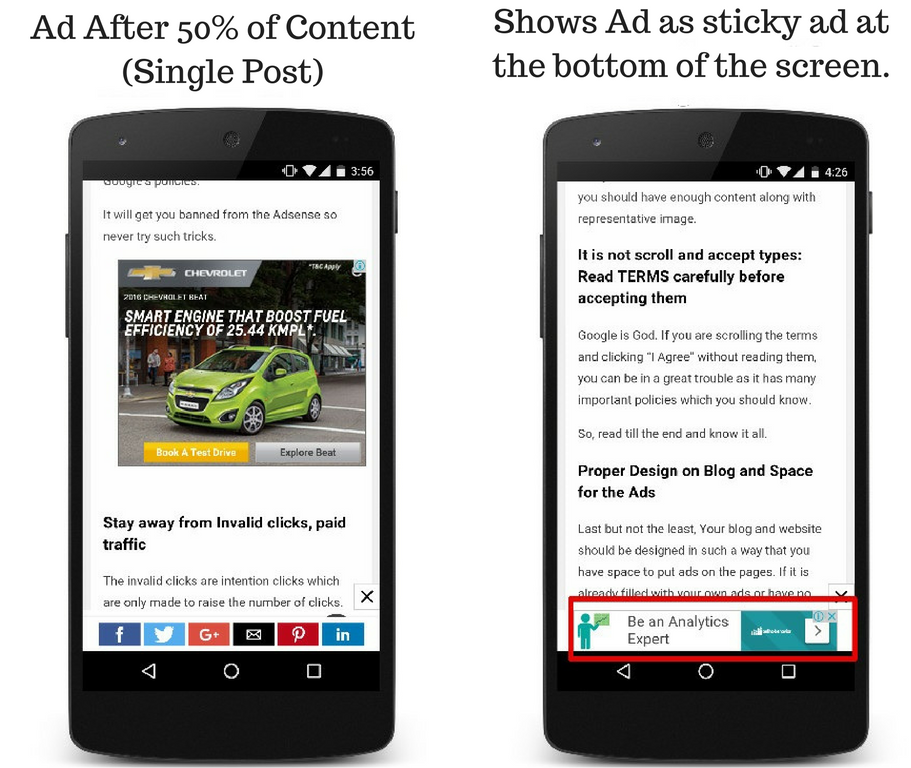
Sorry but our theme as well as our amp plugin do not have a sticky ad functionality.
Thanks
Bogdan B. Hi,
The warning is normal if you make edits to the page outside the composer. What element are you trying to link? please provide an example of the back-end or provide admin credentials via email at contact@tagdiv.com if you want us to take a look and run a quick test on your site.
Thank you!
Catalin Hi,
Did you have tried to add the Analytics code for AMP version? Please check here -> https://www.screencast.com/t/mMV11a6t
Thanks for your understanding?
Bogdan B. Hi,
The more stories font is altered from the font of the module used on that section. If for example you have module 6 here: https://www.screencast.com/t/uqJ0UdopmOm you can change the font from here: https://www.screencast.com/t/7YzXFVELxco4
You have to use the modules, not the particular blocks. A block is made out of 1 or more modules: https://forum.tagdiv.com/theme-blocks-modules/
Mobile fonts cannot be changed. Sorry. It can only be done with custom css. The theme offers no font customization for mobile devices.
Thanks
 cahpolli
 Hi!
No, It is the other way.
The backgrounds of the rows load slow while the content loads faster.
Sure, there is an example:
https://naturam.com.br/ubatuba/praias/
Thanks!
Simion C. Hi,
So the backgrounds of the rows load fast while the content loads slower? A setting to set a delay for the background loading does not exist unfortunately. Provide an example of a page where this is happening so I can check on mobile.
Thanks
 m2sahin
 You show me an example. For example, swipe right to 50 pixels. I can do other options according to the example.
and Can you write a CSS code to work only on mobile?
Simion C. Hi,
You mean the posts are duplicated within the category pages? I could take a look, provide a link to a category page where this happens.
There could be duplicated posts meaning posts displayed in the category grid and also in the post loop below. Try to use an offset in the post loop if that is the case, the value should be the number of posts displayed in the grid above. Like this example
– https://www.screencast.com/t/r6YSG3d0
If I misunderstand please correct me.
Thanks
Bogdan B. Hello,
WordPress only adds 1 sample post and it does not reappear periodically. The theme adds demo posts when installing the demos with content. If you keep installing and uninstalling demos, you will receive the sample posts, but if you are not changing demos, you should not receive any sample content.
Thank you!
NicerightnowHello,
I’m trying to set up Adsense Auto Ads.
The tagDiv documentations says I have to enter values in the Amp >AMP Settings >ADS >ADSENSE ADD SETTINGS section
– data-ad-client –
– data-ad-slot –
Please advise where I get these 2 values from, I can’t find them in the google Adsense documentation.
Regards,
Ramon
Simion C. Hi,
Some elements will still not work properly when both composers are active, some issues were fixed. For example theme provided blocks and grids should work and display the same with both active.
Visual composer specific elements or addons will not work if Visual composer is deactivated. Also they may not display or work properly if both page builders are active. So this may not be easy.
One way to check what will happen in your case is to create a local copy of the website, install and activate the tagDiv composer, then identify whatever problems should present themselves. Better this way than doing it on the live website.
Thanks
Simion C. Hi,
Seems the image box as a widget does not have the same target blank setting as in the composer for example. I will add this on our list and it will be investigated. Sorry for the inconvenience.
Maybe you can use the composer to set the sidebar for the place you want. The tagDiv composer and cloud library plugin can be used to create post templates, category templates etc.
– https://forum.tagdiv.com/tagdiv-cloud-library-plugin/
You could use this method and set image box with the composer, there will be a target blank setting.
Thanks
Simion C. Hi,
The background header image is defined in the header template file, each header style has this option I believe
– https://www.screencast.com/t/ZXSBuyyA
You could create conditions for each category, if is category set a background image. I did not try something like that, can’t say if it’s possible or not.
There would be another way of doing it, with some CSS. For example using the category ID
– https://www.screencast.com/t/snAWT51EL0vc
You could set a background image with CSS for each category like that.
From what I know there are plans to provide an increased functionality for the header in the future, so maybe something like this will be possible.
Thanks
Catalin Hello interfans,
As a quick example, you should try using the code below and place it in Theme panel -> Custom CSS area.
The code is here ->
.td-module-title{

background-color:green;

}
The result is here -> https://www.screencast.com/t/6b6kIACdlh
If you need a deep customize, notice that you should do it yourself, using the Inspector browser from here -> https://forum.tagdiv.com/create-custom-code-using-the-browsers-inspector/
Thanks for your understanding!
Simion C. Hi,
Please try and re-save the permalinks in WordPress settings
– https://www.screencast.com/t/wEDgWwEkz
Then check if the AMP posts are accessible, add /amp at the end of the post page URL. There should be no problem.
Thanks
 WebDevver
Hi guys, amazing theme — thanks so much for all of your hard work on it.
I have a really quick question. I’m using the Better Font Awesome plugin and using icons with all of the header tags. How would I set a default color with CSS for those icons? Here is an example of how I’m currently doing it — I’d like to get rid of all of the span tags:
<h3 style="text-align: center;"><span style="color: #bab8b8;">[icon name="arrow-down" class="" unprefixed_class=""]</span> Check Latest News</h3>
Thanks in advance for your help!
 sabedott
How can I do this in Newspaper?
https://www.ampproject.org/docs/reference/components/amp-sticky-ad
Example
 RTW
RTW For example, if I add a link to any element on the page using the regular editor, I would get a warning as soon as I enter the tagdiv editor saying that there are some features on the page not added with tagdiv (I can’t log in right now so don’t know the exact wording).
Once that happens, whatever links I have added will disappear as soon as I exit the editor. They will last as long as I don’t enter the tagdiv editor.
I find it easier to link to my other pages with the standard editor but, so far, it seems I have to choose between standard or tagdiv.
Again, I would send a screenshot but my login is having problems.
Thanks
 mayaguez
 Thanks Epic,
I think I did it as the Facebook Like & the Twitter Follow icons show and when I click on each they go to the social networks.
But questions:
1. Instructions on documentation are a bit confusing for me. Do I have to create an Face book App if I created the Social Counter as a widget?
2. Whats the difference in creating the Social Counter as a widget vs Using the tagDiv Composer?
3. Is it possible not to show the “Count” for each FB and Twitter for a period of time and then show the count once the count gets at a decent number?
Thansk
