
- TutorialsDefault Block Settings Guide
- NewspaperWP Rocket and Newspaper Theme: Optimization Guide
- TutorialsFrom WPBakery to tagDiv Composer
- TutorialsOffset Feature
- TutorialsWhat is Ajax preloading?
 0xid0
0xid0Hello,
I have an issue. In the big grid block, when i see it from a smartphone or tablet, the headline is too big and doesn’t appear entirely, but it looks nice from a computer. I attach a screenshot taken on a tablet to see the problem better.
Is there any way to limit the font size on mobile devices? thank you
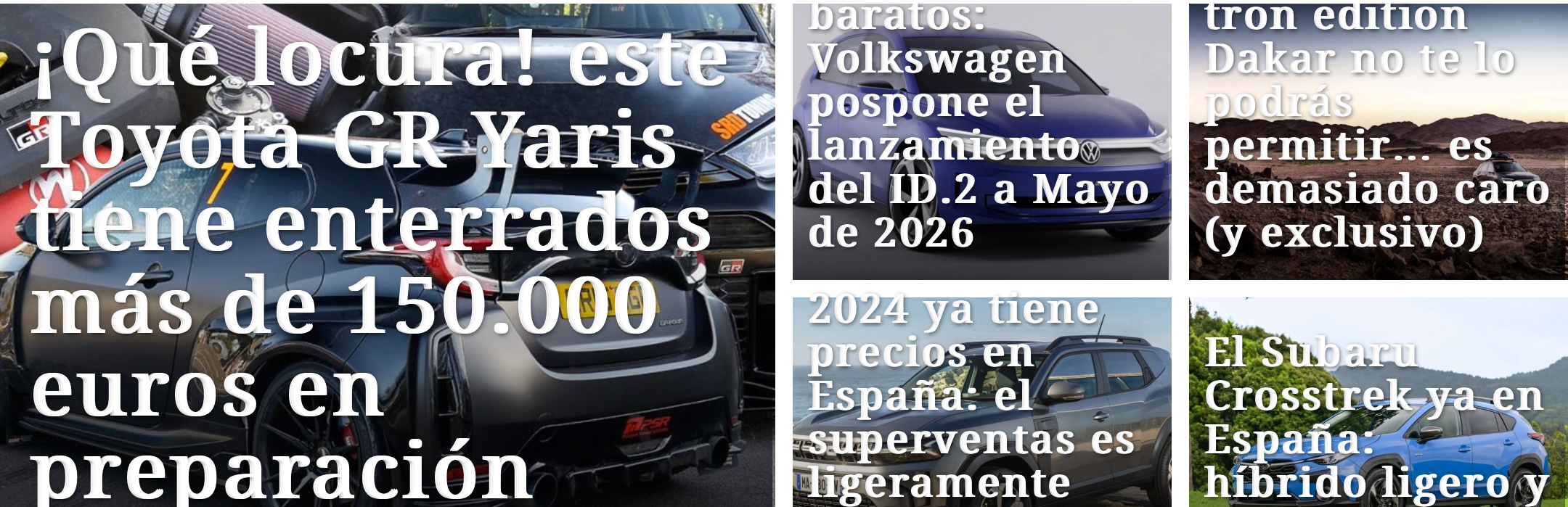
 forevermogulmag
 I am not aware of any codes for blockquote. Will have to check. What about the second part to my message?
 Anamaria
 Hi,
You can delete the ad box with right-click and you can add a block from tagdiv Composer, as in the video https://www.youtube.com/watch?v=fa7GenCHcBU&t=1s
Thank you!
 jkakade
 In my sidebar, there is an Ad box. How can I change ad box to a block?
Anamaria Hello,
You can create a sidebar with tagdiv Composer where you can filter the block -> https://forum.tagdiv.com/sidebars-tutorial/ -> https://forum.tagdiv.com/flex-block-settings-guide/
Thank you!
 Bettina
 Hello Jim!
There are some default blocks that are not editable with the TagDiv Composer.
Thank you!
 JimC50
 For some reason, it now updated. So that’s one issue down. Now the only issue I’m having is why the block that I chose to display news isn’t there anymore! And it won’t add in tagdiv composer because it doesn’t show up…
-
This reply was modified 2 years by
JimC50.
JimC50Hello, I just updated tagdiv composer on one of my sites, and now the news section that runs down the site is missing, replaced by [td_block_11 custom_title=”More News” header_color=”#2c8293″ limit=”20″ offset=”5″]
The site is deeptechdigest.com
It should look like the site at futurefoodtoday.com, with news running down the side.
When I go in to TagDiv composer to try and add/replace Block 11, there is no option to add it.
My other site, walkingpost.com is asking me to update TagDiv Composer but when I click on update, it just generates a blank page.
So, of my three sites, only one is functioning properly.
What’s going on and how do I fix this urgently?!
Thanks!
Jim
Anamaria Hi,
For this, I recommend creating a mobile page https://i.imgur.com/BFGmEKM.png -> https://tagdiv.com/newspaper-10-3-7-update-brings-customizable-and-fast-mobile-pages/, and setting the limit for block.
This is a video about Responsive Newspaper Theme, AMP & Mobile Theme, Mobile Pages & Templates -> https://www.youtube.com/watch?v=SpGkOnJeNZY
Thank you!
Bettina Hello @ersandrino !
This is not an anomaly in the theme. It’s caused by an error or something that blocks the modal from loading. It could be from your server as well, or Cloudflare. Check the console while this is happening(CTRL + right-click -> Inspect).
Examine some other potential interfering factors: https://forum.tagdiv.com/general-options-may-interfere-newspaper-theme/
Thank you!
Anamaria Hi,
Do you want to have this one block?
We don’t have a tutorial for this, but you can try to use the elements/blocks from Composer, like image info box, Fancy text with image.
Thank you!
Anamaria Hi,
you can hide the author using the option on the blocks, edit the page and select the block you want to edit and in the tab called “Layout” you can hide the author => https://www.screencast.com/t/fjrVaQm5IX
Thank you!
Anamaria Hello,
To do this you can use a Flex block 1, and set there the post id, and after you can use Big Grid Flex 2. or you can contact our custom work team -> https://tagdiv.com/web-development-services/
Thank you!
Anamaria Hello,
From what I see seems you have a code for blockquote, can you please provided it to change it as you want?
Thank you!
forevermogulmagHow do I edit the different blockquote layouts? For example on my page here , I have two blockquotes. I want to make the background a little darker, the font a little bigger, and change the font color except for the link. How can I do this? If I need custom CSS, please provide it.
Also, take a look at this website. Do you know how I can add similar boxes like the purple rounded boxes and the grey box shown on the website? I want to highlight certain content/paragraphs and this is a good format to do it.
 Motorpsycle
 Thank´s for the link to the blocks. To make a block I am writing about, using tagdiv Composer, what tutorial would you recommend?
Anamaria Hi,
The website that you provided does not use the Newspaper theme.
If you have on a staging website, please edit the category template with the TagDiv Composer, click on that block, and check if you have any offset values in the settings: https://forum.tagdiv.com/offset-feature/
Thank you!
 yukiy531
 The problem with the error message has been resolved.
Is there any way to replace the code used in the old theme with the new one?
[td_block_4 custom_title="What's New" limit="8″ ajax_pagination="next_prev " header_color="#1e73be"]
Anamaria Hello,
The blocks from WP Bakery are no longer recommended. Please use a block from tagDiv Composer. We do not encourage you to use Wp Bakery at all. Please note that the WP Bakery has a conflict with the tagDiv Composer. Please use only one builder and not both. So, I gladly recommend you to shift from WPBakery to Composer, because WPBakery is an old builder plugin. Please check our guide to know how to shift from WPBakery to Composer: https://www.screencast.com/t/6xLVMmlsY ; https://www.screencast.com/t/zWHrRmK1LQC ; https://www.screencast.com/t/vuFdT9Stx ; https://www.screencast.com/t/DWbSf3qj ; https://www.screencast.com/t/QuHyGccTK71v
Thank you!
 OneMileMedia
I have followed your instructions at https://forum.tagdiv.com/the-newsletter-plugin/ to the letter, but this is still not working. I keep getting a message saying “Newsletter form code is empty. Please configure this block/widget by entering a form code”. The site is onemilemedia.com.au and I’m using Mailchimp.
 platmm
Hey there!
I ran into this issue once before and did a restore to correct the problem. With a site almost done, I can’t do a full restore at this point.
The behavior of the Composer has changed – when I change viewport buttons, rather than switching the view, a black block appears just before some elements.
The big thing is that most elements show an “undo” arrow but there’s nothing to undo.


The site is up but I can’t make changes to existing cloud template pages or post pages.
Thanks so much for your help!
Site: goinglocal.li
platmmHey there!
I ran into this issue once before and did a restore to correct the problem. With a site almost done, I can’t do a full restore at this point.
The behavior of the Composer has changed – when I change viewport buttons, rather than switching the view, a black block appears just before some elements.
The big thing is that most elements show an “undo” arrow but there’s nothing to undo.
The site is up but I can’t make changes to existing cloud template pages or post pages.
Thanks so much for your help!
 nolandolce
 Just to follow up, it’s Jetpack. We recently installed Jetpack and it’s not working with the theme.. or at least, it’s causing the media & text blocks to stack. When we deactivated Jetpack, the media & text block works again. Any ideas why this may be happening? Thanks!
nolandolceHi All,
For some reason the media & text block is stacking on desktop instead of appearing side by side. An image of what it looks like in WP is here: https://ibb.co/dgBn8NF and the same page link is here: https://rareparenting.com/books-for-children-about-disability/
Any ideas why this is happening, and how to fix it?
Thanks!
 Treble666
I’m having a real issue with the site displaying posts in the wrong categories. All posts are correctly defined and the block filters are correctly assigned. However, the block is displaying posts from one category and labelling them as another. I just can’t work out why.

