
- ApiPractical example – How to add a new Block and Module
- Apitd_api_block::delete
- Apitd_api_block::update_key
- Apitd_api_block::update
- Apitd_api_block::add
- ApiAPI – Blocks – Introduction
- Apitd_api_thumb::update_key
- Apitd_api_thumb::update
- Apitd_api_thumb::add
- ApiAPI – Thumbnail – Introduction
- Apitd_api_category_top_posts_style::update_key
- Apitd_api_category_top_posts_style::update
- Apitd_api_category_top_posts_style::add
- ApiAPI – Category top section style – Introduction
- Apitd_api_module::update_key
- Apitd_api_module::update
- Apitd_api_module::add
- ApiAPI – Modules – Introduction
- ApiUsing the Theme API in plugins
- ApiThe Theme API
 llaporte
 Could the problem come from bad coding in the td_standard_pack_main.css
Why I mention this is that the only place where the shortcode is included in the code is on line 11104 for what would seem to be for displaying /* responsive portrait phone */
This would explain why the shortcode doesn’t work in Desktop mode and I can see it just fine from a smart phone.
I’m not a programmer but if you could give me something or a custom CSS code that I could enter in the theme panel, you know the place where we can enter custom codes, that would solve my problem while you release a new corrected version.
Because you see, this problem did not exist before version 12.6, the [td_block_homepage_full_1] block worked perfectly before.
Thanks in advance,
Luc Laporte
llaporte Hello,
No unfortunately the problem with the block [td_block_homepage_full_1] is still there and is not displayed when we display the website on the HD screen of my three laptops as well as my Desktop. The browsers used are Microsoft Edge and Chrome.
This is my main issue.
As for Twitter icons, not displaying the same version between Desktop and smartphones, I don’t really care, even if I find it irritating. We have the new ones on Desktop and the old ones on Smartphones.
At first glance, it looks like the template doesn’t use the same code, depending on the display.
I don’t want the display of my website to be the one used by the code used in the release 12.6.1 for the Desktop but the one used by smartphones, like it was with release 12.5.1, except the X icons.
Now, how do we make the [td_block_homepage_full_1] block work, as it was on version 12.5.1
Thanks in advance,
Luc Laporte
 exmc
exmcRecently updated to version 12.6.1 and the header not loading properly
[tdb_header_logo align_vert=”content-vert-center” align_horiz=”content-horiz-center” image_width=”eyJwb3J0cmFpdCI6IjIyMCJ9″ media_size_image_height=”80″ media_size_image_width=”696″ image=”554″ image_retina=”577″]
spot_img
[tdb_header_menu mc1_title_tag=”p” main_sub_tdicon=”td-icon-down” sub_tdicon=”td-icon-right-arrow” mm_align_horiz=”content-horiz-center” modules_on_row_regular=”20%” modules_on_row_cats=”25%” image_size=”td_324x400″ modules_category=”image” show_excerpt=”none” show_com=”none” show_date=”” show_author=”none” mm_sub_align_horiz=”content-horiz-right” mm_elem_align_horiz=”content-horiz-right” inline=”yes” menu_id=”65″ mm_align_screen=”yes” f_elem_font_family=”” f_elem_font_size=”eyJwb3J0cmFpdCI6IjExIn0=” mm_width=”1300″ mm_subcats_bg=”#ffffff” mm_elem_border_a=”0 1px 0 0″ mm_elem_padd=”eyJhbGwiOiIycHggMjJweCIsInBvcnRyYWl0IjoiMCAxNHB4In0=” mm_sub_padd=”eyJhbGwiOiIxNnB4IDAiLCJwb3J0cmFpdCI6IjE0cHggMCJ9″ f_title_font_size=”eyJhbGwiOiIxNSIsImxhbmRzY2FwZSI6IjE0IiwicG9ydHJhaXQiOiIxMyJ9″ f_title_font_line_height=”1.2″ art_title=”3px 0″ f_mm_sub_font_size=”eyJhbGwiOiIxMyIsInBvcnRyYWl0IjoiMTEifQ==” mm_child_cats=”10″ mm_elem_border=”0 1px 0 0″ mm_height=”eyJhbGwiOiIzNDUiLCJsYW5kc2NhcGUiOiIzMDAiLCJwb3J0cmFpdCI6IjI0MCJ9″ mm_sub_width=”eyJsYW5kc2NhcGUiOiIxNjAiLCJwb3J0cmFpdCI6IjE0MCJ9″ mm_padd=”eyJwb3J0cmFpdCI6IjE0In0=” modules_gap=”eyJwb3J0cmFpdCI6IjE0In0=” elem_padd=”eyJwb3J0cmFpdCI6IjAgMTJweCJ9″ f_elem_font_line_height=”eyJwb3J0cmFpdCI6IjQ4cHgifQ==” video_icon=”eyJwb3J0cmFpdCI6IjI0In0=” all_modules_space=”26″ tds_menu_sub_active=”tds_menu_sub_active1″ tds_menu_sub_active2-line_color=”” tds_menu_active=”tds_menu_active1″][tdb_header_search inline=”yes” toggle_txt_pos=”after” form_align=”content-horiz-right” results_msg_align=”content-horiz-center” image_floated=”float_left” image_width=”30″ image_size=”td_324x400″ show_cat=”none” show_btn=”none” show_date=”” show_review=”” show_com=”none” show_excerpt=”none” show_author=”none” art_title=”0 0 2px 0″ all_modules_space=”20″ tdicon=”td-icon-magnifier-big-rounded” icon_size=”eyJhbGwiOiIyMCIsInBvcnRyYWl0IjoiMTgifQ==” tdc_css=”eyJhbGwiOnsiZGlzcGxheSI6IiJ9LCJwb3J0cmFpdCI6eyJtYXJnaW4tdG9wIjoiMSIsImRpc3BsYXkiOiIifSwicG9ydHJhaXRfbWF4X3dpZHRoIjoxMDE4LCJwb3J0cmFpdF9taW5fd2lkdGgiOjc2OH0=” modules_on_row=”eyJhbGwiOiI1MCUiLCJwb3J0cmFpdCI6IjUwJSIsImxhbmRzY2FwZSI6IjUwJSJ9″ meta_info_horiz=”content-horiz-left” form_width=”600″ input_border=”0 0 1px 0″ modules_divider=”” form_padding=”eyJwb3J0cmFpdCI6IjIwcHggMjBweCAyMHB4IiwiYWxsIjoiMzBweCJ9″ arrow_color=”#ffffff” btn_bg_h=”rgba(0,0,0,0)” btn_tdicon=”td-icon-menu-right” btn_icon_pos=”after” btn_icon_size=”7″ btn_icon_space=”8″ f_title_font_family=”” f_cat_font_family=”” f_cat_font_transform=”uppercase” f_title_font_weight=”” f_title_font_transform=”” f_title_font_size=”13″ title_txt_hover=”#4db2ec” results_limit=”6″ float_block=”yes” icon_color=”#000000″ results_border=”0 0 1px 0″ f_title_font_line_height=”1.4″ btn_color=”#000000″ btn_color_h=”#4db2ec” all_underline_color=”” results_msg_color_h=”#4db2ec” image_height=”100″ meta_padding=”3px 0 0 16px” modules_gap=”20″ mc1_tl=”12″ show_form=”yes” f_meta_font_weight=”” h_effect=”” results_msg_padding=”10px 0″ f_results_msg_font_style=”normal” video_icon=”24″ modules_divider_color=”” modules_border_color=”” btn_padding=”0″ form_border=”0″ form_shadow_shadow_offset_vertical=”3″ results_padding=”0 30px 30px” btn_bg=”rgba(0,0,0,0)” icon_padding=”eyJhbGwiOjIuNCwicG9ydHJhaXQiOiIyLjYifQ==”]
 Anamaria
 Hi,
Please go to the theme panel -> block settings -> inline css and disable the option to minify the css.
Thank you!
Anamaria Hi,
You can customize the category template. For the category template, please use posts loop; if you have set a posts loop then will display all posts in this category or you can use Flex Block/Big Grid Flex and set the filter to “Category -Current category” => https://i.imgur.com/7P99qx0.png and this is why the block will display posts for each category. So, please check the settings.
Thank you!
Anamaria Hello,
On mobile, you can use Flex Block 2, which has the option to swipe on pagination -> https://i.imgur.com/m61Rb15.png for next and prev pagination.
Thank you!
 Calin
Calin Hello,
I think that you want to remove the author from the blocks, if is this, then you can do it using the theme panel option – https://i.imgur.com/uk80JQo.png
Thank you!
 Fernando Pietrafesa
Hello!.
I am working on the local news theme… when I enter the tagdiv I can edit all the blocks/modules, except those below the Youtube video playlist… can you help me modify those blocks or delete them and place the blocks I choose ?. I am looking forward to your response. Greetings!
 odddic
I just change post format to Video and put video url in Featured Video. In regular block the video popup will appear when click the thumbnail. But it not happen in Custom module. Is there step I missing? or it not available yet?
llaporte Hello again,
I did other checks, the Homepage post block,[td_block_homepage_full_1], no longer works when displaying the website in Desktop mode with version 12.6.1, unlike version 12.5.1.Even disabling all plugins other than yours.
I did not edit my main page with WPBakery but rather with TagDiv Composer. The preview works well, but immediately live, the block does not appear. Only viewed from a smartphone.
From there, I don’t know what to do to get my main page back with the display as I had defined it before unless I return to version 12.5.1.
Please find a solution, thanks in advance,
Luc Laporte
 fenomeno0chris
 Hi, is it possible to create a block which is horizontally scrollable on mobile devices? It is a great way to help reduce the vertical height of dense pages.
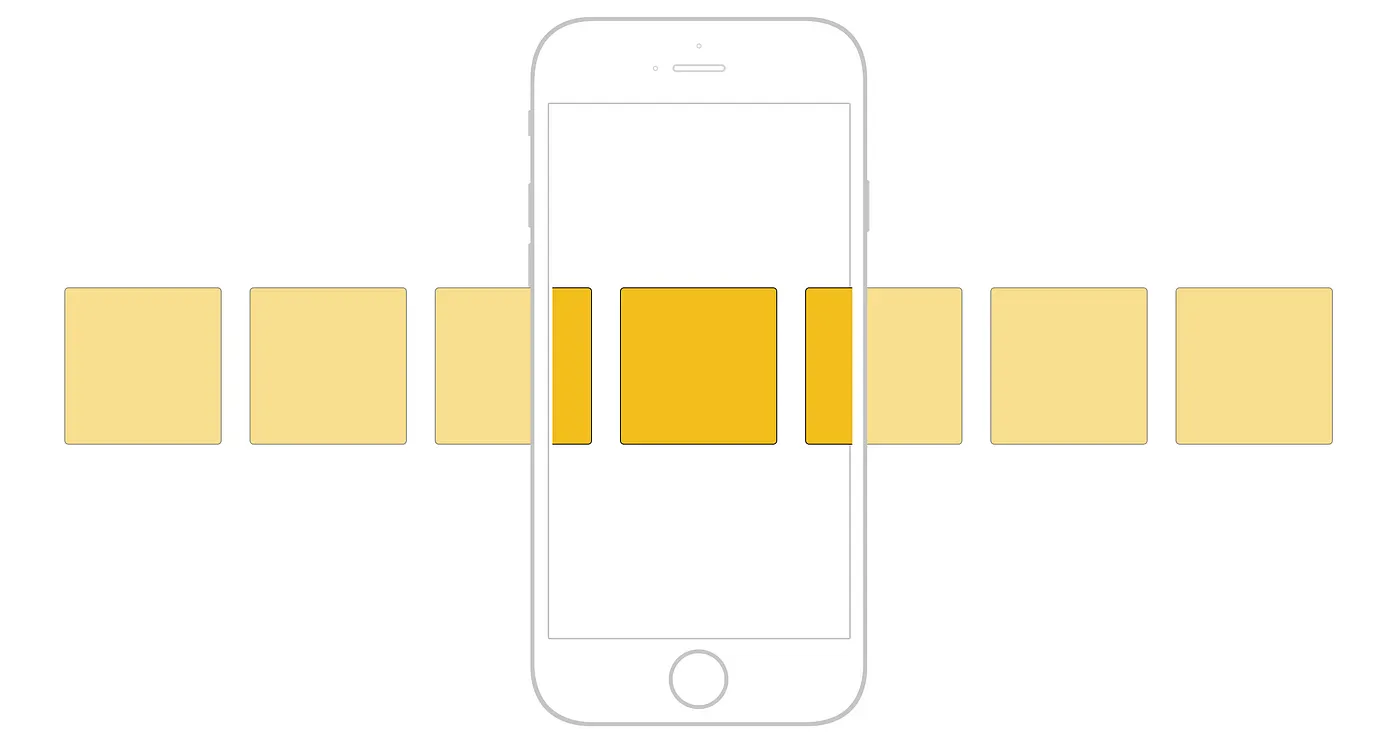
This website (please view on mobile device) demonstrates it very well what I want to achieve on my project.
-
This reply was modified 3 years by
fenomeno0chris.
llaporteGood morning,
Since updating from version 12.5.1 to version 12.6.1 there is a problem with the layout of the home page. I designed my home page with WPBakery. On the version viewed on a mobile everything is fine but on the Desktop version the HomePage Post block does not appear.
Also, the X share icon, formerly Twitter, is different on the Desktop version than on the mobile version. The new icon is corrected on the Desktop version but not on the version viewed from a phone. I don’t use the mobile plugin.
Also, the Social counter plugin still displays the old Twitter logo and not X. When are you going to update?
My website is mesplaisirs.com
I cleared all caches and nothing works like before. I really want to go back to version 12.5.1 even if the X logos are not up to date, at least everything else worked very well.
Please take my comments into consideration to improve the situation and your product.
Thank you in advance,
Luc Laporte
 Neo
NeoHello,
We have a site with registration key and all plugins are up-to-date.
If we do not disable the tagDiv Composer Plugin (running Newsmax theme), we get the following issue / error:

Is this issue from the tagDivComposer plugin code or from a WP post?
Thanks.
 Jason Fernandes
 hey told the category not showing on the category of the add new posts,
please read the below link : https://forum.tagdiv.com/featured-posts-2/
from your blog i read this:
“you must go to the backend of your post, and from the All Categories section, check the box that says Featured. This category is created by default. It is also hidden, so no Featured category tag will appear on pages or blocks.”
I visit the add new posts and try to check on the featured but there is no category available called featured
 FreshySites
 Hi Bettina,
Can you look a little deeper into this?
1. Yes I understand the child theme is not overwritten, I’m asking for guidance about why we would get a critical error from this line of code in it’s header.php – perhaps related to #2? It is related to general issue of the update breaking the site, child theme or not.
This is the code:
/*
* loads the header template set in Theme Panel -> Header area
* the template files are located in ../parts/header
*/
td_api_header_style::_helper_show_header();
This is the error:
PHP Fatal error: Uncaught Error: Class “td_util” not found in /srv/htdocs/wp-content/themes/Newspaper/includes/wp-booster/wp-admin/tagdiv-view-header.php:19 Stack trace: #0 /srv/htdocs/wp-content/themes/Newspaper/includes/wp-booster/wp-admin/tagdiv-view-theme-plugins.php(59): require_once() #1 /srv/htdocs/wp-content/themes/Newspaper/includes/wp-booster/tagdiv-wp-booster-functions.php(499): require_once(‘/srv/htdocs/wp-…’) #2 /wordpress/core/6.3.1/wp-includes/class-wp-hook.php(310): {closure}(”) #3 /wordpress/core/6.3.1/wp-includes/class-wp-hook.php(334): WP_Hook->apply_filters(”, Array) #4 /wordpress/core/6.3.1/wp-includes/plugin.php(517): WP_Hook->do_action(Array) #5 /wordpress/core/6.3.1/wp-admin/admin.php(259): do_action(‘newspaper_page_…’) #6 {main} thrown in /srv/htdocs/wp-content/themes/Newspaper/includes/wp-booster/wp-admin/tagdiv-view-header.php on line 19
#2. We have all dependent plugins. Below is what the shortcodes look like that are appaering everywhere – they look related to the composer, which we have installed & activated, and the new version from the theme update. My theory is that because we are making such a jump in theme versions, we’re missing one of the intermediate updates that performed some sort of action that converted them in td composer during a previous update. Can you please ask your dev team?
[td_block_9 custom_title=”Breaking News” custom_url=”/category/breaking-news/” category_id=”24″ limit=”10″ el_class=”breaking-news-block” header_color=”#d90000″]
-
This reply was modified 3 years by
FreshySites.
 Satheeshraj
Hi,
When I use custom font, It’s getting blocked in browser with error “blocked:mixed-content”.
Custom font name: mobile-theme.woff
URL: https://simplytamil.com/actress-suganya-photo/
Screenshot: https://prnt.sc/BxG1JPLG8cgP
 Alex
Alex In other words, on CPT posts Modal Popup does not show the content via Page ID. It disregards Page ID and shows the content from the “Content CPT” block.
Basically shows the content of “Content CPT” block of the custom post type page you are currently on.
 robink
 No not this time… usually yes, it’s often about update, active plugins after updating theme,
but here it literally removed all templates… header, footer, event the home page is not recognising some tb_blocks…
they’ve been wiped out …
even after DB restore from yesterday, when everything was right…
I’m gonna try to get the files backup to restore the old plugins as well, plus yesterday’s db…
any help from support is welcome !
 seanie2k
 Hi Anamaria,
Thank you for coming back to me. I’m still having an issue. I’m able to import the xml file and it is importing templates such as Header Template, Footer Template, 404 Templates, etc (see screenshot attached https://imgur.com/a/oNUWKeq) but not the Homepage.
It is this customized homepage (with blocks/fonts/colours) that I need to import to the updated staging site. Am I missing a step or is there a workaround?
Thanks for your help.
 phyllispometta
I have tried to sort this out but I am coming up empty.
I have the single post sharing on my site and it was working fine until it wasn’t. Normally when you click on one of the social media icons it will pull up the current URL of the page that you’re on in order to share. Now it is pulling up tags and not directing it to the correct URL.
I have checked permalinks, deleted and reinstalled the single post share block, and deactivated various plugins and I cannot figure out why it keeps pulling tags.
URL – https://www.verifiedmom.com
This is a post on Reading Across America and books but it's pulling up "canned pumpkin https://www.verifiedmom.com/tag/canned-pumpkin/ via @VerifiedMom"
 iirina_1968
Template – Momentum PRO
https://pefafa.com/wp-content/uploads/2023/10/Screenshot_8.jpg
 Bettina
 Hello @yash3114!
When I check your websites, I can see the headers. So, for sure, you use some caching tools. Please ask your host provider to check in on your server about some caching tools, object cache, or some security tool that can block the tagdiv composer. Also, I can see you use a lot of ads.
If your PHP version is 7.4, then it is okay.
Thank you!
Anamaria Hi,
I see that you have the LiteSpeed cache plugin; please disable it and check after.
Also, please go to the theme panel -> block settings -> inline css and disable the option to minify the css.
Thank you!
Bettina Hello @yanaguita !
Set this code in Newspaper -> Theme panel -> Custom code -> Custom CSS.
.td_block_template_17 .td-block-title { background-color: white!important;}
Thank you!
Anamaria Hello,
I recommend setting the background color on the blocks -> https://i.imgur.com/gt5eKPc.jpg and checking after.
Thank you!



