
- ApiPractical example – How to add a new Block and Module
- Apitd_api_block::delete
- Apitd_api_block::update_key
- Apitd_api_block::update
- Apitd_api_block::add
- ApiAPI – Blocks – Introduction
- Apitd_api_thumb::update_key
- Apitd_api_thumb::update
- Apitd_api_thumb::add
- ApiAPI – Thumbnail – Introduction
- Apitd_api_category_top_posts_style::update_key
- Apitd_api_category_top_posts_style::update
- Apitd_api_category_top_posts_style::add
- ApiAPI – Category top section style – Introduction
- Apitd_api_module::update_key
- Apitd_api_module::update
- Apitd_api_module::add
- ApiAPI – Modules – Introduction
- ApiUsing the Theme API in plugins
- ApiThe Theme API
 Anamaria
 Hello,
You can’t find the Flex Block in widgets, but you can create a sidebar like in this guide https://forum.tagdiv.com/sidebars-tutorial/ with flex block.
Thank you!
 dahlnewpage
I am using regular WordPress Sidebar Widgets, and want to display posts with the nice images and title/text that Newspaper Flex Block etc provide. But none of these are listed in the Widgets. Is this no longer possible? I’m sure I did this on older version of Newspaper?
 Bettina
 Hello!
In the blocks, you should use some custom code. But, probably you can modify the single template and do not use the title of the article, but to use an inline text instead of the title.
Thank you!
Bettina Hello @coinedition!
Please provide more information with an example of the block that you use and the filter that you apply.
Thank you!
Bettina Hello!
The error message suggests that the loopback request test is failing and returning a 403 Forbidden error code. This could be caused by a few different factors, including incorrect file permissions, a misconfigured security plugin or firewall, or a conflict with your hosting provider.
To troubleshoot this issue, you can try the following steps:
Check file permissions: Make sure that the file permissions for your WordPress installation are set correctly. In particular, make sure that the wp-content folder is set to 755 and the wp-config.php file is set to 644.
Disable security plugins and firewalls: Temporarily disable any security plugins or firewalls that may be blocking loopback requests. You can also check with your hosting provider to see if they have any security measures in place that may be blocking these requests.
Check your hosting provider: Some hosting providers may block loopback requests for security reasons. Check with your hosting provider to see if they have any restrictions in place.
Use a loopback plugin: There are several plugins available that can help you test loopback requests and diagnose any issues. One such plugin is WP Health Check & Troubleshooting.
Once you have identified the cause of the loopback request issue and resolved it, you should be able to detect page caching and improve the performance of your website.
Thank you!
Bettina Hello!
1. In your screenshot, the filtering is set by CPT (properties). You can also filter by property types, transaction types, and locations. You need to write down their IDs. For example: https://prnt.sc/UAOV85iEC9em Copy the ID and add it to the flex block: https://prnt.sc/4DP7LHXY2IFX Now you can see that properties will appear, but only “apartments.”
2. Edit the file mentioned above, and you should delete this line and add a span with the custom field name: https://prnt.sc/H23RNWgzsVZv. Also, you should mention the variable here: https://prnt.sc/0MFvjX_8Tgu8
Thank you!
 Calin
Calin I see, please try this custom css:
.td-mega-menu ul .td_block_text_with_title a {

text-decoration: underline!important;

}
I hope it will help you!
Thank you!
 coinedition
We have a lot of posts, and some of them have multiple categories and some have single categories. While listing it to the front end which category does your theme show as the category of the post? Primary selected category, right?
But in our theme case, the post block is not showing the primary selected category. it is showing one of the selected categories but not the primary one. We need to show the primary selected one in the listed block.
How to fix this issue? or is there any option to change the option like which category needs to show in the frontend?
Please check the below links.
 Mauricio Jaramillo Marín
 Hello!
I need to migrate my website to another hosting, and this one occupies 30 GB. I want to optimize it and among the things I want to fix are the thumbnails of many unused sizes.
Do I have a way (automated) to know which sizes the site is using?
(I saw this thread, https://forum.tagdiv.com/topic/theme-creates-25-cropsimage-and-not-all-are-necessary-which-can-be-removed/, and it confirms everything I had seen before, but I don’t have an inventory of which blocks or modules the site is using).
Thank you very much!
Translated with http://www.DeepL.com/Translator (free version)
 pedromoliv
1. I’m using Advanced Ajax Page Loader, some plugin that allows me to load all page content without reloading the window. Everything works properly, expect that when I switch to some other page I have to trigger image loading and other tagdiv js again. Is there a simple way to trigger it when some user clicks a new page?
2. Other question. I’ve made many changes to some files.
> plugins/td-cloud-library/shortcodes/single/tdb_single_author.php
> plugins/td-composer/td-multi-purpose/shortcodes/tdm_block_button.php
> plugins/td-composer/legacy/Newspaper/header.php
> plugins/td-composer/legacy/Newspaper/footer.php
how to make it part of my child theme? is that possible?
 leagcooks
 Hi Colin,
i have added the css but it is not underlining the links?
I added the links by using the text with title block?
thanks
Lea.
 qingyemoyu
I select some block elements from the tagDiv Cloud Library and add them to the page. How to reorder the block elements in the page
Anamaria Hello,
This DEMO doesn’t have made custom page templates, foe example, contact, but you can copy and paste style from one block to other.
Thank you!
 folio.fo
 Bettina, I was able to resolve issue with location. As suggested I’ve created a custom field for that.
But now I needed your help on two things now:
1. how to filter properties based on its categories such as Location, Types, and Transaction. I am confused with options given in Flex Block X, see photo for reference – https://prnt.sc/4dv-i4PSAZAZ
2. Can you provide me with custom code to replace User Star Ratings with custom field. Please refer to the image here: https://prnt.sc/k9QNu6lzhl9_
-
This reply was modified 3 years by
folio.fo.
folio.fo Also please explain how to filter Properties based on its category such as Location, Type etc. I am confused with options given in Flex Block X, see photo for reference – https://prnt.sc/4dv-i4PSAZAZ
 zonasuburbanaBettina
 Hello!
This custom block is using the Module Real Estate Pro 1. The file can be found in wp-content/plugins/td-demo-real-estate-pro/modules/tds_module_real_estate_pro_1.
You can create your own custom fields or delete it from the file.
Thank you!
 Djey
Djey I just want this behavior on the “flex-block-1” module (doesn’t matter if it’s apply automatically to others flex-block)
Previously, Anamaria show me a way that was working to edit link for the image and title through the “td_module.php” but I can’t see any class inside this document related to the term “button” or “read-more” to add the “_blank” (code to open it in new tab)
My guess is your technical team didn’t have name it in the same way, I just need to find the name class associated with the “read-more” (button with link) in the php file
Could you just provide me the name of this class in td_module.php file ?
Bettina Hello!
The class “td-read-more” appears in every module’s files. In order to modify it, you need to edit every file because there is no possibility to edit once and have it reflect on every block.
Thank you!
Djey Thanks Bettina, I understand that creating a specific behavior for a block requires development work
However I would just like to know to simply add the same functionality as given previously by Anamaria for the image and title but this to the button. It’s just about to let me know the name used as the appropriate class in the previous file
Anamaria, what is the class associated with ‘td-read-more’ (button link) called in the ‘td-module.php’file please?”
Anamaria Hi,
The tagDiv Composer is our page builder and it can be used for building pages and cloud templates, but not for creating posts. For this, you’ll need to use Gutenberg or a classic editor.
Using tagDiv Composer, you can build/edit the single post template (the layout of the posts).
Here is a video that will show you how to use the builder to create a website from scratch https://www.youtube.com/watch?v=SoGQ0d5kIBg to do this you’ll need to already have the posts.
Also, on our channel https://www.youtube.com/channel/UCOT1RiNysIPCTPSnVZskwtQ, you can find more videos that can help you and documentation https://forum.tagdiv.com/newspaper-theme-documentation/ and you can ask us here on the forum or email if you have any questions.
Also, if you want to have some blocks/elements on a certain post, then you can use a different single template for posts, you can duplicate the template -> https://forum.tagdiv.com/topic/different-logo-in-categorypage/
I hope this will help you!
Thank you!
 Gyanitechnews
How to off wp admin edit block quotes color
Website achishayari.com
leagcooks Hi Calin,
i have recently added a page to use for the mega menu, But the text blocks are not underlining the hyperlinks? is it possible to just have the txt blocks underlined?
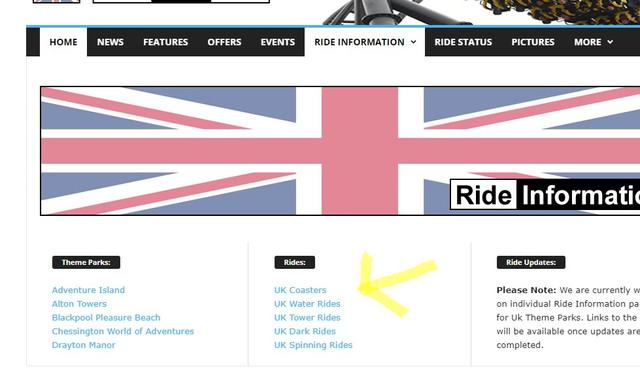
Hope you can help.
Lea.
 jtoney
I’ve found an issue that I need to resolve on my page. Using the block 21 module I have all of the posts from 1 category being shown. The issue is that I have a few hundred of these posts and I want people to be to find by letter. I see there isnt an option for this so I wanted to find out what else I could do. An before you tell me it can’t be done please help me figure some other way.
I see I could do taxonomies but that would be tedious to go back and edit all of those posts. So what can I do to make the user experience better?
 d8tabyte
I am searching for a way to adjust the main content block in a post to allow a full-width ad similar to https://theathletic.com/4238379/2023/02/22/scott-harris-aj-hinch-tigers/.
Right now, all content is contained within the column. Is there any way to break the container?
