
- ApiPractical example – How to add a new Block and Module
- Apitd_api_block::delete
- Apitd_api_block::update_key
- Apitd_api_block::update
- Apitd_api_block::add
- ApiAPI – Blocks – Introduction
- Apitd_api_thumb::update_key
- Apitd_api_thumb::update
- Apitd_api_thumb::add
- ApiAPI – Thumbnail – Introduction
- Apitd_api_category_top_posts_style::update_key
- Apitd_api_category_top_posts_style::update
- Apitd_api_category_top_posts_style::add
- ApiAPI – Category top section style – Introduction
- Apitd_api_module::update_key
- Apitd_api_module::update
- Apitd_api_module::add
- ApiAPI – Modules – Introduction
- ApiUsing the Theme API in plugins
- ApiThe Theme API
 Simion C.
 Hi,
You can use the offset option for that https://forum.tagdiv.com/offset-feature/
If multiple blocks use the same filter and sort, then they will display the same posts. But using the offset option you can make for example the second block skip a set number of posts, which are displayed the previous block. And so on for the following blocks.
Regarding the category tag, where exactly don’t you want them to be displayed?
There is a setting for example that removed the category tag in the post page and in the category page https://i.imgur.com/Ngzi5oX.png The setting is per category.
In modules/blocks, there are these settings https://i.imgur.com/HhXqaVF.png
So if you don’t want category tags in a specific block, you can disable them.
Let me know if you have more questions, or if perhaps I misunderstood what you want to do.
Thank you!
 Bettina
 Hello Mauri!
No. You need to access your category page and press the green button “Edit with the TagDiv Composer”: https://forum.tagdiv.com/tagdiv-composer-tutorial/
Add the element posts loop in the category page. In this mode, you will have a block with the posts from the current category on every category page.
Or do you need anything else and it is a misunderstanding?
Please let me know!
Thank you!
 sudipto
 Hi Bettina,
Thanks.
This is exactly what I am doing. But the content that is coming in the block is latest articles despite applying the filter.
I understand the cloud template will show the dummy content. But the actual pages (after applying template to global) is also showing “latest articles” on all templates.
Here are 2 example URLs of 2 different custom taxonomies ::
https://www.thip.media/health/diabetes/
https://www.thip.media/health/polycystic-ovary-syndrome-pcos/
You will note that they are showing the same set of articles.
[Fact Check and Questions are categories]
Can’t figure out what I am doing wrong.
 Edragon
Hi
Just noticed that when you create a widget sidebar and you use Block 14 then only 7 main categories are shown, no subcategories.

 Anılatay
Hi everyone,
How can the posts that are in placed in same category in different blocks or grid on one page be shown in succession. What I mean is that when I direct same category to different blocks or grid, every blocks and grid show the same post. However,I want them to be shown in succession as they are different posts in different blocks or grid but in same category. Like continue to show different posts on different block but in same category after one block or grid.
My another question is that, Can I turn one of posts’ category tags off manually regardless theme panel system, since it is so limited, yet I just want some of posts’ category tags not to be shown.
If you answer my questions, you make me really so happy.
Sincerely
 isabell.noelle
Hello,
we use the news ticker block on our homepage. In our case we set an custom title for the news ticker block and we also want to give this title a URL so that users can click on the title and will land on the linked category page.
Is this possible?
Many thanks.
Isabell
 Bamsfoldigital
 Good day
The link is not opening from my end, I have used several browsers, and I have also tried opening it on several devices(Computers and Tablets) ,still the same result, Maybe its blocked from being opened in my country. Kindly fine alternative solution to this . Thanks I will appreciate .
I’m talking about the link to the solution of the problem being discussed here
Simion C. Hi,
The big grids of the Newsmag theme can only be placed in a full row, meaning a row that is not split into columns.
Assuming you want a 2 or 3 column layout below the grid, like in the demo, please use multiple rows. So a full row with the grid, and a second row or as many as needed split into columns below it https://i.imgur.com/qzc7FTZ.png
Except grids, the blocks can be placed in any layout, but grids can only be placed in a full row.
I hope this helps. Please let me know if you have questions, or if something is unclear.
Thank you!
 nwnuyhs
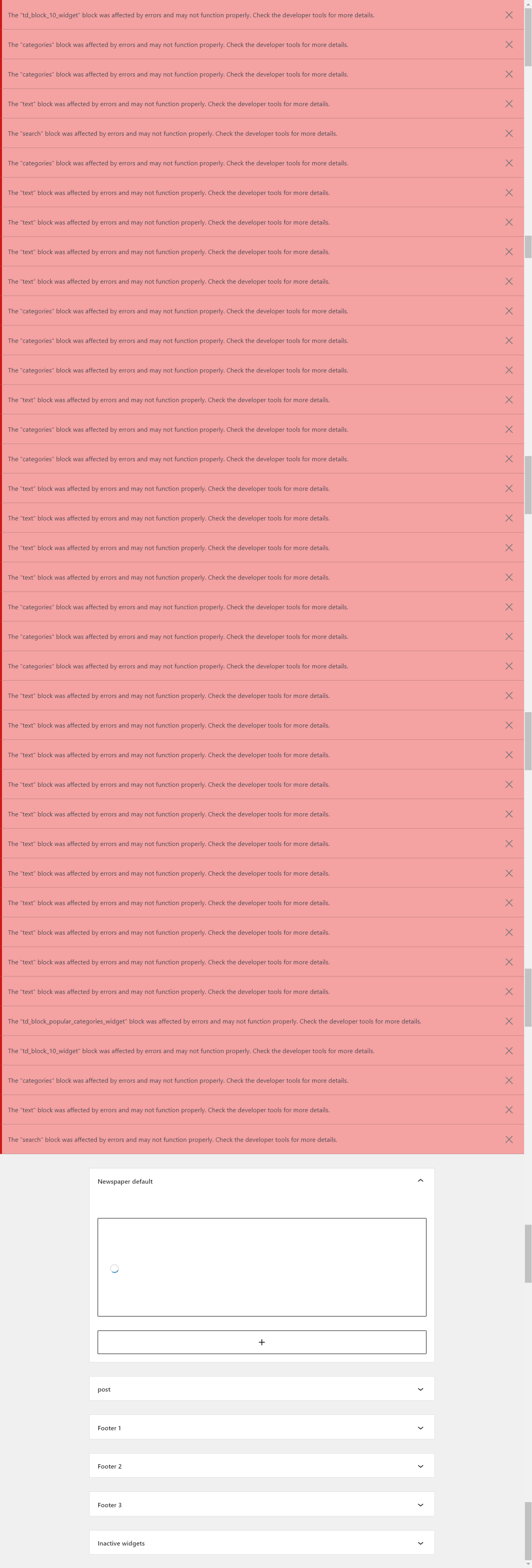
The Widgets has many erros:
The "td_block_10_widget" block was affected by errors and may not function properly. Check the developer tools for more details.
The "categories" block was affected by errors and may not function properly. Check the developer tools for more details.
The "categories" block was affected by errors and may not function properly. Check the developer tools for more details.
The "text" block was affected by errors and may not function properly. Check the developer tools for more details.
The "search" block was affected by errors and may not function properly. Check the developer tools for more details.
The "categories" block was affected by errors and may not function properly. Check the developer tools for more details.
The "text" block was affected by errors and may not function properly. Check the developer tools for more details.
The "text" block was affected by errors and may not function properly. Check the developer tools for more details.
The "text" block was affected by errors and may not function properly. Check the developer tools for more details.
The "text" block was affected by errors and may not function properly. Check the developer tools for more details.
The "categories" block was affected by errors and may not function properly. Check the developer tools for more details.
The "categories" block was affected by errors and may not function properly. Check the developer tools for more details.
The "categories" block was affected by errors and may not function properly. Check the developer tools for more details.
The "text" block was affected by errors and may not function properly. Check the developer tools for more details.
The "categories" block was affected by errors and may not function properly. Check the developer tools for more details.
The "categories" block was affected by errors and may not function properly. Check the developer tools for more details.
The "text" block was affected by errors and may not function properly. Check the developer tools for more details.
The "text" block was affected by errors and may not function properly. Check the developer tools for more details.
The "text" block was affected by errors and may not function properly. Check the developer tools for more details.
The "text" block was affected by errors and may not function properly. Check the developer tools for more details.
The "categories" block was affected by errors and may not function properly. Check the developer tools for more details.
The "categories" block was affected by errors and may not function properly. Check the developer tools for more details.
The "categories" block was affected by errors and may not function properly. Check the developer tools for more details.
The "text" block was affected by errors and may not function properly. Check the developer tools for more details.
The "text" block was affected by errors and may not function properly. Check the developer tools for more details.
The "text" block was affected by errors and may not function properly. Check the developer tools for more details.
The "text" block was affected by errors and may not function properly. Check the developer tools for more details.
The "text" block was affected by errors and may not function properly. Check the developer tools for more details.
The "text" block was affected by errors and may not function properly. Check the developer tools for more details.
The "text" block was affected by errors and may not function properly. Check the developer tools for more details.
The "text" block was affected by errors and may not function properly. Check the developer tools for more details.
The "text" block was affected by errors and may not function properly. Check the developer tools for more details.
The "text" block was affected by errors and may not function properly. Check the developer tools for more details.
The "text" block was affected by errors and may not function properly. Check the developer tools for more details.
The "td_block_popular_categories_widget" block was affected by errors and may not function properly. Check the developer tools for more details.
The "td_block_10_widget" block was affected by errors and may not function properly. Check the developer tools for more details.
The "categories" block was affected by errors and may not function properly. Check the developer tools for more details.
The "text" block was affected by errors and may not function properly. Check the developer tools for more details.
The "search" block was affected by errors and may not function properly. Check the developer tools for more details.
Edragon Schmitz, you should either use different blocks or change your title margins, both will fix your problem.
sudiptoHi,
[I can see this has been discussed multiple times. But I couldn’t find a solution yet. Thus, a new post]
The Cloud Templates have a CPT/Taxonomy tab from where we can add a cloud template. We can use the + button to add new template. And then set it to Global to apply.
[So far I am referring to your guide here: https://forum.tagdiv.com/custom-post-type-support/ ]
Questions are:
1) Whenever I click on the plus sign to add a cloud template, it only allows me to add a blank template. That’s how it’s supposed to be? Are there no pre-made templates for this section?
2) In the blank template, when I add an element like Custom Block 5 and save it – it starts showing latest articles of the website and not the articles related to the taxonomy. The standard template is showing right articles of the taxonomy but applying the cloud template makes all taxonomies show only the recent articles from the website. Am I doing something wrong? How do I show articles for that taxonomy under cloud templates?
Edragon TagDiv Composer elements? Are you sure? Where exactly and why it’s in elements or why it’s in two completely different places it’s kind of very confusing, because nobody is going to search this option from elements (does not make sense) when it’s already in
And why it’s on two different places in THEME PANEL > ADS > CUSTOM AD 1 (or any other one you use) > DISABLE FOR ADMINS/EDITORS
And no, ad blockers are not ON and would not even affect my ad block where I use manual ad with image and url.
Edragon Thank you for the suggestion but post loop elements are very limited, only 2 different blocks when there ae way more blocks/styles available. And I do use completely different blocks. Example Block 11.
Bettina Hello @Edragon!
Please note that this option is also in the TagDiv Composer elements. Check there too.
Also, verify that you do not have any adblockers enabled.
Thank you!
Bettina Hello Mauri!
Unfortunately, we do not have any blocks that have both features, only separate.
Thank you!
 Maurafarah
 Hi Bettina, thanks for your answer, I would like a block that has numbered pagination + category filtering, do you know any block capable of doing that?
Thanks in advance 🙂
Bettina Hello Mauri!
There are no filters for that element. Try to use a flex block instead: https://forum.tagdiv.com/flex-block-settings-guide/
Thank you!
Simion C. Hi,
The Newsmag theme has a few footer templates to choose from, some have a 1 column layout, some have 2 and some have 3 – https://forum.tagdiv.com/newsmag-footer-templates-2/
Some of them also have predefined content in them, like the widgets you mention.
I believe you are using footer template 1, so if you do not want to have these widgets https://i.imgur.com/gLDpo9X.png
Then you can use template 2 https://i.imgur.com/pcigZGh.png which provides the columns 2 and 3 empty so you can add your own widgets https://i.imgur.com/hwzlHsA.png
About the other question, this is a category page .com/category/animal
This can be a page .com/animal You can create a page called “animal” if that is what you want. In the page you can use grids and blocks from the composer, which you can filter to display only posts from the animal category, if you want the page to display the same content as the category page.
If maybe I am misunderstanding what you want to do, if that is the case please correct me.
Let me know
Thank you!
 Opes
Opes Hi!
I sent it right now. The problem is if you try to modify a page from block builder you can’t use it cos is only code, the native page composer works now but there is a problem of cash. Please i need to solve urgently. If you need more info let me know please.
Thank you
Alessio
 tizian-ffm
Hello
dropcaps are no longer displayed. Regardless of which version I select, no dropcaps are displayed. I have also used the Classic Editor to create dropcaps, but then I get the error message of a non-functioning block. The class seems to be there (e.g. “dropcapp3”), but the initial letter is not converted.
 Eighthats
 I recently had similar issues and found a solution to the problem.
Flex box elements using AJAX to pull in posts were causing major issues with database queries.
I changed to the post loop for the main content area, and removed any blocks using ajax from the footer.
All performance stats on the site dropped by 50% pretty much right away.
Aug 24th – 10am-11am
Response time: 1.36s
CPU Utilization: 97%
Memory Usage: 13GB
Aug 31st – 10am-11am
Response time: .592s
CPU Utilization: 46%
Memory Usage: 7.5GB
Our site has about 100,000 posts and around 500,000 unique visitors per month.
For anyone else having these issues:
Don’t use any blocks / elements with ajax to pull in post data unless you absolutely have to.
Eighthats Looks like the flex block using ajax was absolutely the problem.
I changed to the post loop for the main content area, and removed any blocks using ajax from the footer.
All performance stats on the site dropped by 50% pretty much right away.
Aug 24th – 10am-11am
Response time: 1.36s
CPU Utilization: 97%
Memory Usage: 13GB
Aug 31st – 10am-11am
Response time: .592s
CPU Utilization: 46%
Memory Usage: 7.5GB
For anyone else having these issues:
Don’t use any blocks / elements with ajax to pull in post data unless you absolutely have to.
Bettina Hello @romi!
Please make sure you have the Standard Pack plugin installed and activated. Although, I recommend you to use the new flex blocks because they can be customized as you like.
Thank you!
Bettina Hello Mark!
Please correct the code:
.td-post-content a, .td-post-content blockquote a {

text-decoration: underline dotted!important;

text-decoration-color: red !important;

color: black!important;}
Let me know the results!
Thank you!
 Romi
RomiWhy there is no Block 1, till block 7 in my TD Composer?




