- NewspaperFlex Block Builder and Flex Loop Builder
- NewspaperHow to use the Flex Blocks cache option
- NewspaperHow to edit modules for Flex Block X
- NewspaperHow to insert a block inside the content of a post
- NewspaperFlex Block Settings Guide
- NewspaperMeta Info on Modules and Blocks
- NewspaperTheme modules and blocks
- TutorialsDefault Block Settings Guide
- NewsmagBlock settings tutorial
- NewsmagCategory tag on modules/blocks
- NewspaperThumbnails – Fix strange looking images on blocks
- NewspaperBlock settings tutorial
- NewspaperCategory Tag on Modules/blocks
- ApiPractical example – How to add a new Block and Module
- Apitd_api_block::delete
- Apitd_api_block::update_key
- Apitd_api_block::update
- Apitd_api_block::add
- ApiAPI – Blocks – Introduction
- NewspaperWP Rocket and Newspaper Theme: Optimization Guide
 jparejaadmin
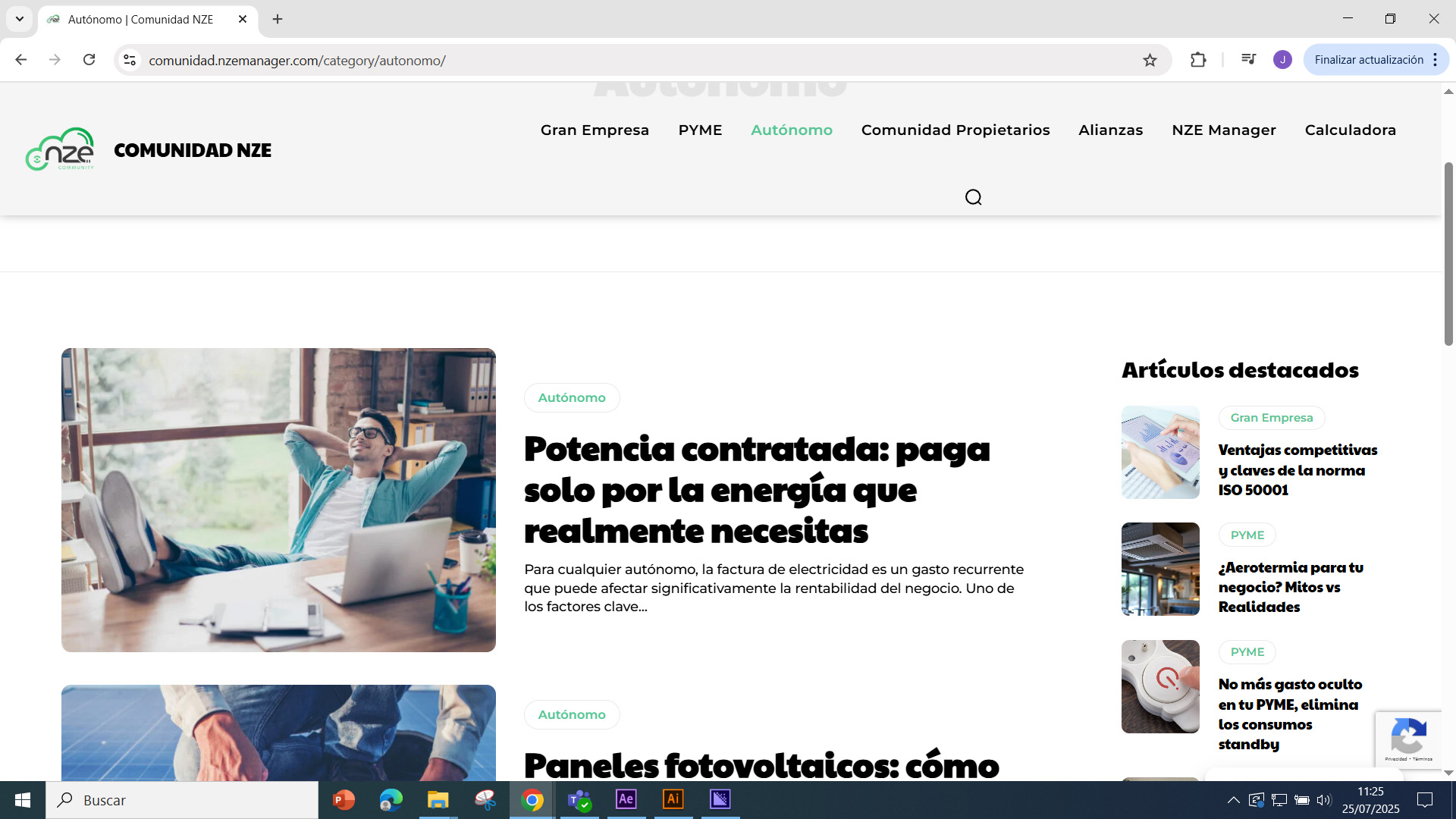
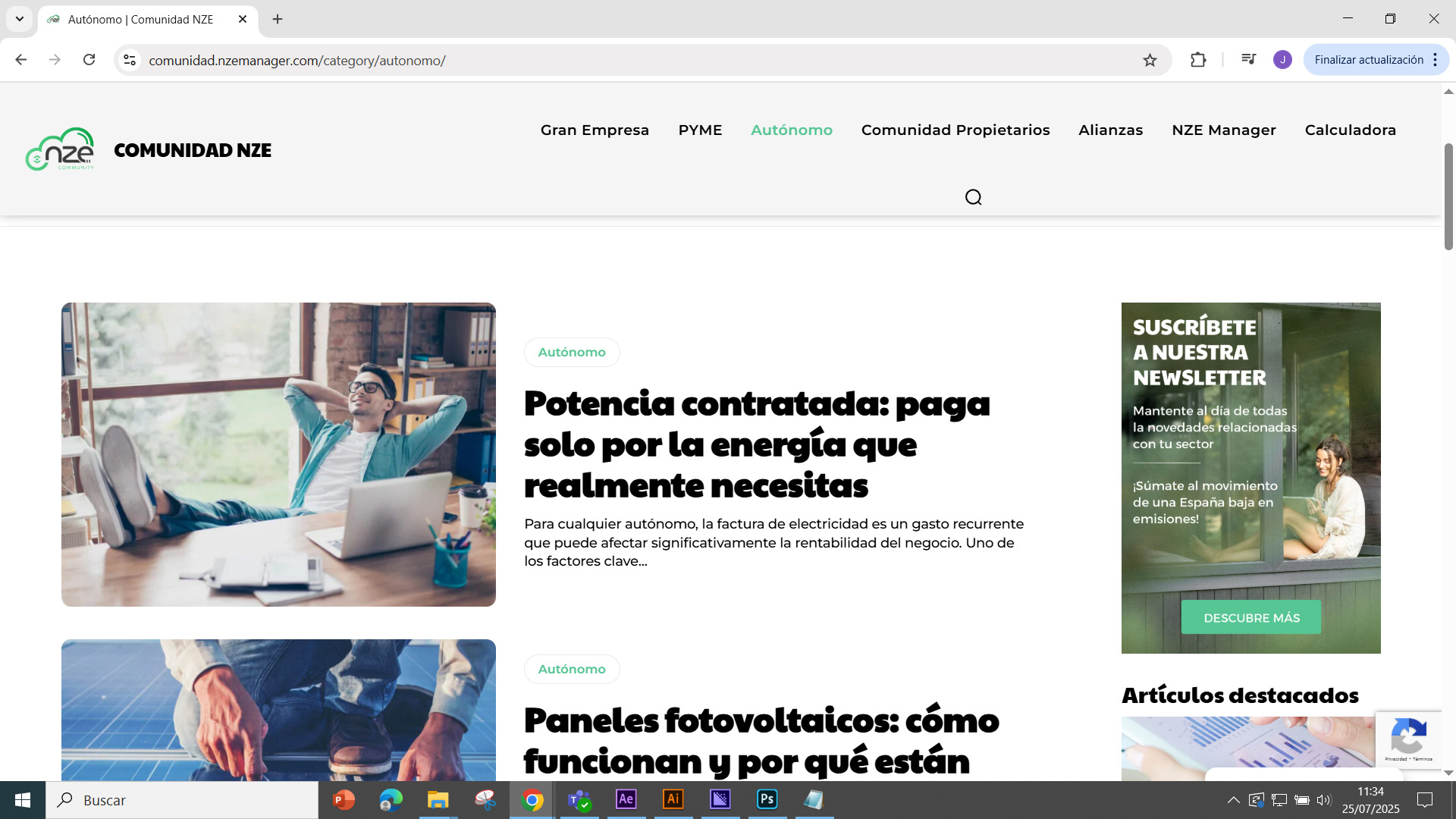
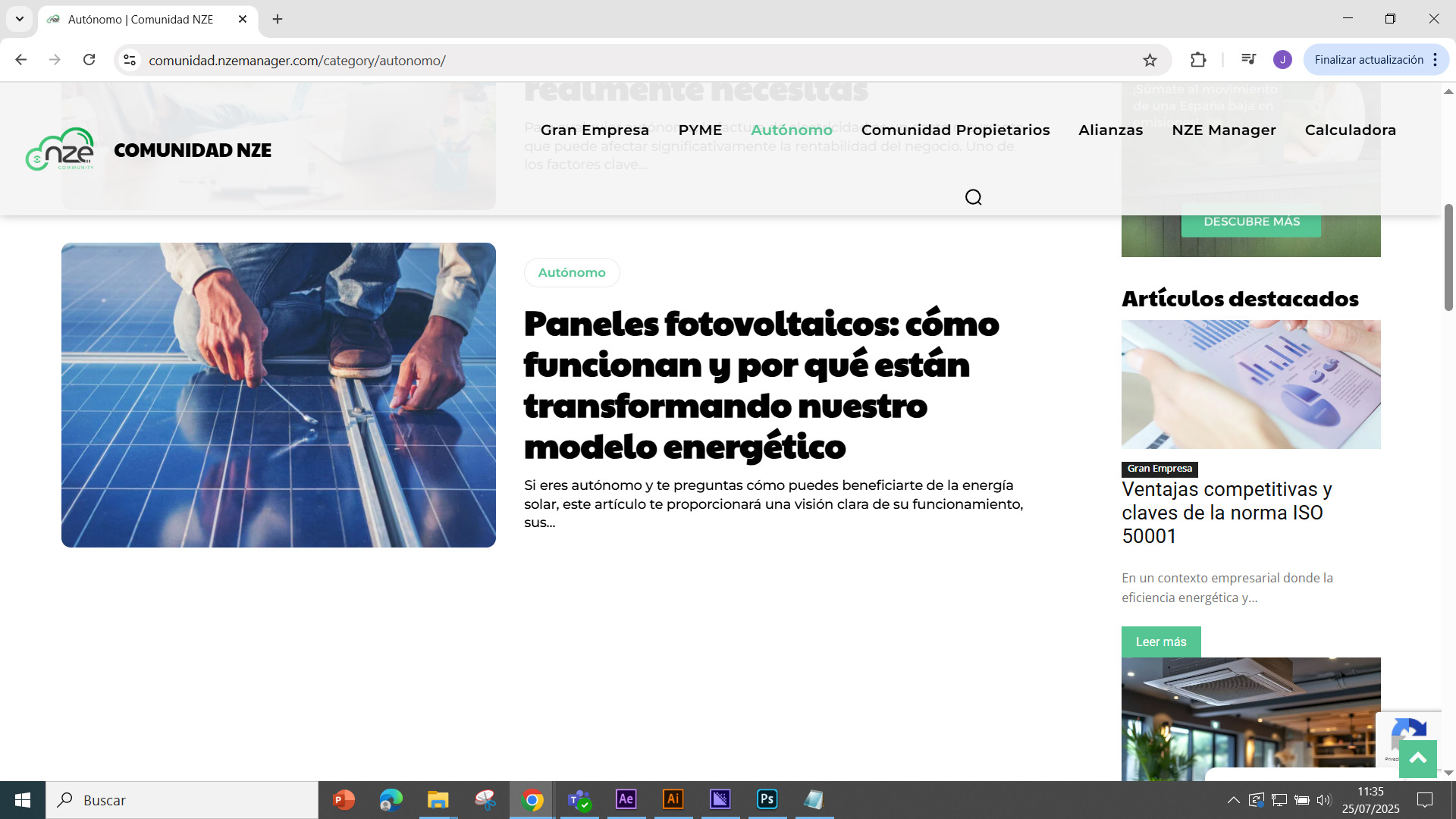
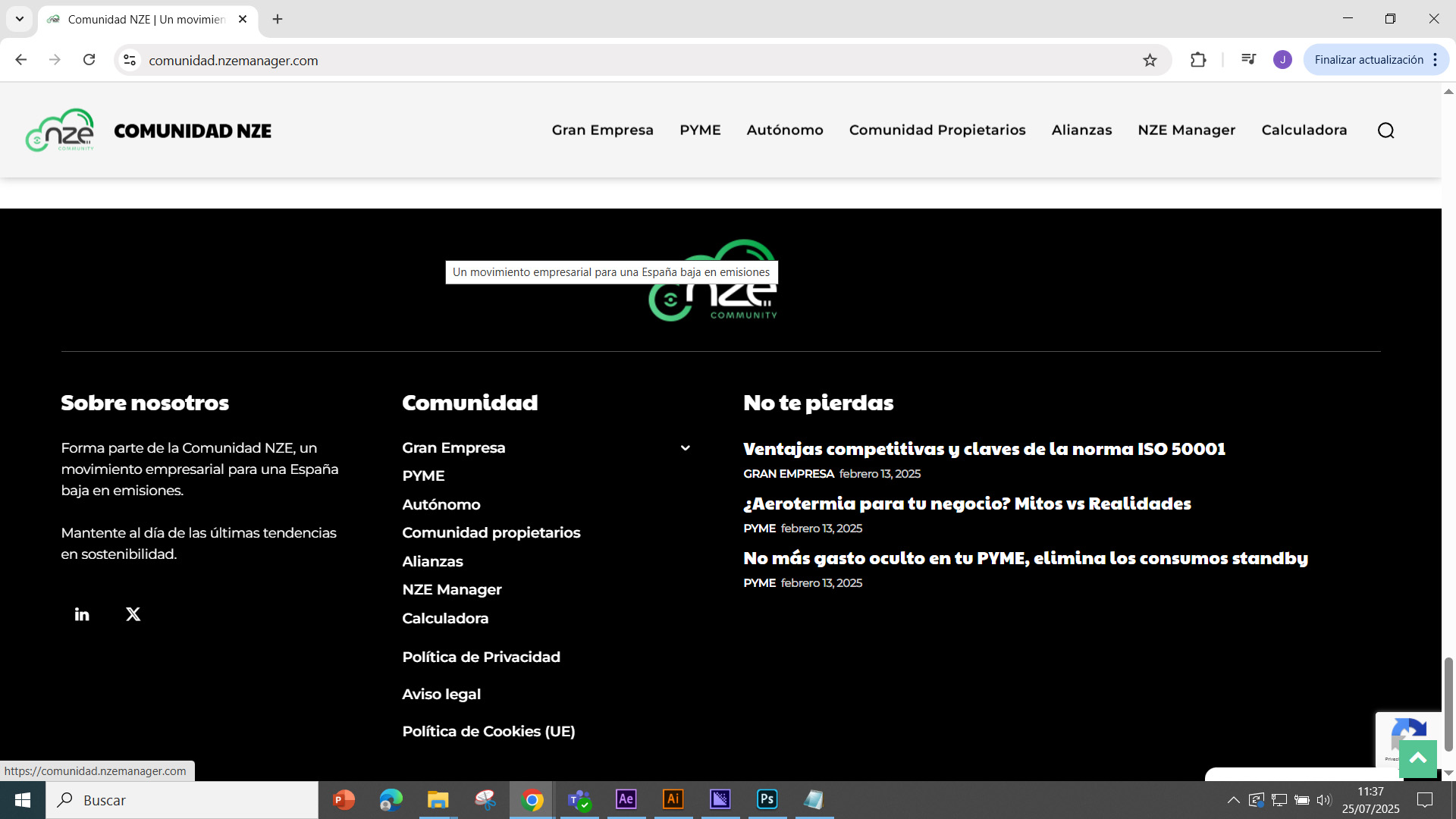
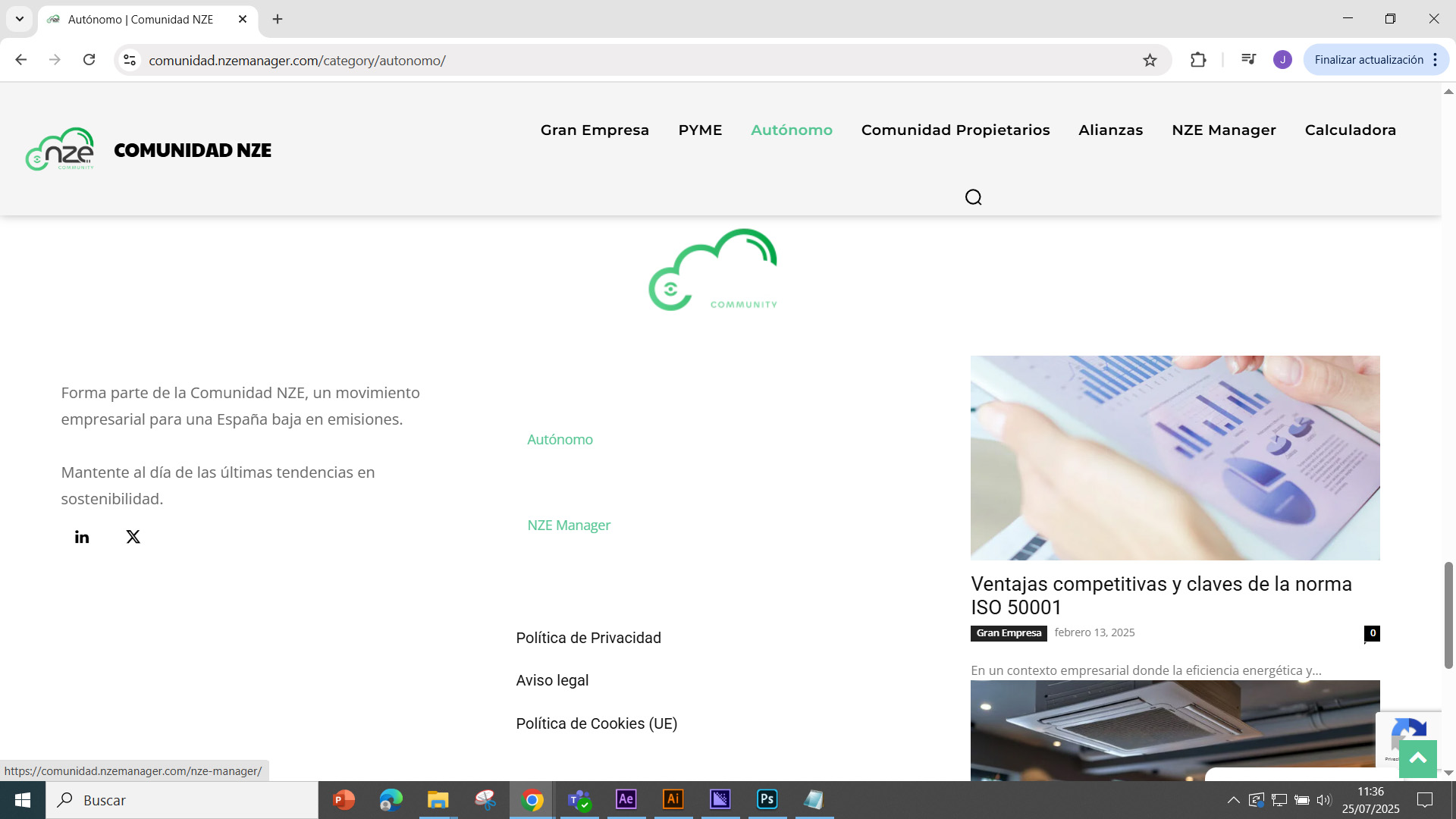
Good morning, I have placed a banner in all sections of the website (https://comunidad.nzemanager.com/category/autonomo/). I have placed it on the side of the website, just above the latest news section. The problem is that when I include the banner, all the styles of the latest news block are modified, including the footer, which causes the content and background to become misaligned, etc.
The banner is a simple image placed at the top.
Photo 1: Preview before inserting the banner
https://comunidad.nzemanager.com/wp-content/uploads/2025/07/preview-1.jpg
Photo 2: Preview of the banner
https://comunidad.nzemanager.com/wp-content/uploads/2025/07/Preview-of-the-banner.jpg
Photo 3: Preview of the changes after inserting the banner
https://comunidad.nzemanager.com/wp-content/uploads/2025/07/Preview-of-the-changes-after-inserting-the-banner.jpg
Photo 4: original footer
https://comunidad.nzemanager.com/wp-content/uploads/2025/07/Original-footer.jpg
Photo 5: changes in the footer
https://comunidad.nzemanager.com/wp-content/uploads/2025/07/Changes-to-the-footer.jpg
If you could tell me the cause of the style mismatch, I would appreciate it. Best regards.
Translated with DeepL.com (free version)
 Calin
Calin Hi,
In case you want to have this functionality https://demo.tagdiv.com/newspaper_podcasts/ and this one https://demo.tagdiv.com/newspaper_video_news_pro/, then you need to use video and audio formats for your articles, set the links for video or audio, and the featured image will be transformed into video/audio, as mentioned in the demos. Also, on your websites, you should use flex blocks to have the audio/video icon displayed. https://i.imgur.com/zceMuk7.png
Also, you can import from cloud the blocks you like for audio and video format and just adjust them using tagDiv Composer
Thank you!
Calin Hi,
You can contact us privately via email at contact@tagdiv.com if you’d like to share your credentials. Please do not post them on the forum.
Regarding your issue:
The problem is that you’ve edited the single post template each time when you think you add the article content, as shown here: https://i.imgur.com/LeuIZit.jpeg also, the dynamic post content element was replace with a Text with Title element. This element displays static content and does not automatically show each article’s content.
To display content dynamically for each post, you need to use the Post Content element instead: https://i.imgur.com/hldTlpY.png (I set it back)
If I understand correctly, you created the articles, then opened each article individually, edited the cloud template using tagDiv Composer, and manually changed the text inside the fixed text block. That’s the root of the issue.
There are currently 24 edits on your template, and 22 of them are changes to the text inside the static Text with Title element.
This means you’ve essentially created articles with only a title, but added the content directly in the template, not in the article itself https://i.imgur.com/U6qR7mt.png
Articles should be created properly in the post editor, like this example:
https://www.pomeranian.dk/wp-admin/post.php?post=64&action=edit
frontend view: https://www.pomeranian.dk/index.php/2025/06/26/mobile-marketing-is-said-to-be-the-future-of-e-commerce/
Also, please make sure you’re using the global template from the panel: https://i.imgur.com/vHbkSTS.png use an individual template only if you want a custom layout for a specific article.
Thank you!
Calin Hi,
That is an ajax dropdown on a block it can be added using tagDiv Composer, select the block and in the filter tab, look for ajax dropdown https://forum.tagdiv.com/flex-block-settings-guide/ https://i.imgur.com/YDUKC2m.png https://i.imgur.com/Lmr2Xxg.png
Thank you!
Calin Hi daveslc,
The feature the user requested is not a default option from WordPress (the provided example is not using WordPress). It is a custom solution that appears only in the block module when an image and caption are used together. This functionality is not standard for block modules it’s typically only available for standalone images. We implemented this as a custom addition and have provided the necessary solution. Thank you for your understanding!
 emssp
emsspHello,
Could you please tell where I can find the settings to change ‘flex block 1’ hover color exactly like in newspaper_kattmar_pro (Recent Articles, Homepage).
Thank you
Calin Hi,
If the problem wasn’t there before the CSS, the replace the code with this one:
@-moz-document url-prefix() {

.single .tdm_block_image_info_box .tdm-image-description {

position: absolute;

top: inherit;

}

}
Calin Hi,
Yes, you can use the “load more button” pagination option. This is available on all blocks in the filter tab – https://i.imgur.com/PgzLbNG.png
Thank you!
 unit45host
 Also, I noticed that in your own functions.php, the WooCommerce breadcrumbs use microdata:
‘wrap_before’ => ‘<div class=”entry-crumbs” itemprop=”breadcrumb”>’,
This suggests that microdata such as itemprop is generally acceptable in the Newspaper theme.
So I’m wondering why manually inserted microdata (e.g. via Raw HTML or Composer blocks) is stripped — even though the theme itself uses them internally.
unit45hostHi TagDiv team,
I’m currently using the Newspaper theme with TagDiv Composer, and I’d like to implement Schema.org microdata markup (e.g. itemscope, itemtype, itemprop) for services and FAQs on some of my pages for better SEO and structured data compatibility.
To make this work, I’ve extended the allowed HTML attributes using wp_kses_allowed_html inside functions.php as follows:
function allow_microdata_attributes($allowedtags) {
    $microdata = [
        'itemscope' => true,
        'itemtype' => true,
        'itemprop' => true,
        'itemid' => true,
        'itemref' => true
    ];

    foreach ($allowedtags as $tag => &$attributes) {
        if (is_array($attributes)) {
            $attributes = array_merge($attributes, $microdata);
        }
    }

    return $allowedtags;
}
add_filter('wp_kses_allowed_html', 'allow_microdata_attributes', 10, 2);
However, even after doing this:
the microdata attributes disappear both from the editor view and the rendered frontend HTML;
I’ve confirmed that the functions.php is correctly loaded and applied;
I also verified that the attributes are stripped even when I use the Raw HTML module.
So my question is:
➡️ Is there an internal TagDiv Composer or Newspaper filter that sanitizes or strips these attributes even after kses has been adjusted?
And if so, is there a recommended way to allow inline Schema microdata in Text/Raw HTML blocks?
I’d love to keep this inline for SEO reasons, but if it’s not possible, I can switch to JSON-LD with RankMathSEO plugin.
Thank you in advance for your time and support!
Best regards,
Zoltan
Calin Hi,
Please remove the above css and try this one:
@-moz-document url-prefix() {

  .tdm_block_image_info_box .tdm-image-description {

    position: absolute;

    top: inherit;

  }

}
I hope this one will provide better results!
 slivertorp
 In addition to my previous message
If I remove
.tdm_block_image_info_box .tdm-image-box {
height: auto;
}
I can see the images and the text, but there is now a big gap between the images and the text below.
https://tahiti.bucket-list.fr/que-visiter-a-tahiti-les-plus-beaux-endroits-a-ne-pas-manquer/
what could I do to get something that looks fine on firefox? similar to how it looks on chrome now.
Thank you
-
This reply was modified 1 year by
slivertorp.
-
This reply was modified 1 year by
 c386
c386 Hi Calin,
Agree on both counts. It’s a niche suggestion, but nevertheless, it would be good for consistency to have the ‘Global header’ option, as we do for Flex Blocks: https://imgur.com/a/ANMpOWo
Calin Hi,
You can use the Flex Block and customize it to fit your layout. Alternatively, you can use the Module Builder to create your own module, or simply import a block you like from the Cloud Library and add it to your sidebar.
Regarding filters:
If the block is placed on a category page and you want to display posts from that category, use the special filters (https://i.imgur.com/YsQSGx4.png).
If it’s on a single post template, make sure to use the single post special filter.
If you’d like to show posts from a specific category across all templates, just select that category from the dropdown menu.
Thank you!
Calin Hi,
If the ad is set in the sidebar, then the only solution is to set the column sticky as it was. But to prevent the problem you had with the column sticky, please do like this, add an inner row element in the sidebar and set the block with background color in the inner column, the background color from the sticky column will be lost, but if it is set on the inner column, it will remain.
Thank you!
 GentlemanJack
Hi,
i need (search) a flexblock for the sidebar with the TOP5 Reviews in on Categorie.
The block should contain five articles, one below the other, with small images and the text next to the small (round) image.
Which block and which settings should I use? I know how to display only the reviews.
Thanks in advance.
c386Hi,
Most blocks allow ‘Header template’ to be set to ‘Global Header,’ helping ensure consistency across a site.
Table of Contents doesn’t have this option. Any chance it could be added?
While it’s possible to create a separate header using the ‘Title’ element, this isn’t ideal as it would still show if the table of contents is not populated.
 David
DavidEnvironment
Newspaper 12.7.1 (fix claimed in 12.6.9)
WP 6.4.2, PHP 8.x
Permalinks: “/%category%/”
All caching/minification plugins disabled; server cache purged
Issue
On two independent sites, Posts Loop 2 still renders only a handful of posts on the front end—even though the Composer preview shows the full list.
Workaround
Switching to the Flex Loop Builder block surfaces all posts correctly.
Expected
Posts Loop 2 on category templates should output all posts exactly as shown in the preview.
—
Thanks for looking into restoring full loop support!
Calin Hi,
I think that you are referring to this block for demo – https://i.imgur.com/GBI3Rbj.png if so, this is the design made for the respective module you can edit it using tagDiv Composer – https://i.imgur.com/WvGBskt.png and create the module as you like.
Thank you!
Calin Hi Badri,
For the logo part, you should use tagDiv Composer, select the row that is holding the row and stretch it https://imgur.com/hpDp0E3
For the title to align it to left with the featured image, you should check the settings of the flex block 1, you have set a padding 25px 0 0 64px for meta info https://i.imgur.com/tc2GhbY.png
Thank you!
Calin Hi Vlad,
The problem with icons is related to the CORS policy that blocks access https://i.imgur.com/dZT6Vp7.png. This problem can be solved using those guides:
– https://forum.tagdiv.com/topic/font-blocked-from-loading-by-cross-origin-resource-sharing-policy-no-access-co/
– https://stackoverflow.com/questions/25577981/font-from-origin-has-been-blocked-from-loading-by-cross-origin-resource-sharing
– https://webmasters.stackexchange.com/questions/71630/font-blocked-from-loading-by-cross-origin-resource-sharing-policy-no-access-co
Calin Hi,
Normally the images from blocks modules should not open in lightbox and should redirect you to the article. Can you please provide a link to the website to investigate the situation with page refresh?
Thank you!
Calin Hi,
I made a similar situation, but for me, the results are like this https://i.imgur.com/w2jpvHy.png. Please contact us via email at contact@tagdiv.com and provide a temporary wp-admin access to investigate the settings of the flex block element.
Thank you!
 bts026
 All plugins are deactivated (except tagDiv plugins) and after replacing td composer and td cloud library I am getting this:
Logo
VESTI
BTS PODCAST
KONCERTI I DOGAĐAJI
RECENZIJE
RAZBIJANJE TIŠINE
O NAMA
More
Fatal error: Uncaught ValueError: Unknown format specifier ” ” in /home/milosbts/public_html/wp-content/plugins/td-cloud-library/parts/tdb-comments.php:177 Stack trace: #0 /home/milosbts/public_html/wp-content/plugins/td-cloud-library/parts/tdb-comments.php(177): sprintf() #1 /home/milosbts/public_html/wp-includes/comment-template.php(1629): require(‘/home/milosbts/…’) #2 /home/milosbts/public_html/wp-content/plugins/td-cloud-library/state/single/tdb_state_single.php(2110): comments_template() #3 /home/milosbts/public_html/wp-content/plugins/td-cloud-library/shortcodes/single/tdb_single_comments.php(470): tdb_state_single->{closure}() #4 /home/milosbts/public_html/wp-content/plugins/td-cloud-library/shortcodes/single/tdb_single_comments.php(470): Closure->__invoke() #5 /home/milosbts/public_html/wp-content/plugins/td-composer/legacy/common/wp_booster/td_global_blocks.php(27): tdb_single_comments->render() #6 /home/milosbts/public_html/wp-includes/shortcodes.php(434): td_global_blocks::proxy_function() #7 [internal function]: do_shortcode_tag() #8 /home/milosbts/public_html/wp-includes/shortcodes.php(273): preg_replace_callback() #9 /home/milosbts/public_html/wp-content/plugins/td-composer/includes/tdc_composer_block.php(222): do_shortcode() #10 /home/milosbts/public_html/wp-content/plugins/td-composer/includes/shortcodes/vc_column.php(440): tdc_composer_block->do_shortcode() #11 /home/milosbts/public_html/wp-content/plugins/td-composer/legacy/common/wp_booster/td_global_blocks.php(27): vc_column->render() #12 /home/milosbts/public_html/wp-includes/shortcodes.php(434): td_global_blocks::proxy_function() #13 [internal function]: do_shortcode_tag() #14 /home/milosbts/public_html/wp-includes/shortcodes.php(273): preg_replace_callback() #15 /home/milosbts/public_html/wp-content/plugins/td-composer/includes/tdc_composer_block.php(222): do_shortcode() #16 /home/milosbts/public_html/wp-content/plugins/td-composer/includes/shortcodes/vc_row.php(1204): tdc_composer_block->do_shortcode() #17 /home/milosbts/public_html/wp-content/plugins/td-composer/legacy/common/wp_booster/td_global_blocks.php(27): vc_row->render() #18 /home/milosbts/public_html/wp-includes/shortcodes.php(434): td_global_blocks::proxy_function() #19 [internal function]: do_shortcode_tag() #20 /home/milosbts/public_html/wp-includes/shortcodes.php(273): preg_replace_callback() #21 /home/milosbts/public_html/wp-content/plugins/td-composer/includes/tdc_composer_block.php(222): do_shortcode() #22 /home/milosbts/public_html/wp-content/plugins/td-composer/includes/shortcodes/tdc_zone.php(771): tdc_composer_block->do_shortcode() #23 /home/milosbts/public_html/wp-content/plugins/td-composer/legacy/common/wp_booster/td_global_blocks.php(27): tdc_zone->render() #24 /home/milosbts/public_html/wp-includes/shortcodes.php(434): td_global_blocks::proxy_function() #25 [internal function]: do_shortcode_tag() #26 /home/milosbts/public_html/wp-includes/shortcodes.php(273): preg_replace_callback() #27 /home/milosbts/public_html/wp-includes/class-wp-hook.php(324): do_shortcode() #28 /home/milosbts/public_html/wp-includes/plugin.php(205): WP_Hook->apply_filters() #29 /home/milosbts/public_html/wp-content/plugins/td-cloud-library/wp_templates/tdb_view_single.php(189): apply_filters() #30 /home/milosbts/public_html/wp-includes/template-loader.php(106): include(‘/home/milosbts/…’) #31 /home/milosbts/public_html/wp-blog-header.php(19): require_once(‘/home/milosbts/…’) #32 /home/milosbts/public_html/index.php(17): require(‘/home/milosbts/…’) #33 {main} thrown in /home/milosbts/public_html/wp-content/plugins/td-cloud-library/parts/tdb-comments.php on line 177
There has been a critical error on this website.
As soon as I move back from any php 8.x version to php 7.4 the error message is gone.
bts026 I have copied files from zip and this is the new error message:
Notice: Function _load_textdomain_just_in_time was called incorrectly. Translation loading for the media-library-organizer domain was triggered too early. This is usually an indicator for some code in the plugin or theme running too early. Translations should be loaded at the init action or later. Please see Debugging in WordPress for more information. (This message was added in version 6.7.0.) in /home/milosbts/public_html/wp-includes/functions.php on line 6121
Logo
VESTI
BTS PODCAST
KONCERTI I DOGAĐAJI
RECENZIJE
RAZBIJANJE TIŠINE
O NAMA
More
Fatal error: Uncaught ValueError: Unknown format specifier ” ” in /home/milosbts/public_html/wp-content/plugins/td-cloud-library/parts/tdb-comments.php:177 Stack trace: #0 /home/milosbts/public_html/wp-content/plugins/td-cloud-library/parts/tdb-comments.php(177): sprintf() #1 /home/milosbts/public_html/wp-includes/comment-template.php(1629): require(‘/home/milosbts/…’) #2 /home/milosbts/public_html/wp-content/plugins/td-cloud-library/state/single/tdb_state_single.php(2110): comments_template() #3 /home/milosbts/public_html/wp-content/plugins/td-cloud-library/shortcodes/single/tdb_single_comments.php(470): tdb_state_single->{closure}() #4 /home/milosbts/public_html/wp-content/plugins/td-cloud-library/shortcodes/single/tdb_single_comments.php(470): Closure->__invoke() #5 /home/milosbts/public_html/wp-content/plugins/td-composer/legacy/common/wp_booster/td_global_blocks.php(27): tdb_single_comments->render() #6 /home/milosbts/public_html/wp-includes/shortcodes.php(434): td_global_blocks::proxy_function() #7 [internal function]: do_shortcode_tag() #8 /home/milosbts/public_html/wp-includes/shortcodes.php(273): preg_replace_callback() #9 /home/milosbts/public_html/wp-content/plugins/td-composer/includes/tdc_composer_block.php(222): do_shortcode() #10 /home/milosbts/public_html/wp-content/plugins/td-composer/includes/shortcodes/vc_column.php(440): tdc_composer_block->do_shortcode() #11 /home/milosbts/public_html/wp-content/plugins/td-composer/legacy/common/wp_booster/td_global_blocks.php(27): vc_column->render() #12 /home/milosbts/public_html/wp-includes/shortcodes.php(434): td_global_blocks::proxy_function() #13 [internal function]: do_shortcode_tag() #14 /home/milosbts/public_html/wp-includes/shortcodes.php(273): preg_replace_callback() #15 /home/milosbts/public_html/wp-content/plugins/td-composer/includes/tdc_composer_block.php(222): do_shortcode() #16 /home/milosbts/public_html/wp-content/plugins/td-composer/includes/shortcodes/vc_row.php(1204): tdc_composer_block->do_shortcode() #17 /home/milosbts/public_html/wp-content/plugins/td-composer/legacy/common/wp_booster/td_global_blocks.php(27): vc_row->render() #18 /home/milosbts/public_html/wp-includes/shortcodes.php(434): td_global_blocks::proxy_function() #19 [internal function]: do_shortcode_tag() #20 /home/milosbts/public_html/wp-includes/shortcodes.php(273): preg_replace_callback() #21 /home/milosbts/public_html/wp-content/plugins/td-composer/includes/tdc_composer_block.php(222): do_shortcode() #22 /home/milosbts/public_html/wp-content/plugins/td-composer/includes/shortcodes/tdc_zone.php(771): tdc_composer_block->do_shortcode() #23 /home/milosbts/public_html/wp-content/plugins/td-composer/legacy/common/wp_booster/td_global_blocks.php(27): tdc_zone->render() #24 /home/milosbts/public_html/wp-includes/shortcodes.php(434): td_global_blocks::proxy_function() #25 [internal function]: do_shortcode_tag() #26 /home/milosbts/public_html/wp-includes/shortcodes.php(273): preg_replace_callback() #27 /home/milosbts/public_html/wp-includes/class-wp-hook.php(324): do_shortcode() #28 /home/milosbts/public_html/wp-includes/plugin.php(205): WP_Hook->apply_filters() #29 /home/milosbts/public_html/wp-content/plugins/td-cloud-library/wp_templates/tdb_view_single.php(189): apply_filters() #30 /home/milosbts/public_html/wp-includes/template-loader.php(106): include(‘/home/milosbts/…’) #31 /home/milosbts/public_html/wp-blog-header.php(19): require_once(‘/home/milosbts/…’) #32 /home/milosbts/public_html/index.php(17): require(‘/home/milosbts/…’) #33 {main} thrown in /home/milosbts/public_html/wp-content/plugins/td-cloud-library/parts/tdb-comments.php on line 177
There has been a critical error on this website.
Line 177 looks the same as the previous error:
esc_attr( sprintf( __td( 'Logged in as %s. Edit your profile.' , TD_THEME_NAME), $user_identity ) ),
-
This reply was modified 1 year by
bts026.