- ApiPractical example – How to add a new Block and Module
- Apitd_api_block::delete
- Apitd_api_block::update_key
- Apitd_api_block::update
- Apitd_api_block::add
- ApiAPI – Blocks – Introduction
- Apitd_api_thumb::update_key
- Apitd_api_thumb::update
- Apitd_api_thumb::add
- ApiAPI – Thumbnail – Introduction
- Apitd_api_category_top_posts_style::update_key
- Apitd_api_category_top_posts_style::update
- Apitd_api_category_top_posts_style::add
- ApiAPI – Category top section style – Introduction
- Apitd_api_module::update_key
- Apitd_api_module::update
- Apitd_api_module::add
- ApiAPI – Modules – Introduction
- ApiUsing the Theme API in plugins
- ApiThe Theme API
 akiim.deshay@onlymoveforward.com
Text on sidebar block headings is not consistent and I’m having trouble adjusting it.
I have run out of options for adjusting the text on sidebar headings other than using CSS code (I am not good at it) but I am having trouble getting the code right.
Installed Newspaper 9 with the Default Demo initially (2 years ago) but upgraded and converted and no longer using the tagDiv Standard Pack plugin.
On the homepage https://testsite.northdallasgazette.com/
Image: https://testsite.northdallasgazette.com/wp-content/uploads/2021/01/Sidebar-Heading-1.jpg
On another page: https://testsite.northdallasgazette.com/index.php/ndg-live-video/
Image:
https://testsite.northdallasgazette.com/wp-content/uploads/2021/01/Sidebar-Heading-2.jpg
I want them both centered with the font size of the larger one (19px). I followed the instructions for using the browser’s Inspector here and could only come up with the following code but it does not work.
td_block_templete_14 widget .td-block-title a {
font-size: 19px;
text-align: center;
}
Please help.
 chellofr
Good morning and best wishes to all.
I would have liked to know if it was possible to display the subcategories associated with an article on my site?
I am using Flex Block 1 to display the articles. I would like the other categories to be displayed with the main category.
Is this possible?
 SergioFD
 Good evening, Vlad!
With the coming NY) there is a suspicion that you can read in Russian, so I duplicate the message in 2 languages.
OK, if with embedded videos of the Yandex service.Ether can still wait, although this is a new standard that is becoming more popular every day, but blocking ads from the Yandex Advertising Network is a huge problem (100% rejection of the topic), because this is the monetization of the site.
Banners are not displayed or are not displayed consistently-see the screenshots below
1
https://monosnap.com/file/tWPKG3BP8QzI9okkfmqTcgYru6gqMA
2
https://monosnap.com/file/j9zffoOHZdIh1nXbvYbUiA3GrtWups
how can I fix this?
thx a lot!
======
Добрый вечер!
С наступившими) есть подозрение, что вы можете читать по русски, поэтому дублирую сообщение на 2х языках.
Ок, если с встроенными видео сервиса Яндекс.Эфир ещё можно подождать, хотя это новый стандарт, который становится популярнее с каждым днём, но вот блокировка рекламы Рекламной Сети Яндекса – это огромная проблема (100% отказ от темы), т.к это монетизация сайта.
Баннеры не показываются или показываются не стабильно – смотри скрины ниже
1
https://monosnap.com/file/tWPKG3BP8QzI9okkfmqTcgYru6gqMA
2
https://monosnap.com/file/j9zffoOHZdIh1nXbvYbUiA3GrtWups
как можно это исправить?
спасибо заранее!
 steve@tvstrategies.com
 Hi – Thanks for your suggestions. I still need help with your first one. The second one is resolved. The third one is resolved, but not in the way that you suggested.
1) You suggested to change the images to 300×250 (from 300×300) -> https://i.imgur.com/PaHY1Y2.png
See my screen shot: https://ibb.co/6nJQ4pq
As you suggested, I changed the image on the right to be 300 x 250 (the other two, i did not change). This did not help. Also, there is no control for the padding or borders around the individual images in the image block, using tagDiv Composer. Unless I did not understand what you suggested!
2) For the sidebar image alignment, you mentioned the different width and margins that were set on the element https://i.imgur.com/rG2xch9.png I removed them as you suggested, and it’s great – thanks
3) For my Text Alignment problem, I pasted your custom CSS into the Theme Panel > Custom Code > Custom CSS. It did not work. But, when I pasted it into Live CSS, it worked perfectly.
.td_block_image_box.td-image-box-style-2 .entry-title a {
padding: 0px;
}
Thanks for the great technical support!
 rideclick
Hey, this might be a noob question but were is the Latest Article section inheriting it’s style from? It’s outside a block or module and I’ve tried changing the default post settings to no avail. I’d like it to display like the Module 22 in the top part of the picture, just a single larger image above with teaser text below. Are we able to change the style and layout of the Latest Article section at all?
rideclickHey, this might be a noob question but where is the Latest Article section inheriting it’s style from? It’s outside a block or module and I’ve tried changing the default post settings to no avail. I’d like it to display like the Module 22 in the top part of the picture, just a single larger image above with teaser text below. Are we able to change the style and layout of the Latest Article section at all?
[EDIT] spelling
 boroguide
 If I disable the Category Top Posts style on the individual category, the most recent posts show for ‘FA Cup’.
But nothing happens when I try to make any changes to Category Template. And the dropdown menu still doesn’t appear.
It’s as if something could be preventing the top bar from showing?
The only reason I thought it might be was because I blocked a .js script with Autoptimize. But deactivating Autoptimize had no effect.
On this custom category page, however, I hardcoded the top post style grid and it does work (with dropdown). I can do this as a workaround but I’m confused why theme panel is having no effect normally.
-
This reply was modified 5 years by
boroguide. Reason: typo
 Calin
Calin Hi,
That block will display the elements in slide https://i.imgur.com/bWS6CLs.png https://i.imgur.com/1SYyIx9.png this is the way that the Big Grid 7 was made to work.
Thank you!
 shawshawshaw
 I apologize for not being clear.
I am trying to add blocks to the website via the cloud template catalog.
I can’t add anything because that box you had in the screenshot (the one that says “pre-designed templates – tagDiv Cloud Library”) will not get out of the way once I press “create page”.
When I press “create page” – the box that says “TEMPLATE IMPORT: are you sure you want to import the selection?” appears BEHIND the box that says “pre-designed templates – tagDiv Cloud Library” and I cannot access it.
Now does that make sense?
 vampireprincess
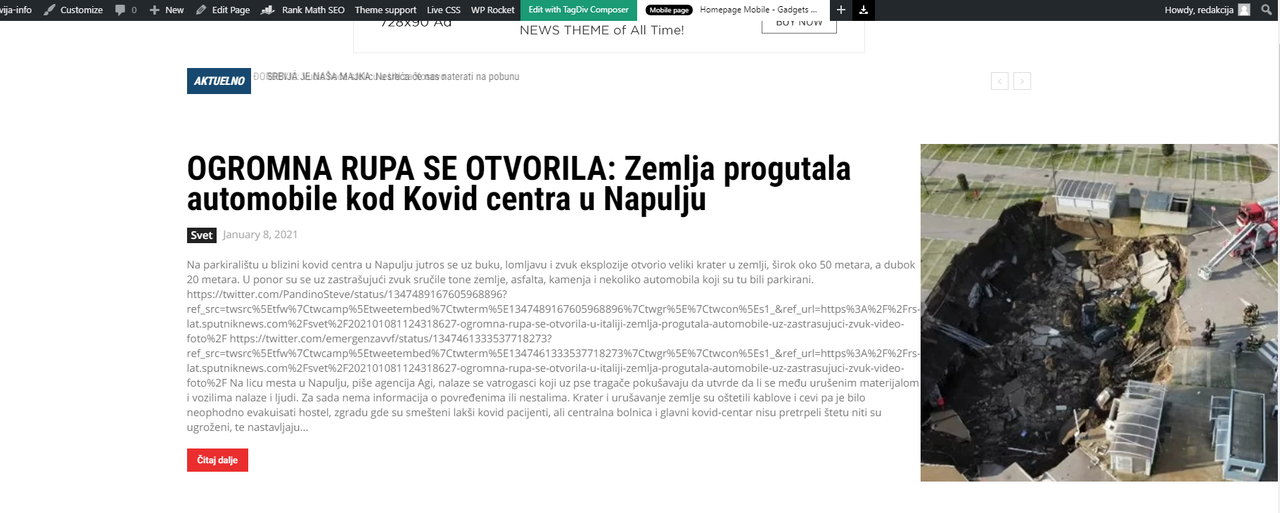
 Hi I here is the link to website address to inspects what is wrong with the twitter followers https://slavija-info.com/
I have a few issues more
1. How can I hide from ALL Mega Menu the “All” Section
2. I have an issue with the Flex Block 1 on the main page
when we embed twitter tweets to a regular post … part of the text become codes
and it pushes the image to right. What would be the workaround for the flex block to
show only the regular text from the post, and not the gibberish codes.
This way its looking very ugly and unprofessional, and nowadays everybody embedding
tweets on the posts.
 John Kord
 Okey, I understand it, but what block I must add to this page and what CSS write inside it?
I use “tdb_single_bbg_featured_image” for main block in single page templalte
 Bettina
 Hello!
You can not modify the blockquote in the WP editor(back-end editor), but after you published the post, you can modify the element by TagDiv Composer like in this screenshot: https://www.screencast.com/t/OUJZoCzGtkB
Modify the first value which means the font size of blockquote.
Hope that helps you!
Thank you!
 stuartmasson
Hi team,
We’re trying to add a custom HTML code from an advertiser into some posts, using the ‘custom HTML’ block in the WordPress editor, but it’s not displaying at all. Example post below (ad should be just under main feature image and title, but it’s just a big white space).
https://www.thecarexpert.co.uk/audi-a4-2015/
However, when we try to do the same thing in a page using tagDiv Composer, it displays correctly (example below, where there’s a full-page widget displaying without any problem):
https://www.thecarexpert.co.uk/cars-for-sale/
We can’t understand why the widget works fine for a page and not for a post. We’ve tried it using different themes and don’t run into the same problem, so not sure if it’s a conflict somewhere between Newspaper and the Gutenberg/Wordpress editor system.
Do you have any suggestions?
Many thanks,
stuart
 SMK
SMKHello Team,
It’s not possible to adjust colors in header settings of block “Single Post Comments”. When I try to change colors in header settings of this block (title text color, border color, accent hover color), nothing’s changed.
Please check it and if it’s not a bug, please tell me how can I fix it on my site.
Edit: Header settings of other blocks works good, I have problem only with this one.
 mainage
Blockquote font size in the back-end editor is too big.
How can I change the blockquote font size in the back-end editor?
 Anamaria
 Hello,
Unfortunately, this cannot be done on any block, they can be linked only to the posts that they display.
Thank you!
Anamaria Hello,
The block 14 don’t have the option for full width.
You can import a Flex Block or Big Grid Flex from tagDiv Cloud Library, https://tagdiv.com/tagdiv-cloud-library-blocks/ =>https://www.screencast.com/t/V9Du6uZRi which looks like block 14, where you can set the full width => https://www.screencast.com/t/IEne3SHQuici
Hope this helps you!
Thank you!
Calin Hi,
If you use the amp with mobile theme plugin then you can set that ads in mobile theme ads section, those should display for amp to -> https://i.imgur.com/ZLg1jDI.png
Also make sure that the error that appear in console are not blocking the ads https://i.imgur.com/hs6M6JO.png
Thank you!
Calin Hi,
It looks that is ca css problem.
please try this code https://i.imgur.com/310fqzp.png
body #td-outer-wrap .block-mega-child-cats {

    overflow-x: hidden;

    overflow-y: auto;

    max-height: 252px;

}
Set the code in theme panel> custom code> custom css.
Hope this will help you.
 itictmedia-nl
 Hey Webmamadou,
I did have the same problem, it has something to do with old Jqeury.
What works for me is using the ‘jquery migrate helper’ plugin, im not an expert but I think it allows the older Jquery from tagdiv to work again, enabling you to work again : ).
Although be carefull with the plugin, when enabled it blocked some features for my agenda plugin. So I only used it when i want to make changes with the Tagdiv composer, and then deactivate it again.
Hopefully this helps!
Huub
shawshawshawI click on a block from the library and I press “import selection” from the description box – and the box asking me “TEMPLATE IMPORT: are you sure you want to import the selection?” stays BEHIND of the box with the description of the block, preventing me to press “ok”. As soon as I press “X” on the description, the “import selection” box – it disappears along with the “template import” box. I turned off all of my plugins and I still can’t figure out the problem. Any ideas?
This is what I mean by the description box:

I can’t get to the “TEMPLATE IMPORT: are you sure you want to import the selection?” box because the description box is covering it.
-Thanks in advance!
 steveroberts
Hello,
Here: http://www.SchillingShow.com
Social counter widget is showing code:
[td_block_social_counter facebook=”schillingshow” twitter=”schillingshow” youtube=”theschillingshow” custom_title=”STAY CONNECTED” border_top=”no_border_top” block_template_id=”” manual_count_youtube=”538″ manual_count_facebook=”4430″]
Editing with TagDiv says “install plugin”
Not sure how to fix this. Can you please assist?
 pensivedog
Hello,
I have used the “Style, Fashion, Outfits – Lifestyle PRO” section from the cloud template library to display posts of a custom content type. I would like the titles/images displayed in this section to NOT link to the post, but instead link to an external URL which is stored in a field of the custom content type.
Can you please provide some instruction on how to achieve this? I’m using a child template and happy to edit some files as needed if you can indicate which ones.
Thanks in advance!
 felipefel
 To be clear, I don´t want a “Featured Image” on top of my post, I want the video, so the “video format” and “featured video”. But I wanna upload a thumbnail to show on all the blocks outside the post.
 MikeKhero
Hello good day everyone:
I need some help with my newspaper website: in my site the block 14 cut the thumbs, I need to that thumbs appears complete.
I send the section where the thumbs appears cut.
Can you help me with this issue?
Regards.
http://1045radiolatina.com/wnrl/

Real Size of the banner: