
- TutorialsDefault Block Settings Guide
- NewspaperWP Rocket and Newspaper Theme: Optimization Guide
- TutorialsFrom WPBakery to tagDiv Composer
- TutorialsOffset Feature
- TutorialsWhat is Ajax preloading?
 dabk
dabk Hi, Călin,
I want to remove the page title.
Another question, how do I change the background for the category in Block 11? Also, in Block 11, how do I hide the author and the date?
On Chrome, on mobile phone, block 11 looks like it has 3 columns: image, empty, text. How do I make it look like 2 columns? Here’s the page I’m looking at: http://www.homeloanmine.com. I would like it to look like it does on desktops.
Thanks,
Dusan
-
This reply was modified 6 years by
dabk.
 Calin
Calin Hi,
Usually this issue is related to a firewall or security module which blocks admin-ajax.php request. Please verify the console for error while saving the settings on the Theme Panel, usually it displays a 403 or 404 error.
If you don’t use a security plugin, please ask your host about this, maybe you have a security module which blocks this.
If you use a plugin like Wordfence please set it in learning mode.
If you are not using non of them, please make sure that you do not have a plugin conflict, please deactivate ALL non theme plugins except tagDiv plugins, also if you are using child theme or cache plugin, deactivate them, clear all cache and try again.
Let me know the results!
Thank you!
Calin Hi,
This type of block -> https://i.imgur.com/AYHo8Q8.png is only on standard post style -> https://i.imgur.com/EwzzbAF.png, you can not create it with tagDiv Composer.
Thank you!
 gpm79
gpm79Hello, I need to put a custom image size (book cover format) on my site. Currently I use flex block 1, and what best suits my images is the size of 696×0, the other formats do not work for me.
The problem is that in the home and other sections of the site, I show many books (rows of 6 books), and many 696 x images (other size) are loaded and it makes the site very heavy. I need to generate images eg 348×0 (half 696×0) on flex block 1 or other blocks.
I need to do the same (create a custom image size) in the block of related articles that comes out in a single template that I install from the cloud template.
And in that same single that I have installed from the cloud template, I need to add below the content these buttons that have a PHP code
<div class=”tiendas”> ” rel=”nofollow”>
&tag=bajarlibr-20″ rel=”nofollow”>
</div>
Calin Hi,
1. You need to edit the page with tagDiv Composer, click on the first block and check the css tab -> https://i.imgur.com/QX7RCky.jpg set the margin bottom 0 -> https://i.imgur.com/kH3bbaU.jpg aftr that click on row -> https://i.imgur.com/hTehlOu.jpg and set the margin bottom you want, for example 4 -> https://i.imgur.com/KKxN2Pp.jpg
2. If you are using the social counter of Instagram, make sure that you set in theme panel the api key -> https://forum.tagdiv.com/instagram-widget/ also for YouTube you need to use an api key too -> https://forum.tagdiv.com/youtube-api-key/ after that the social counter should work -> https://forum.tagdiv.com/tagdiv-social-counter-tutorial-2/
Also if you are using cache plugin, you need to clear all cache.
3. If you are using the mobile theme plugin, hen you need to set the mobile logo here -> https://i.imgur.com/Kg5l5uL.png if you are using the responsive version, you need to set the logo with tagDiv Composer -> https://www.youtube.com/watch?v=HXQQygkCCJo
4. You can change the background image from here -> https://i.imgur.com/013hPu8.png also if you are using the mobile theme plugin you need to change it for mobile from here -> https://i.imgur.com/lwZs1hu.png
5. The page speed of your website depends on how well your site is optimized, if you follow the steps which are presented in this tutorial here -> https://tagdiv.com/how-to-increase-page-loading-speed/ you’ll be able to increase the speed of your website.
Also you can check this similar topic for more solutions: -> https://forum.tagdiv.com/topic/optimize-script-to-improve-site-speed/ -> https://www.infophilic.com/get-almost-100-pagespeed-newspaper-theme/
– https://forum.tagdiv.com/topic/a-few-tips-for-newspaper-x-speed-high-cpu-usage-issues/
– https://tagdiv.com/how-to-increase-page-loading-speed/
Hope this will help you!
Thank you!
 ChristosV
Hi,
I am developing a Greek site with your theme and I have the following problem: When I create blockquotes, the Greek font is messed up: turned into capital letters, changing the accent characters.
I have used Google fonts that support Greek language (Noto Sans, GFS Didot) but the problem insists. I went ot the theme panel> theme fonts> post content and declared Noto Sans in Default Blockquote, Pull Quote and Box Quote (I did not know which one to choose). Still, no change.
Calin Hi,
Make sure that you do not have a plugin conflict, please deactivate ALL plugins except tagDiv plugins, also if you are using child theme or cache plugin, deactivate them, clear all cache and try again.
Flex block documentation -> https://forum.tagdiv.com/flex-block-settings-guide/
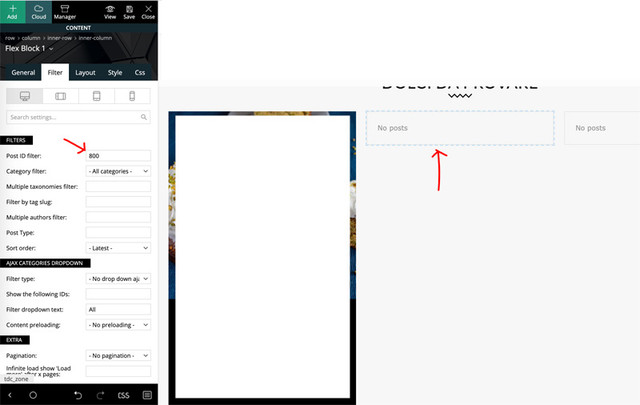
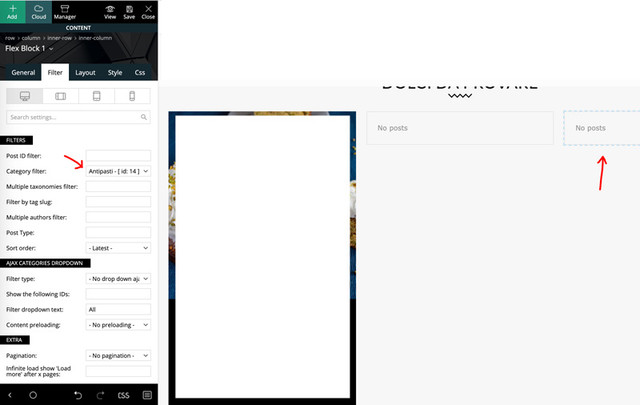
Make sure that you have posts set on the category selected -> https://i.imgur.com/GKbqLOv.png or using the post id -> https://i.imgur.com/oqWuqVE.png -> https://i.imgur.com/lNMYz8u.png
Let me know the results!
Thank you
 dfrosso
Hello.
tagDiv Composer is not working well on Chrome.
I can open and edit pages but I can´t select the blocks and elements.
And when I create a new page and select a new block the editor looks like this: https://tinyurl.com/y7donnbr.
I have no problems using it with Edge browser, for example.
Any idea about what might be happening?
Thanks for the help.
Calin Hi,
Indeed there is an issue on Internet explorer + Flex Blocks, the IE do not recognize the flex css parameter.
Please try this code:
[class*="ie"] .td-module-container {

display: block;

}

[class*="ie"] .td-image-container {

height: auto;

flex: initial;

}
The code must be inserted here: https://www.screencast.com/t/J1Nxw5s5
Also please let me know the version that you are using on Safari.
Let me know the results!
Thank you!
Calin Hi,
The blocks from tagDiv Cloud Library need to be import as section on page using tagDiv Composer -> https://i.imgur.com/KAwRl3S.png the block will be set at the bottom of page content -> https://i.imgur.com/qwdtp1b.png
Hope this will help you!
Thank you!
 cdftravel
Hello,
In the “New Post” page in the administartor area, after editor there is the Post Settings block where the writer can choose the Post Template, Smart list and Reviws. Can this be disabled for all the user roles except the Administrator?
Thanx
 tirkizna
Hi!
I am having trouble with wordpress gallery captions. It used to be fine with a previous theme I used. Now I have a huge gap between photos and than no gap between the next block, and also I would like it if the font was the same size and color as the caption that I use for single images. I found a way to adjust the caption for single images in Theme panel, but not for the gallery captions.
Here is an example: https://prnt.sc/sewnfu
Thank you in advance.
Best regards!
 SquallSFU
Hello guys,
I guess I’m doing something wrong because I can’t set the filters for these two blocks. If they are imposted to “All Categories”, they works, otherwise they don’t work in any other way. Only the former also works with different filters. Why?
 Josan
Josan Oh thanks. Didn’t notice that option of AMP only for mobile theme.
I have one More question. Is it possible to hide some of the block from tag div composer on mobile? I am using tag div cloud library and don’t want to show sidebar blocks on mobile.
 cjolicoeur123456
Hello,
We have advertising clients who want very specific Meta Descriptions and we use Yoast to do so.
However, I believe Newspaper 9 uses its own meta descriptions. I see in the header.php that it’s from WPBooster.
I read this article: https://forum.tagdiv.com/meta-info-modules-blocks/ but I couldn’t find the info I need.
I went to Theme Panel and tried to find where I can deactivate the Meta Descriptions from the theme but I can’t see where.
This is what I need: I need to be able to use the Yoast module to enter custom meta descriptions on individual posts and deactivate any meta descriptions entered on posts by the theme. Alternatively, I need to know where I can customize the meta descriptions for each post in the theme if we can’t deactivate it.
 Gmcarlson
Hello,
I re-activated my mobile theme and when I did, the logo left justified blocking the mobile menu search bar. Is there anyway to center it again?
The site is Dudefluencer.com
 ludyma
 Hello according to a support, the problem is the modifications that you made in the custon CSS, but how can I do so that these modifications do not affect “RESPONCIVE”?
Even so, it doesn’t fit well, at least the boxes or blocks
Calin Hi,
You can use the mobile them only for amp version -> https://i.imgur.com/mmQWJC9.png also you can use the mobile editor -> https://forum.tagdiv.com/the-mobile-theme/ to add content for mobile pages and you can display more blocks/grids using these options -> https://i.imgur.com/DPw3npx.png
Or you can use this option with out mobile theme -> https://i.imgur.com/Qaly90z.png
Thank you!
 sfnewsdaily
Hi,
I want to remove pagination number from my post and instead display “Back” and “Next Page” blocks. For this following custom css code was suggested in one of the Tagdiv forum thread. So I tried below code which works well on desktop but not on mobile devices. I am using mobile theme.
On desktop, I can see it properly https://www.screencast.com/t/dXJtxJ3WWEu
But on mobile, it is showing 1st and last page numbers. https://www.screencast.com/t/otiUL1wkW0
This is the custom CSS cosw I have used. Please suggest how can I get the same display on mobile as on desktop.
.page-nav-post .post-page-numbers {
display: none;
}
.page-nav-post .post-page-numbers:first-child, .page-nav-post .post-page-numbers:last-child {
display: block;
}
.page-nav i{
font-size: 20px;
padding: 25px 150px;
justify-content: center;
}
.page-nav-post a {
color: #fff;
background: gray;
}
.page-nav-post .post-page-numbers:last-child{
background: orange;
}
.page-nav-post .post-page-numbers .td-icon-menu-left:before {
content: ‘\e80c BACK’;
}
.page-nav-post .post-page-numbers .td-icon-menu-right:before {
content: ‘NEXT PAGE \e80d’;
}
ludyma Hello, I do not understand if I warned you to send the mail until I put the address that would come to you, also makes the access data public ….. I find it very bad of you gentlemen.
Hello, I have put the accesses, please, solve the problem, and I reinstalled all the 10 newspaper, from 0 in the server and in the test one with the same result in the two cases separately and installing the 9 newspaper all well. they already have access created. sending mail tecnico.sopor@xxxxxx
matter the same of this case
 aaronwongxm
 Hi, I want to maintain the blocks that I am using, but would still want the comment counter box. Are there any ways that I can custom code that in? I think the comment count box is a very common feature that many blogs have, and we most definitely would need it.
 swolly
Hi,
we have a problem with Newspaper theme in our site (Pulses pro demo). In Internet Explorer we have a problem with Flex block 1 and in Safari with Flex block 5.
Can you check here > https://www.gazzettinodelchianti.it/
I saw that the same problem, news title under photo insteasd next to it, are still in pulses pro demo!
Thanks!
Let me know
Calin Hi,
Unfortunately for the moment our theme use the WhatsApp only on mobiles, but if you want to have it on desktop to, you can use this custom css:
.td-social-whatsapp{

display: inline-block;

}
The code need to be set in theme panel> custom code> custom css.
Please note that this will only display the WhatsApp share button on desktop, it will not work as WhatsApp Web app.
Thank you!
 Maxyct
Hi all,
I’m using pre-designed templates from cloud library. I imported a block (block 83 – Fitness PRO) but I do not understand where i can find it. It is neither available on Cloud Templates nor on Add Element of tagDiv Composer.
Just for your information I imported pages, footer with success.
Thanks,
Max
 jmbenech
 Sorry I first didn’t understood you were using STYLE PRO mockup… So to answer your question, just open & edit your homepage in td-composer. Select the element block you want to change and in left hand menu, go to style. search for title attributes and make your selection. see the changes. save it ! TAF.



