
- TutorialsDefault Block Settings Guide
- NewspaperWP Rocket and Newspaper Theme: Optimization Guide
- TutorialsFrom WPBakery to tagDiv Composer
- TutorialsOffset Feature
- TutorialsWhat is Ajax preloading?
 Anamaria
 Hello,
To have something like this, you need to create a custom code CSS.
.entry-title::before,

.td-module-title::before {

    content: "Live ";

    display: inline-block;

    padding: 5px 10px;

    background: linear-gradient(45deg, #ff0000, #ff4d4d);

    color: #ffffff;

    font-size: 12px;

    font-weight: bold;

    text-transform: uppercase;

    border-radius: 20px;

    margin-right: 10px;

    animation: pulse 1.5s infinite;

    vertical-align: middle;

}
/* Pulse animation */
@keyframes pulse {
0%, 100% {
box-shadow: 0 0 10px rgba(255, 0, 0, 0.8);
}
50% {
box-shadow: 0 0 20px rgba(255, 0, 0, 1);
}
}
/* Optional: Hover effect for title */
.entry-title:hover::before,
.td-module-title:hover::before {
background: linear-gradient(45deg, #cc0000, #ff0000);
box-shadow: 0 6px 8px rgba(0, 0, 0, 0.2);
}
You need to add an extra class on the block where you want to have the icon and add it to the code.
Thank you!
 fabinhoalmeida
 Hello Anamaria.
This is a possibility, but it will distort the post, especially for a news portal that in this case will no longer have the main illustration of the article. I think that the Newspapper technical team could provide an alternative, if they cannot adjust it so that the featured image is removed only when the video URL is filled in, then they could develop a separate block just for featured images, disassociating it from the featured video function, which I believe is a very specific functionality and should not interfere with its main purpose, which is to display the featured image of the post.
I hope you can provide this help that will be useful to me and many other people. Thank you.
 MKJ
MKJ I wish I could, but I got the following error:
Envato key is alright, but it is not assigned to the current domain. Just assign it and then you are ready to enjoy the full benefits.
I can’t assign this subdomain, since it is a temporary site for the relaunch.
 mottoyou
Hi there,
I’m using the “Page Links To” plugin to redirect some custom post types (created with ACF) to external sources. I also set Rank Math to automatically add the target=”_blank” attribute for external links to open them in a new tab.
Some of these posts don’t have links to external sources, but are left to open on the single post page directly on the site, so they are internal.
Using the TagDiv Module feature, I created a custom display for the specific post type (“Business”). Within it, I’ve added the “Module Read More Button” element and some custom CSS to display this button only for internally redirecting businesses:
https://prnt.sc/2t_nfnymDpep
CSS code used:
.tdb_module_read_more a[target="_blank"] {

  display: none;

}
Everything is working properly until it comes to using any of the “Next Prev”, “Load More” or “Infinite Load” pagination:
- CSS code works for the first displays of businesses:
https://prnt.sc/cXfuEyCQbUYz
target=”_blank” attribute being correctly associated:
https://prnt.sc/0d92HKZkuAWR - Once pagination is used, the posts on the next page display the “Read more” button even if they are external:
https://prnt.sc/qVIj8VKGW3H2
target=”_blank” attribute disappearing:
https://prnt.sc/Hr5AnsgqSC3Q
This also happens and if go back to the first page, the target=”_blank” attribute disappears and the “Read more” buttons are displayed.
This doesn’t happen with the “Normal Numbered” pagination type, but that’s only available for the “Flex Loop Builder” element. If I want to use the “Flex Block Builder” (in order to filter the custom posts based on multiple terms), that pagination type is no longer available, so having to use one of the other three, causes the problem described.
I would really appreciate your support in solving this issue!
Thank you in advance!
 zenlounge
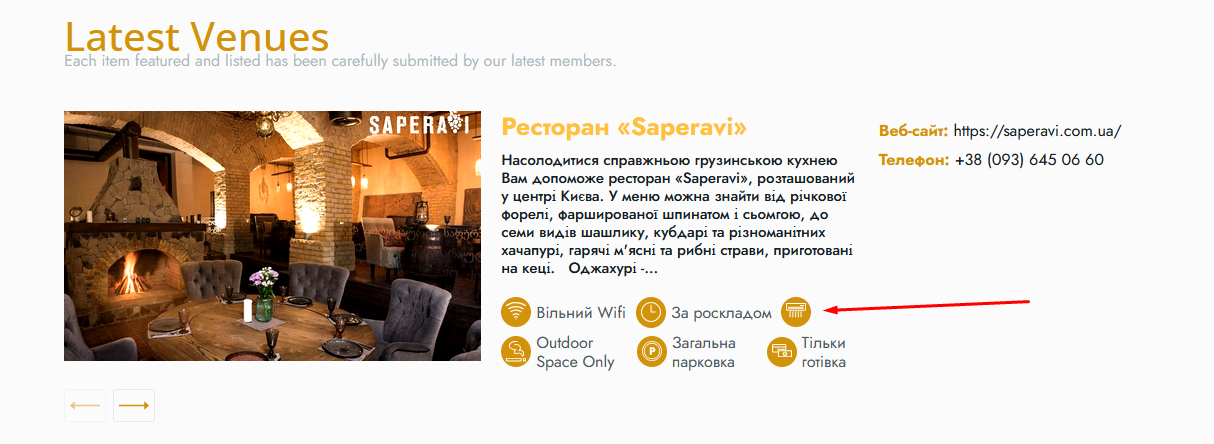
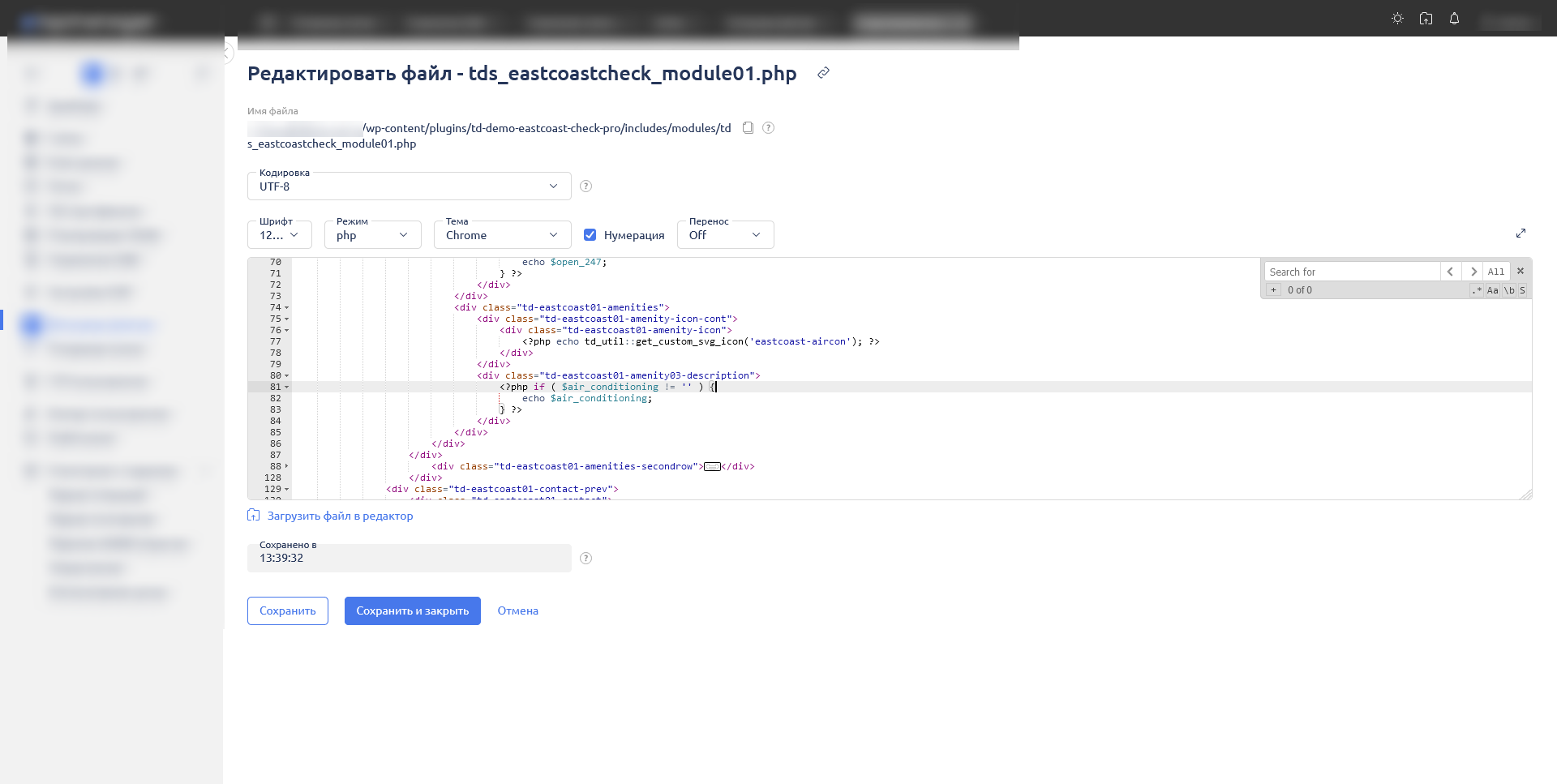
 Hello. I put the issue with the card aside for now. But there is a question, where to create a variable to display the necessary data from SCF on the main page of Block1 (tds_eastcoastcheck_module01.php)
photo:
 be2name
Hello,
since WordPress 6.7 nothing happens if I click on “Convert to blocks” of a classic block in the Gutenberg editor.
In the console of chrome there is a message:
Uncaught SyntaxError: Identifier '__' has already been declared (at td_js_for_guten_blocks_editor.min.js?ver=def8edc4e13d95bdf49953a9dce2f608:1:1)

    at td_js_for_guten_blocks_editor.min.js?ver=def8edc4e13d95bdf49953a9dce2f608:1:1

(anonymous) @ td_js_for_guten_blocks_editor.min.js?ver=def8edc4e13d95bdf49953a9dce2f608:1
Is this the reason why nothing happens and classic code gets not converted into blocks? How can I fix this?
Anamaria Hello,
I’m sorry. You need to create a new page and the code there. I recommend creating your own blocks because the blocks from that template are from the standard pack, and those are deprecated.
Thank you!
 22halomedia
 Hi,
As mentioned earlier, I have set the images to 1920×0 and the height to 55. The current module is utilizing the flex block builder. I’m unsure how to proceed, as the articles and gif linked did not provide any new information.
Best,
Joey
fabinhoalmeida Perfect Anamaria, it worked well. But I’m having problems with the Only Single featured image block. We use the “video format” option in some posts so that the reader can see in the home highlights that the post contains a video between the paragraphs of the article and, in these cases, the block does not display any image, waiting for a video link that in this case was not previously configured by us. Is there any way to disable this function so that the block displays the featured image without a previously configured video link, even if the article is using the “video format” option? I tried using the Single Post Bg Featured Image instead, it works very well, but unfortunately it does not provide the title and alt description of the image, which loses the meaning of implementing a Featured Image for us, since the SEO effect for this is what motivates us to do such an implementation. I hope you can help me. Thank you.
 yannick-eky
 Hello Anamaria,
Thank you.
I have checked in logo, mobile logo, sticky, block title and footer but still 1 H1…
Is it possible to find with the source code where is this H1 ?
For example:
<span class="tdb-logo-text-title">...</span><span class="tdb-logo-text-tagline"> </span></span></h1>
Thank you
 c386
c386 Hi Bettina,
I don’t see the ‘Expand on click’ option in the image block editor, what am I doing wrong?
Anamaria Hello,
I recommend creating your module and using the flex block builder -> https://forum.tagdiv.com/modules-builder-newspaper-theme/ Also, you can set the image width and height on the flex block 1 https://i.imgur.com/0LnlxGR.jpeg
Thank you!
fabinhoalmeidaHello everyone.
Even before adopting Newspaper, we used images manually inserted at the top of the text as the main image of our posts, thus stopping using the featured image block when we started using Newspaper to avoid duplication of images on single pages. However, I see that using the featured image block has its advantages, such as the “Image preload” option and the new feature for critical images in wp rocket that only covers featured images. Would it be possible to apply some configuration to avoid duplication of images in already published posts by hiding the image at the top of the text that was previously inserted? In this way, we and users who may migrate to the theme could have the advantage of adopting the featured image block and enjoy its benefits by avoiding this duplication of images at the top of the articles.
I await your evaluation
 jonybigude
Hi!
Please see the image I attach here: https://imgur.com/a/OtEXxBz
I really don’t want that block over there. I have been searching everywhere and I cannot find where I can delete it. I cannot find it on widgets, I cannot find it when editing in WP standard page editor, I cannot find it on TagDiv composer, I cannot find it either on the Theme panel…
Please help, how can I delete that block?
Thanks in advance!
 zuberkz
Hello,
I reinstalled plugins, but error is not resolved.
Dashboard Page is’t working and get error:
 tola999
 Oktay
Oktay Oops I meant this is the standard template: https://prnt.sc/Jv50u3UhI6qb
And this is the customised blocks BEFORE making it a posts page as you say: https://prnt.sc/p5rcGqXXOEQ6.
So as soon as I make it a Posts Page, it reverts to the standard template.
-
This reply was modified 1 year by
Oktay.
Oktay Yes that is what I did.
I created a page called “Articles”. I customise it with cloud library blocks. It looks like this for example: https://prnt.sc/Jv50u3UhI6qb
But when I change the posts page on settings>readings>Posts page to “Articles”, the green button “Edit with TagDiv Composer” button disappears and the appearance reverts to default layout and does not show my customise design. It looks like standard template again when I set the post page to my custom design: https://prnt.sc/p5rcGqXXOEQ6
With the post page set to “Articles”, it says “TD Composer is disabled on Posts page” and does not permit me to edit the page via the cloud library. See this link: https://prnt.sc/cJiaBgRzfjuA.
Again the appearance becomes just a standard layout despite that I customised it prior to setting it to Posts Page.
Anamaria Hi,
You can create your own blog page, and after set the blog page here -> https://i.imgur.com/n3QYYIT.png You can import what blocks you want from tagdiv Cloud Library.
Thank you!
 Phil Creighton
I have an issue on my planned site cheeselogs.co.uk that I can’t seem to resolve easily regarding the header.
I have installed the header REEL NEWS PRO on the site, it displays fine on desktop but on mobile view there is no white space between the end of the header and the start of the post (as seen on the left).
Using the Inspect function on the website, I can force it on the .tdi_3 tag.
The CSS would be:
@media (max-width: 767px) {
.td-container, .tdc-row, .tdc-row-composer {
width: 100%;
padding-left: 20px;
padding-right: 20px;
padding-block-end: 18%;
}
}
But I can’t seem to make this work on custom code.
Have got myself into a right tizzy with this header … have added custom code to force display of the SVG to none, and have probably added additional unlogical code to try and get it to do what I’m intending.
Some pointers would be appreciated. Thank you!
(For a future update, please consider adding more customisation to the header to make it easier to adapt)

Anamaria Hello,
I tested it with Flex Block 1, and this is hidden. Can you please contact us via email to check it?
Thank you!
 Daniel Finch
Hello,
I have searched the forum and discovered you cannot check the Sticky Post checkbox in the backend to assign it to a block. Instead you have to find out the ID and enter it manually every time. This is insane for a theme mainly for use as news sites/blogs.
Surely it’s easy enough for you guys to add it.
 Mark Gilbert
 Hello Anamaria – thanks for this. I have deleted the page cache in Super Cache several times and had my host disable and re-enable object cache in the wp-config.php file. No file called “object-cache.php” exists in my WP. I still cannot hide any Flex Block 1 article.
Ad Box and Button elements are hiding fine. Flex Block 1 will not. I cloned one of my Flex Block 1 articles and changed it to Flex Block 3 – it hid fine. Is there a problem with Flex Block 1?
Thanks
Mark
 mkh67
mkh67 I tried 2 ways
Embedding with the builder, and copy paste directly without nothing the twitter post url.
the problem is that the tweet is shown correctly in the back office edition, but in front office, just the link
with the copy paste, it does this code in source :
<!– wp:embed {“url”:”https://twitter.com/CerfiaFR/status/1856068379309691201″,”type”:”rich”,”providerNameSlug”:”twitter”,”responsive”:true} –>
<figure class=”wp-block-embed is-type-rich is-provider-twitter wp-block-embed-twitter”><div class=”wp-block-embed__wrapper”>
🚨🇫🇷 FLASH | La boutique Louis Vuitton sur le boulevard Saint-Germain (Paris) a été attaquée à la voiture-bélier cette nuit. Elle avait déjà subi le même sort fin septembre. Les auteurs sont en fuite. (témoins) pic.twitter.com/2SlgLOz7w9
— Cerfia (@CerfiaFR) November 11, 2024
</div></figure>
<!– /wp:embed –>
 Bettina
 Hello!
Check this thread: https://forum.tagdiv.com/topic/feature-request-faq-block-and-dark-mode-block-in-tagdiv-composer/
Thank you!


