
- NewspaperFlex Block Builder and Flex Loop Builder
- NewspaperHow to use the Flex Blocks cache option
- NewspaperHow to edit modules for Flex Block X
- NewspaperHow to insert a block inside the content of a post
- NewspaperFlex Block Settings Guide
- NewspaperMeta Info on Modules and Blocks
- NewspaperTheme modules and blocks
- TutorialsDefault Block Settings Guide
- NewsmagBlock settings tutorial
- NewsmagCategory tag on modules/blocks
- NewspaperThumbnails – Fix strange looking images on blocks
- NewspaperBlock settings tutorial
- NewspaperCategory Tag on Modules/blocks
- ApiPractical example – How to add a new Block and Module
- Apitd_api_block::delete
- Apitd_api_block::update_key
- Apitd_api_block::update
- Apitd_api_block::add
- ApiAPI – Blocks – Introduction
- NewspaperWP Rocket and Newspaper Theme: Optimization Guide
 Simion C.
 Hi,
Mainly support means helping with theme available options, not theme customization. We do not have a dedicated customization department at the moment.
Maybe I misunderstood the problems you are having using the theme. From your first issue I understood that you want to place a grid on the homepage. You can place any of the available grids, there is no problem achieving that. Edit the page with the composer and insert the grid you want, where you want it (on top of the block 15 you mention).
The second issue you present describes displaying the author avatar on the module thumbnail. There is no function in the theme to do this.
You could adapt the solution for this topic, and edit the respective module (module 16)
– https://forum.tagdiv.com/topic/author-bio-help/#post-45418
There is a solution in this topic for implementing views in modules, you can try it for block 21 (module 16)
– https://forum.tagdiv.com/topic/show-eye-counter-in-article-category-view/
Thanks
 menneskedyr
 Non-AdSense ads are displayed properly. When no ad is shown, AdRotate tries to display the AdSense responsive unit, but fails every time. It’s the same for any other ad location on the site. Fixed-size AdSense works fine. Responsive AdSense units work only if they’re not in groups.
I have tried placing separate AdSense units for desktop and mobile in the same group, but that doesn’t work either. I believe there’s something in the code that blocks them from rendering even though they are properly loaded in the source, but can’t figure out what it is.
 omorfizoi.gr
Hello!
Can we have both TagDiv Composer and Visual Composer active on the same site, but used on different pages?
We are currently migrating our site to the Newspaper Theme and there are a couple of pages that have components that don’t exist in TagDiv composer (the FAQ block for example). Can we keep the Visual Composer plugin enabled and use it only on these specific pages? Will it have an overall impact on site performance, even on pages that do not use it?
Regards,
George (omorfizoi.gr dev)
 Edward
 https://forum.tagdiv.com/category-tag-on-modulesblocks/
Theme panel settings:
To enable or disable the category tag on any module use the switches included in Theme Panel > Block Settings > Category tag on Modules/Blocks
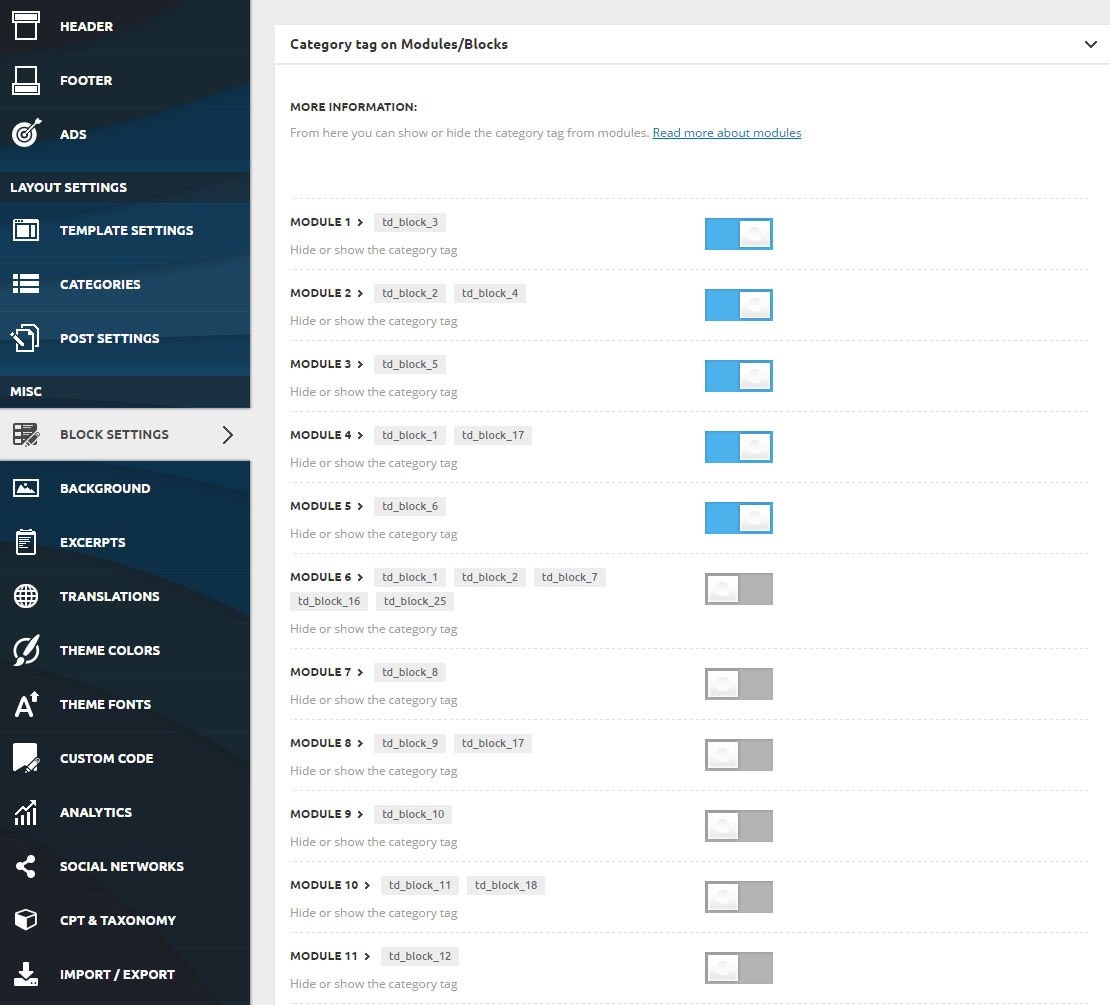
Simion C. Hi,
Here is a list containing all the block and grid types, and the modules they contain
– https://forum.tagdiv.com/theme-blocks-modules/
Block 5 uses module 3, so the article title font properties can be customized here
– https://www.screencast.com/t/wHifPkXlWrv
Thanks
Simion C. Hi,
A simple modification needs to be made, the result would be like this (I have changed the color as your general color, but you can change it how you wish)
– https://www.screencast.com/t/qYAnqBInN
– https://www.screencast.com/t/z6MUCQdRiQIB
– https://www.screencast.com/t/J11aCLep
This is the new code, make further tests and see i everything is displayed properly
.block-title {

text-align: center;

border: none;

margin-bottom: 25px;

}

.block-title a,

.block-title span {

background: transparent!important;

color: #b001ff;

border-width: 1px;

border-style: solid;

border-color: #b001ff;

padding: 10px 0 8px 0;

width: 100%;

}
Thanks
Simion C. Hi,
I believe this is a misunderstanding, hopefully we can solve it. Each available demo has it’s own custom design. Installing it will import a demo stylesheet, this may overwrite default styles and designs.
The magazine demo has a condition set for the block titles in it’s stylesheet
– https://www.screencast.com/t/hoWCoi1Ohi5
The result is that the block titles background is transparent, only the border color is affected by changing the background color.
If you were to remove the code shown in the screenshot, the background of the block titles will have default functionality
– https://www.screencast.com/t/cg1hoKIop
You can then customize the blocks with the composer and set the colors as you wish
– https://www.screencast.com/t/oWEQeliiJqg
Thanks
Simion C. Hi,
If you have created and published posts, then these posts are still available. They are saved in the database. Please do not edit the dummy posts that are provided when the demo is installed
– https://forum.tagdiv.com/installing-demos/
If you edit these dummy posts and then uninstall the demo, they will be removed. They are demo content, you have to create your own posts and publish them.
Pages can be edited and the blocks and grids can be filtered and sorted to display posts from your own categories, replacing the demo content
– https://forum.tagdiv.com/block-settings-guide/
Unless you have a backup, there is no way or restoring edited dummy posts.
Thanks
Simion C. Hi,
Each block or grid has options to filter and sort the content that is displayed. This is an useful guide regarding block settings
– https://forum.tagdiv.com/block-settings-guide/
Simply edit the page with the composer, then add/remove and customize the elements you want
– https://forum.tagdiv.com/tagdiv-composer-tutorial/
Please note that each block and grid is made of modules (same type or different ones)
– https://forum.tagdiv.com/theme-blocks-modules/
These modules can display an author name, date and comment count
– https://www.screencast.com/t/3c6GtgIwf
Not all modules display that information however. You can see how all the blocks and grids look in the live demo
– https://demo.tagdiv.com/newspaper/block-1/
– https://demo.tagdiv.com/newspaper/big-grid-1/
– https://demo.tagdiv.com/newspaper/full-big-grid-1/
There is no option to display the author avatar and view counter in the modules. They will only display what they are meant to.
Thanks
 arirasanen
Hi!
I use Block 5 on my front page, and it filters 6 of my pages to front page. In theme panel I just found a list of modules and a possibility to change font for all blocks without the possibility to fix size. Can I change the font and is the size adjustable for a specific block, like this Block 5? And what are these modules?
 Edragon
 Okay, I give up. I can’t figure out what I am doing wrong with TABS.
Tried to add hr/separator there like you see from left side. So they both can have exactly same design. But every time when I try to use margin for separator it disappears. I can play margins for whole tabs or any blocks inside it, but whenever I try it for separator, it disappears. Also tried to play with border bottom for tabs, but it adds that border of course whole tabs bottom.
Also, since I used separator inside tabs, it means that I need to duplicate to all tabs windows. Which is probably another bad idea. So I tried to add hr via css, but it did not end well. Same when I tried to use some td css for titles.

Any ideas?
Also again that green color appeared. Any clue where I can find that green color in newspaper theme panel so I can change it forever and permanently.
-
This reply was modified 9 years by
Edragon.
 sunnydream
Hi, sorry, another newbie question. I need to have some special styling on some text blocks such as colored background with padding. I did it with in-line style currently but would love to know that where can I add the CSS style so that elements with the class names will have the same style throughout the site. Also, customized CSS style won’t be wiped out with wordpress or theme update, right? Thanks so much!
 David
David Hi Simion,
Thanks for your quick reply! The code you provided works well, except for the pages I build with Visual Composer. Do you know which classes I have to select for this?
Visual Composer also offers its own design options for each object but it seems that these options are not working. Probably they are blocked by theme settings?
 uoygnivol
 Hi thank you,
I have another question, the featured image as show seems wrong display in the large screen. I attached the link below:
http://vntokenomy.com/moodys-thach-thuc-tu-blockchain-va-tien-ma-hoa/
Thanks.
 themaker67
 ok, it can work for the moment, but please, implement something like your “big grid 4” but for 1 post from 1 category, because the result is visually much nicer.
With the “block 22” there are too many text under the picture.
Thanks again
 Catalin
 Hello themake67,
Please check our Block list because there we have a lot of blocks. For example, you should try using the Block 22 because this element uses 1 thumbnails to display posts. Check here -> https://demo.tagdiv.com/newspaper/block-22/
Thanks for your understanding!
Simion C. Hi,
Each demo has custom design, that is one of the design choices for the demo. It would depend where you want to make this customization, in some cases it could not work properly. The style is not available as a block header, it is made with CSS.
This section of code is responsible
– https://www.screencast.com/t/xJgciKdGg6r
– https://www.screencast.com/t/u96hgAwLabml
Try it with the default block template selected
.block-title {

text-align: center;

border: none;

margin-bottom: 25px;

}

.block-title span {

background: transparent;

color: #222;

border-width: 1px;

border-style: solid;

border-color: #ff9bd2;

padding: 10px 0 8px 0;

width: 100%;

}
This is the base code, it will apply to all block titles. Make modifications to it how you like.
Thanks
 shubhamhoriba
Hello,
Everybody,
I am facing few issue with current newspaper theme.
First category image issue,- i need to bring a category grid on top of my home page with images under grid 15 (block 15),
Second – i need to bring Author Avatar in to the image thumbnail in block 21,also need to bring view counter in block 21 grid view..
I would really appreciate any help in solving this problem.
DavidHi,
I would like to make my block headers look like seen here at the baby blog demo (square outline). But I can’t find this style under the block header templates. Could you please tell me how you created this?
Thanks in Advance!
Simion C. Hi,
That could be caused by insufficient resources. Please check the theme system status and make modifications to the parameters mentioned in this guide
– https://forum.tagdiv.com/system-status-parameters-guide/
You could ask your hosting provider to make them for you if needed. There is no limit to how many sidebars you can create, and how many widgets you place in them.
On the homepage I seem you use a widget sidebar element
– https://www.screencast.com/t/K3G8XkaFp
It contains a social counter, a few blocks and an ad.
Thanks
Simion C. Hi,
You could hide the grid with CSS, only for mobile. Something like this, in the Advanced CSS section of the theme panel
– https://www.screencast.com/t/q8ooShGqbE
.td_block_big_grid_3 {

display: none;

}
Thanks
Simion C. Hi,
The modules display a set of predefined meta, a taxonomy is not part of this information, at the moment.
The module files are found here – https://www.screencast.com/t/i19PlFjMw
The corresponding functions are here – https://www.screencast.com/t/UZwHBNhPCO
These are some somewhat similar topics that might have useful information if you would like to implement this
– https://forum.tagdiv.com/topic/custom-taxonomy-or-custom-query-for-newspaper-blocks/
– https://forum.tagdiv.com/topic/filter-blocks-by-custom-taxonomies/
– https://forum.tagdiv.com/topic/how-to-add-taxonomy-filter-in-block-filter-settings/
Thanks
themaker67 Ok, thank you, but i need a single block (a single square) where to show a single article, the latest, from a single category.
 ataoglu78
 hi, in rd_block_77.php i found a foreach loop code. line 42 “$td_post_count = 0; // the number of posts rendered”. i add this $buffy .= $td_post_count; cumber came in loops.
But i want to add this index number like blow
<div class=”td-module-meta-info”>
<?php $td_post_count;?>
<?php echo $this->get_author();?>
<?php echo $this->get_date();?>
<?php echo $this->get_comments();?>
</div>
Catalin Hello themaker67,
Yes, this option exists in our theme. You simply use a block from our list if you like it and then, from Block Settings you should choose a category after which to filter the posts, like this -> https://www.screencast.com/t/uDn8aSfl
Thanks for the message!
