
- ApiPractical example – How to add a new Block and Module
- Apitd_api_block::delete
- Apitd_api_block::update_key
- Apitd_api_block::update
- Apitd_api_block::add
- ApiAPI – Blocks – Introduction
- Apitd_api_thumb::update_key
- Apitd_api_thumb::update
- Apitd_api_thumb::add
- ApiAPI – Thumbnail – Introduction
- Apitd_api_category_top_posts_style::update_key
- Apitd_api_category_top_posts_style::update
- Apitd_api_category_top_posts_style::add
- ApiAPI – Category top section style – Introduction
- Apitd_api_module::update_key
- Apitd_api_module::update
- Apitd_api_module::add
- ApiAPI – Modules – Introduction
- ApiUsing the Theme API in plugins
- ApiThe Theme API
 Simion C.
 Hi,
If you created and assigned a tag for some posts, you can simply use that tag to filter a block content. Like in this example
– https://www.screencast.com/t/7k0yhwTn
– https://www.screencast.com/t/6jbAGrYnJ
Only posts that have that tag will be displayed in that block. You can further filter by category and sort the posts as well. More about the available block settings here
– https://forum.tagdiv.com/block-settings-guide/
The category slug will have to be used in the field, but unless you have set a different slug than the tag name, it should be the same
– https://www.screencast.com/t/I6kfBc4lxp
Thanks
 Catalin
 Hello princeehirim,
Please check our theme thumbs from here -> https://www.screencast.com/t/Acgcqay63tBp and here you will see all the theme sizes for our blocks/modules.
Thanks for the message!
Simion C. Hi,
By default the top bar will not be displayed on mobile. There is no theme option to enable it. If it is absolutely necessary it could be made to display with custom code, like this
– https://www.screencast.com/t/FIlbEiNcA
The code will also center align the menu items and date, you can remove that conditions if it is not needed. Enter the code in Theme panel->Custom CSS section
@media (max-width: 767px) {

.td-header-top-menu-full,

.td-header-sp-top-menu {

display: block!important;

text-align: center;

}}
Thanks
Simion C. Hi,
A code like this will align all the block titles on the homepage, to the right
– https://www.screencast.com/t/AZTQjGsjmNg
Enter the code in Theme panel->Custom CSS
.home .td-block-title {

text-align: right;

}
Thanks
 Bogdan B.
 Hello,
If you require 2 posts at the top and 3 posts on the bottom on the same layout (sidebar wise) then you will need to use separate blocks.
Try to use a big grid for the top 2 posts and then use block 4 for the 3 posts per column part. You can use the offset feature to not have duplicates.
https://forum.tagdiv.com/block-settings-tutorial/
Thank you!
Simion C. Hi,
When using the mobile theme plugin, this will always display on the front page a Top grid (which displays posts from the Featured category) and a Latest articles section. The mobile theme does not have options to remove any of these elements. The latest articles title could be removed with some CSS if you don’t want it displayed.
Enter this code in Theme panel->Mobile theme->Custom CSS section and it should remove the text “Latest articles”
.td-pb-article-list .block-title span{

display: none;

}
Thanks
Simion C. Hi,
For me the website seems to display the latest version at the moment
– https://www.screencast.com/t/FU31saVWSK
– https://www.screencast.com/t/vHgWBCL5gB
I don’t see any problem with the website, browsing the homepage, category pages and posts. The displayed posts are as late as Oct 20 and the grid and block filtering seems to work properly.
Regarding the sitemap issue, try using the Yoast SEO plugin, and configure the sitemap again
– https://kb.yoast.com/kb/enable-xml-sitemaps-in-the-wordpress-seo-plugin/
– https://yoast.com/what-is-an-xml-sitemap-and-why-should-you-have-one/
– https://kb.yoast.com/kb/how-to-customize-the-sitemap-index/
– https://kb.yoast.com/kb/submit-sitemap-search-engines/
The theme does not have any setting or options concerning SEO pr sitemaps, everything has to be done through a plugin. We don’t have an optimization or website review department. Try the Yoast plugin, enable and customize the sitemap if needed, then submit it and check the results.
Thanks
 khan_7
this theme buy one year before, smoothly going on last one year , last 15 days before shift server new server upload all file and database, then problem start server cpu uses 100% all time different ip to spam visitor came per minute 100 up, already 5 ip block but visitor continue please help
Simion C. Hi,
Thank you for your appreciation. You can create a page using any of the available elements with the tagDiv composer, and set it as homepage
– https://forum.tagdiv.com/homepage-how-to-build-and-set-it/
– https://forum.tagdiv.com/tagdiv-composer-tutorial/
There are Big grids, Full Big grids and blocks that can be used to display your posts
– https://demo.tagdiv.com/newspaper/big-grid-1/
– https://demo.tagdiv.com/newspaper/full-big-grid-1/
– https://demo.tagdiv.com/newspaper/block-1/
I see you are not using a static page as homepage at the moment. For example create a page and select the Latest articles page template
– https://www.screencast.com/t/DV99YC1k
Place the grid of you choosing at top (like Big grid 1 that is present on your category page)
– https://www.screencast.com/t/4ghxi5Bz
The module that displays posts in the Latest articles section can be changed as well, in addition a custom name can be set for this section
– https://www.screencast.com/t/FuEMewgoeaN
The result will be a page with a grid on top, and a latest articles section below. Just like you wanted. Using the composer you can create pages in any way you like, it is not hard to use.
Please let us know if you have further questions, or you need help.
Thanks
 fquiquet
 I have the same issue with Block header 1. I need to colour the text and the line but it will only colour the line beneath the text, but not the background of the text itself.
I have installed News Magazine Demo.
How did you solved this issue ?
 Prokhorov
 Lets simplify this:
I want to have a block size equal to red marker lines, but I want that title resize itself according to size of words to fit inside it and doesnt change layot
ProkhorovHello.
So, I add some borders and background on my blocks to look cooler and I want another thing. In down post I use paddig but when i add more words to title whole block became bigger.
I want to have fixed layout and predefined block size like down photo on my picture, but I dont want to use excerpts.
I want to prevent that smaller headline pull whole article bottom color up.
https://imgur.com/a/VSVZ5 this link is from The Guardian and explains what I want, so, blocks of the same size but that title size doesnt affect on that block size or push my posts down and broke layout. How can I achieve that?
It also can be solved by adding automatic font resize when title become too big for fit inside block, how can I do that?
 mdz
mdzHello!
Is it possible to use in category template the same what is used in front page:
[td_block_21 limit=”10″ category_id=”1″ ajax_pagination=”infinite” custom_title=”asd”]
???
 misolek
Hi,
In Theme Panel > THEME FONTS I cannot open the Modules MX and Other Blocks – Article Titles menu. It just makes the loading animation, but it never opens.
 cantonjester
 Actually, I figured out how to do it. The question now is: how do I make particular smart sidebars, or the modules/blocks contained within them, have the hyperlinks to the posts they contain open in new tabs/windows?
-
This reply was modified 9 years by
cantonjester.
 simchris
 Note – renaming theme folder will likely cause you to have to re-enable the theme from WordPress if you also rename the theme in the style sheet (the advanced method in addition to changing folder name). So, make sure you have backups of everything including all your settings from theme panel which you should already have backed up after cleaning.
The idea is
a) hide WP version
b) hide theme name by folder and style.css reading (style sheet is public, so ‘name’ is in there for bots to find)
c) perhaps even change the version in the style sheet to something like 44.6.66 vs 4.6.1 or whatever
so if your folder and style sheet say ‘newspooper’ vs ‘newspaper’ and different version number, and you block XMLRPC (known attack vector); you have a little bit of safety from bots ‘trolling the web’ for vulnerable versions.
In fact when I check my site running newsmag using this methodology, the “what theme are they using” site says “site not running wordpress…” — so a ‘win’ there.
Food for thought for those not wanting to upgrade. I can’t provide any other help than as noted, as I don’t work here — but ideas for those of you on older versions.
simchris This may help while waiting for reply from TagDiv on specific file to remove — however theme may not work with some edits:
https://forum.tagdiv.com/topic/tutorial-good-basic-security-practices/
One option if not ready to upgrade, after cleaning boxes and dbase
a) rename theme folder to something else (newspooper)
b) add function in the functions.php to remove versions/XMLRPC in the post data.
remove_action('wp_head', 'rsd_link');

remove_action('wp_head', 'wlwmanifest_link');

remove_action('wp_head', 'wp_generator');

add_filter('xmlrpc_enabled', '__return_false');
disable xml-rpc in your htaccess file (if using Apache hosting)
# Block WordPress xmlrpc.php requests

<Files xmlrpc.php>

order deny,allow

deny from all

allow from 123.123.123.123

</Files>
 princeehirim
I want to edit my photos to the default size of the image box so photos I upload to the site don’t get cropped out. Otherwise you can help suggest what block or module works best with movie posters of about 27 x 41.
 habarnama
Hello, ON MAIN PAGE, I want to align blocks headings and theme little text on right side. Its newspaper and on main page, I want block news and their news text to align right. I am not talking about single Post. I am talking about main page, where all the blocks are showin with all posts. Thanks in advance.
urdu.habarnama.com
mdz Simion – and what about popular categories (.td_block_popular_categories li a) – to change css for that block, we also need to put css code in custom css – but thats not good, because when page is loaded it first render default font and after that render cuustom css …
I think that box css also must be configured via THEME PANEL font settings.
What u think ?
-
This reply was modified 9 years by
mdz.
 bmorgan
Hello,
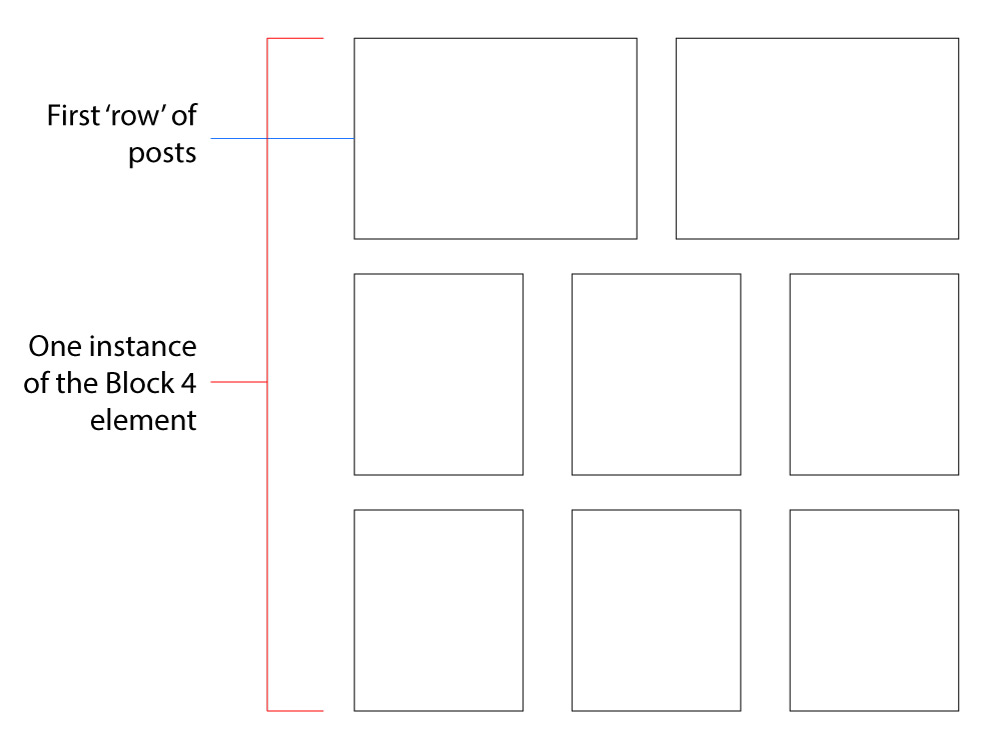
I am looking to use one instance of Block 4 for displaying posts on a page. I understand that placing the block 4 element into a 12/12 VC Row will render me a three-grid layout for each ‘row’ of posts (dependent on how may posts I choose to show).
What I need to do is edit the first ‘row’ of the Block 4 element to render me a two grid layout, while keeping the subsequent ‘rows’the same at three-grid.
I’ve attached an image showing you what I’m trying to do.
Please tell me what file(s) I need to edit to accomplish this. Also, if possible, if you can tell me exactly what I need to do when editing the file(s), I would greatly appreciate it.
Thank you
Catalin Hello,
If you want to change the block pagination you should change from here -> https://www.screencast.com/t/fjXYViNnK
Thanks.
Simion C. Hi,
The theme grids and blocks can only display featured images that you set for posts and pages. The modules will not display anything else, they are not meant to have a different functionality.
That could only be achieved by modifying the module file that the full grid 1 is using
– https://www.screencast.com/t/BppNsGmYA
Modify or replace the code where the thumbnails is called, and display what you want instead.
Thanks
Simion C. Hi,
Maybe I am misunderstanding this, sorry if I am. When a post has a review, the theme modules used on blocks and grids display the stars instead of the author name and date. I believe that is for design purposes.
I thought you wanted to remove the stars in this case, and display the author name and date. That is what the modification from above will do, for all the modules at once.
If this is not what you wanted to know, please state what exactly is it you want to do with the review stars so we can avoid further misunderstandings.
Thanks
Catalin Hi,
Please show me exactly the block which you are referring to.
Thanks for your understanding!
