
- ApiPractical example – How to add a new Block and Module
- Apitd_api_block::delete
- Apitd_api_block::update_key
- Apitd_api_block::update
- Apitd_api_block::add
- ApiAPI – Blocks – Introduction
- Apitd_api_thumb::update_key
- Apitd_api_thumb::update
- Apitd_api_thumb::add
- ApiAPI – Thumbnail – Introduction
- Apitd_api_category_top_posts_style::update_key
- Apitd_api_category_top_posts_style::update
- Apitd_api_category_top_posts_style::add
- ApiAPI – Category top section style – Introduction
- Apitd_api_module::update_key
- Apitd_api_module::update
- Apitd_api_module::add
- ApiAPI – Modules – Introduction
- ApiUsing the Theme API in plugins
- ApiThe Theme API
 Simion C.
 Hi,
You cannot set featured images for categories, you can only set featured images for posts and pages. The theme grids and blocks can display created posts and also pages
– https://forum.tagdiv.com/featured-image-or-video/
The category pages are created automatically, and can only be customized through the theme panel at the moment
– https://forum.tagdiv.com/how-category-settings-work/
The thumbnails that are displayed in grids and blocks are created from the featured images set. This is an automatic process
– https://forum.tagdiv.com/theme-thumbs/
Thanks
Simion C. Hi,
There are many footer templates that you can choose from
– https://forum.tagdiv.com/footer-templates/
Some contain predefined content and content will be added below them, others are empty templates. The demo uses footer template 1 for example
– https://demo.tagdiv.com/newspaper/
Those three blocks are predefined in the footer template. The logo and footer text can be set in the theme panel
– https://www.screencast.com/t/WEtc5iIyu
Socials can be enabled or disabled in the same footer settings. The socials displayed will be the ones entered in Theme panel->Social networks
– https://www.screencast.com/t/G7EppaN9xriM
Thanks
 Eric V
 Hey Catalin,
I think it was a strange glitch. When i was in a post, i did see that same post in the related article block right under it. I think the issue resolved itself. I have no idea. You?
Simion C. Hi,
That is an unusual problem. If there is no caching then the homepage and website should display the changes and modifications immediately, on all browsers. There should be no, or minor delay.
That kind of problems are usually caused by a form of caching
– https://codex.wordpress.org/I_Make_Changes_and_Nothing_Happens
The general issue you are describing seems to be with the homepage content. Try inspecting this page, check the blocks and grids settings. Specially the filtering and sorting.
If you could provide a link to your website we will inspect it, and see what it displays.
Thanks
 Arlink
Hello,
After updating the theme, the weather function stopped working. Both a block of weather on the site and the weather in the top bar don’t work. An api key error message appears. Please help me.
Simion C. Hi,
On pages you can use any of the available grids, blocks and other elements to display your posts. Check them all out and pick the ones most suited to display the content
– https://demo.tagdiv.com/newspaper/block-1/
– https://demo.tagdiv.com/newspaper/big-grid-1/
– https://demo.tagdiv.com/newspaper/full-big-grid-1/
There is a video playlist element as well
– https://demo.tagdiv.com/newspaper/video-playlist/
Or you can simply paste the video link in a text element on pages
– https://www.screencast.com/t/q00KC4Ol
– https://www.screencast.com/t/1CxMJZOZuL
We will add more elements for the tagDiv page builder in future updates.
There are post templates that you can use for featured videos
– https://forum.tagdiv.com/featured-image-or-video/
These are some video post examples
– https://demo.tagdiv.com/newspaper/td-post-how-to-make-a-perfect-caffe-macchiato-video/
– https://demo.tagdiv.com/newspaper/louge-music-reasons-why-in-form-leicester-city-will-finish/
– https://demo.tagdiv.com/newspaper/td-post-major-deep-feelings-january-2015-deep-house-mix/
Thanks
Simion C. Hi,
The pages can be customized using the tagDiv composer. Each element on the page can be customized. This is a guide about using the composer
– https://forum.tagdiv.com/tagdiv-composer-tutorial/
And this a guide mentioning all the available block settings and options
– https://forum.tagdiv.com/block-settings-guide/
A block title or color can be easily modified, while editing the page with the composer
– https://www.screencast.com/t/u4ZSvuom
Widgets present on pages can be customized in Appearance->Widgets
– https://www.screencast.com/t/3ZVbKN6q
Please let us know if you need further help, or you have more questions.
Thanks
 Edward
 > on my site http://www.kreditwuerdigkeit.de/ you see everywhere postingdates.
> How I can delete them?
For Block – Check this point: Theme panel – Block Settings – Meta info on Modules/Blocks
> Below on my site you see the column “Neueste Beträge”. How I can remove this?
For homepage do not use this template:
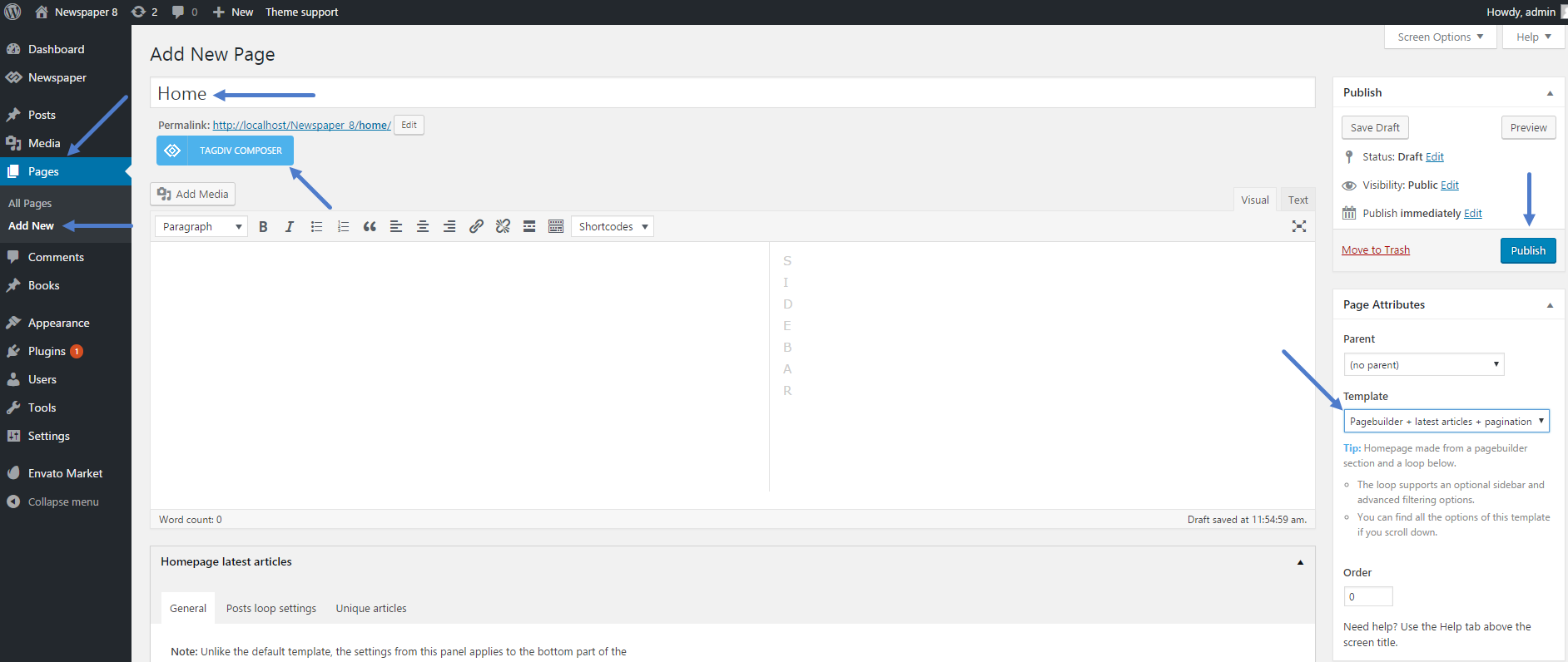
-
This reply was modified 9 years by
Edward.
Simion C. Hi,
1. Grids and blocks will display posts according to the configuration you set for each of them. If you use the same settings for the grid and the block, then the posts displayed will be the same. Please check this block settings tutorial
– https://forum.tagdiv.com/block-settings-tutorial/
Filter the elements on the page differently so they will not display the same posts. If it is required to use the same categories you can use the offset feature
– https://forum.tagdiv.com/offset-feature/
2. You could do that with a code like this
– https://www.screencast.com/t/egH4VJoYVgh
.td-header-style-5 .sf-menu > li.td-normal-menu > ul.sub-menu {

left:0;

}
Enter it in Theme panel->Custom CSS section.
3. The width of the page cannot be changed. It is not recommended to make any modifications concerning the width of the theme. This will break the website layout, all the elements on the page are dependent on the fixed width defined in the theme stylesheet.
4. You can try plugins to create a table, at the moment the composer does not have a specific element for table creation. Try a few plugins and see which one works properly.
5. As well, plugins can be used to create subscription forms. I believe there are many free subscription plugins that would allow you to do this.
Please let us know if you have more questions, or you need further help.
Thanks
Edward > am having trouble with removing on author name
> and comments icon from displaying on home page and etc…
For Block – Check this point: Theme panel – Block Settings – Meta info on Modules/Blocks
Eric VHello,
When i click on one of my posts, the same post is also showing in the related article block, right under that same post. This means double. This is not a good user experience. This is probably because of the use of multiple categories.
How can i make sure the particular post doenst show up again in the related article block?
Thanks!
 AntonioGM
Can I change the position of the blocks of social networks? Now appears FB, INSTAGRAM AND TWITTER and I would like it to be FB, TWITTER AND INSTAGRAM.
Thank you.

 richardvu
thank you for helping my problem.
Today I have a few problems thanks for your help.
My website: thegioicoin.net or cryptonews.vn.
1. My default homepage is about to hit a big grid and a block 11 below. I would like to design the homepage just like the homepage of https://www.coindesk.com. There the Big Gird on contains the typical posts. But these articles will not repeat in the blocks below.
2. I want to edit a bit on the sub menu. When dragging the mouse will drop in a straight line and the corner as coindesk.com
https://www.screencast.com/t/FwxSVsx5VAjI
3. I want to increase the width of the page, and the sidebar with the background color separator. At the same time, the wigets will be aligned with the same size of margin.
4. I want to create an article with a calendar table to insert events in my favor, can I use pulgin or any support tool?
https://www.screencast.com/t/ZnFesAH8Rz
5. I want to create a subscribe section so that visitors of my page can leave the email and I can automatically send new posts to them.
I look forward to your excellent and enthusiastic support staff who will help me.
I am very thankful!
 amma_marketing
Hi
I’m sure this is really easy but I can’t see where to do it…
I want to be able to change the block titles (currently Don’t Miss, Stay Connected etc) to titles of my own. How/where do I do this?
I’d also like to be able to change the colours of the boxes these are in and the line underneath. How/where do I do this?
Thanks in advance
richardvu thank you for helping my problem.
Today I have a few problems thanks for your help.
My website: thegioicoin.net or cryptonews.vn.
1. My default homepage is about to hit a big grid and a block 11 below. I would like to design the homepage just like the homepage of https://www.coindesk.com. There the Big Gird on contains the typical posts. But these articles will not repeat in the blocks below.
2. I want to edit a bit on the sub menu. When dragging the mouse will drop in a straight line and the corner as coindesk.com
https://www.screencast.com/t/FwxSVsx5VAjI
3. I want to increase the width of the page, and the sidebar with the background color separator. At the same time, the wigets will be aligned with the same size of margin.
4. I want to create an article with a calendar table to insert events in my favor, can I use pulgin or any support tool?
https://www.screencast.com/t/ZnFesAH8Rz
5. I want to create a subscribe section so that visitors of my page can leave the email and I can automatically send new posts to them.
I look forward to your excellent and enthusiastic support staff who will help me.
I am very thankful!
 Jevgenij
Hey!
I want to change footer1, footer2 and footer3 blocks which you can see https://www.screencast.com/t/20I0gWlL But in widget part this footer’s blocks are empty – https://www.screencast.com/t/zUcqUk6ORVh
Where can I make changes in footer’s blocks
 underdusken
 Wops, the problem was AdBlock.
 jorleyst
Hello, my theme has character problems of social network icons, I noticed that when I am logged in as administrator and open the site in another tab, the same appears normal, but when removing from the administrator the images and characters of social networks Are bugged. Please wait for directions!
——————
Hello,
This is most likely a font loading problem. Please try the solution posted here: https://webmasters.stackexchange.com/questions/71630/font-blocked-from-loading-by-cross-origin-resource-sharing-policy-no-access-co
If you have any further questions please open a new topic on our official support forum at https://forum.tagdiv.com/forum/newspaper/ The comments section here is destined for presale questions.
Thank you! Bogdan B
———————
Hello friend, the solution presented for htaccess applies only to apache server, nginx server in my case, how can I solve this?
Simion C. Hi,
The header cannot be disabled, there is no option for that. The footer can be disabled in the theme panel, but for the whole website.
The theme blocks will only work within the theme, they will not work with another theme. Everything is custom coded and designed. Blocks and modules are complex elements, there are many processes related to them. Maybe there are plugins that you can use to share content with other websites.
Or maybe these solutions would be helpful
– https://stackoverflow.com/questions/14117763/how-do-you-put-only-a-certain-section-of-a-website-into-an-iframe
– http://www.dimpost.com/2012/12/iframe-how-to-display-specific-part-of.html#.U8jdd3dj42A.wordpress
Thanks
 adrian_van_hal
 Hello Catalin,
It concerns only the block text with title.
Type of text put on the site with the wordpress editor, backend, can be modified with the settings in the theme panel. However, text put on the site with the frontend editor of TAGDIV, does not follow the settings of text in the theme panel.
E.g. I made a page with the TAG DIV editor, front end. In the panel I set the text under ‘pages’ as Droid Sans 18pt. The text on the page however still stays theme deafult.
See in case you want: http://www.europahypotheek.nl/spanjehypotheek/
 alohaboy
Hi,
i would like to offer some partner-websites a widget which should look like a block of my website and refers to my website by clicking on a article-teaser. It should look like this:

Is it somehow possible to make a Website without any header and footer which just shows one block as a widget? This site should be implemented in another site via IFRAME.
Thanks
Simion C. Hi,
Each block and grid post sorting can be customized. There is a popular post sorting available, which displays posts based on views
– https://forum.tagdiv.com/block-settings-guide/
You can choose from the available grids and blocks, and set them to display popular posts. Please note that post views need to be active, in order for the sorting to work
– https://www.screencast.com/t/UR6tdpOEpj
Thanks
Simion C. Hi,
Single modules can be selected for loop section, like Latest articles, category pages, tag pages etc
– https://www.screencast.com/t/leYkP5cHz94
– https://www.screencast.com/t/rMp0EZ8yAnn9
– https://www.screencast.com/t/6l71mlHE1
On pages created with the composer you can add blocks and grids
– https://forum.tagdiv.com/tagdiv-composer-tutorial/
Some blocks contain multiple modules, others are made of the same module
– https://forum.tagdiv.com/theme-blocks-modules/
These are all the blocks that have a Read more button, and you can place on pages
– https://demo.tagdiv.com/newspaper/block-12/
– https://demo.tagdiv.com/newspaper/block-13/
– https://demo.tagdiv.com/newspaper/block-20/
– https://demo.tagdiv.com/newspaper/block-22/
– https://demo.tagdiv.com/newspaper/block-23/
– https://demo.tagdiv.com/newspaper/block-24/
Please note that the number of posts in blocks can be limited, so it could limit it to one module for example
– https://www.screencast.com/t/PQx6iZM8VLv5
Depending on the layout the blocks can switch modules as well. The block may not look the same when on a full row, and a 1/3 split for example.
All the available blocks are predefined, this will ensure they will always display properly in any situation.
I could’t say exactly why the modules are named as they are, it was a decision made by the developers when creating the theme.
Thanks
Simion C. Hi,
You can include posts in the Featured category
– https://forum.tagdiv.com/featured-posts-2/
Then choose the Featured category in the slide filter settings, and sort by Latest
– https://www.screencast.com/t/cjaN2O4V
In this situation the slide will display the latest posts added to the Featured category. A limit of posts can be set as well as an autoplay interval
– https://www.screencast.com/t/XouPGmR1
So now the slide will display for example 5 latest posts from the chosen category, changing every 5 seconds.
The excerpt in this case should be set to letters, maybe choose the same value for all modules. The post titles will not be the same for all posts, experiment with different values for the blocks you use, until you find a perfect solution.
Regarding the cache configuration there is a guide
– https://forum.tagdiv.com/cache-plugin-install-and-configure/
Some settings might have changed, but most are the same
– https://www.screencast.com/t/viT3UUna
We will update the tutorial as soon as possible, taking in account the changes in the cache plugins panels.
The front page will be used to display the posts, you will not be needing that option to use a different page. The “Blog pages show at most” setting controls the number of posts in the Latest articles section (if there is no value set manually – https://www.screencast.com/t/3Io9tIeZhU2), and on category pages loop
– https://www.screencast.com/t/VN0sogW6LNS
– https://www.screencast.com/t/W8vNqqmA1RFs
A sidebar can be set or removed for each category, in the Per category settings. The actual sidebar content can be customized in Appearance->Widgets
– https://www.screencast.com/t/DatBdFk8j
There could be such plugins, but we cannot make any recommendations. You can search for and try out a few plugins that have options like this. The post can be shared but manually, not automatically
– https://forum.tagdiv.com/sharing/
Please let us know if you have further questions, we will try to help you as soon as possible.
Thanks
 Gavin
Gavin Hi Catalin,
I’m ok to edit td_block_authors.php but will it be affected when I update the theme?
