No search results were found in Documentation!
 alexschneiderru
 I still cannot get it working sorry 🙁
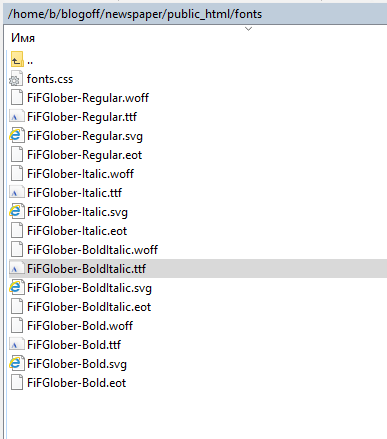
1) I have webfonts files on the site http://c2n.me/3tJ4xkE.png
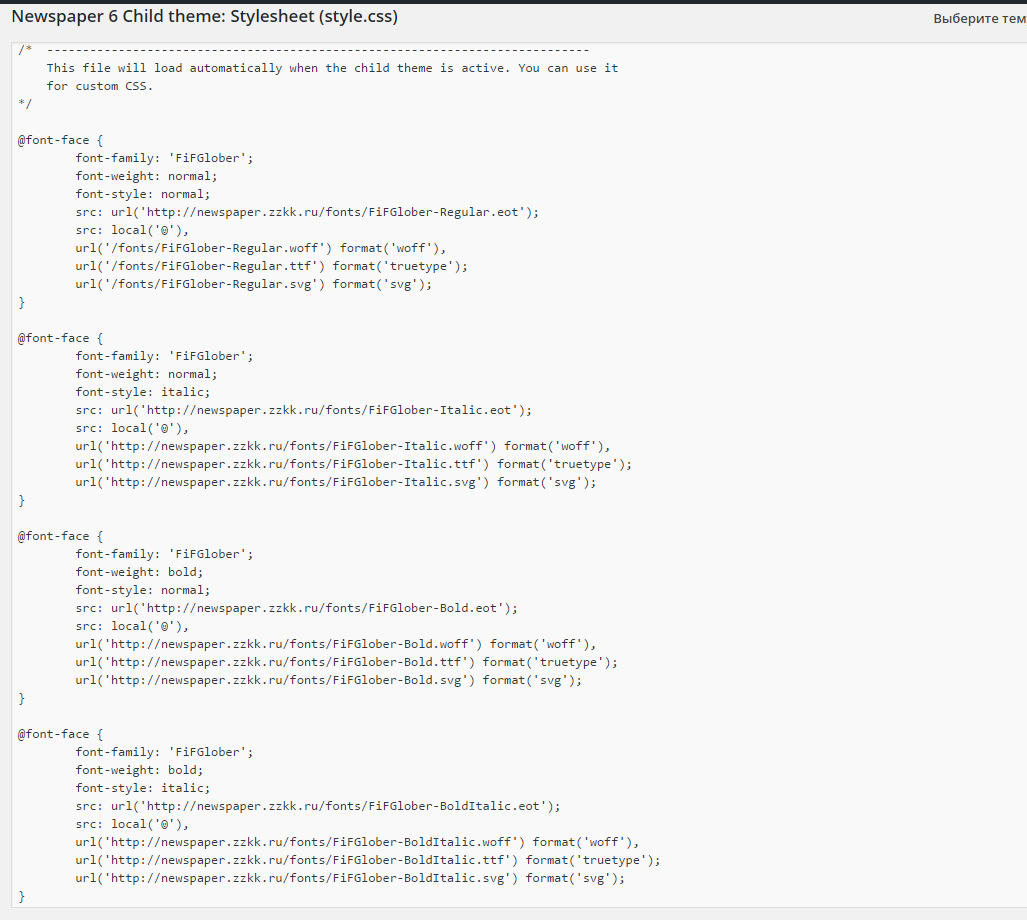
2) I have loaded 4 files for my custom fonts family through css of my child theme: http://c2n.me/3tJ3nG0.png
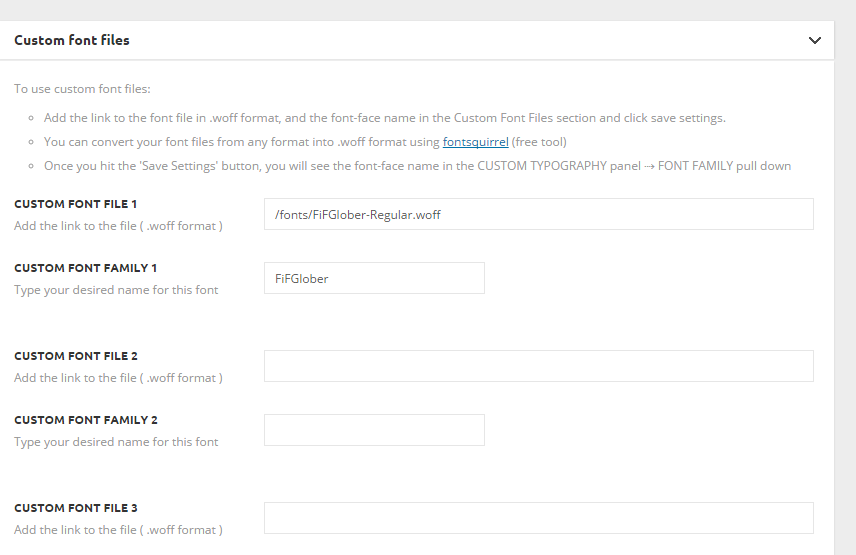
3) I insert one font family in Custom Fonts panel http://c2n.me/3tJ3zQn.png
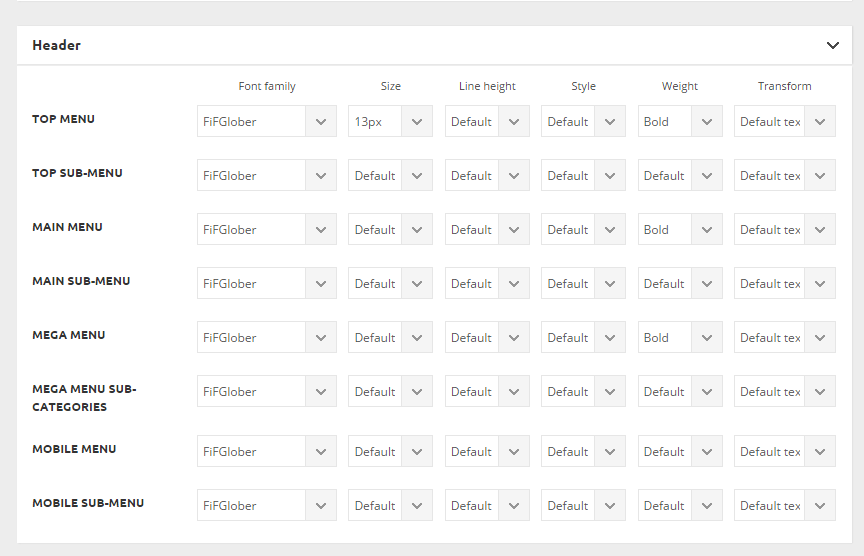
4) I set fonts for menu as ‘bold’ http://c2n.me/3tJ3HlQ.png
5) In front-end menu is still in ‘normal’ weight in Chrome http://c2n.me/3tJ48gA.png and browser-generated faux bold in Firefox http://c2n.me/3tJ4kyB.png
What am I doing wrong?
Please help me.
-
This reply was modified 10 years by
alexschneiderru.
 gaby
gaby Hi,
we tried with absolute path too.
But as you can see on source, for example, on that page http://www.aerospatium.info/un-marche-en-plein-essor-mais-plein-dincertitudes/ the generated code still appears
<!-- Header style compiled by theme -->
<style>
@font-face {
font-family: "neosanspro";
src: local("neosanspro"), url("css/fonts/NeoSansPro.ttf") format("woff");
}
@font-face {
font-family: "neosanspro";
src: local("neosanspro"), url("css/fonts/NeoSansPro.ttf") format("woff");
}
@font-face {
font-family: "neosanspro";
src: local("neosanspro"), url("css/fonts/NeoSansPro.ttf") format("woff");
}
@font-face {
font-family: "neosanspro";
src: local("neosanspro"), url("css/fonts/NeoSansPro.ttf") format("woff");
}
whereas fonts are declared into child theme css as:
@font-face {

    font-family: 'neosanspro';

    src: url('/wp-content/themes/Newspaper-child/css/fonts/NeoSansPro.ttf');

    font-weight: normal;

    font-style: normal;

}
It’s like there are cache issue.
Thanks for your help
 Catalin
 Hello joyceloh,
Please try the code below and add it int Theme panel->Custom CSS area and then you can change the name LATEST->your desired name from Theme panel->Translations->Translations like this -> http://screencast.com/t/OVZ5mmgnOy4
.td-pulldown-filter-item:nth-child(2n){

display:none;

}

.td-pulldown-filter-item:nth-child(1){

display:none;

}

.td-pulldown-filter-item:nth-child(5){

display:none;

}
Thank you for the message!
Catalin Hello joyceloh,
Please try the code below and add it in Theme panel->Custom CSS area.
The code is ->
.td-pulldown-filter-item:nth-child(2n){

display:none;

}

.td-pulldown-filter-item:nth-child(5){

display:none;

}
The result -> http://screencast.com/t/OpbjkZU60FD
As I said you above, you cannot change the ‘LATEST’ to ‘SELECT’ because this is the theme behaviour and so it was set it by default.
Thanks.
 Alin [tagDiv]
 Hi,
Please make sure you have installed/updated the theme right using this guide – https://forum.tagdiv.com/how-to-update-the-theme-2/ and please make sure you use the latest version of the plugins provided with the theme(Visual Composer, Social Counter..) – https://forum.tagdiv.com/how-to-update-the-theme-2/
If you have also other plugins active please disable them and check this only with Visual Composer active, clear cache and see if it works, if you use child theme please check this by using the main theme.
If you still have issues with this, please send an email at contact@tagdiv.com and provide wp-admin access so we can take a look. Also paste a link to this topic.
Thanks!
 nucreative
 Hi Alin, thanks for your reply, and for the custom CSS. Using the CSS would hide the problem, but it would be better if we could get rid of this javascript code completely.
I understand we’re not required to add anything to the Typekit section. And, admittedly, we probably shouldn’t have put Myfonts code in there either. But it’s happened now. And now that javascript is in the database and being injected into the page (<!– JS generated by theme –>)
What we want to do now is remove that code. We’ve tried overwriting the contents of the Typekit box with <script></script> (http://i64.tinypic.com/28tb6gx.jpg), but we still get the same Myfonts code being injected.
By the way, I have searched all of our theme files – we definitely haven’t hardcoded this into our child theme. It must be coming from the database.
I seem to have no option but to edit the database directly – unless you can help me figure out a way to remove it via the theme settings.
Catalin Hello kreacom,
If you want to do a child theme with your desired fonts, this will override these styles from the main theme. If you want to do this for all the fonts in our theme, you can change the style.css with search and replace option and see how it works for you.
I will add your suggestion to our list and hopefully, in a future update, maybe we will be able to implement such an option.
Hope this helps!
Thank you for your suggestion.
 simchris
 Try with just the visual composer plugin and no other plugins installed/active (e.g., no reason to use a woocommerce plugin if not usinf WC). Try not using child theme. Make sure you have at least 64MB allocated to WP. Make sure the paths are correct for WP to find itself.
 kreacom
 If I have a child theme, I suppose that I’ll need to copy all the style that have the fonts style applied and paste it in my child theme style.css to override it?
Would you be able in your next update to add an option in the theme panel font settings to override all the fonts? I think a lot of people need that feature.
Thanks,
Alin [tagDiv] Hi,
You can try this custom css in Theme Panel > Custom Css and it will remove the gradient color, but it may cause issues to your titles, they are not fully visible on some images – http://screencast.com/t/A9Nda8D1U4Ke – http://screencast.com/t/N8NNPrvAVz2G
.td_block_slide .td-image-gradient:before, .td-grid-style-1.td-hover-1 .td-module-thumb a:last-child:before, .td-post-template-3 .td-image-gradient:before {

opacity: 0;

}
Thanks!
nucreative Hi Alin, thanks for your reply.
Yes, I appreciate that this preview bar is not a direct result of the Newspaper6 theme. However, I think you might still be able to help us.
I think we have somehow changed one of the theme settings, and this is what is injecting the Myfonts code into the page.
If you view the source of http://79.170.40.247/wellbeingofwomen.org.uk/ and search for ‘myfonts’ you will find this section:
<!-- JS generated by theme -->
...
<script type="text/javascript">
(function() {
var path = '//easy.myfonts.net/v2/js?sid=250385(font-family=Geometria+Bold)&sid=250387(font-family=Geometria+ExtraLight)&sid=250395(font-family=Geometria+Medium)&sid=250397(font-family=Geometria)&key=Kiee4jHq8u',
protocol = ('https:' == document.location.protocol ? 'https:' : 'http:'),
trial = document.createElement('script');
trial.type = 'text/javascript';
trial.async = true;
trial.src = protocol + path;
var head = document.getElementsByTagName("head")[0];
head.appendChild(trial);
})();
</script>
<!-- Header style compiled by theme -->
If I search a mysql dump of our database, I can also find this data:
INSERT INTO wowwp_options VALUES (
...
(607,'td_011','a:271:{s:15:\"tds_logo_upload\";s:94:\"http://79.170.40.247/wellbeingofwomen.org.uk/wp-content/uploads/2016/01/WoW_horizontal-500.png\";s:13:
...
var path = \\\'//easy.myfonts.net/v2/js?sid=250385(font-family=Geometria+Bold)&sid=250387(font-family=Geometria+ExtraLight)&sid=250395(font-family=Geometria+Medium)&sid=250397(font-family=Geometria)&key=Kiee4jHq8u\\\'
So it appears that the source of the myfonts code within the “JS generated by theme” is one of the entries in the wp_options table.
I suspect the way it got there was via this panel in Theme Panel > Theme Fonts > Custom Fonts:
http://i64.tinypic.com/28tb6gx.jpg
We originally had the myfonts code pasted in here. We’ve tried to overwrite it with a simple empty script tag, but this doesn’t seem to have worked.
Can you help us to fix this?
gabyHi,
On our site, the former developper created a child theme for Newspaper. In the child theme style.css he declared custom fonts like that:
@font-face {

    font-family: 'neosanspro';

    src: url('css/fonts/NeoSansPro.ttf');

}
Fonts are located into child theme directory wp-content/themes/Newspaper-child/css/fonts/
The problem we encounter appears to be with wp-booster which generate inline code (style declaration to avoid css blocking code):
<!-- Header style compiled by theme --><style>

    @font-face {

font-family: "neosanspro";

src: local("neosanspro"), url("css/fonts/NeoSansPro.ttf") format("woff");

}
Whichever the page is, it includes relative path to fonts. So if you navigate to http://domain.com/mypage the browser tries to load http://domain.com/mypage/css/fonts/NeoSansPro.ttf which does not exists…
How to handle this? Is there a way to proper declare custom fonts into the child (we tried absolute path to fonts) theme or into the parent theme so as wp-booster optimization runs correctly?
Any help would be appreciated.
Catalin Hello gunner05,
To achieve this change, it is unnecessary to do child theme. You will just comment the code that I showed you above. The command for the comment is // before each line you want to comment.
If you want to create a child theme for this, you must recreate that file via child theme files. For more information about creating a child theme, please consult our documentation here ->
https://forum.tagdiv.com/the-child-theme-support-tutorial/
Thank you for the message!
 gunner05
 Catalin, how do i do this via child theme? copy the same folder architecture, create a file in child theme folder ?
Catalin Hello joyceloh,
If you want to remove other function from your category page, you have to remove/comment from the td_category_template.php file, like this -> http://screencast.com/t/UTH3tJH7WRl and if you want to hide it, without altering the code, please try the code below and add it in Theme panel->Custom CSS area.
The code is ->
.td-pulldown-filter-item:nth-child(2n){

display:none;

}

.td-pulldown-filter-item:nth-child(3){

display:none;

}

.td-pulldown-filter-item:nth-child(5){

display:none;

}
The result you should see here -> http://screencast.com/t/1oo9uauCSPG
Hope this helps and let us know how it goes!
Thank you for the message!
Catalin Hello sporkhc,
You can do a child theme because the Block template files that can be modified using the child theme.
The child theme helps you to keep the changes made by you for the future update but if your modified files are not changed by the theme in this update. Please notice that the style.css file is changed in every update and it is necessary to update your child theme that comes bundled with our theme on every update to works well. If your files changed are different to files changed by the theme you have to replace only those files in the child theme.
For more information about the child theme support, please check our tutorial here -> https://forum.tagdiv.com/the-child-theme-support-tutorial/
Hope this helps!
Thank you for the message!
 sporkhc
 Thanks – I used that (or another example) and it worked fine, just wondered if there was an easier way using a child theme. Most of my changes are not progmatic, just simple things like altering the thumbnail size or similar, so I’ll continue with the API method.
Alin [tagDiv] Hi,
Please update the theme to the latest version 6.6.4 as these structured data issues were fixed – http://screencast.com/t/WoxwbHZqQfs
Check this guide to update the theme and also update the plugins provide with the theme files from /plugins folder(Visual Composer, Social Counter) – https://forum.tagdiv.com/how-to-update-the-theme-2/ – https://forum.tagdiv.com/how-to-update-visual-composer-plugin/
Also be aware of child theme changes if you use it as we have made some changes – https://forum.tagdiv.com/the-child-theme-support-tutorial/
Thanks!
 Andrei L.
 Hi
I am not aware of the changes that you made in child theme so I can’t say why this happens now. Please make sure that you’re using the child theme acording with our documentation: https://forum.tagdiv.com/child-theme-support/ Also provide more details about the files that you edited and also what changes did you made so I can duplicate the situation on my side and maybe I can provide a solution.
Please consider that editing the theme files with child theme it’s a task which require php knowledge and your customizations must be compatible with the parent theme, otherwise the site functionality will be affected.
Thanks!
 cstibi
Hi,
we are creating our new city portal with your amazing Nespaper theme.
We want to use Delightful Downloads plugin (https://wordpress.org/support/view/plugin-reviews/delightful-downloads) for document management.
When creating new downloadable document, there are two unnecessary windows that we want to hide:
– Custom Post Type – layout settings
– Revolution Slider Options
But we want to show them in post editor. What have to do for hide them using Delightful Downloads plugin?
We use child theme, so we could write something into child themes functions.php if necessary.
Thanks,
Tibor
sporkhcWhat’s the better option if I need a block with a different layout? I see you can either use the td-api plugin or a child theme. I’m not totally clear that the child theme approach lets me add a new block or only override an existing block.
Also, is there a guide somewhere in the docs that shows an example of the layout of each block? It’s kind of hit and miss with the tiny icons in the composer, and no way to see how big the thumbs and such are.
 Przyjem
After creating a simple Newspaper-child theme – some contents of the sidebar moved to footer
Why this happened and how to change this behaviour?
 Seelife
 The only way I can see how to do this is to use a child theme with the featured image php stripped out so only inline images are displayed – not ideal – ideas please…. the theme really locks me into using featured images to display on Home page etc, but how to control on post page selectively?
Catalin Hello damianvadone,
If you are referring to Grid 5 from the category page, like this -> http://screencast.com/t/GM3KiAQDIFOs, unfortunately, our theme does not have such an option to show only the categories without the child’s categories. If you want to display more levels you need custom modifications and if you are not aware the steps in this regard, please consider hiring a freelancer or developer to implement this in our core files because we cannot provide custom services at the moment, sorry!
Also, if you are referring to Big Grid 5, from Visual Composer, you can set it from the Big Grid settings to exclude the categories wich you do not want to be displayed into your grid, like this -> http://screencast.com/t/wEM5Ixel9Z -> http://screencast.com/t/4tEMOINPL
Hope this helps and let us know how it goes!
Thank you for the message!
Andrei L. Hi
Try this css in theme panel > custom css: http://screencast.com/t/WLRp1fCCd
.td-module-thumb a:last-child:before, .td-module-thumb a:last-child:after {

background: none!important

}
Thanks!