
- TutorialstagDiv Social Counter Tutorial
 Bettina
 Hello!
Please note that the page should be built with the TagDiv Composer in order to edit it. We recommend using cloud/PRO templates in order to have the possibility to edit them with the TagDiv Composer, which contains a lot of functions and features. Please check out our tutorial here: https://forum.tagdiv.com/tagdiv-composer-tutorial/
More documentation about the cloud templates is here:
– https://forum.tagdiv.com/cloud-library-templates/
– https://forum.tagdiv.com/design-post-pages-using-cloud-library-templates/
– https://forum.tagdiv.com/cloud-library-category-templates/
Thank you!
Bettina Hello!
Please note that the page should be built with the TagDiv Composer in order to edit it. We recommend using cloud/PRO templates in order to have the possibility to edit them with the TagDiv Composer, which contains a lot of functions and features. Please check out our tutorial here: https://forum.tagdiv.com/tagdiv-composer-tutorial/
More documentation about the cloud templates is here:
– https://forum.tagdiv.com/cloud-library-templates/
– https://forum.tagdiv.com/design-post-pages-using-cloud-library-templates/
– https://forum.tagdiv.com/cloud-library-category-templates/
Thank you!
 Anamaria
 Hi,
If you have a Single Post Template from Cloud Library, then you need to edit the post with tagDiv Composer => https://www.screencast.com/t/jHatJGC1qRf, select the Single Post Views => https://www.screencast.com/t/NhUGCRfI and with right-click, you can delete it.
If you have a standard template, then you can disable the post views from Theme Panel -> Post Settings -> Post and Custom Post Types => https://www.screencast.com/t/LAv90B5eZ (please make sure you have tagDiv Standard Pack activate for standard template)
Thank you!
Bettina Hello @Santi420987 !
If you use a cloud template, then you can edit the page and delete or change the title of the blocks, or change the filter: https://www.screencast.com/t/SEmxo13Fo2X
Thank you!
 jakegeno
 Now I kind of figured out what’s happening. In this part of code:
c = window.tdcAdminSettings.globalHeaderTemplateContent,

    d = !0) : "no_header" === f && (a = !0);

    if ("" !== c) {
window.tdcAdminSettings.globalHeaderTemplateContent is null, so probably should be fixed in the code to check not only for empty string, but null as well or make sure that globalHeaderTemplateContent is always set to something.
Anyway to quickly fix this is to go to “Cloud templates” menu in admin panel, then in section “Header templates” set first “Header Template Global” as global (for some reason I have 2 “Header Template Global” Header templates there).
jakegenoHi!
When I’m trying to edit single post template with tagdiv composer I get following error in console:
Uncaught URIError: URI malformed

    at decodeURIComponent (<anonymous>)

    at Object.b64DecodeUnicode (js_files_for_wrapper.min.js?ver=6e115e4f3fd55dfd38f44cc142869bd1:14:90)

    at js_files_for_wrapper.min.js?ver=6e115e4f3fd55dfd38f44cc142869bd1:44:305

    at js_files_for_wrapper.min.js?ver=6e115e4f3fd55dfd38f44cc142869bd1:45:375

b64DecodeUnicode @ js_files_for_wrapper.min.js?ver=6e115e4f3fd55dfd38f44cc142869bd1:14

(anonymous) @ js_files_for_wrapper.min.js?ver=6e115e4f3fd55dfd38f44cc142869bd1:44

(anonymous) @ js_files_for_wrapper.min.js?ver=6e115e4f3fd55dfd38f44cc142869bd1:45

load-scripts.php?c=0&load%5Bchunk_0%5D=jquery-core,jquery-migrate,utils,wp-polyfill-inert,regenerator-runtime,wp-polyfill,wp-hooks&ver=6.4.2:2 jQuery.Deferred exception: Cannot read properties of undefined (reading 'getShortcodeFromData') TypeError: Cannot read properties of undefined (reading 'getShortcodeFromData')

    at Object.saveHeaderState (https://evhicle.org/wp-content/plugins/td-composer/assets/js/js_files_for_wrapper.min.js?ver=6e115e4f3fd55dfd38f44cc142869bd1:28:388)

    at Object.init (https://evhicle.org/wp-content/plugins/td-composer/assets/js/js_files_for_wrapper.min.js?ver=6e115e4f3fd55dfd38f44cc142869bd1:23:279)

    at https://evhicle.org/wp-admin/post.php?post_id=131&td_action=tdc&tdbLoadDataFromId=115&tdbTemplateType=single&prev_url=%2F%2Fevhicle.org%2F2023%2F12%2F16%2Fapple-may-be-making-major-changes-to-some-of-its-iphone-sizes-next-year%2F:808:44

    at c (https://evhicle.org/wp-admin/load-scripts.php?c=0&load%5Bchunk_0%5D=jquery-core,jquery-migrate,utils,wp-polyfill-inert,regenerator-runtime,wp-polyfill,wp-hooks&ver=6.4.2:2:25304)

    at fireWith (https://evhicle.org/wp-admin/load-scripts.php?c=0&load%5Bchunk_0%5D=jquery-core,jquery-migrate,utils,wp-polyfill-inert,regenerator-runtime,wp-polyfill,wp-hooks&ver=6.4.2:2:26053)

    at e (https://evhicle.org/wp-admin/load-scripts.php?c=0&load%5Bchunk_0%5D=jquery-core,jquery-migrate,utils,wp-polyfill-inert,regenerator-runtime,wp-polyfill,wp-hooks&ver=6.4.2:2:27300)

    at t (https://evhicle.org/wp-admin/load-scripts.php?c=0&load%5Bchunk_0%5D=jquery-core,jquery-migrate,utils,wp-polyfill-inert,regenerator-runtime,wp-polyfill,wp-hooks&ver=6.4.2:2:27330) undefined

ce.Deferred.exceptionHook @ load-scripts.php?c=0&load%5Bchunk_0%5D=jquery-core,jquery-migrate,utils,wp-polyfill-inert,regenerator-runtime,wp-polyfill,wp-hooks&ver=6.4.2:2

t @ load-scripts.php?c=0&load%5Bchunk_0%5D=jquery-core,jquery-migrate,utils,wp-polyfill-inert,regenerator-runtime,wp-polyfill,wp-hooks&ver=6.4.2:2

setTimeout (async)

(anonymous) @ load-scripts.php?c=0&load%5Bchunk_0%5D=jquery-core,jquery-migrate,utils,wp-polyfill-inert,regenerator-runtime,wp-polyfill,wp-hooks&ver=6.4.2:2

c @ load-scripts.php?c=0&load%5Bchunk_0%5D=jquery-core,jquery-migrate,utils,wp-polyfill-inert,regenerator-runtime,wp-polyfill,wp-hooks&ver=6.4.2:2

fireWith @ load-scripts.php?c=0&load%5Bchunk_0%5D=jquery-core,jquery-migrate,utils,wp-polyfill-inert,regenerator-runtime,wp-polyfill,wp-hooks&ver=6.4.2:2

fire @ load-scripts.php?c=0&load%5Bchunk_0%5D=jquery-core,jquery-migrate,utils,wp-polyfill-inert,regenerator-runtime,wp-polyfill,wp-hooks&ver=6.4.2:2

c @ load-scripts.php?c=0&load%5Bchunk_0%5D=jquery-core,jquery-migrate,utils,wp-polyfill-inert,regenerator-runtime,wp-polyfill,wp-hooks&ver=6.4.2:2

fireWith @ load-scripts.php?c=0&load%5Bchunk_0%5D=jquery-core,jquery-migrate,utils,wp-polyfill-inert,regenerator-runtime,wp-polyfill,wp-hooks&ver=6.4.2:2

s.<computed> @ load-scripts.php?c=0&load%5Bchunk_0%5D=jquery-core,jquery-migrate,utils,wp-polyfill-inert,regenerator-runtime,wp-polyfill,wp-hooks&ver=6.4.2:2

c @ load-scripts.php?c=0&load%5Bchunk_0%5D=jquery-core,jquery-migrate,utils,wp-polyfill-inert,regenerator-runtime,wp-polyfill,wp-hooks&ver=6.4.2:2

fireWith @ load-scripts.php?c=0&load%5Bchunk_0%5D=jquery-core,jquery-migrate,utils,wp-polyfill-inert,regenerator-runtime,wp-polyfill,wp-hooks&ver=6.4.2:2

s.<computed> @ load-scripts.php?c=0&load%5Bchunk_0%5D=jquery-core,jquery-migrate,utils,wp-polyfill-inert,regenerator-runtime,wp-polyfill,wp-hooks&ver=6.4.2:2

Q.onsuccess @ js_files_for_wp_admin.min.js?ver=6e115e4f3fd55dfd38f44cc142869bd1:49

IndexedDB (async)

get @ js_files_for_wp_admin.min.js?ver=6e115e4f3fd55dfd38f44cc142869bd1:49

(anonymous) @ post.php?post_id=131&td_action=tdc&tdbLoadDataFromId=115&tdbTemplateType=single&prev_url=%2F%2Fevhicle.org%2F2023%2F12%2F16%2Fapple-may-be-making-major-changes-to-some-of-its-iphone-sizes-next-year%2F:778

load (async)

(anonymous) @ post.php?post_id=131&td_action=tdc&tdbLoadDataFromId=115&tdbTemplateType=single&prev_url=%2F%2Fevhicle.org%2F2023%2F12%2F16%2Fapple-may-be-making-major-changes-to-some-of-its-iphone-sizes-next-year%2F:777

(anonymous) @ post.php?post_id=131&td_action=tdc&tdbLoadDataFromId=115&tdbTemplateType=single&prev_url=%2F%2Fevhicle.org%2F2023%2F12%2F16%2Fapple-may-be-making-major-changes-to-some-of-its-iphone-sizes-next-year%2F:812
Note that editing homepage works perfectly fine and currently I have only 3 plugins activated: tagDiv Composer, tagDiv Cloud Library and tagDiv Newsletter.
Site url: evhicle.org
 urbandigital
Hey,
how can I load a customized section that I inserted earlier from the cloud templates store, in my pagebuilder process? I tried following your documentation (https://forum.tagdiv.com/page-templates-2/)
but in my case I simply dont see this option.
Where I dont find the option you show in your documentation: https://ibb.co/B2RfbhJ
What I want to insert: https://ibb.co/K9npL82
Thanks
 pavel_t
I need to do a basic thing: show individual issues of a magazine/ezine. I prepared a TD Cloud template that displays articles in individual categories (headline, fashion, entertainment, etc.) as I need. But now I don’t know how to mark individual articles so that they belong, for example, to the 2023/25 issue, i.e. the address is mymagazine.com/issue/202325, and then the prepared template will display the articles that belong to this issue. I can’t find a filter in the individual TD elements that says “include articles with the given attribute”, in general, not just from those that I can already select from the list at that moment. I assume that it must be somehow possible, because that is basically the principle of how magazines and newspapers work. How do I do that?
 pavel@earnware.com
We have encountered a notable surge in traffic originating from the Netherlands (some of the source IP’s are 176.222.55.137, 176.222.55.139 both listed here https://www.wordfence.com/threat-intel and 93.174.93.127), specifically targeting the path /wp-json/tdw/save_css, beginning on the 14th of December.
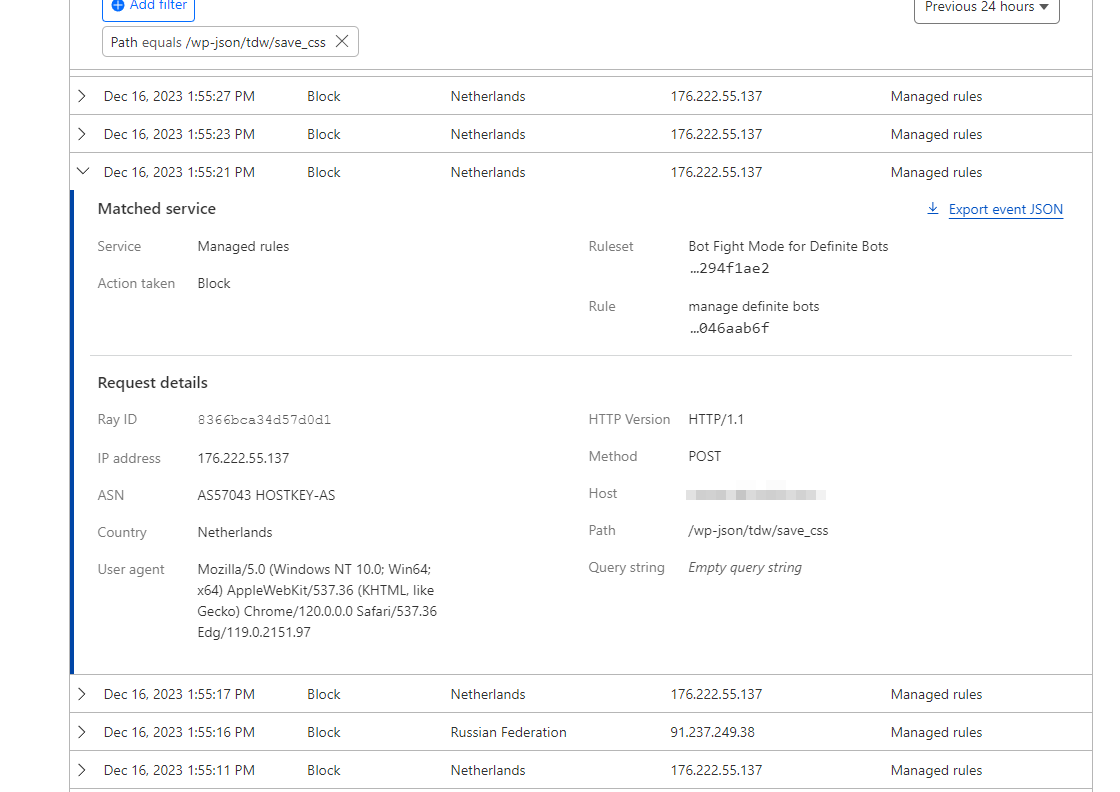
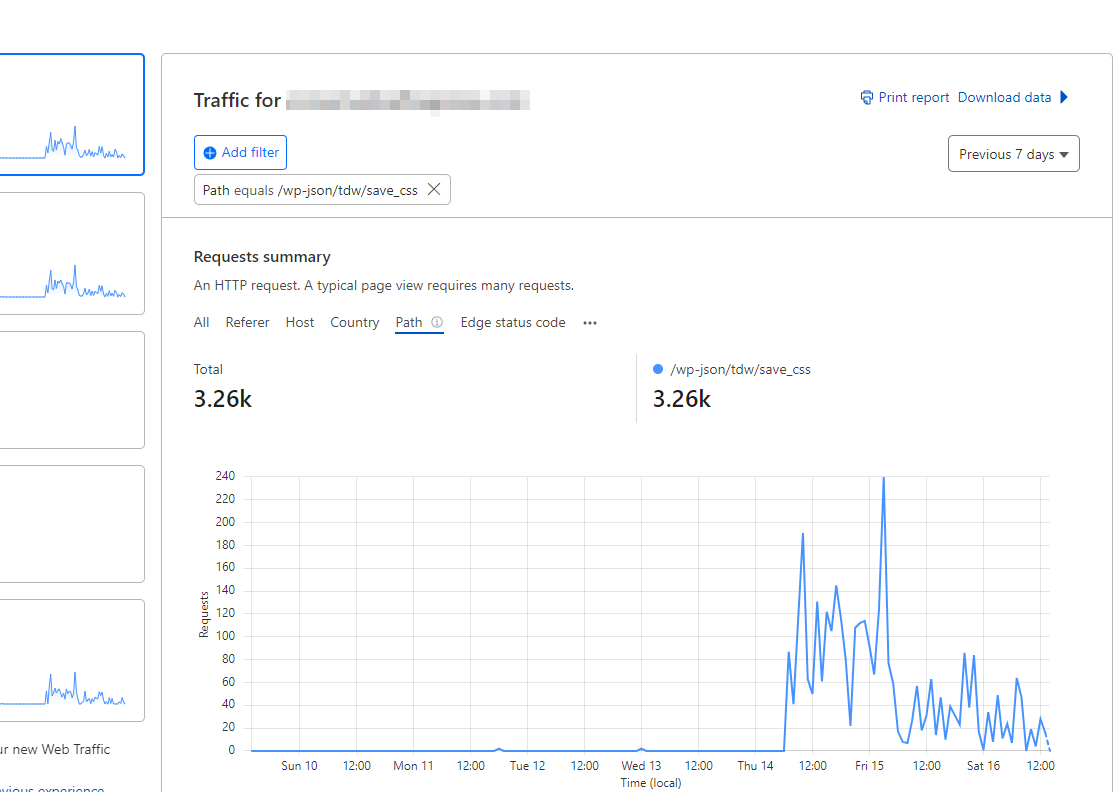
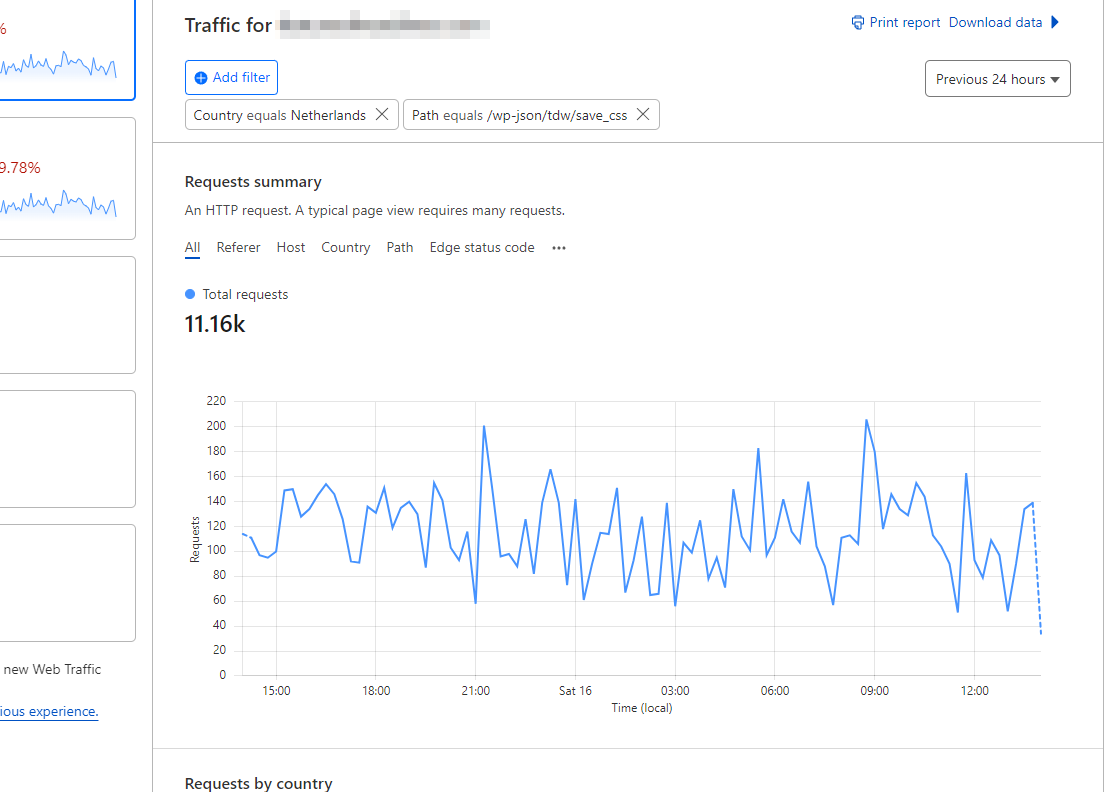
This surge is happening across multiple websites hosted on WPEngine or Digital Ocean. Despite updating all websites from version 12.6.2 to 12.6.3, the increased traffic persists.
Is this related to Balada Injector? https://blog.sucuri.net/2023/10/balada-injector-targets-unpatched-tagdiv-plugin-newspaper-theme-wordpress-admins.html
In our efforts to address the issue, we have also attempted the solution outlined here: How to Disable Access to Exploitation Path for Vulnerable Code in Outdated TagDiv Composer Plugin, but without success.
Is anyone else experiencing this issue (check your Cloudflare stats) and when a fix will be released?
 Calin
Calin Hi,
Please make sure that the necessary theme plugins are installed, those are tagdiv Composer, tagDiv Cloud Library, also, in some cases it’s needs to install the tagDiv Standard Pack plugin. Those plugins can be installed from Newspaper > plugins.
Thank you!
 commandeleven
 Hello Bettina,
I can’t figure out what the problem is. Could you please log in and take a look?
This is what is on the System Status tab of the theme settings:
Theme config
Registration key i 8f6c80cf – **** – **** – **** – 0b3c469dd266 Reset key
Theme name i Newspaper
Theme version i 12.6.3
Theme database version i 12.6.3
HTTP channel test wordpress
Installed demo i Crypto News PRO – demo ID: crypto_news_pro | install type: full
tagDiv advertisement i
php.ini configuration
Server software i Apache
PHP Version i 8.1.26
post_max_size i 516M – You cannot upload images, themes and plugins that have a size bigger than this value. To see how you can change this please check our guide here.
max_execution_time 300
max_input_vars 3000
SUHOSIN installed false
PHP extensions
mbstring available
GD library available
WordPress and plugins
WP Home URL i https://www.commandeleven.com
WP Site URL i https://www.commandeleven.com
WP version i 6.4.2
WP multisite enabled i No
WP Language i en_US
WP Memory Limit 5 GB/request
WP_DEBUG False
Caching plugin No caching plugin detected – for best performance we recommend using WP Super Cache
I turned off WP Super Cache when I saw the header problem.
I’ve checked the Cloud Templates that we have been using and they are all setup correctly.
I’ve already sent the admin access today.
Regards,
Khalid
 pratul11
 I already have Cloud Library plugin installed. Theme & WordPress is updated. Child theme is activated.
Tried loading your tagDiv Cloud Template for Shop but this is what happens even after long time waiting to install…
Screen Recording Video Link. Please check the link.
-
This reply was modified 2 years by
pratul11.
 brega
bregaCan’t import Cloud templates.
Previously imported Footer and header templates disappeared from admin.php?page=tdb_cloud_templates page.
 jonle944
 The issue was actually from my side, there was an issue regarding http and https redirect. It was caused by a misconfiguration setup between the server SSL Certificate and Cloudflare encryption “Flexible” mode.
I fixed it now after I removed the old SSL certificate and used Cloudflare’s Origin Certificate instead and switch Cloudflare’s SSL/TLS encryption mode to Full
Bettina Hello!
You can have different templates for your post, but you need to assign every template individually for each post. Duplicate the template, give it another name, make the changes and set it to your post. https://forum.tagdiv.com/design-post-pages-using-cloud-library-templates/ See https://forum.tagdiv.com/topic/different-logo-in-categorypage/ for more information. So, you can have a different template for your special posts
Thank you!
commandelevenHello,
I have some confusion about some of the pages on our website admin.
I have 3 different login pages.
https://www.commandeleven.com/log-in/ – which is completely blank
https://www.commandeleven.com/login/ – which seems to be connected to a AR member plugin, based on the shortcode on the page. We don’t have AR member installed in our plugins.
https://www.commandeleven.com/tds-login-register/ – which I think is the TagDiv login page for the site.
In addition:
https://www.commandeleven.com/change_password/ – is completely blank, so I don’t know if this part of the TagDiv pages or not
If it is supposed to have content, please help me understand what shortcode or content should appear here, because there are no sections in the cloud template library for a change password page.
https://www.commandeleven.com/my-account/ – gives a 404 error, so I don’t know if this is linked to another plugin and wasn’t deleted when the plugin was deleted. But in the admin section, it’s listed as My Account.
https://www.commandeleven.com/tds-login-register-2/ – gives a 404 error, so I don’t know if this is linked to another plugin and wasn’t deleted when the plugin was deleted. Although this is listed as the login page for TagDiv Opt-In Builder.
https://www.commandeleven.com/register/ – also blank. Please advise on what content is supposed to appear here or if I can download a template from the TagDiv cloud templates library.
https://www.commandeleven.com/reset-password/ – also blank. Please advise on what content is supposed to appear here or if I can download a template from the TagDiv cloud templates library.
https://www.commandeleven.com/sign-up/ – also blank. Please advise on what content is supposed to appear here or if I can download a template from the TagDiv cloud templates library.
https://www.commandeleven.com/edit_profile/ – also blank. Please advise on what content is supposed to appear here or if I can download a template from the TagDiv cloud templates library.
https://www.commandeleven.com/guest/ – completely confused on why there is a guest page. Please advise on what content is supposed to appear here or if I can download a template from the TagDiv cloud templates library.
https://www.commandeleven.com/thank_you/ – also blank. Please advise on what content is supposed to appear here or if I can download a template from the TagDiv cloud templates library.
I have sent an email to contact@tagdiv.com with the same administrator rights that I had sent before. Please take a look.
Here’s a link to the screen shots – https://imgur.com/a/Y75VVep
Regards,
Khalid
Bettina Hello @carpeher !
We have the element Single Post Views, which can be found in the single cloud templates.
Thank you!
 epetros
Hi,
I need to have a different header for specific post categories ( would change between Cloud Header Templates), how can I go about it?
If programmatically is the only way, how can I make reference in the code to specific Headers (ex: Header Template 43 – Tech News PRO, Header Template – Town Talk, Header Template – Default PRO, etc)?
Thanks
 NAGARAJBV5
 thrown in /home1/krishb32/public_html/wp-content/plugins/td-cloud-library/td-cloud-library.php on line 165
[13-Dec-2023 14:37:11 UTC] PHP Fatal error: Uncaught Error: Class “td_util” not found in /home1/krishb32/public_html/wp-content/plugins/td-cloud-library/td-cloud-library.php:165
Stack trace:
#0 /home1/krishb32/public_html/wp-includes/class-wp-hook.php(324): tdb_add_js_variables(”)
#1 /home1/krishb32/public_html/wp-includes/class-wp-hook.php(348): WP_Hook->apply_filters(NULL, Array)
#2 /home1/krishb32/public_html/wp-includes/plugin.php(517): WP_Hook->do_action(Array)
#3 /home1/krishb32/public_html/wp-includes/general-template.php(3052): do_action(‘wp_head’)
#4 /home1/krishb32/public_html/wp-content/themes/Newspaper/header.php(13): wp_head()
#5 /home1/krishb32/public_html/wp-includes/template.php(790): require_once(‘/home1/krishb32…’)
#6 /home1/krishb32/public_html/wp-includes/template.php(725): load_template(‘/home1/krishb32…’, true, Array)
#7 /home1/krishb32/public_html/wp-includes/general-template.php(48): locate_template(Array, true, true, Array)
#8 /home1/krishb32/public_html/wp-content/themes/Newspaper/404.php(1): get_header()
#9 /home1/krishb32/public_html/wp-includes/template-loader.php(106): include(‘/home1/krishb32…’)
#10 /home1/krishb32/public_html/wp-blog-header.php(19): require_once(‘/home1/krishb32…’)
#11 /home1/krishb32/public_html/index.php(17): require(‘/home1/krishb32…’)
#12 {main}
thrown in /home1/krishb32/public_html/wp-content/plugins/td-cloud-library/td-cloud-library.php on line 165
 tizian-ffm
 Hello Bettina,
During an intensive check, we discovered a conflict with old user roles. After we removed these old roles, all media in the media library are now also visible to the admin. The interaction with the tagdiv Cloud Library plugin was probably just a symptom and not the actual error. I apologize for my initial accusation. The problem has now been fixed.
Bettina Hello @jonasfrey !
You can customize every row or column in the tagdiv Composer and add an extra class: https://app.screencast.com/TCfMyzgF1vTZ1
We recommend using cloud/PRO templates in order to have the possibility to edit them with the TagDiv Composer, which contains a lot of functions and features. Please check out our tutorial here: https://forum.tagdiv.com/tagdiv-composer-tutorial/
More documentation about the cloud templates is here:
– https://forum.tagdiv.com/cloud-library-templates/
– https://forum.tagdiv.com/design-post-pages-using-cloud-library-templates/
– https://forum.tagdiv.com/cloud-library-category-templates/
Thank you!
Bettina Hello!
Because you do not use a cloud template. We recommend using cloud/PRO templates in order to have the possibility to edit them with the TagDiv Composer, which contains a lot of functions and features. Please check out our tutorial here: https://forum.tagdiv.com/tagdiv-composer-tutorial/
More documentation about the cloud templates is here:
– https://forum.tagdiv.com/cloud-library-templates/
– https://forum.tagdiv.com/design-post-pages-using-cloud-library-templates/
– https://forum.tagdiv.com/cloud-library-category-templates/
Thank you!
Bettina Hello!
If you do not use a cloud page, then there are no settings to achieve what you need.
Thank you for understanding!
Bettina Hello!
Did you assign a single cloud template? https://forum.tagdiv.com/design-post-pages-using-cloud-library-templates/
Please ask your host provider to check as well, and maybe he has an idea why this is occurring on your website.
Thank you!
 msproductions
 Hello,
The guide provided, “use-tabbed-content-shortcode”, is related to my original concern of not wanting to create a whole page for tabbed content.
Previous versions of Newspaper allowed the content to easily be tabbed on the same PAGE without having to create a whole other page to then import it.
Even though not the designed I was hoping for, I was open to your original suggestion of “sections” (https://cloud.tagdiv.com/#/single/page/Sections/2496) but I don’t want to import a template and have it override my page layout.
Is there a way to have it similar to an old version of Newspaper where it was a simple tab and the content was entered within the composer? or if it requires some line of code I can do that as well.
I would like to avoid the built-in option of having to create multiple pages when the main event page should be enough.
