- NewsmagRequirements for Newsmag
- NewsmagtagDiv Social Counter tutorial
 MetkaS
Hi,
I cant find where to set the main picture of the post – the picture from the post I have created is not showing in the first page – https://antiaging.si/ (the first two posts are without pics)
Can I get a post tutorial please? I have found https://forum.tagdiv.com/design-post-pages-using-cloud-library-templates/
but this is quite complicated to begin with.
Thanks for help
Metka
 Anamaria
 Hello,
It seems you have the mobile theme + amp activated.
The mobile theme comes with its own templates for page, post, category, etc so your current templates from the desktop theme will get converted to the mobile theme layout, the page content is made without builders in mobile editor => https://www.screencast.com/t/xbgZG8kH also, the options that are provided to edit the mobile theme version are limited (this keeps the things simple)).
So, if you want to use the cloud templates, then you need to disable the mobile theme and AMP plugins, and then use the responsive version.
You can disable the mobile theme plugin on the pages from the Gutenberg editor using the following option => https://www.screencast.com/t/axXRJsWby
Also, please check this topic where I explained each mobile version -> https://forum.tagdiv.com/topic/mobile-version-not-working-properly-2/ -> https://forum.tagdiv.com/topic/amp-pages-not-working-well-with-this-theme/ and choose what mobile version you want.
Thank you!
 Satyajit3097
As per direction of Tagdiv Forum expert @Bettina, I have created a Single Post Template for mobile version with the help of Cloud Library Post Template for display the in article google ads as I want. I have properly save the mobile template and also assign it as Global but still why it not implemented to all post for mobile version. I don’t know why make your platform so complicated.
Also sorry to say here that after continuously writing here for my problem since 02/03/2023, problem is still open, not solve yet. Then, what is the benefit of buying Newspaper Premium Theme. So, I am requesting to all support expert, please pay proper attention of customer problem without distributing Link of your website one by one. Do you think, Why I am using harsh language here, because despite request repeatedly my problem is still not solve.
So, once again requesting to solve my problem as early as possible.
 Harutyun
Hi, i have found bug on single post cloud template “Single Post Template 48 – Animals PRO” with using modal popup, the page is crashing please test, i have added html code for my mailerlite.com project, i have tested same code on different cloud tamplates, everywhere is working perfect only in Single Post Template 48 – Animals PRO crashing.
 mdev
mdev After digging into it more, it looks like if the “slug” of the post type is “product” it does not add to Cloud Templates.
mdevHello,
I have tried to add a new CPT but the CPT is not showing up in the Cloud Templates. It shows up in the Newspaper CPT panel but it is missing the article display view as well that is in the setup instructions.
I used the name for CPT: product and Products
Thank you.
 IT Webmedia
 I solved it :
Cloud Templates > CPT/Taxonomies > Set Global
 nearview
Hi gang. With TagDiv, is there a way to either:
– Export/import a cloud template from one site to another?
– Export/import elements from one site to another?
– Copy/paste elements from one site to another?
We have an existing site that we like and want to replicate parts of it to a new site we’re building.
Satyajit3097 Hi, I have created the Single Post Mobile Template through Cloud Library Post Template.
But, still my problem is not solve Google Ads is showing only in before the article start and after article is finished.
Please check my website Tazahindi.com and what next thing is required to do.
 baukunst
Hi,
I’m using an adaptation of Center Pro and everything works great except for the mobile header. I configured the header from the cloud library and it works on all platforms. This is how it should look like:
https://snipboard.io/zSGR8f.jpg
When I switch to mobile I get this:
https://snipboard.io/xiepnO.jpg
I the try to revert the order via the tagdiv-builder
https://snipboard.io/26k4qf.jpg
the I get this:
https://snipboard.io/VC0sTU.jpg
The image is gone.
I resetted the page, I imported the logo in different resolutions about a dozen times, I reinstalled the theme, deleted the header and reinstalled: always the same result: I want to change the order – title, then logo – and the logo is gone. Any ideas?
Thanks so much
Thomas
 Bettina
 Hello @satyajit3097 !
If you will edit an article with the TagDiv Composer, then you can see the settings presented in that guide in my previous message. There, you can edit the mobile or tablet viewport.
More information about cloud templates can be found here:
– https://forum.tagdiv.com/cloud-library-templates/
– https://forum.tagdiv.com/design-post-pages-using-cloud-library-templates/
– https://forum.tagdiv.com/cloud-library-category-templates/
Thank you!
Anamaria Hello,
To have the menu fro amp, you need to have selected mobile+ amp or amp.
Using our theme you can choose from 3 mobile versions
-> mobile responsive => https://www.screencast.com/t/oJ2ShOp47
-> mobile theme plugin => https://forum.tagdiv.com/the-mobile-theme/
-> mobile page => https://tagdiv.com/newspaper-10-3-7-update-brings-customizable-and-fast-mobile-pages/
If you created the mobile pages with tagDiv Composer, then when you install the Mobile Theme plugin, your pages will be overwritten by the plugin (the mobile theme comes with its templates for page, post, category, etc so your current templates from the desktop theme will get converted to the mobile theme layout, the page content is made without builders in mobile editor => https://www.screencast.com/t/xbgZG8kH also, the options that are provided to edit the mobile theme version are limited (this keeps the things simple)).
This is a video about Responsive Newspaper Theme, AMP & Mobile Theme, Mobile Pages & Templates -> https://www.youtube.com/watch?v=SpGkOnJeNZY
So, the mobile responsive is what you see then that you select the viewport on phone => https://www.screencast.com/t/matV17hH, so some settings may apply for each viewport(where is the border blue), and others are not(where the border is black).
The mobile page has the mobile templates from Cloud Library => https://www.screencast.com/t/YCcZ8rL8
Mobile responsive version of the theme and the mobile page editor can be edit with tagDiv Composer, the mobile theme plugin not.
For example, you can have the mobile theme plugin activate and use the mobile page/mobile responsive version for the homepage/pages, but for the categories pages/404 page you can’t use the mobile page/mobile responsive version if you have the mobile theme plugin activate.
So, if you want to design the pages with tagDiv Composer, you can use the mobile page or mobile responsive version.
Thank you!
Satyajit3097 Ok,
You mean, if I use cloud templates, then you have the option to display the ads as I need. I am sending a screen shot of Cloud Library Post Template, link is HERE, please check and how to use this template properly for my blog posts.
Also, intimate is it use for all the devices OR only for mobile version.
Thanks in advance.
-
This reply was modified 3 years by
Satyajit3097.
Bettina Hello @satyajit3097 !
I presented you with the 3 options that you have. Please take a little time to carefully read it, so you can choose a convenient version without the option of a mobile theme. If you will use cloud templates, then we have the option to display the ads as you need. Check out the section called “Cloud Library Post Templates” from here: https://forum.tagdiv.com/post-template-ads/
Thank you!
Anamaria Hello,
So, if you don’t use cloud templates for posts, then the options to edit the font are in Theme Panel -> Theme Fonts -> Post Title/Post Content -> https://i.imgur.com/2ap0uUV.png
Also, change the font here https://i.imgur.com/K3NAPCk.png
Thank you!
 what-the
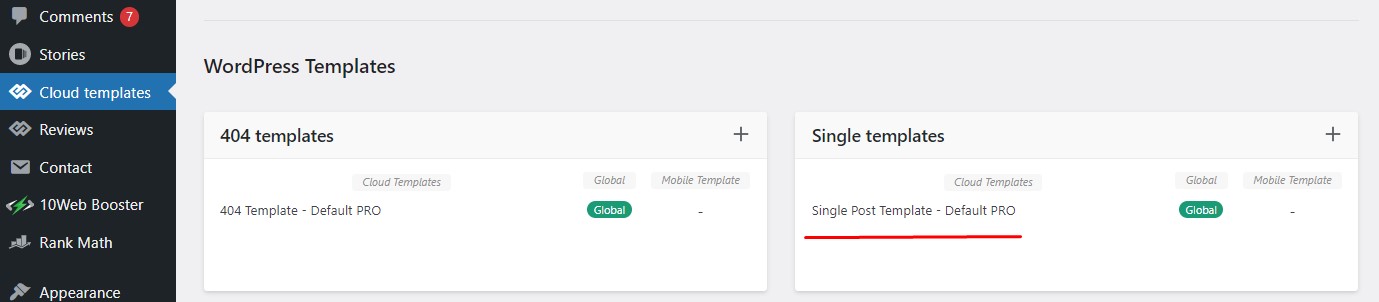
We updated to the newest version of the newspaper theme and the post option on the top of the post page to select a single cloud template is no longer there thus allowing us not to have that particular post to that cloud template.
Help!!!
 Chris Baird
 Where do you apply the cloud template to the cpt?
 ivpt
ivpt I am using standard templates.
Only header is using cloud template.
So it is not possible to remove Roboto completely, but I need to set “Helvetica Neue, Helvetica, Arial, sans-serif” for every page element?
ivpt I am not using cloud template for posts.
In Theme Panel / Theme Fonts / Font Settings everything is set to “Default Font”.
Don’t want to use Roboto nor custom fonts. Want to use system fonts “Helvetica Neue, Helvetica, Arial, sans-serif”.
In CSS I see:
h1,h2,h3,h4,h5,h6 {

    font-family: 'Roboto',sans-serif;

}
div.td-block-title {
font-family: 'Roboto',sans-serif;
}
p.td-module-title,p.tdb-subcategory-name {
font-family: 'Roboto',sans-serif;
}
etc.
Clearly the theme inserts ‘Roboto’,sans-serif everywhere?
Anamaria Hi,
You can follow the steps from those articles -> https://www.cloudways.com/blog/wordpress-403-forbidden-error/ -> https://support.nitropack.io/hc/en-us/articles/360061104274-Page-Optimizations-Forbidden-403-Error-By-Cloudways-Bot-Protection
Thank you!
 Nathan45
 Hey Anamaria,
I did look through those pages yesterday but nothing fixed the issue. I see from this thread – https://forum.tagdiv.com/topic/403-error-on-tagdiv-composer-when-trying-to-use-wp-editor-wpedito-php/ that this is likely a Cloudways issue as I am also running my site through them and getting the exact error as that person but doing that step listed also did not resolve the problem.
Anamaria Hello,
Please check if you have a CPT cloud template on the CPT post.
Also, please provide a video with your steps.
Thank you!
ivpt I am trying to replicate standard “Header Style 7” using cloud template.
I did import “Header Template 7” from Pre-designed Templates – tagDiv Cloud Library window: /wp-admin/admin.php?page=tdb_cloud_templates
It’s impossible mission to add social icons and iOS&Android icons before search icon in the main menu.
Bettina Hello!
This header 7 is a standard one, not a cloud template. Please import a cloud header from Cloud Templates. Although this header: https://imgur.com/a/8WX2nSF is editable with the TagDiv Composer.
Thank you!
ivpt I did try using cloud template “Header Template 7”, but without success. Please see my previous comment.