
- NewsmagRequirements for Newsmag
- NewsmagtagDiv Social Counter tutorial
 Natdanai Kon
Hi Support Team,
I encountered a fatal error on my WordPress site when accessing a category page such as:
https://thekey.news/category/lifestyle/?filter_by=featured
Fatal error: Uncaught Error: Call to a member function is_post_type_archive() on string
in /wp-content/plugins/td-cloud-library/td-cloud-library.php on line 184
 T J
T J The image didn’t come through. Here’s a link to it: https://u.pcloud.link/publink/show?code=XZnxo95ZISYWDkdEf6L0D8dIY3vVxjexgKGy
T JHi there,
Are updating the theme, the frontend looks like this:
Thoughts on what might be causing the issue? The site is niagaranow.com
 yassinee
 I’ve updated the tagDiv Cloud Library plugin to version 3.9.2 (manually), but I’m still receiving a vulnerability warning
 kappe79
Hi,
I’m using Newspaper theme with WPML multilanguage plugin.
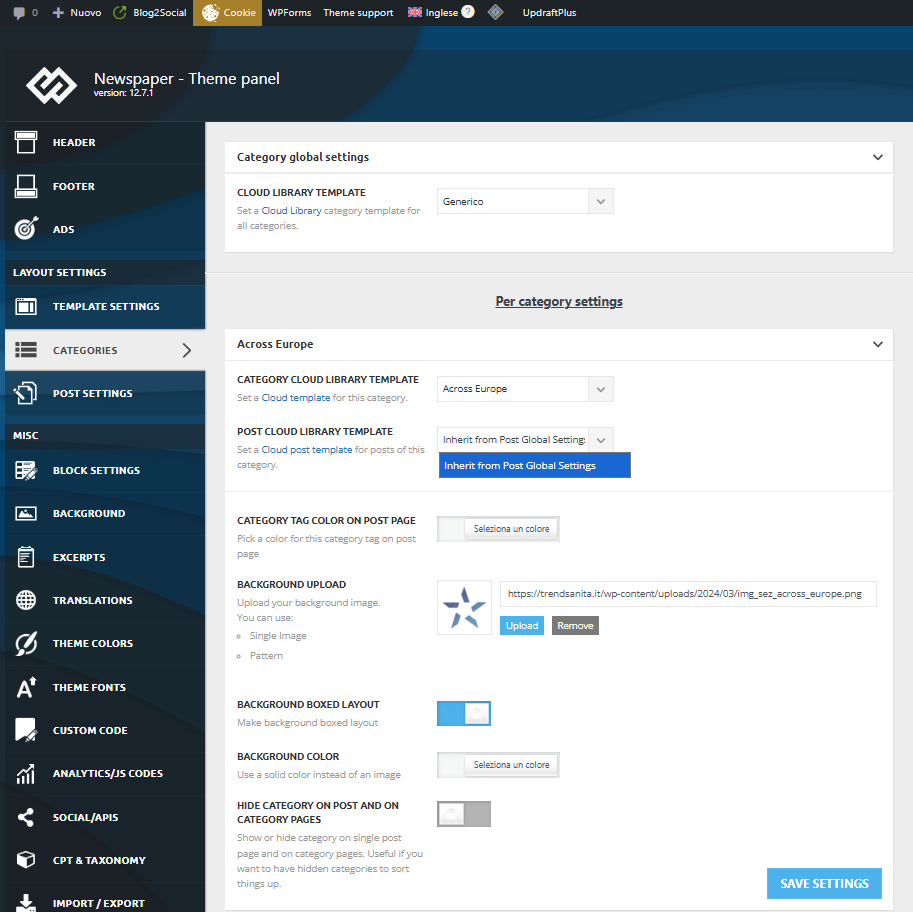
I defined 8 single templates with tagdiv Cloud Template and use two languages managed with WPML. If I work with original language I haven’t any problems, but if select my secondary language there is something wrong in the Theme Category Setting.
For the first category, my Post Cloud Library Template list is empty, so I can’t associate my template to the category:
For the next category instead the list is right and complete:
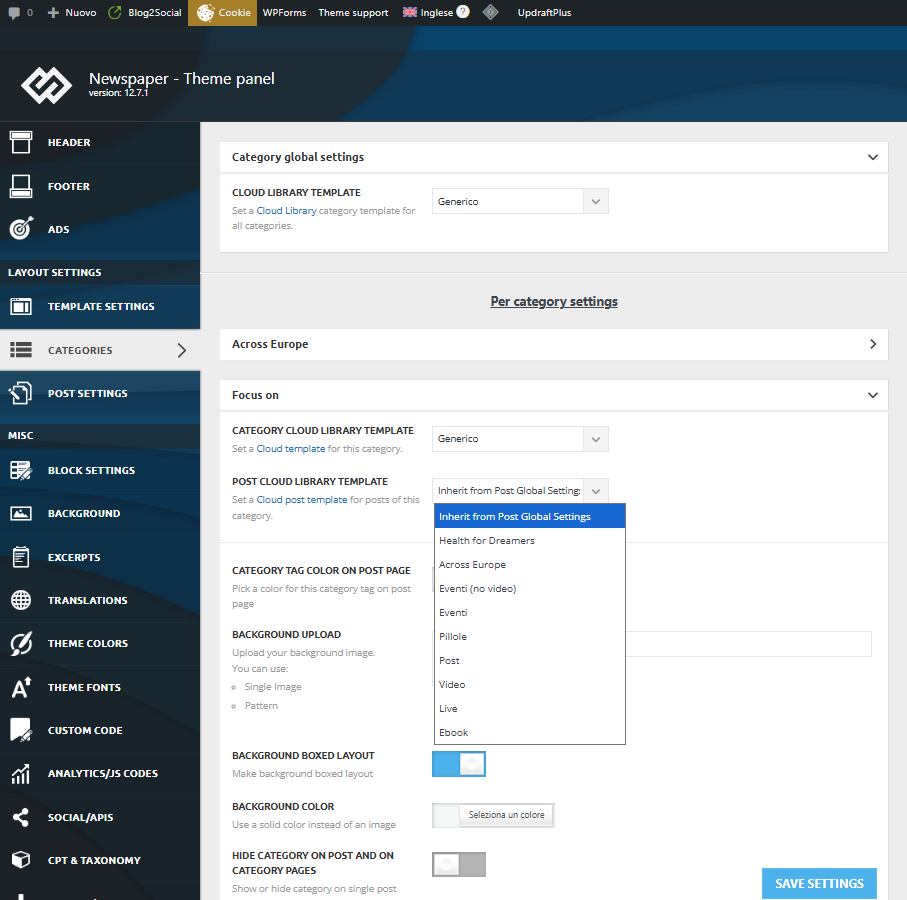
Why?
Thank you.
Enzo
 Calin
Calin Hi,
One solution is to import and export the pages and templates using the wordpress tools, but the main site should have the same plugins https://learn.wordpress.org/tutorial/tools-import-and-export/
Alternatively, you can use the copy-paste method: simply copy the cloud template from one site and paste it into a cloud template on the other site.
Thank you!
 idiriasl
 Uploading it from the plugins GUI didnt work for me. It just disabled the plugin and the Cloud plugin drawing the aspect of the web unusable… Is this latest zip diferent?
Thanks,
Jose
Calin Hello, you have version 3.9.2 and this is the version that has the fix and only previous versions (lower than 3.9.2) have this vulnerability – https://i.imgur.com/xx2opkb.png https://patchstack.com/database/wordpress/plugin/td-cloud-library/vulnerability/wordpress-tagdiv-cloud-library-plugin-3-9-cross-site-scripting-xss-vulnerability?_a_id=241
Other tools like Jetpack and Wordefance will be updated soon.
Thanks!
Calin Hi,
This is the vulnerability reported via Patchstack:
https://patchstack.com/database/wordpress/plugin/td-cloud-library/vulnerability/wordpress-tagdiv-cloud-library-plugin-3-9-cross-site-scripting-xss-vulnerability?_a_id=241
It shows the correct version, but it’s possible that the scan tools haven’t updated their data for some time https://i.imgur.com/LfogY7p.png We hope they will update it soon.
In the meantime, you can manually update the plugin version as shown here:
Thank you!
idiriasl Thanks for your response. Uploading the fix just disables de Cloud plugin too and complains about incompatible versions. What is the correct workflow to update? Is it disable the plugin, downgrade the theme and then install the fix and enable it?
Thanks
 mikeshecky
 UPDATE: Sorta…
unable to edit any templates (e.g., post or category templates). When I attempt to open a template for editing, the Composer editor either fails to load, displays a blank screen, or encounters an error, preventing any modifications.
Crucially, the TagDiv Composer seems to work for editing regular pages and posts. I’m guessing the problem is specifically localized to the template editing functionality?
I’ve already done many troubleshooting steps, including:
WordPress & Theme/Composer Versions:
– My WordPress core is up-to-date. 6.8.3
– Dashboard says WP, Themes and Plugins are all up to date. but on the Newspaper updates page it shows I need to update to 12.7.3
– Newspaper theme currently updated to 12.6.9, can’t upto to 12.7.3
Theme Reinstallation Attempts:
– I’ve tried a significant process to ensure theme integrity: I manually downloadeed 12.7.3 from ThemeForest and then performed a fresh, clean update to the current latest version of the Newspaper theme and its associated plugins. This was done to rule out any corrupted files. It wont et me update though, it doesnt complete it.
Site Restore:
– I performed a full site restore from a recent working backup, but the template editing issue persists.
Caching Management:
– I have thoroughly cleared all levels of caching: my WordPress caching plugins (e.g., [mention specific plugin if you use one]), server-side cache via my hosting provider, CDN cache (Cloudflare, etc.), and my browser cache (including incognito mode).
PHP Environment Configuration:
– I have verified my server’s PHP version (currently running 8.3.22)
– I have also manually increased critical PHP limits in my php.ini and wp-config.php, including:
– memory_limit 1024M
– post_max_size 1024M
– upload_max_filesize 1024M
– max_execution_time 600
– max_input_vars 5000
WordPress Core Diagnostics:
– I’ve checked the WordPress Site Health tool, and it reports no issues
– I’ve re-saved permalinks from the WordPress settings.
– I’ve tested editing in different browsers, ccomputers and incognito/private windows.
Plugin Conflicts:
– While pages/posts edit fine, I have also systematically deactivated non-TagDiv plugins that might interact with editors or custom content types to check for conflicts, but the template editing issue remained.
My leading hypothesis is that the problem may be tied to a version mismatch or conflict? My current system is detecting Newspaper Theme 12.6.9, while it seems certain theme components or template assets might have been created or are expecting an environment compatible with Newspaper Theme 12.7.3? This discrepancy appears to specifically affect the way TagDiv Library interacts with or loads template files, as all other Composer functionalities for pages and posts appear to be working correctly.
Could you please provide guidance on this specific issue? I can provide screenshots, access to the browser console, or temporary admin access if needed.
Thank you for your urgent attention to this matter.
-
This reply was modified 11 months by
mikeshecky.
 WebECDQ
When will there be an update to the Newspaper theme with the secure version of td-cloud-library because our WordPress.com server warns us that the td-cloud-library plugin version 3.9.2 has a major vulnerability?
idiriaslHi, since the very last update last week, the search buttons are no longer working. I can do a live search and items do show up but when I hit the button, the search results page wont open and a fatal error page will pop up instead. I have enabled debug and this is what I get:
Fatal error: Uncaught TypeError: Cannot access offset of type array on string in /var/www/html/news/wp-content/plugins/td-composer/legacy/common/wp_booster/td_util.php:1196 Stack trace: #0 /var/www/html/news/wp-content/plugins/td-composer/legacy/common/wp_booster/td_util.php(340): td_util::get_template_id() #1 /var/www/html/news/wp-content/plugins/td-composer/legacy/common/wp_booster/td_wp_booster_functions.php(513): td_util::check_header() #2 /var/www/html/news/wp-includes/class-wp-hook.php(324): td_load_css_fonts() #3 /var/www/html/news/wp-includes/class-wp-hook.php(348): WP_Hook->apply_filters() #4 /var/www/html/news/wp-includes/plugin.php(517): WP_Hook->do_action() #5 /var/www/html/news/wp-includes/script-loader.php(2299): do_action() #6 /var/www/html/news/wp-includes/class-wp-hook.php(324): wp_enqueue_scripts() #7 /var/www/html/news/wp-includes/class-wp-hook.php(348): WP_Hook->apply_filters() #8 /var/www/html/news/wp-includes/plugin.php(517): WP_Hook->do_action() #9 /var/www/html/news/wp-includes/general-template.php(3192): do_action() #10 /var/www/html/news/wp-content/plugins/td-composer/legacy/Newspaper/header.php(8): wp_head() #11 /var/www/html/news/wp-content/plugins/td-composer/td-composer.php(254): require_once(‘…’) #12 /var/www/html/news/wp-includes/class-wp-hook.php(324): {closure:/var/www/html/news/wp-content/plugins/td-composer/td-composer.php:249}() #13 /var/www/html/news/wp-includes/class-wp-hook.php(348): WP_Hook->apply_filters() #14 /var/www/html/news/wp-includes/plugin.php(517): WP_Hook->do_action() #15 /var/www/html/news/wp-content/themes/Newspaper/header.php(2): do_action() #16 /var/www/html/news/wp-includes/template.php(810): require_once(‘…’) #17 /var/www/html/news/wp-includes/template.php(745): load_template() #18 /var/www/html/news/wp-includes/general-template.php(48): locate_template() #19 /var/www/html/news/wp-content/plugins/td-cloud-library/wp_templates/tdb_view_search.php(8): get_header() #20 /var/www/html/news/wp-includes/template-loader.php(106): include(‘…’) #21 /var/www/html/news/wp-blog-header.php(19): require_once(‘…’) #22 /var/www/html/news/index.php(17): require(‘…’) #23 {main} thrown in /var/www/html/news/wp-content/plugins/td-composer/legacy/common/wp_booster/td_util.php on line 1196
I have tried to use another cloud template for the search page, I have tried editing the existing one and saving… but nothing helps same error all the time.
Any clues on what is going on?
Thanks in advance,
Jose
yassinee Hi,
I’ve updated the Newspaper theme to the latest version (12.7.3), but the issue still persists. The tagDiv Cloud Library (v3.9.2) plugin is showing as vulnerable, and even after updating the theme, the problem remains unresolved.
Could you please advise on the next steps to fully fix this issue?
Thank you for your assistance.
Best regards,
 petar777
Hey there,
I have an issue with my website where whenever I try to save a page via the composer, it just keeps spinning and nothing happens. I read some things in the forum but nothing described helped. I deinstalled and installed TagDiv Composer, I set my security plugin to learning, I checked CloudFlare and so on. I guess I might be missing something I don’t know what it is.
I made an image of my network tab – https://postimg.cc/LgpLCf6N
I get to a 10 second time out and it just crashes there.
Please help me finding a way to fix this.
Best regards!
Calin Hi,
Please make sure that the thene plugins you used before the update are installed. Those can be installed from Newspaper > plugins. You should have installed and activated tagDiv Composer, cloud library and possible tagdiv standard pack.
Thank you!
Calin Hi,
This is because some theme plugins are no longer installed. Go to Newspaper > plugins and make sure that tagDiv Composer, cloud Library, and tagDiv Standard Pack are installed.
Thank you!
yassineeHi Support,
I’m using the tagDiv Cloud Library plugin on my WordPress site and noticed there is a Cross-Site Scripting (XSS) vulnerability in versions before 3.9.2.
Could you confirm if updating to version 3.9.2 fully fixes this issue? Any advice to secure my site would be appreciated.
Thank you,
 zarbos
Hi
I installed Today News Pro from Cloud Templates.
When I installed all the examples, I also installed the opt-in builder plugin.
How can I completely remove the tables and options of tagDiv Opt-In Builder?
Thanks for your answer
Regard
Paolo
zarbos Hi, thanks for your answer
I don’t want the content image added automatically. I’d like to remove the content image and keep only the featured image with the correct captions. Is there a way to do this, or do I have to change the default template in the theme options or import a template from the cloud?
Regards
Calin Hi,
Can you please provide some screenshots related to this situation?
Normally the mentioned cloud template can be edited like this https://i.imgur.com/kpnKeas.png and is using the Single Post Featured Image that can display the caption https://i.imgur.com/IEbHHHo.png
Now in case you have set the same image as featured image but also as the first image in teh post content, then I think a better solution will be to remove the Single Post Featured Image from single post template.
Calin Hi,
When WPML is used with our theme https://forum.tagdiv.com/using-theme-translations-together-wpml/ the cloud template will be displayed for the language that has been imported, to display it for other languages, you need to duplicate it for that language and after that, edit the text in that language https://i.imgur.com/fd9AonW.png https://i.imgur.com/DPOXyzs.png https://i.imgur.com/SM7h0xa.png
zarbosHi
I installed the Today Pro template, and when I added the featured image row, it still appears in the content.
I can’t figure out how to remove the image from the content of the post cloud template.
I need the featured image because it recalls the caption and the alt caption necessary for newspaper journal ex: photo reuters n. 425455cxxx
Regards
Paolo
 babak.s.z
 SVPrasad
Hello
I recently noticed a security warning in my hosting panel related to the tagDiv Cloud Library plugin.
Here are the details:
Plugin: tagDiv Cloud Library
Version: 3.9.2
Build Date: 22.10.2025 10:59
Issue Type: Cross-Site Scripting (XSS) Vulnerability
Reference: Patchstack Advisory Link
My hosting provider is flagging this as a potential security issue.
Can you please confirm:
Whether this vulnerability has already been patched in the latest release or upcoming update?
https://prnt.sc/QomoE4P-SpO3



