- NewsmagRequirements for Newsmag
- NewsmagtagDiv Social Counter tutorial
 dumagroup
 I am having this same issue!
No luck to access the cloud library at all
 ben.hinc
 Update:
I posted this issue to PowerPress plugin support forum and got this response:
Looking at your screenshots, it appears the theme was stripping the category feed of all of the settings applied by PowerPress. There is an option in PowerPress >> Settings, Advanced Mode >> Feeds tab to keep outside plugins from modifying podcast feeds (it can also help with theme-based issues sometimes). If you’re still having trouble, enable this option and save the changes.
Other than that, all you can do is get support from the theme developer. If the category-based podcast feed is working as expected under a default theme, the issue isn’t with PowerPress.
The full thread is located here: https://wordpress.org/support/topic/powerpress-incompatible-with-tagdiv-newspaper-cloud-templates/#post-10878019
I can confirm that I had the setting he refers to turned on already. Even with the plugin set to prevent outside plugins from adjusting the RSS feed of the category, it is still unable modify the feed when a Cloud Template is applied to the category.
 charlessam
Hi, I checked in with the support, they said that api.envato.com is not blocked.
I also tried activating another site that’s hosted on another server, same issue.
http://prntscr.com/li2el6 http://prntscr.com/li2ez1
Please help.
 jayliew
 Great. I’ve just installed Cloud Library but am receiving the following message when trying to add new pre-designed templates.
“Received a response code != 200 while trying to contact the templates API server.”
ben.hincHello,
We’ve recently converted our site at https://www.theapex.racing over to a fully customized Cloud Template-based layout. We also use Blubrry’s PowerPress plugin to turn one of our categories into a podcast feed.
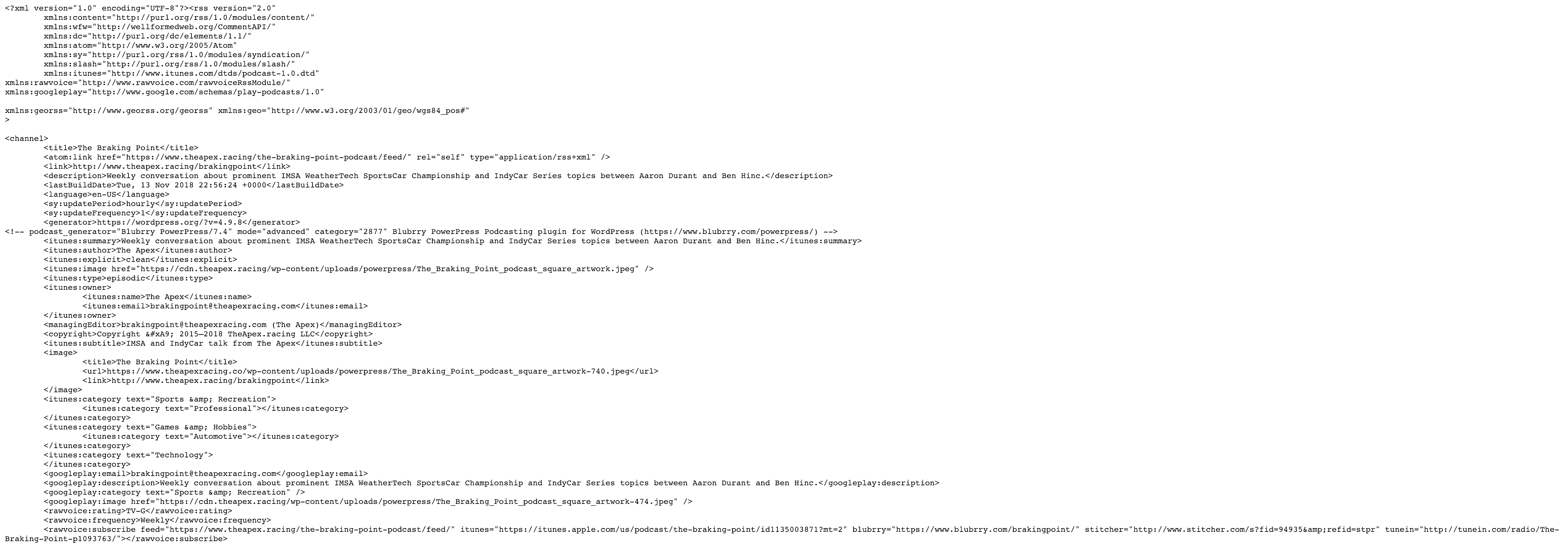
Using stock Newspaper, the plugin worked fine — you can see in this image where Blubrry’s additions to the category feed begin: https://f002.backblazeb2.com/file/dropshare-adbh/Messages-Image-316474783-/Messages-Image-316474783-.png
After I applied a Cloud Template to the category, the podcast-specific elements that Blubrry adds have disappeared as seen in this image: https://f002.backblazeb2.com/file/dropshare-adbh/Messages-Image-1686072585-/Messages-Image-1686072585-.png
Here are links to the category and RSS feed in question:
- https://www.theapex.racing/the-braking-point-podcast/
- https://www.theapex.racing/the-braking-point-podcast/feed/
My question at this point is: What about the Cloud Template being applied to the category would prevent PowerPress from being able to make changes to the category’s RSS feed. Second, what can be done to fix the issue?
 Charles Tucker
Hello,
I have two other Newspaper themes and have not had this issue. The TagDiv composer and cloud library deactivate after a day or so. I login and the plugins say not active. I can activate them, and its back to normal, but this is a problem. I contacted my host Flywheel, and they said all is good on the server side. I uninstalled the plugins and reinstalled them, and that did not work. This is the third time since I bought the theme last week that this happened.
Please quickly advise me on what to do here. Thanks
 McDohl
 Hello
I already put the file on tagdiv cloud library in plugin folder, but the result is remain the same, theme panel is still resetting right after I make another change
404 template, archive template, attachment template, author template, search template and tag template is still have this bug.
Thanks. 🙂
 Jose
Jose Hi Simion C.
Thanks, I’ll use that tool to add some text.
I would like to ask, if it is possible to edit the homepage of the mobile tagdiv plugin, something similar to the cloud library, i.e. to give the option to select different homepages or to create custom ones.
thank you
 Simion C.
 Hi,
Seems the test detects that you do not use a CDN, that is not required however. You could use one and make tests. For example
– https://forum.tagdiv.com/cloudflare-cdn/
Using a CDN or a caching plugin may reduce the http requests as well
– https://torquemag.io/2018/02/how-to-reduce-http-requests-wordpress/
For expires headers you could check their documentation, maybe try what is suggested
– https://gtmetrix.com/add-expires-headers.html
The theme will serve a minified javascript already, for CSS minification you could do it manually for example
– https://cssminifier.com/
Or try plugins that can do this automatically (these could create problems in some cases).
Also check with your hosting, maybe they have optimizations services or modules they can activate server side.
Thanks
 Calin
Calin Hi,
You can use a template from TagDiv Cloud Library end edit it how you want.
https://www.screencast.com/t/HVMdumotc
https://www.screencast.com/t/VDToeXqz0w
Hope this will help you.
Thanks.
Simion C. Hi,
Please try the following. Make a backup before attempting. Access the cloud library files in the plugins folder, replace this file with the one provided below
– https://www.screencast.com/t/Vq7763fl
– https://www.filedropper.com/jsfilesvuethemepanelmin
Then set cloud templates if needed, check if they still reset after making this modification. Please let us know the results.
 bdeepu
Hello,
I’ve been using the Newspaper theme and it is really wonderful. However, after activating the cloud library templates, I see that it is not loading any template either from the tagDiv pagebuilder or from the template sidebar option in the WP admin dashboard. The error I get is this:
“Invalid reply from server endpoint.”
Please help.
Thanks!
Calin Hi,
You can use a template from TagDiv Cloud Library and edit it and set the text were you want to be set, for example https://www.screencast.com/t/POc4DkkpsR
Hope this will help you.
Thank you.
Calin Hi,
You can use cloud templates, get a single template from cloud ( example: https://www.screencast.com/t/gGxFput0 ) , edit it with TD Composer, drag a ad box were you like to have ads, click on the ad box and set a “Use adspot from” ( https://www.screencast.com/t/fXGYNChD3N https://www.screencast.com/t/vIqzbfCTHoeK ) save the template and set it on posts.
See results: https://www.screencast.com/t/s9MHniu6FuXh
Thanks.
Simion C. Hi,
From what I can see at the moment the website uses the default WordPress blog page as homepage. That will only display a list of your posts, ordered by latest.
You can create a static page with the composer and set that as homepage
– https://forum.tagdiv.com/homepage-how-to-build-and-set-it/
In that page you can place any elements you want from the tagDiv composer, grids, blocks etc.
Also you can use block designs made by us (based on flex blocks), from the cloud library
– https://forum.tagdiv.com/tagdiv-cloud-library-plugin/
Here you can see how they look, preview them and even edit them
– https://affiliate.tagdiv.com/#/load/Blocks
Import the ones you like in the pages you create
– https://www.screencast.com/t/fz0yfnvC
Flex blocks have an option to set dividers between modules, so that won’t be a problem
– https://www.screencast.com/t/fz0yfnvC
Please let us know if you have more questions.
Thanks
Calin Hi,
1. I don’t quite understand what shadow you refer, please provide some screenshots with the problem.
2.Please read about Create custom code with the browser’s Inspector or the Live CSS Box
https://www.screencast.com/t/ZcY9bP81cqBy
.widget_product_tag_cloud span,

 .widget_archive span

{

  background-color: lightgray;

  color: gray;

}

.widget_product_tag_cloud .block-title,

.widget_archive .block-title

{

    border-color: lightgray;

}
Hope this will help you.
Thank you.
Calin Hi,
In order to have all authors in theme panel, please you need to edit a theme file.
Please go in wp-content>plugins>td-cloud-library>includes>panel>tdb_panel_vue.php
https://www.screencast.com/t/WbC0QRtnzv
Hope this will help you.
Thanks.
Calin Hi,
You can use tagDiv Cloud Library and get a template for posts and set just Related article ( https://www.screencast.com/t/mzJrovYK6 ), or you can use some custom css
.td_block_related_posts .td-related-title > .td-related-right {

    display: none;

}
See results: https://www.screencast.com/t/tB45M1Bhk
Set the custom css in Newspaper>Theme panel>Custom code>Custom css
Thank you.
 Catalin
 Hello Incrosnatu,
At the moment, the only way for changing this can be made from Theme panel -> https://www.screencast.com/t/oTnyt7PBiBHI In the future, we hope to add this function in Cloud Template.
Thanks for the suggestion!
 nktheme
Hi,
I would have two questions:
1. In Big Grid 1 i use Grid style 4 – Bottom box. Could i remove the shadow from the title text?
2. How can i change the background color of widgets’ titles, like tag cloud, latest comments, archive etc.
Thank you in advance,
Judit
 seofoxx
 ok this is very strange. When not logged in another layout is shown. When logged in the correct cloud template is shown.
I thought its a cache issue – but its not. i used a 100% fresh browser and deactivate wp-rocket – nevertheless, after logged in the issue appears, since than the Cloud template “Layout einzelner Artikel Lexikon” is shown.
So in fact i have 2 issues now – 1. why another layout is shown when logged in and 2nd the paragraph issue.
I would like to send u a login but here is no private option in this support forum – so how do i send you a login?
Calin Hi,
Yes you can create a 404 page with tagDiv Cloud Library, you can build your own template or edit one and add search bar and a link or button to the home page, but the last one is not possible for the moment, maybe there is some plugins for this.
Sorry for the inconvenience.
Thank you for your understanding.
Calin Hi,
Please read this topics:
-> https://forum.tagdiv.com/topic/change-template-box-size-for-box-layout/
-> https://forum.tagdiv.com/topic/force-full-width-on-categories-post-grid/
-> https://forum.tagdiv.com/topic/cloud-template-post/
Thank you for your understanding.
Calin Hi,
You can do that using tagDiv Cloud Library, get a a template( for example single post template 1 https://www.screencast.com/t/H6HOIQWsiE ), open it to edit, and just drag the related articles in the place you want.
https://www.screencast.com/t/mzJrovYK6
Hope this will help you.
Thank you.
Calin Hi,
If you want to have pages in the category page, you can use a cloud template from tagDiv Cloud Library , edit the template:
https://www.screencast.com/t/wxzxjIOY
After that drag a block, set the type from filter to page
https://www.screencast.com/t/eoxIW1FS8XT
Save the template and set it on Theme panel > Categories.
Hope this will help you.
Thank you.