
 Mihkel
Hello. when i change the page with tagdiv composer, everything is okay.
But when i use the regular post editor. Half of the dropdown menu is hidden and Also it will display me second search icon.
How can i make this work ?

 Arafat
Hi, I want to add Search Box on home page use TD Composer, So, how to do this?
 pavel@earnware.com
 When you edit inside the tagdiv composer, in the TEXT not VISUAL – and use single quotes – then save it and open it again – those single quotes become double quotes – when you type in for html elements, here: 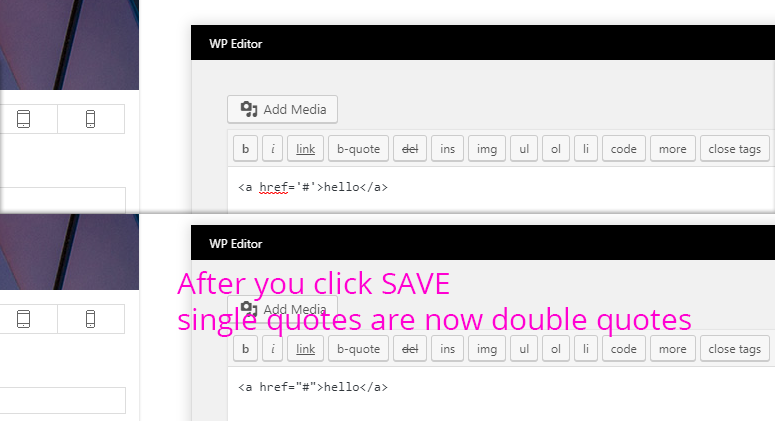
*Note that the WordPress regular Editor doesn’t do this..
 InstallationComplete
I can see about 84 icons… which appear to be Font Newspaper. I can’t see or search any of the other ones.
Suggestions?
Thanks!
 kaylee174
Hello,
I created my start page with TagDiv Composer and you can find a part called “Latest Articles”. I can switch the sites from 1 to xxx. I realised that my start page can be reached by
and also by
https://coin-dragon.com/page/1/
There is no redirect. Is that duplicate content? If yes, how can I get rid of that?
Regards
Florian
InstallationComplete1 – The content still has padding with the Stretch Row and Content option selected.
That’s a revslider element in the row.
https://screencast.com/t/sR765VDZp8pg
2 – Pinterest – I mention before I was having issues with it connecting to Pinterest. I’m on a new install and still no connection. It just errors.
 Ryansmccain
When I try to launch TD composer it opens to a blank window. Any ideas?
 Catalin
 Hello geekykant,
I have inspected your website and I saw that you are using the Mobile Theme plugin and the content of your page has been created with TD Composer. Notice that plugin does not recognize any shortcode of page builder and that’s why you do not bring the content of the page on mobile devices. You should create it only with HTML code which will have to be added in Mobile Editor. If you do not like this theme behavior, you should simply disable the mobile plugin and then, the theme will be automatically switched to the general responsive mode. For more information about this plugin, please check here -> https://forum.tagdiv.com/the-mobile-theme/
Thanks for your understanding!
 ALM2000
 Hello,
Apologies for the delay.
Thanks for the support.
I increased the WP memory limit from 64MB to 128MB but nothing changed.
TD Composer still does not load; and I’m still unable to navigate through the “Theme Panel” of the theme: anything I click there just takes me back to the top of the page.
The problems in the links provided aren’t related to mine.
Thanks in anticipation of your response.
 Bogdan B.
 Hi,
The theme does not have any specific implementation in this regard.
Please try this guide: https://en.support.wordpress.com/splitting-content/page-jumps/#middle
As an alternative, you can use the tagdiv composer to add a buton linking to a particular section.
Here is an example for a button: https://www.screencast.com/t/WNWrLTjm
I added the ‘mycustomclass’ to the field and I need to add the class to the block where I want to scroll to – like so: https://www.screencast.com/t/gYQMXF9OCwVG
Thank you!
Bogdan B. Hello,
Indeed it can be done in the new tagdiv cloud library plugin. You can import a category template and edit it in the tagdiv composer adding elements as you would on a standard page. Then you can save and apply the template created to your category in the theme panel
Thank you!
Bogdan B. Yes, indeed you will not be able to edit the standard shop page created by woocommerce with the tagdiv composer. You should create a new page using the tagdiv composer and woocommerce shortcodes:
https://docs.woocommerce.com/document/woocommerce-shortcodes/
Shortcodes are implemented like so in the tagdiv composer: https://www.screencast.com/t/LFAFqmzqyfIO using a column text element.
As a note, the tagdiv composer can only edit pages that have been originally created with it. The shop page is created by woocommerce so it cannot be edited. Only replaced by a new one. Please use this guide to set another page as a shop page: https://docs.woocommerce.com/document/configuring-woocommerce-settings/
Thanks
 tanteidee
 Well… I want to say
…there is no longer the stretched image but too much space between one image and another, this because if you open the page with tagDiv Composer you see Image height: 400! How Image height can be “auto” and not 400 by default? Where is this part of code on CSS or PHP files?
tanteidee As I said I need to use WPBakery Page Builder on Post and specific Post Type.
Put this code generated with WPBakery Page Builder
[vc_row][vc_column][vc_single_image image="390" img_size="full"][vc_single_image image="390" img_size="full"][/vc_column][/vc_row]
And this CSS Custom code:
.td_single_image_bg {

    background-size: auto !important;

}
there is no longer the stretched image but too much space between one image and another, this because if you open the page with tagDiv Composer you see height 100%! How height can be “auto” and not 100% by default? Where is this part of code on CSS or PHP files?
Bogdan B. Hello,
Sorry but there is no simple way of removing the category pages in the breadcrumbs. There are 2 ways you can go about this.
1. is to redirect the link from the category to the page you created using a 301 redirect: http://www.wpbeginner.com/beginners-guide/beginners-guide-to-creating-redirects-in-wordpress/
2. You can now use the cloud library plugin to edit category templates directly in the tagdiv composer and then set that template for your category.
Than you!
Bogdan B. Hello,
Each flex block has it’s own particular settings from the tagdiv composer. Changing the setting for one flex block, will not affect the other one on that page.
Thank you!
 great1212
When I tried to edit the woocommerce page with TD composer this error is showing:
Errors happened during tdcIframeData.init() -> bindViewsModelsWrappers()!
Catalin Hello tanteidee,
Try using only TD Composer shortcodes because if you are using WP Bakery and then load with TD Composer, might appear some errors. Try to recreate all of your page elements with TD Composer page builder and check the results. You can check here -> https://forum.tagdiv.com/visual-composer-tagdiv-composer-transition/
Thanks.
Bogdan B. Hello,
This is caused by using both wpbakery and tagdiv composer page builders. Please only use 1 and disable the other. Keeping 2 page builders active causes compatibility issues.
Thank you!
 lenahe
I had the TD composer working on a draft site, but when it’s migrated on a main domain of the same hosting server it has stopped working and shows a blank page. All the configuration setting has been the same.
Please advise how to fix this issue.
 ankitsethi
I Got this error when I try to use TD Composer
Fatal error: Out of memory (allocated 182976512) (tried to allocate 786417 bytes) in /hermes/bosnaweb03a/b2362/ipg.hackploitcom3/mysterioustrip/wp-content/plugins/td-composer/includes/tdc_main.php on line 552
Please resolve this error
 kashanti
I’d noticed that when we use the TD Composer to set up certain blocks, when images are used I cannot find a way to change the size of the image shown. For example, I’m using covers of a book, but the blocks do not show the whole image within the container. How do I change that?
 liln5k
 I am having this EXACT issue… follow the video verbatim and I click the composer and 500 Error… I checked all prereqs and they are on my CPANEL VERBATIM… I really would like to use this plugin…
 ppbub
ppbubHi, using tagdiv composer and when I am trying to save the content, it seems to just hang… any ideas what might be causing this?
 cheryldimof
I’m trying to use the Text with Title in TagDiv Composer. When I go to Edit Content and open the WP Editor, I cannot save the content — there is no save button. Any ideas how to fix this? Thanks.
