
- TutorialsFrom WPBakery to tagDiv Composer
- TutorialsDefault Block Settings Guide
- TutorialsOffset Feature
- TutorialstagDiv Social Counter Tutorial
- TutorialsHow to Update the WPBakery Page Builder plugin
 Bettina
 Hello!
We recommend to use cloud/PRO templates or demos in order to have the possibility to edit them with the TagDiv Composer which contains a lot of functions and features, please check our tutorial here: https://forum.tagdiv.com/tagdiv-composer-tutorial/
The demo you chose is not a PRO/cloud one, it’s an old one made by default templates, that’s why it’s not customizable with the TagDiv Composer.
Thank you!
Bettina Hello Martin!
In the TagDiv Composer, the font size should be found like this: https://www.screencast.com/t/kJr1LNHfal
Thank you!
Bettina Hello!
Please provide some screenshots/video about how this header looks like in the TagDiv Composer and check for a plugin conflict (deactivate ALL plugins except tagDiv ones, also if you are using a cache plugin, deactivate it, clear all cache(also from your browser) and try again) or some custom CSS if you have which can interfere.
A solution for sending a screenshot/video is this:
Download, capture, send: https://www.techsmith.com/jing-tool.html
After making the screenshot, you will have a link, paste it here.
Thank you!
 Calin
Calin Hi,
I just made a test on my install where I use Newsmag v5.1 and for me looks to work -> https://i.imgur.com/Jm740LF.png -> https://i.imgur.com/6dE2agZ.png
Maybe there are some problems with the pre-build websites, I tested on default, which one do you use? If the problem is on a different pre-build website, then it can be only from the extra file that are added on it, for example for magazine the file is this one wp-content/plugins/td-composer/legacy/Newsmag/includes/demos/magazine/td_block_template_1.php just replace the code with this one https://pastebin.com/QRqsNDeQ and the problem should be solved.
I hope this will help you!
Thank you!
Calin Hi,
Using Newsmag theme, tagDiv Composer can be used only on page, so you can not use it for category templates.
Also, our Newsmag theme has a general system for ads, in case that you want to have more control over them, you can try some plugins:
https://blog.hubspot.com/website/best-advertising-management-plugins-for-wordpress
Thank you!
 mytwebsolutions
 How to add contact form 7 short code to Tag div composer ?
I placed shot code [contact-form-7 id=”221″ title=”Contact”] in raw html but showing code only. Not showing the form.

How to find the suitable icons for replacing the menus. I mean icon library. so i can pick the suitable icons related to my menus like INDIA, GULF etc

 Diana
DianaHi, guys:
I have problems with the WP dashboard Pages functionality when I want to see all pages (I have 24 published and 12 drafts):
With all plugins deactivated (when the WP Pages problem doesn’t exist), upon activating plugins one by one:
1. Standard Pack activated – no problem
2. tagdiv composer activated – errors, Page in the WP dashboard present me with a fatal error that states there is not enough space on the server, which actually is.
3. After increasing Memory_limit in the php.ini file from 256MB to 2GB and
4. If I change the view number of pages to 12, for example, then it works, without any further problem from any of the plugins, all being activated.
I am wondering if there are any specific or more drastic requirements as far as memory is concerned, so I can see in my WP dashboard Pages as many as I want?
Many thanks,
Diana
 elvisfrog
 Posting just in case it helps, I had the same issue, did the delete TD Composer and reinstalled it, no help. I entered WordPress Trouble Shooting mode and I have a bug on my server that disabled all the plugins, so I had to re-enable all plugins. The TD Composer error went away, so I am assuming some plugin needed to be disabled/re-enabled, not sure which, but thought this might help those in a tight spot.
 bilgin53
After upgrading the newspaper theme version, when I try to edit the header and footer section, I get the following error
header section link 
footer section link 
this type of header is not editable with tagdiv composer. Please use a cloud header template when I try to load no screen results
screen results section link1 
screen results section link2 
system status link 
Note: there is no problem when editing other parts
 malletanne
Hi,
I created a Mobile Page for My Homepage with TagDiv Composer. Thats great but Pages are duplicated in search result.
Could you please help me with this matter ? How can i avoid that ?
Sincerely
Anne
 alter6
hello
i use my own template for mobile page and post with tagdiv composer
I can set as i want with tagdiv composer but i don’t see my modification on smartphone page
thanks
 mediatute
Hi..I am using newspaper wordpress theme in my website. Last day my site home page layout was broken automatically. I can’t use Edit with TagDiv composer also. It is not loading. Can I reset my old home page without missing my content ?’
 Sparton05
I’m developing my site at derfmagazine.com/home/ and I am unable to activate any plugins, including td-composer. As soon as I try to activate these plugins, even if I do it through the newspaper theme section of the dashboard, any part of the site I then try to navigate to says -There has been a critical error on this website. Please check your site admin email inbox for instructions.-
I am then forced to change the wp_options database, active_plugins, to a:0:{} in order to even access my sites dashboard again.
 trebol30
Hello team,
I comment.
I wanted to know if in the Newspaper theme there is an option to make an element float on the screen when scrolling in the mobile version of the screen just like the top menu can do. (I use the TagDiv composer)
If the answer is negative, they know or recommend a plugin through their extensive experience with other users, that works well with Newspaper and completes this functionality.
I have a website focused on reviews and, therefore, on call to click and it would be very useful for me. Also, your new approach to WooCommerce would also be useful for adding floating “Add to Cart” buttons.
I’ll look forward for your answer.
Thank you for your time
 rahulroushan
I was testing updates in a staging environment before taking the changes to live environment. Everything seems to work after updates, except the mobile plugin. Activating the mobile plugin causes critical error on mobile devices.
To troubleshoot, I deactivated EVERY plugin except tagdiv composer, tagdiv social counter, and tagdiv cloud library. Yet, enabling the tagdiv mobile plugin causes a critical error (only when accessing the website via a mobile browser).
Please look into the issue. WordPress 5.8.1 and Newspaper 11.3.1
 tsc_site
Hi, I put a column text on my page and nothing I type appears on the page as you can see here: https://prnt.sc/1wagom2
The only plugin I have installed are tagdiv composer and tagdiv cloud library, since I`m building the website from scratch.
I was using wp super cache and deactivated, didn’t work.
Please help me
 webmasteramisun.com
The update to 11.3.1 resulted in code appearing on our front page. We had to go back to 11.3 to get everything to work again, activating these plugins: Composer, Cloud Library, Social Counter and Standard Pack. Why isn’t the update working please? Is a higher PHP required? What else are we missing??
 foreclosurepedia
 tagdiv Composer now missing …
Not located on page
And activated
tsc_site I created pages and posts 7 years ago using WordPress html simple editor.
For some reason I can`t edit it in tagdiv composer as you can see in my printscreen.
 Patrick93
Hello,
I have set my template to Pagebuilder + Title on a site (https://nimb.ws/bMXsQU).
I am working with tagdiv composer.
I have set all my rows to 1200px.
The breadcrumbs are indented too far >> https://nimb.ws/vEqubA
How can I fix this problem?
 salsero72
 I checked but the content has all closing tags
I am trying to recreate the page and when adding custom post types in block filters under every (custom) post I see the alert below
"WP booster error:

td_module: td_module_single($post): $post is not WP_Post"
2. The error appears on one other page.
I deactivated and deleted tagDiv composer, then reinstalled it but nothing changed
 Borissep
after I install the demo https://demo.tagdiv.com/newspaper_cars/, I open the home page with tagdiv composer, select the header, and it says that the header can not edit by tagdiv composer. Why?
After I import another header from cloud lib, and change the header to the import one, the site shows that all the post content changed. Why?
 russellk
 A followup – we were able to accomplish this through the Web Manager in the TagDiv composer. Still no clue as to why the CSS avenue didn’t work.
 ventamar
Hi,
I would like the VIVO ad on my site http://www.greeneuropetoday.com to also appear on the top of the business category sub page: https://greeneuropetoday.com/category/business/. How do I make changes to category pages using the TagDiv Composer?
See screenshot:
 institutMises
Hello,
I don’t know how to customize my mobile menu to make it possible to use the same social icons as desktop.
Desktop :

Mobile :
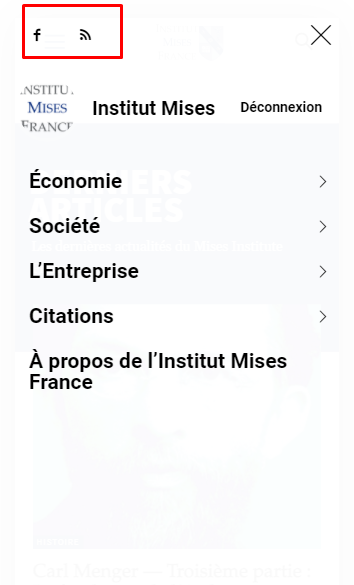
I don’t know how to customize mobile menu for changing this. It seems Tagdiv composer does not allow to change the content inside mobile menu.
My website is : https://www.mises-fr.org


