
- NewsmagtagDiv Composer Tutorial
- NewsmagBlock settings tutorial
- NewsmagLogo & Favicon
- NewsmagFooter templates
- NewsmagUsing other ads
- NewsmagUsing Typekit fonts
 Anamaria
 Hi,
To remove the orange section you need to use this custom code
.tdc-element-empty {

    margin-bottom:0;

}
You need to insert the code in Live CSS => https://i.imgur.com/7kDAlh9.png
Hope this helps you!
Thank you!
 Vlad S
 Hello !
Please try this css code: .td-post-sharing-top {
margin-bottom:30px;
}
The code can be adjusted and needs to be inserted here: https://www.screencast.com/t/ahwdwZk93
Thank you !
 Anh Tuan Trinh
 it very good.
and i have a more question. can u CSS it(menu-item) same => https://imgur.com/a/UaY0mks
wish u have a nice day sir
 Tinystepsbabyclub
 Hi Bettina
Thanks, but i am getting an error triangle when i try and add that css. On the second line it gives a warning “use of !important”
ALso, is there a way/setting i can make the text smaller and not in capitals of the RELATED ARTICLE and MORE FROM AUTHOR?
Many Thanks
Sarah
 ChildhoodBiz
 Hi Bettina,
thanks for the fast reply. Well, I just put it into the “custom css” section of the newspaper theme panel.
First, the code editor there throws an error and marks the ” p” (with the empty space) in red. If I just save it and load a page, not dropcaps do appear.
See here (copied CSS is in place):
https://www.childhood-business.de/2021/01/19/petrol-mit-neuer-linie-custom-charged/
 Bettina
 Hello!
Unfortunately, there is no settings for this because this is a default template.
Please try this CSS code to add spacing in that heading:
.td-related-left {

    margin-right: 10px !important;

}
You can adjust the size of spacing with any value you need on your website.
Add this code in Newspaper -> Theme panel -> Custom code -> Custom CSS.
Thank you!
 somefun
Hi,
My website https://kazanuba.com/ has an error with the newspaper theme.
The error persits regardless of efforts to fix
This is a snippet the entire site displays this blurb
[tdc_zone type=”tdc_content” tdc_css=”eyJhbGwiOnsiZGlzcGxheSI6IiJ9fQ==”][vc_row tdc_css=”eyJhbGwiOnsiZGlzcGxheSI6IiJ9fQ==” row_hide_on_pagination=”yes”][vc_column tdc_css=”eyJhbGwiOnsiZGlzcGxheSI6IiJ9fQ==”][td_block_trending_now
Can you send the fix.
Thanks
Vlad S Hello !
Please use this css code: .td-post-sharing-visible, .td-social-sharing-hidden {
display:none;
}
This code must be inserted here: https://www.screencast.com/t/ahwdwZk93
Thank you !
 what-the
Where is the size options for the “Border” from the box style drop down option? In other words there is only a default size. Is there a way we can modify this? Yes we know we can use css to style it but shouldn’t there be a option for us to do this through the TD composer single image control panel?
Thanks!

Anamaria Hello,
For hiding the Instagram for mobile you need to use this custom CSS => https://www.screencast.com/t/vvTxUYxjGD
#sb_instagram

{

display: none;

}
The code need be insert in Theme Panel -> Custom Code -> Advanced CSS -> Phones => https://www.screencast.com/t/hDBYSbJ4X8
Hope this helps you!
Thank you!
ChildhoodBizHi,
though there is a shortcode for drop caps (https://demo.tagdiv.com/newspaper/dropcaps/) I want to add drop caps automatically to all regular WordPress posts (best if it is possible not to add it also to custom post types…). So, I do not have to add a shortcode manually to thousands of posts – and I can change having drop caps in future without having to alter each post again…
According to
https://premium.wpmudev.org/blog/how-to-create-drop-caps-big-first-letters-in-wordpress/
there is just a bit of custom css neccessary:
div.entry-content p:first-child:first-letter {

float:left;

font-size:4em;

color: #000099;

margin-right:0.10em;

line-height:90%;

text-shadow: 0.05em 0.05em #C0C0C0; }
So, I tried to figure out which td-class I have to address to do so – but failed so far! Can you help?
Would be really great!
Kind regards, Martin
Anamaria Hello,
For scroll menu you need to insert this custom code in Theme Panel -> Custom Code -> Custom CSS
.tdb_header_menu .tdb-normal-menu ul .tdb-menu-item.tdb-hover > ul

{

overflow: auto;

max-height: 400px;

}
Looks like this => https://www.screencast.com/t/MZaI8Ak2kli
Hope this helps you!
Thank you!
 thebarefootnews
 Hi,
I can’t seem to load the screen shots.
On http://www.thebarefootnews.com this is at the top of the page. On http://www.barefootnewshawaii.com it has disappeared so therefore I can not edit from the site once I visit via the dashboard.
About WordPress
The Barefoot News
Customize
11 Plugin Update
0 Comments in moderation
New
Edit Page
SEOSEO score: OK
Site Kit
Theme support
Live CSS
Edit with TagDiv Composer
Mobile pageNo mobile page
It’s a bar across the top. Hope this helps.
 Topfgartenwelt
 In the mobile theme there are the top-social-buttons and after that buttons there is the possibilty to insert an ad. That I have done including the description -Werbung/Advertisement-. But this ad block receives most of the invalid clicks in my blog. According to the guidlines of AdSense there should be enough space between links (social media buttons) and the ad. So I want to increase the space between the ad and the top social media buttons.
Doing it with CSS within the themepanel always increases the CLS, can please tell me where I have to do it in the style.css of the mobile theme? It just should be done by increasing the margin, but I don’t know where.
Greetings Kathrin
Anamaria Hello,
You can hide the Instagram widget, using tagDiv Composer, select the Phone viewport and in CSS tab you can choose the display options to Hidden => https://www.screencast.com/t/V44HBbOH9WeB
Let me know about your results!
Thank you!
Vlad S Hello !
Space can be done easier through css. Can you provide an example or some more information of where and how much the space increase you’d like to have?
Thank you !
Anh Tuan TrinhHello
My main menu is filled with tags, it too long to view in a screenshot.
Can u give me a CSS to do menu scrolling?
My website is bangxephang.vn
Thank u sir.
(sorry for my english)
 snovosel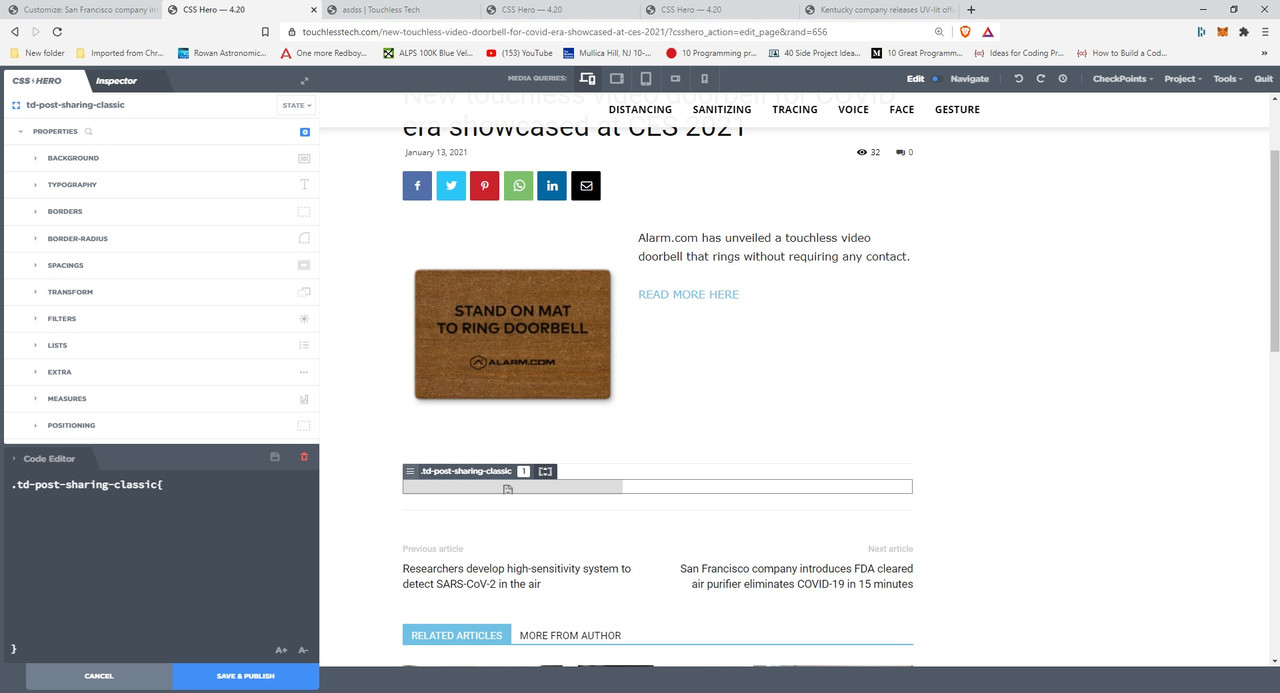
Vlad, please see the above image. It shows that the element is .td-post-sharing-classic.
How to remove it?
Is this element embedded somewhere in a template that affects the entire site Posts?
Anamaria Hello,
I checked the line code where you get that notification https://i.imgur.com/S3tLgCw.png and this seems to be related to mobile CSS from the mobile theme plugin.
We’ll like to take a look to your website if this is possible, for this please make a full backup and contact us via email at contact@tagdiv.com provide wp-admin and cPanel. Also include the link of this topic. My teammates will inspect the website to see what can be the problem.
Thank you!
snovosel Hello,
Your recommendation does not work. See attached image. Now the icon/grey bar has moved up into the image on the post.
Help me understand exactly what you mean when you say, “It looks like you are using a plugin for read more option.” Which plugin are you referring to? If it is a plugin, why wouldn’t we simply focus on that instead of CSS?
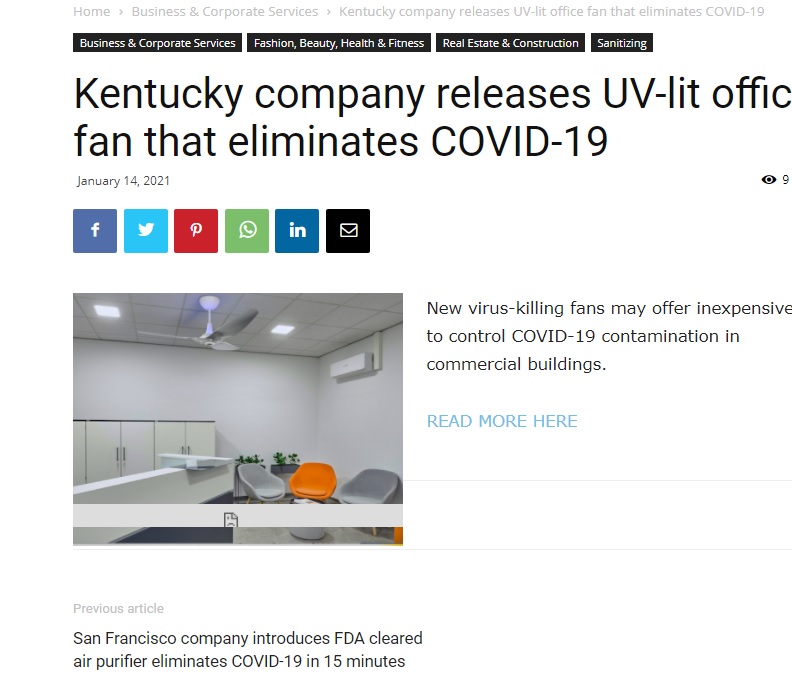 Best regards,
Stephen
Vlad S Hello !
You can use this css code as you can see here #td-top-mobile-toggle { But Your website doesn’t seem to work with responsive method, that is a strange behaviour.
display:none;
}
This may be a plugin conflict. You will have to first start looking for a plugin conflict. please deactivate ALL plugins except tagDiv ones, also if you are using child theme or cache plugin, deactivate them, clear all cache and try again.
Also you can try and remove and re-install the tagDiv Composer plugin and please send us a link to your website in order to take a look.
Let us know the results.
Thank you !
TopfgartenweltWhere in the style.css for the mobile theme I can increase the space between the top social buttons and the info text for the ads like -advertisement- for the top ad?
Thank you very much!
Greetings Kathrin
 SjacPhoto
Hello Team,
I am trying to speed-up my Website and want to generate a critical CSS.
When applying the critical CSS the website is a lot faster.
Unfortunately, at the same time Google PageSpeed Insights sees an increase in CLS.
The Value rises from near 0 to a plain 1. Everything above 0,25 is already seen as a very bad user experience.
Going to the diagnoses it shows me that “<div id=”td-outer-wrap” class=”td-theme-wrap”>” is responsible for the whole content-shift. Is there any workaround for the critical CSS so that there won’t be any content shift?
I am using the Plugin WP-Rocket but had similar results when using Asset CleanUp.
Thanks in Advance.
ChildhoodBiz Hi, thanks for this fix. Looking at the css code I assume that the post date will not displayed anymore on ALL posts, right? But in my case I just need it for the custom post types, not the wordpress regular posts.
The more, I assume that it does not need to be a special Toolset fix. I just use it to create CPTs as any other tool can do so or as it can get done by some manual plugin code.
I would suggest that in the theme panel’s CPT section there should be a selector to decide on CPT by CPT if I want to display the date or not. If this can get integrated in Newspaper – great!
Anamaria Hello,
For Android, the author name looked fine => https://www.screencast.com/t/R7x7FjCo6V7D
Is possible that accent color from Theme Panel -> Mobile Theme -> Theme Colors to be set to white => https://www.screencast.com/t/PQEntMkI3jKB
If you want to change the color link for the author name, you can try this custom CSS
header .td-module-meta-info .td-post-author-name a {

color: green;

}
To add the code, you need to go in Theme Panel -> Mobile Theme -> Custom Code -> Custom CSS => https://www.screencast.com/t/WfVOQkaGJwwm
Let me know about your results!
Thank you!


