
 Jaddy1219
Hi,
I’d like to insert a grid around the images in post. I tried to add CSS like this
img.grid {border: solid 1px #3E3E3E;}
or
img.w {
border:1px solid #c7c7c7c7;
}
But both didn’t work.
Could you please tell me the right code for “Beauty Blog” theme?
Thank you.
 Nikolcho
Hi,
We are already using Newspaper theme purchased true other account, and now we have purchased the theme with this account. We installed the theme website on website http://worldoffloweringplants.com/ and we plan to install it on https://worldofsucculents.com/. We already had some pre-sale questions about archive php template listing on this here: https://forum.tagdiv.com/topic/archive-php-template-listing/#post-300915 and the few modifications went just fine.
The only problem that we have noticed is when the archive template description is listed the links in the description, when hovered over them they are not underlined (see here https://worldoffloweringplants.com/?genera=achillea) and all other links (for example https://worldoffloweringplants.com/browse-flowering-plants-genus/) are underlined when hovered over them. We tried to implement some CSS but no luck.
Can you please help us with this problem.
Thanks
 nakrajsveta
Awesome theme, love to play with, but have one issue which I can’t get rid of even after several days.
1. I delete some element in tagdiv composer by clicking on the cross button
2. The element is deleted, but EMPTY COLUMN rectangle stays there.
3. The EMPTY COLUMN rectangle can’t be deleted. I’ve tried all possible methods.
No X cross on the EMPTY COLUMN.
The EMPTY COLUMN can’t be drag and droped anywhere on the side, also red delete button which usually appear is NOT appearing.
4. Only possible way how to actually HIDE the EMPTY COLUMN is trought css. However this is not the solution as HTML code is still there.
Please help me. Thank you
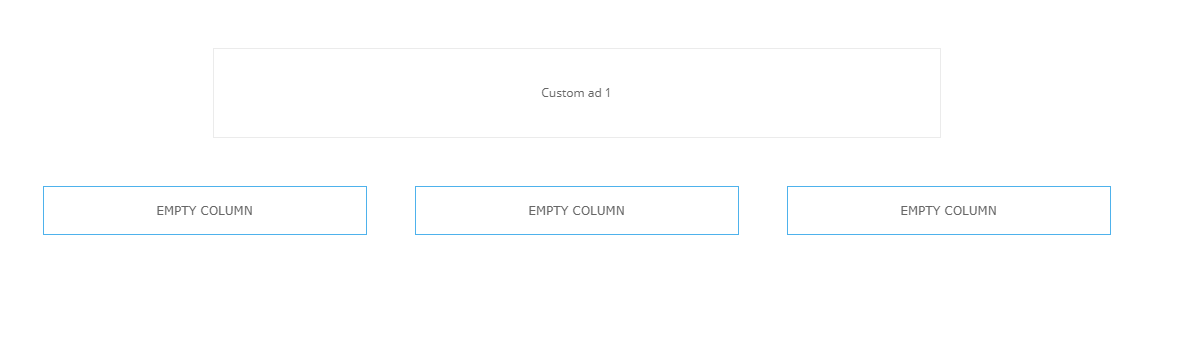

UPDATE 20min after
Recently did several other deletions of elemets and end up with having these EMPTY COLUMNS already 5…

Interesting is that some of the elements can be deleted without leaving EMPTY COLUMN after them, and some not
 Vlad S
 Hello !
The child theme was affected in the last updates due to the new reglementations of Envato:https://tagdiv.com/updating-the-core-of-tagdiv-themes/ The most important files from the child theme lately are style.css and functions.php, other modifications can be achieved using the theme panel.
Normally our child theme should remain the same after updates. But depends on the updates. 9.7 was a major update and that’s why there were so many issues with our users.
Yes, in the next update the child theme will be better optimized for Newspaper Theme.
I hope you understood our point of view and it’s clearer to you !
Thank you !
 Xristos
 Is that specific for newspaper theme, because with other themes, when I create a child theme, inside I have style.css, functions.php and sometimes i create header.php and when I do a change inside function.php (child theme) it doesn’t effect it when I update the theme.
So in next update i should use child theme? for better customization.
 Calin
Calin Hi,
Here is an article about the changes made and why they were made – https://tagdiv.com/updating-the-core-of-tagdiv-themes/
Please make sure that you are using the mobile theme that comes with the Newspaper 9.7.3 package, this will allow you to use the functions.php and style.css files.
Thank you for your understanding and sorry for the inconvenience!
 ML
ML Hi Calin,
To be honnest I’m very surprised by this situation. I’m using the child theme for many files :
– style.css
– editor-style.css
– functions.php
– special php page template
– other files
I don’t understand why you did not give any warning before ? It’s OK to decide to remove the child theme but please help us do the migration. Not like this without any help or heads up.
>> What are the next steps for your users with child theme ? We need to understand what to do now, not in 2 weeks.
Thanks for helping.
 arivibez
 .td-load-more-wrap a{
background-color: red;
color: white;
}
I used the above code in the Custom CSS and the changes I wanted happened but only for desktop. The mobile didn’t get the changes. How can I make the changes show on mobile? http://www.insideEko.com
 constantin
 Salut, nu, ma interesa sa scot cu totul, toata categoria de structured data : Article, Website, Breadcrumblist, hentry, nu doar componente din ele.
Daca elimin Article, imi apare altceva cu website. Ma intereseasa sa le scot complet. In momentul de fata nu sunt definite bine, nu sunt ok pentru rich snippets, iar cand pun alt plugin cu structured data mai complet, apar tipuri diferite, de mai multe ori, ceea ce nu e ok.
Tot legat de Google, se pare ca in testul PageSpeed Insights, sistemul vostru de lazyload pentru imagini nu e recunoscut ca fiind eficient, Google inca spune ca imaginile nu au lazyload. Alte plugin-uri rezolva problema, dar as prefera sa nu am ceva separat daca tema are deja implementata functia.
In aceeasi idee, speed booster-ul muta css/js in footer, dar PageSpeed Insights spune ca tot blocheaza incarcarea paginii. O functie de defer, sau async, nu exista pentru el ?
In final, legat de problema cu Disqus, despre care ziceam la inceputul thread-ului. Daca sunt dezactivate comentariile la un articol, pagina se incarca goala la accesare, fara vreo eroare in consola, fara vreo eroare in server, fara nimic. Am testat pe doua setup-uri separate, e fix aceeasi problema.
-
This reply was modified 7 years by
constantin.
ML Hi Catalin,
I removed all the code and reset CSS in TD composer configuration to keep only default data but no changes at all.
Any other idea ?
Thanks for your help
Vlad S Hello !
Yes, they can be changed using css, provide a link to your website and we will try helping you !
Thank you !
 chiuaua
 Simion C.
 Hi,
1. I checked the website https://www.fossguru.com with Safari, looks fine for me
– http://prntscr.com/och6nb
For me there is no top red bar as in your screenshot. Does it maybe appear only when being logged in?
2/3. I tested the website with the mobile friendly tool – http://prntscr.com/ochew7 everything looks in order now. Those issues are usually detected when the website loads slow, or there is a delay before the CSS loads. Without the CSS, elements are detected as too close together, small text font etc. While actually there is no visual problem accessing the website and browsing it, Google can see it as an issue.
That is why for increased performance on phones we recommend the mobile theme plugin
– https://tagdiv.com/mobile-theme-automatic-optimization-for-mobile-newspaper-theme/
This plugin will receive many more settings and options in coming updates. You can see how it looks and works in this live theme demo which has the plugin active
– https://demo.tagdiv.com/newspaper_local_news/ (check with phone or mobile emulator).
Thanks
Calin Hi,
If you are using a Flex Block you can change the “Load more” button color from Style -> https://www.screencast.com/t/u7I0gPSJ4hP
Or using custom css for the predefined blocks -> https://www.screencast.com/t/bsgHwxLpV
.td-load-more-wrap a{

 background-color: red;

color: white;

}
The code need to be set in the Theme Panel>Custom code> Custom css
Thank you!
Simion C. Somehow I missed that question, sorry about that. I see the problem, it is happening because the header menu elements don’t have a visibility priority one over the other. They are the same, regardless of how many are in the page.
I could give you a CSS solution for this, it will make the top header menu element display over the bottom one – http://prntscr.com/ocgpoe
The code can be entered in the theme panel->custom code->CSS section
.td-header-desktop-wrap .tdb_header_menu:nth-child(3) {

z-index: 998!important;

}
Let me know if you have more questions. Either here or create a new topic.
 Catalin
 Hi,
Please note that child theme is not mandatory to be used in our theme. Most of the theme files were moved into the tagDiv Composer plugin as per the requirements of Envato: https://help.author.envato.com/hc/en-us/articles/360000472383-WordPress-Theme-Requirements. We wrote an article on the subject here: https://tagdiv.com/updating-the-core-of-tagdiv-themes/ Moving forward with such requirements, a child theme will only work with functions.php, and style.css, as there are very few files left in the main theme as Envato, requires all functionality to be added through plugins. For more information about installing the theme, please check here -> https://forum.tagdiv.com/install-via-ftp/ Also, for more information about child theme, please check here -> https://developer.wordpress.org/themes/advanced-topics/child-themes/
Thank you!
Vlad S Hello !
Unfortunately wordpress does not have this feature. The only way to change the font size is via CSS or by using a single post template from the cloud library. Find out more about it here: https://tagdiv.com/customize-articles-with-single-post-templates/ wich can be edited using the tagDiv Composer.
We are sorry for the inconvenience !
Thank you !
Simion C. From what I can see at the moment, you have removed the empty space element, looks fine
– http://prntscr.com/ocfvmo
I could provide a CSS code to better align the ad and give it a margin bottom
– http://prntscr.com/ocfynp
Here it is if you want to use it
.home .td-main-content-wrap .adsbygoogle {

text-align: center;

margin-bottom: 48px;

}
Let me know if you have more questions.
Simion C. Hi,
Most elements in the tagDiv composer have options to set a background color. In this case the row containing the big grid has a background color set.
So first select the row with the grid inside – http://prntscr.com/ocflg7 in the CSS tab set a background color of your choosing.
Then in the general tab of the row select the stretch row option
– http://prntscr.com/ocflu5
To add some space above the grid, add a padding of 48px to it, it will be similar to the space below the grid – http://prntscr.com/ocfqel
That would be all there is to it. If you have more questions let me know.
Thanks
 Cryptodex
I’m currently building my site using the Newspaper 9 Dark theme. Is there any way with this theme to be able to have a toggle button on the home page where it can change the page from dark mode to light mode with a white background and black text instead? If not, is there any way to do this with custom CSS?
Thanks
 garyjones
Hi,
I have Newspaper 9.7.2 installed and have tried to follow this, https://forum.tagdiv.com/practical-example-how-to-add-a-new-block-and-module/ to create a new version of block 9 in which I have custom code (for the purposes of the learning exercise i have called it block and module 77 as per the exercise).
The php for the shortcode is,
<?php
class td_block_77 extends td_block {
static function cssMedia( $res_ctx ) {
// fonts
$res_ctx->load_font_settings( ‘f_header’ );
$res_ctx->load_font_settings( ‘f_ajax’ );
$res_ctx->load_font_settings( ‘f_more’ );
// module 77 fonts
$res_ctx->load_font_settings( ‘m77f_title’ );
$res_ctx->load_font_settings( ‘m77f_cat’ );
$res_ctx->load_font_settings( ‘m77f_meta’ );
}
public function get_custom_css() {
// $unique_block_class – the unique class that is on the block. use this to target the specific instance via css
$unique_block_class = $this->block_uid . ‘_rand’;
$compiled_css = ”;
$raw_css =
“<style>
/* @f_header */
.$unique_block_class .td-block-title a,
.$unique_block_class .td-block-title span {
@f_header
}
/* @f_ajax */
.$unique_block_class .td-subcat-list a,
.$unique_block_class .td-subcat-dropdown span,
.$unique_block_class .td-subcat-dropdown a {
@f_ajax
}
/* @f_more */
.$unique_block_class .td-load-more-wrap a {
@f_more
}
/* @m77f_title */
.$unique_block_class .td_module_77 .entry-title {
@m77f_title
}
/* @m77f_cat */
.$unique_block_class .td_module_77 .td-post-category {
@m77f_cat
}
/* @m77f_meta */
.$unique_block_class .td_module_77 .td-module-meta-info,
.$unique_block_class .td_module_7 7.td-module-comments a {
@m77f_meta
}
</style>”;
$td_css_res_compiler = new td_css_res_compiler( $raw_css );
$td_css_res_compiler->load_settings( __CLASS__ . ‘::cssMedia’, $this->get_all_atts() );
$compiled_css .= $td_css_res_compiler->compile_css();
return $compiled_css;
}
function render($atts, $content = null) {
parent::render($atts); // sets the live atts, $this->atts, $this->block_uid, $this->td_query (it runs the query)
if (empty($td_column_number)) {
$td_column_number = td_global::vc_get_column_number(); // get the column width of the block from the page builder API
}
$buffy = ”; //output buffer
$buffy .= ‘<div class=”‘ . $this->get_block_classes() . ‘ td-column-‘ . $td_column_number . ‘ td_block_padding td_block_bot_line” ‘ . $this->get_block_html_atts() . ‘>’;
//get the block js
$buffy .= $this->get_block_css();
//get the js for this block
$buffy .= $this->get_block_js();
// block title wrap
$buffy .= ‘<div class=”td-block-title-wrap”>’;
$buffy .= $this->get_block_title(); //get the block title
$buffy .= $this->get_pull_down_filter(); //get the sub category filter for this block
$buffy .= ‘</div>’;
$buffy .= ‘<div id=’ . $this->block_uid . ‘ class=”td_block_inner”>’;
$buffy .= $this->inner($this->td_query->posts); //inner content of the block
$buffy .= ‘</div>’;
//get the ajax pagination for this block
$buffy .= $this->get_block_pagination();
$buffy .= ‘</div> <!– ./block –>’;
return $buffy;
}
function inner($posts, $td_column_number = ”) {
$buffy = ”;
$td_block_layout = new td_block_layout();
if (empty($td_column_number)) {
$td_column_number = td_global::vc_get_column_number(); // get the column width of the block from the page builder API
}
$td_post_count = 0; // the number of posts rendered
$td_current_column = 1; //the current column
if (!empty($posts)) {
foreach ($posts as $post) {
$td_module_77 = new td_module_77($post, $this->get_all_atts());
switch ($td_column_number) {
case ‘1’: //one column layout
$buffy .= $td_block_layout->open12(); //added in 010 theme – span 12 doesn’t use rows
$buffy .= $td_module_77->render($post);
$buffy .= $td_block_layout->close12();
break;
case ‘2’: //two column layout
$buffy .= $td_block_layout->open_row();
$buffy .= $td_block_layout->open6(); //added in 010 theme – span 12 doesn’t use rows
$buffy .= $td_module_77->render($post);
$buffy .= $td_block_layout->close6();
if ($td_current_column == 2) {
$buffy .= $td_block_layout->close_row();
}
break;
case ‘3’: //three column layout
$buffy .= $td_block_layout->open_row();
$buffy .= $td_block_layout->open4();
$buffy .= $td_module_777->render($post);
$buffy .= $td_block_layout->close4();
if ($td_current_column == 3) {
$buffy .= $td_block_layout->close_row();
}
break;
}
//current column
if ($td_current_column == $td_column_number) {
$td_current_column = 1;
} else {
$td_current_column++;
}
$td_post_count++;
}
}
$buffy .= $td_block_layout->close_all_tags();
return $buffy;
}
}
And the php for the module is,
<?php
class td_module_77 extends td_module {
function __construct($post, $module_atts = array()) {
//run the parrent constructor
parent::__construct($post, $module_atts);
}
function render() {
ob_start();
$title_length = $this->get_shortcode_att(‘m77_tl’);
$modified_date = $this->get_shortcode_att(‘show_modified_date’);
///print_r($this->post->ID);
$choosen_post_functionality = get_field( “choose_post_functionality”, $this->post->ID );
// For Element One
$title_lo = get_field( “title_lo”, $this->post->ID );
$title_link_lo = get_field( “title_link_lo”, $this->post->ID );
$media_name_lo = get_field( “media_name_lo”, $this->post->ID );
$media_link_lo = get_field( “media_link_lo”, $this->post->ID );
$publish_date_lo = get_field( “publish_date_lo”, $this->post->ID );
//$abstract_excerpt_lo = get_field( “abstract_excerpt_lo”, $this->post->ID );
$abstract_excerpt = get_post_field(‘post_content’, $this->post->ID);
// For Element Two
$title_lt = get_field( “title_lt”, $this->post->ID );
$title_link_lt = get_field( “title_link_lt”, $this->post->ID );
$author_name_lt = get_field( “author_name_lt”, $this->post->ID );
$media_name_lt = get_field( “media_name_lt”, $this->post->ID );
$publish_date_lt = get_field( “publish_date_lt”, $this->post->ID );
$citations_title_lt = get_field( “citations_title_lt”, $this->post->ID );
$citations_link_lt = get_field( “citations_link_lt”, $this->post->ID );
//$abstract_excerpt_lt = get_field( “abstract_excerpt_lt”, $this->post->ID );
?>
<div class=”<?php echo $this->get_module_classes();?>”>
<?php if($choosen_post_functionality == “ext_lo_one”) { ?>
<div class=”item-details”>
<?php //echo $this->get_title($title_length);?>
<h3 class=”entry-title td-module-title”>” rel=”bookmark” title=”<?php echo get_the_title( $this->post->ID );//$title_lo; ?>”><?php echo get_the_title( $this->post->ID ); //$title_lo; ?></h3>
<div class=”td-module-meta-info”>
<?php //if (td_util::get_option(‘tds_category_module_77’) == ‘yes’) { echo $this->get_category(); }?>
<?php //echo $this->get_author();?>
<div class=”media_date” style=”margin-top:5px;”>
<span class=”td-post-author-name”>“><?php echo $media_name_lo; ?> <span>-</span> </span>
<?php //echo $this->get_date($modified_date);?>
<span class=”td-post-date”><time class=”entry-date updated td-module-date”><?php echo $publish_date_lo; ?></time></span>
</div>
<div class=”td-post-content” style=” margin-top: 5px; padding: 0; “><?php echo $abstract_excerpt; //$abstract_excerpt_lo; ?> </div>
<?php //echo $this->get_comments();?>
</div>
</div>
<?php } elseif($choosen_post_functionality == “ext_lo_two”) { ?>
<div class=”item-details”>
<?php //echo $this->get_title($title_length);?>
<h3 class=”entry-title td-module-title”>” rel=”bookmark” title=”<?php echo get_the_title( $this->post->ID ); ?>”><?php echo get_the_title( $this->post->ID ); ?></h3>
<div class=”td-module-meta-info”>
<?php //if (td_util::get_option(‘tds_category_module_77’) == ‘yes’) { echo $this->get_category(); }?>
<?php //echo $this->get_author();?>
<div style=”margin-top: 5px;”>
<span class=”td-post-author-name”><?php echo $author_name_lt; ?> </span>
</div>
<div class=”media_date” style=”margin-top:5px;”>
<span class=”td-post-author-name”><?php echo $media_name_lt; ?> </span>
<?php //echo $this->get_date($modified_date);?>
<span class=”td-post-date”><time class=”entry-date updated td-module-date”><?php echo $publish_date_lt; ?></time></span>
</div>
<span style=” display: block; margin-top:5px;” class=”td-post-author-name”>“><?php echo $citations_title_lt; ?> </span>
<div class=”td-post-content” style=” margin-top:5px; padding: 0;”><?php echo $abstract_excerpt; ?> </div>
<?php //echo $this->get_comments();?>
</div>
</div>
<?php }else { ?>
<div class=”item-details”>
<?php echo $this->get_title($title_length);?>
<div class=”td-module-meta-info”>
<?php if (td_util::get_option(‘tds_category_module_77’) == ‘yes’) { echo $this->get_category(); }?>
<?php echo $this->get_author();?>
<?php echo $this->get_date($modified_date);?>
<?php echo $this->get_comments();?>
</div>
</div>
<?php } ?>
<?php echo $this->get_quotes_on_blocks();?>
</div>
<?php return ob_get_clean();
}
}
I have set up the folders as per the tutorial but am not sure where to pull the two CSS files needed that set out the style for Block 9.
NOTE: I also wish to create custom block versions for the Flex Blocks.
Please can you advise as to where these are located and if any additional considerations need to be made in view of the Envato-required changes.
Finally, another question. Given the change to follow Envato rules when I come to update to a new release version will this overwrite any custom blocks?
Thanks.
Best
Gary
 shuaybi
 Thanks Cain. The custom css code you provided solved the issue.
Calin Hi,
You can try this custom css for the post ads
.td-g-rec-id-content_top, .td-g-rec-id-content_bottom {

    text-align: center;

}
The code need to be set in Theme panel> Custom code>Custom css
Please check the inline ad from our article from here ->https://forum.tagdiv.com/article-ads/
The code that you set is hidden the search button -> https://www.screencast.com/t/eZXUMxlN I think that was just a cache problem.
Thank you!
Calin Hi,
If you want to remove those categories -> https://www.screencast.com/t/l4nEBMyn you’ll need to add this custom css in Theme panel>Custom code> Custom css
-> https://www.screencast.com/t/IADuxIAdk
.tag .td-post-category {

  display: none;

}
Thank you!
Calin Hi,
If you are using the mobile theme, the mega menu will not be display, this can be display only in responsive version of the theme, if you have the responsive version, you can try this custom css
.td-mobile-content .td-icon-menu-right {

display: inline-block;

}
The code need to be set in Theme panel> Custom code> Custom css
If there is still a problem, please provide me a link to take a closer look to it.
Thank you!
