
- NewspaperWP Rocket and Newspaper Theme: Optimization Guide
- TutorialsFrom WPBakery to tagDiv Composer
- TutorialsDefault Block Settings Guide
- TutorialsHow to use custom fonts
 Calin
Calin Hi,
1. Please read our documentation for Page templates -> https://forum.tagdiv.com/page-templates-2/
You need to set a template with out latest articles.
2. If I’m right you are using theme mobile if is so you need to set the css in mobile theme not in custom code
https://www.screencast.com/t/IoE4DsIL
Thank you for your understanding.
Calin Hi,
1. In order to change the post title size go in Newspaper> Theme panel> Theme fonts> Post Title and change for the post you want.
example: https://www.screencast.com/t/Jxptg3FTE
https://www.screencast.com/t/WqEsyC07t
For color please go in Newspaper> Theme panel>Theme color> posts https://www.screencast.com/t/7FqPXrBh
2. If you refer at this space https://www.screencast.com/t/oWIaljALX
There is tow ways one if you are using cloud templates from tagdiv Cloud Library , just select the tag and set the margin tom you need ( https://www.screencast.com/t/zhy9WXRJKx ).
If you are using custom template you’ll need custom css
https://www.screencast.com/t/REQGuGj3XL0
.tdb_single_tags ul {

   display: block;

    margin-top: -20px;

}
Add this custom css in Newspaper>Theme panel>Custom code>Custom css
Hope this will help you.
Thanks.
 Simion C.
 Hi,
Seems to be a design issue with the newsletter element, I have tested it with the latest version of the theme in exactly the same layout in a cloud post template
– https://www.screencast.com/t/1QJAjitMrVLa
Seems to display alright in my case, in your case the button drops on a new line for some reason.
What if you edit the cloud post template after you update and remove then add the newsletter again? Does it happen if you place it in a page?
I could inspect it but you will have to update the theme again, so I can see what the problem is. Could be some CSS that affects it.
Thanks
Calin Hi,
Please use these guides to make the implementation properly:
http://www.wpbeginner.com/wp-tutorials/how-to-add-ssl-and-https-in-wordpress/
https://css-tricks.com/moving-to-https-on-wordpress/
https://yoast.com/dev-blog/move-website-https-ssl/
https://forum.tagdiv.com/topic/moving-to-ssl/
Thank you for your understanding.
Calin Hi,
Unfortunately the mobile theme do not have settings for H1,H2,H3.. color, you’ll need to ad a custom css in Newspaper>Mobile theme> Custom code
h1, h2, h3, h4, h5, h6 {

    color: #926ae8;

}
You can change the color with the one set for desktop.
https://www.screencast.com/t/GpbFKRQ2H
see results: https://www.screencast.com/t/kRiMSDFmzc9
Thank you for your understanding.
Calin Hi,
If you refer at this gradient https://www.screencast.com/t/bYH6pCKHA6o
Just add this custom css in Newspaper>Theme panel>Custom code> Custom css
https://www.screencast.com/t/I7UCjLhN
.mfp-figure:before {

    display: none;

}
Thank you for your understanding.
Simion C. Hi,
I tried that plugin seems to replace the buttons, but causes a bit of a problem with the design of the button.
It could be fixed with some CSS – https://www.screencast.com/t/mcA9ryitArN
You could give it a try, here is the code
 a.vc_btn {

color: #fff;

background: none #222;

font-size: 11px;

padding: 5px;

font-weight: 700;

}

a.vc_btn:hover {

color: #fff;

}
Thanks
Simion C. Hi,
I tried that plugin seems to replace the buttons, but causes a bit of a problem with the design of the button.
It could be fixed with some CSS – https://www.screencast.com/t/mcA9ryitArN
You could give it a try, here is the code
 a.vc_btn {

color: #fff;

background: none #222;

font-size: 11px;

padding: 5px;

font-weight: 700;

}

a.vc_btn:hover {

color: #fff;

}
Thanks
 NickDeBaerdemaeker
Hi,
I have been adding some additional custom field values (with the acf plugin), to the flex block 1 module located in /includes/modules/td_module_flex_1.php
I am trying to write a code that makes a span class disappear if the custom field is empty. Via css I’m adding a comma, since the field concertlocation comes behind earlier metadata.
However if I program it like the code below, the span class simply doesn’t show up at all. the this->post_ID is necessary since the data is to be shown on an overview page, where some articles don’t have that field “concertlocatie”. What am I missing here, anyone ?
                    <span class="td-author-date">

                        <?php if( $author_photo != '' ) { echo $this->get_author_photo(); } ?>

                        <?php echo $this->get_author();?>

                                                    <?php echo $this->get_date();?>

                        <?php $concertlocatie = the_field( "concertlocatie" , $this->post->ID ); //etc...?>

                        <?php if ( $concertlocatie ) : ?><span class="metacelocation"><?php echo $concertlocatie; ?><?php endif; ?></span>

                        <?php echo $this->get_comments();?>

                    </span>

                </div>
the css
.home .metacelocation:before,

.category-306 .metacelocation:before {

content: ', ';

text-transform: none;

font-weight: normal;

color: #aaa;

display: inline-block;

position: relative;

top: 2px;

}
Simion C. Hi,
1/3.There is a scroll to top button that appears on desktop (on mobile only if the mobile theme plugin is used).
If you want it to appear on mobile without using the mobile theme, try this
– https://forum.tagdiv.com/topic/scroll-to-top-mobile/
2. The button will inherit the theme accent color, set in the theme panel
– https://www.screencast.com/t/uzvqNDnjbI
It could be customized differently with some CSS, if needed. Mention how exactly you want it to be and I will try to help you.
Or make some experiments with it and this guide
– https://forum.tagdiv.com/create-custom-code-using-the-browsers-inspector/
4. If you want the same customization as the scroll up in this forum, this is the code
– https://pastebin.com/kvPcX6GH
Result – https://www.screencast.com/t/PxHixIRTcBkG
Thanks
 Catalin
 Hello medienmogul,
If you want to change the color for your links you need to use a bit of CSS code like below ->
a{

color:green;

}
The result is here -> https://www.screencast.com/t/W8hkL0xS
Thanks for your understanding!
Catalin Hi,
Please notice that the speed of your website depends on how well your site is optimized.
Notice that is not a simple task and if you do not have any experience in this regard you will do not bring good results for the theme. Also, notice that we have a speed optimization tutorial but this is addressed only to advanced users. So, if you follow the steps which are presented in this tutorial here -> https://forum.tagdiv.com/how-to-make-the-site-faster/ you can increase the page speed loading and if you are not aware of the steps in this regard, please consider hiring a freelancer/developer to help you because the speed optimization services are not covered by our support policy, as you can read here -> https://forum.tagdiv.com/support-policy-2/ Check our documentation here -> https://forum.tagdiv.com/requirements-for-newspaper/ regarding on dedicated server to fit our requirements.
Unfortunately, our theme does not have such an option to minify the style.css file and we cannot recommend any plugins with this functionality because is not tested with our theme. For minifying this file, we are using CloudFlare for our demo and works fine. If you want to read other views from our users, please check this topic -> https://forum.tagdiv.com/topic/tip-how-to-easily-minify-your-css-without-breaking-your-site/
Also, check all of your Ad Spots and if you have entered any suspicious code through them, remove all of them and check the results without them.
One of our top members here on the forum wrote his own optimization tutorial here:
https://forum.tagdiv.com/topic/tutorial-chriss-custom-optimizations-for-functions-php-etc/ and here -> https://www.infophilic.com/get-almost-100-pagespeed-newspaper-theme/
Basically, these are the theme requirements
– https://forum.tagdiv.com/requirements-for-newspaper/
Another useful guide for increasing the page speed can be found here -> https://kinsta.com/blog/google-pagespeed-insights/
Thanks for your understanding!
Simion C. Hi,
1. By default a logo and retina logo can be uploaded in the theme panel, the retina logo will be displayed when needed automatically. If you entered the images directly in the theme header template, those will be displayed at all times.
Maybe create bigger images with a higher resolution (and reduce them with CSS), that may provide a better quality result.
It would be more difficult to switch the images when retina is detected or by screen width, maybe it could be done
– https://stackoverflow.com/questions/15142902/php-echo-statement-if-screen-is-a-certain-size
– https://developer.mozilla.org/en-US/docs/Web/API/Screen/width
– https://wordpress.stackexchange.com/questions/269133/detect-screen-width-in-functions
2. Since that is a category, clicking it will direct to the category page. The mega-menu will display only categories. You could use a redirection plugin and redirect the category you want to a different page
– https://www.wpbeginner.com/beginners-guide/beginners-guide-to-creating-redirects-in-wordpress/
3. The active and hover color are tied together. I could give you a code that will change only the active state and not the hover
– https://www.screencast.com/t/RCpgk6v1
.sf-menu > .current-menu-item > a:after {

background-color: yellow;

}
4. Maybe with a view counter plugin, or statistics plugin. Check some of these for example
– http://learningcms.com/wordpress-post-views-counter-plugins/
– https://wpmissing.com/plugins/elegant-vistor-counter-wordpress/
Thanks
Catalin Hello,
You need to use a bit of CSS code and place it in Theme panel -> Custom CSS Area. The code is here ->
.td-module-thumb{

border:1px solid red;

}
The result is here -> https://www.screencast.com/t/scVXmMfdJg
Thanks!
Calin Hi,
That space is set by default, and if you do not want to use custom css you can use the css from the block and set it with “-” https://www.screencast.com/t/TuWsl0oSg068 .
Thank you for your understanding.
 reddisl
Hello tagdiv !
1. How to remove latest articles in homepage? I’m using default demo, but I just want to delete latest article from front page but keep the same DEMO content!
2. As my website is in Arabic, and I didnt know that Newspaper doesnt support RTL, unfortunately among other errors there is this mistake in the theme.
== Below every post , there is “find related articles” , How can I fix this so that picture displays in left instead of appearing on right ( because they are hiding related articles titles ) this problem only appears when I navigate website with mobile.
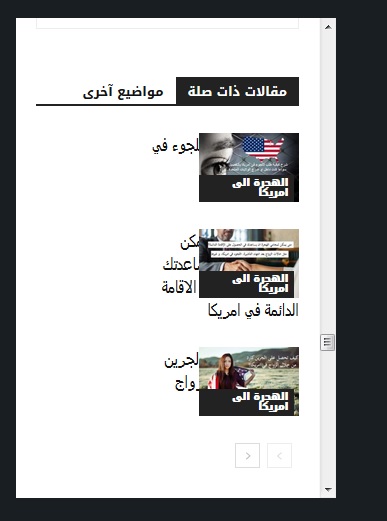
—- ————————————————————————–
I want to help NewsPaper in turning their theme into RTL support !
you might find this helpful! in the next update !
When website language turned to any RTL language , the menu is broken ! I used this CSS to fix it ! and PS Custom CSS in theme panel doesnt work at all!!!
#td-mobile-nav {
position:fixed;
}
.header-search-wrap {
display: none;
}
—– I hided search button because of an error in dispaly – it is mixed with menu button in the right! –
I will try my best to help TAGDIV !
 shubhamsharma7979
When you click the upload button for the logo, the upload box is not being done at all. And in the custom CSS also the text type in the CSS box means the CSS type can not be typed
reddisl This is the website from MOBILE! a disaster !

without additional CSS

reddisl this is the link to my website:
It is in Arabic, but I suppose as developers that doesn’t matter! because CSS, JS, Html, Php is what we speak
reddislhello, I just bought this theme. It is amazing and easy to use, but I have been facing some real issues, which made me really unsatisfied and disappointed.
1. When I was uploading the default theme demo, it kept saying error connecting with server; however the demo was downloaded but in a weird way, as if it is broken.
A. The wide of the page is small then the demo
B. The Menu was totally broken, especially in mobile version!

thankfully, after spending 8H trying to fix this weird issue, I figure out the solution, which is this adding this custom CSS code.
#td-mobile-nav {
position:fixed;
}
The problem is why the hell, does this mobile-nav appears in desktop version? and it’s broken in mobile version.
Please I need the theme to be wider as the demo, and the menu work without this additional css.
—————————
2. Facebook counter is not working ! it is showing 0 followers!
Please fix this issue, I even uninstall and reinstall social counter from theme panel but facebook still not working.
—————————
3. The theme is far from being mobile friendly !!!! too many render blocking CSS and JS , I used TD booster but it said conflects with WP security plugin! and it is out of questions to delete this important plugin; so I used autoptimize plugin! he successfully combine CSS, but no JS are combined !!!!
Test in google test speed page, show 20% for mobile and 80% in desktop !!! huge difference !!
—————————
4. The menu in mobile is not working correctly until the whole page load !
5. when I activate TOP BAR, the mobile menu doesn’t work at all.
6. Lazy load is not working at all in mobile ! ( google test speed page ) show warning about lazy load in mobile.
—————————
I am tired, it is 02:14 A.M , I spend the past 11 Hours trying to figure out solutions! but I failed!
I need TAGDIV support !
Please help me, ^^
ps: my website is in Arabic, but that is not the reason for those issues anyway.
 emmak
emmak wilhard
 Hi, thanks. But how to fix it without CSS coding? Because it’s a flaw. You delete element and you have a big hole. I don’t think that it was supposed this way: to adjust spaces between blocks with CSS. Most users do not know CSS. I am just trying to understand why and how to avoid it. Have you purposefully designed this hole between the header and the first block? Maybe if I use other blocks there will be no problem?
Calin Hi,
Here is the css, you can change the parameter
.td-main-page-wrap {

    padding-top: 25px;

}
https://www.screencast.com/t/DuLOdB3tw2NC
Hope this will help you.
 diggerdog
 wow so to see the hidden rows again I have to add the css and then re-edit the page is that correct?
This is like basic functionality in other builders like divi/elementor etc. I would suggest this is something that should be implemented ASAP.
Thanks
Calin Hi,
With composer, this is possible only if you do not hide the from all devices
https://www.screencast.com/t/yavEE6Uj4vn.
https://www.screencast.com/t/xATftIa1
Select other devices, click on the row, go back to desktop and set it visible
If you want to display them all in the front page please add the below css in Newspaper>Theme panel>Custom code>Custom css
.tdc-content-wrap .vc_row  {

     display: block!important;

}
https://www.screencast.com/t/efGu1DBA3Ek7
https://www.screencast.com/t/9TFPGJH5Y
The first solution is the best.
Hope this will help you.
