
 WakeUpCallProject
 1) ok, but am asking if News Mag has anything similar?
That other site was just as an example to show kind of what I want.
2) the code also removed the line in between my posts and the sidebar.
I only want the 2 lines gone on the homepage in between the investor videos.
Also the CSS section said the ‘*’ would slow down the site.
Is there another code we can try? 🙂
 Bogdan B.
 Hello,
The reason is the sidebar being activated. If you deactivate the sidebar the width in the editor will be full. It is a visual representation of how the page will look with the sidebar activated. If you do not want this it can only be removed from the code as there is no setting to remove this width. The code can be found in editor-style.css: https://www.screencast.com/t/mvV0ZsXun8wS
Thank you!
Bogdan B. Hi,
I understand the issue now. Sorry but the thumbs will not work with faces unfortunately as all of our thumbs get cropped center-top. It will not work properly with just a picture of a face.
If you want to hide the images you can do it like so:
@media(max-width:767px){

.category-obituaries .entry-thumb{

display:none;

}}
Add the code in the theme panel->custom css box.
Thank you!
 eugqua
 Hello Simon,
Yes, I did change that in Font panel but it doesn’t work. No matter the size selected it remains the same.
The CSS you’ve sent me does work.
This is quite annoying (as is font control in general with this theme).
Anyway, thanx for solution with CSS code.
 Simion C.
 Hi,
There is an option to change the excerpt font properties in general, in Theme panel
– https://www.screencast.com/t/4mrJDtJB
If you would like to change the font size for that particular module could simply do it like this
– https://www.screencast.com/t/koAxe8yxIjor
– https://www.screencast.com/t/Lc2FuKXc5ph
Using a code like the one provided below, that must be entered in Theme panel->Custom Css section
.td_module_18 .td-excerpt {

font-size: 20px;

}
Thanks
Bogdan B. Hello,
Try to use chrome when using such tools as firefox seems to have a few issues with css. It is a very difficult browser to work with nowadays. We long switched to chrome as it’s much more reliable. Try this extension along with the browser inspector on chrome: https://www.screencast.com/t/BtLQ8kRc
Thanks.
 Amit
AmitHi Newspaper Developers,
I have a few questions,
1. Jason-LD – How to Add Jason-LD data to all pages of My Newspaper Theme. Is there any template functionality where I add the Code once and it implements across my site, and, all new pages created, will have it automatically.
If you can suggest a plugin for the same, Except YoastSeo, I will be more than happy.
2. Code Tweaks– I intend to use and will always use Newspaper as a Blog Theme Only without any sample data. In that way What Can I delete from my theme files for example: Can I delete WooCommerce and bundled sample data and plugins. Will it break the theme. My aim is to make it light and efficient.
3. Code Compression – Can I compress PHP, CSS & JS Code across the theme, Before I upload it to my host. If yes then how and what tools/services you suggest for it.
That would be all,
Thanks for your interest
I await all insightful and implementable replies
Amit
Simion C. Hi,
You can change the color for the menu, as well as for the footer in Theme panel->Mobile theme section
– https://www.screencast.com/t/hQaJVZB6VUC
Content for the pages when using the mobile theme must be entered through the mobile editor
– https://www.screencast.com/t/MHHBfeJtMya
More information about the mobile theme here – https://forum.tagdiv.com/the-mobile-theme/
The mobile theme is meant to be as light as possible for the best performance on mobile devices. The css file can be found here – https://www.screencast.com/t/GBH5AeUfso if you would like to modify this file directly. Please note that you could use the custom code section available for the mobile theme if you want
– https://www.screencast.com/t/cjvzI1yd
Thanks
Bogdan B. Hi,
3) Sorry but we do not have a customization department. we try to help out where we can but we cannot tackle time consuming tasks.
5) The default quote style is added by wordpress. You cannot change the style itself but you can change the css for it making it look like quote box left. The css code for the quote box left is found here: https://www.screencast.com/t/fGnHY8237Py
6,7,8) Unfortuantely those js and css “errors” are plugins that speedbooster is not compatible with. Our plugin will not be abel to move all the plugin styles and js to the footer unfortunately. That is why originally it had the compatibility function included. I provided the solution so you can sue the plugin with other plugins active but that does not mean it will move the js and css for untested plugins. it mearly means it will run and move what it can. WIthout the modification speedbooster would have disbaled itself and not run at all.
12) did you add td-ss-row to the row in visual composer as this guide specifies? : https://forum.tagdiv.com/smart-sidebar-2/
Thank you
 Catalin
 Hello Sebastian Escobar,
You should use a bit of CSS code to do that. Try the code below and place it in Theme panel->Custom CSS Area.
@media (max-width:767px){

.author-box-wrap{

display:none!important;

}

}
Thanks.
Catalin Hello Siddhartha Mukherjee,
Please notice that our theme uses thumbnails for each featured images and the general cropping system will crop the images from center to top. This is the whole theme behavior. The theme does not have any such an additional option that allows you to avoid this for featured images. All of this will be cropped from center to top and it is not a solution to increase the width and height of image because the image is cropped yet. If you want, you can change the height and the width of the image via CSS custom code. If you are not aware of the steps which are needed to take in this regard, please consider hiring a freelancer, developer to help you because we can not provide custom work at the moment, sorry!
Thanks for your understanding!
Bogdan B. Hello,
There is no setting to change this but you can use this custom css in the theme panel-> custom css box:
.td-category-header .td-page-title{

    text-transform: none!important;

}
Thank you!
Catalin Hello eugqua,
If you want to change the font family for your excerpts for module 18, you should use a bit of CSS code to do that. Try the code below and place it in Theme panel->Custom CSS area. Notice that the font should have to be loaded in your theme panel if you want to bring best results.
The code is ->
.td_module_18 .td-excerpt {

font-family: Arial;

}
Thanks for the message!
Bogdan B. Hi,
1) You can use a css code like so:
.td-load-more-wrap a{

    color: white;

    background-color: red;

}
result: https://www.screencast.com/t/SGYlYb62dyc
If you want to increase the button width, you cna change it;s padding like so:
.td_ajax_load_more{

 padding: 10px 110px;

}
https://www.screencast.com/t/RY46wsrxY5
2) I’m not sure what bottom border you are referring to.
3)You can try to make it more visible like so:
.td-next-prev-wrap a{

border: 2px solid #fa0000;

color:Red;

}
https://www.screencast.com/t/QrM8kdoPLv
Thank you!
 nairolf
 Hi Bogdan,
I don’t want to replace the default fonts with another Googlefonts.
I want to remove completely any call from googleapis (I already replace on the main css the Roboto/Open Sans fonts with Verdana,Geneva,sans-serif; so it doesn’t make any sense use them).
So my question was which option is correct: 1, 2 or 3 (images above) to get rid of any call to googleapis.
Thank you!
Catalin Hello osabob,
Please notice that each post template has an own style and that’s why the color for post title for this template is white. If you want to change them, you should use a bit of CSS code to make these changes.
Thanks for your understanding!
Catalin Hello WakeUpCallProject,
You should use a bit of CSS code to change the font size property for your widget. Try the code below and place it in Theme panel->Custom CSS area.
The code is ->
.td-ss-main-sidebar .widget_text a{

font-size:14px!important;

}
Thanks for your understanding!
Catalin Hello Antonino1985,
Try the code below and place it in Theme panel->Custom CSS area.
The code is ->
#td-header-menu{

border-top: 4px solid red;

}
The result is here -> https://www.screencast.com/t/AAi5MWdsRkC
Thanks for the message!
Simion C. Hi,
You can try this code to hide the menu on mobile – https://www.screencast.com/t/bvyBdzLL5JnC
The code must be entered in Theme panel->Custom Css
@media (max-width: 767px) {

.td-header-wrap .td-header-menu-wrap-full {

display: none;

}}
Please provide more details about what other changes you would like to make to this menu, so I may give you a a more accurate answer. Right now I see that you are using Header style 8, and a stretch property on the header menu.
Thanks
 kobealbo
When modifying the css on the fly with the code editor on Firefox, the theme slows down quite a bit.
twice it crashed the browser.
Is this normal?
 jansena
Hi,
In visual composer I added an ad box within a a custom add box.
On desktop, the advertisement is shown correctly, but on mobile I only see the code:
[td_block_ad_box spot_id="custom_ad_5" tdc_css=""]
I’m using the mobile theme. How come it’s showing the visual composer code?
 Sebastian Escobar
Hi
I want to change some styles in mobile theme, like menu drop-down background and footer color, but also I need to show tags widget below. Where can I configurate this? and where can I find .css files?
Thanks!
 deambris
 I don’t want to remove excerpts. I use custom excerpt for every block, but I want to use a number of words/letters in a specific block’s excerpt. Can I try with custom css?
 fenomeno0chris
 1) CHECK
2) CHECK
3) Too bad you can’t help me with that. It is just one line to edit -.-
4) CHECK
5) Since my team has written a lot of news before I changed the theme, can I somehow edit the default Quote-Style to “Quote box left”?
6,7,8) I have edit my functions.php file with the code from your pagespeed tutorial. Those are the css and js files, which appeared on the top of the page:
registered scripts

common | /wp-admin/js/common.min.js

farbtastic | /wp-admin/js/farbtastic.js

admin-bar | /wp-includes/js/admin-bar.min.js

jquery-ui-sortable | /wp-includes/js/jquery/ui/sortable.min.js

utils | /wp-includes/js/utils.min.js

svg-painter | /wp-admin/js/svg-painter.js

wp-auth-check | /wp-includes/js/wp-auth-check.min.js

td_social_counter | http://www.ps4source.de/wp-content/plugins/td-social-counter/js/td_social_counter.js

yoast-seo-admin-global-script | http://www.ps4source.de/wp-content/plugins/wordpress-seo/js/dist/wp-seo-admin-global-460.min.js

media-editor | /wp-includes/js/media-editor.min.js

media-audiovideo | /wp-includes/js/media-audiovideo.min.js

mce-view | /wp-includes/js/mce-view.min.js

image-edit | /wp-admin/js/image-edit.min.js

td_wp_admin | http://www.ps4source.de/wp-content/themes/Newspaper/includes/wp_booster/wp-admin/js/td_wp_admin.js

td_wp_admin_color_picker | http://www.ps4source.de/wp-content/themes/Newspaper/includes/wp_booster/wp-admin/js/td_wp_admin_color_picker.js

td_wp_admin_panel | http://www.ps4source.de/wp-content/themes/Newspaper/includes/wp_booster/wp-admin/js/td_wp_admin_panel.js

td_edit_page | http://www.ps4source.de/wp-content/themes/Newspaper/includes/wp_booster/wp-admin/js/td_edit_page.js

td_page_options | http://www.ps4source.de/wp-content/themes/Newspaper/includes/wp_booster/wp-admin/js/td_page_options.js

td_tooltip | http://www.ps4source.de/wp-content/themes/Newspaper/includes/wp_booster/wp-admin/js/tooltip.js

td_confirm | http://www.ps4source.de/wp-content/themes/Newspaper/includes/wp_booster/wp-admin/js/tdConfirm.js

thickbox | /wp-includes/js/thickbox/thickbox.js

gadwp-backend-ui | http://www.ps4source.de/wp-content/plugins/google-analytics-dashboard-for-wp/admin/js/ui.js
registered styles
farbtastic | /wp-admin/css/farbtastic.min.css
admin-bar | /wp-includes/css/admin-bar.min.css
zilla-popup | http://www.ps4source.de/wp-content/plugins/zilla-shortcodes-2.0/assets/css/admin.css
colors | 1
ie | /wp-admin/css/ie.min.css
wp-auth-check | /wp-includes/css/wp-auth-check.min.css
seedprod_plugin | http://www.ps4source.de/wp-content/plugins/ultimate-maintenance-mode/inc/css/admin-style.css
wysija-admin-css-widget | http://www.ps4source.de/wp-content/plugins/wysija-newsletters/css/admin-widget.css
yoast-seo-adminbar | http://www.ps4source.de/wp-content/plugins/wordpress-seo/css/adminbar-460.min.css
yoast-seo-admin-global | http://www.ps4source.de/wp-content/plugins/wordpress-seo/css/admin-global-460.min.css
yoast-seo-dismissible | http://www.ps4source.de/wp-content/plugins/wordpress-seo/css/wpseo-dismissible-460.min.css
google-font-ubuntu | http://fonts.googleapis.com/css?family=Ubuntu:300,400,500,700,300italic,400italic,500italic,700italic&subset=latin,cyrillic-ext,greek-ext,greek,latin-ext,cyrillic
td-wp-admin-td-panel-2 | http://www.ps4source.de/wp-content/themes/Newspaper/includes/wp_booster/wp-admin/css/wp-admin.css
wp-color-picker | /wp-admin/css/color-picker.min.css
media-views | /wp-includes/css/media-views.min.css
imgareaselect | /wp-includes/js/imgareaselect/imgareaselect.css
thickbox | /wp-includes/js/thickbox/thickbox.css
gadwp | http://www.ps4source.de/wp-content/plugins/google-analytics-dashboard-for-wp/admin/css/gadwp.css
woocommerce_admin_menu_styles | http://www.ps4source.de/wp-content/plugins/woocommerce/assets/css/menu.css
I tried every single jss and css ID in the td-speed-booster.php file, but none of them could fix the missing errors which google pagespeed displays. So how can I put those 9 JS and 5 CSS to the footer?
JSS Error:
http://ajax.googleapis.com/ajax/libs/jquery/1.11.1/jquery.min.js?ver=1.11.1

http://www.ps4source.de/wp-includes/js/jquery/ui/core.min.js?ver=1.11.4

http://www.ps4source.de/wp-includes/js/jquery/ui/widget.min.js?ver=1.11.4

http://www.ps4source.de/wp-includes/js/jquery/ui/accordion.min.js?ver=1.11.4

http://www.ps4source.de/wp-includes/js/jquery/ui/tabs.min.js?ver=1.11.4

http://www.ps4source.de/wp-content/plugins/zilla-shortcodes-2.0/assets/js/zilla-shortcodes-lib.js?ver=4.7.3

http://www.ps4source.de/wp-content/plugins/background-manager/resources/js/functions.js?ver=1.2.5.2

http://www.ps4source.de/wp-content/plugins/background-manager/resources/js/flux.js?ver=1.2.5.2

http://www.ps4source.de/wp-content/plugins/background-manager/resources/js/pub.js?ver=1.2.5.2
CSS Error:
http://www.ps4source.de/wp-content/plugins/wysija-newsletters/css/validationEngine.jquery.css?ver=2.7.8

http://www.ps4source.de/wp-content/plugins/zilla-shortcodes-2.0/assets/css/shortcodes.css?ver=4.7.3

http://www.ps4source.de/wp-content/tablepress-combined.min.css?ver=6

http://www.ps4source.de/wp-content/plugins/wp-jquery-lightbox/styles/lightbox.min.css?ver=1.4.6

http://www.ps4source.de/wp-content/plugins/background-manager/resources/css/pub.css?ver=1.2.5.2
9) Im patiently waiting for the fix!
10) CHECK
11) I have changed my PHP version to 7.0. Everything seems to work faster.
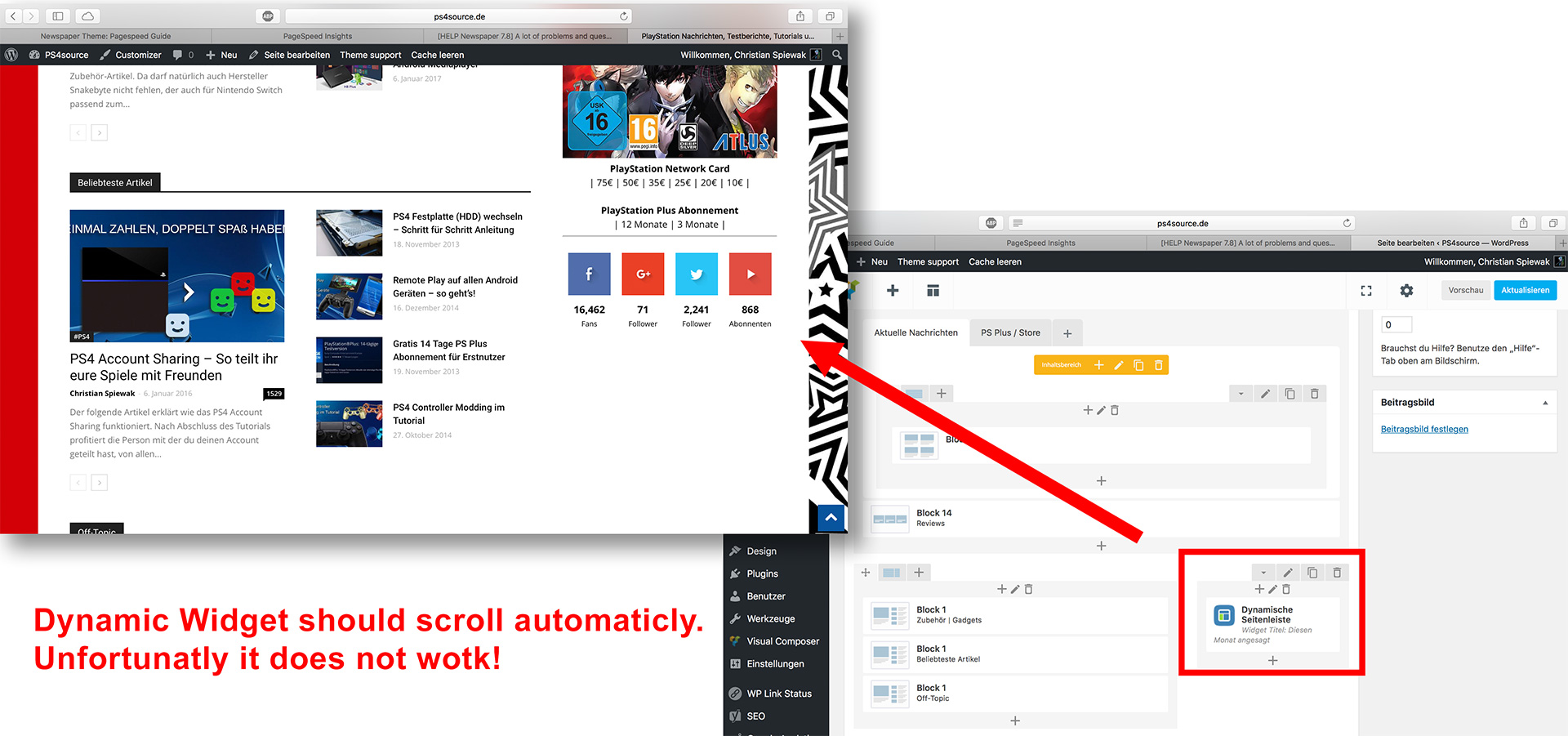
12) As you can see my dynamic widget on the homepage does not work:
 Zakkery
 The problem is in plugin AddThis.
Looks like there is some CSS conflict on pages. https://www.screencast.com/t/FyA9OxuBaiUX
Can u help we with this?
