
- NewsmagInstalling pre-built websites
- NewsmagIntroduction
- NewsmagSmart Lists
- NewsmagTheme thumbs
 Miroslav Glavić
I am using Magazine Pro by the way.
So as I edit things around….on the side bar, there are two elements:
MOST POPULAR
then way lower
MUST READ
Currently it is using the demo’s posts.
How does it decide what is most popular or is that random category?
On the Must Read………It’s sort of like an Editor’s Pick.
Is there a way to pick specific posts from different categories? for both Most Popular/Must Read elements?
 Anamaria
 Hello,
Gossip Pro Demo is a Prebuilt Website Pro built with tagDiv Composer and Cloud Templates.
The sidebar and all design were made with tagDiv Composer, therefore this can not be achieved with the classic editor.
The sidebar on this demo was built like in this video => https://www.youtube.com/watch?v=fa7GenCHcBU
Thank you!
 Vlad S
 Hello !
That is because the one from the demo is being added using tagDiv Composer as you can see here:https://www.youtube.com/watch?v=fa7GenCHcBU&t=2s
Thank you !
 Paata
PaataHello. When I change the image on the main page of the Fitness Blog demo, the new image loses quality. Please help me how to solve this problem?
Please see the links:
home page of Fitness Blog demo – https://demo.tagdiv.com/newspaper_fitness_pro/?fbclid=IwAR0DcaDhGFvswJBaiSBrS_70aLmKqB0pbl_bL2neVLE4Tl1HUpmf-KW8TUQ
home page of my Blog: https://www.studentblog.ge/
 jagonly
Hello, i’m new in this community, and first I would like to say, that this theme is very potential, just takes times to spin it around. I have Gossip Pro Demo installed, and all looked awesome, although for video post I need to make a duplicate template and replace big image featured image with regular one.
But now I have problems, I have current page content, and I dont want to make with composer, just plain old classic editor. The problems are, I cant seem to make a sidebar just like in single post template from Gossip demos. In widget there are buch of tagdiv blocks, but in single template gossip is using flex block 1 in right sidebar. How can I make my default sidebar just like in demo. Thanks
Anamaria Hello,
Usually, this problem appears only when you are using a pro demo made with tagDiv Cloud Library, we indicate to use only one of them with our theme, WP Bakery or Cloud Library.
If you want to keep both I can try to help you with this problem with a custom CSS, this isn’t the best practice, but it can work for the moment. For this please provide a link to your website.
Thank you!
 greenbooks
Hi
We are using – https://demo.tagdiv.com/newspaper_magazine_pro/ theme.
How shall we change the color/size/font itself of the titles?
Eg. blue for one tile and light read for another title etc.
(Our development site link: https://starbeambookstore.com/gportal2/)
Thanks
 mayfairmedia
Hi there guys!
I wonder how can I change the Style for the Social Counter Widget on Categories/Archives pages?
Usually, via the Page Builder I can insert the Social Counter as an element, but for the Categories/Archives pages I can only use Widgets to place the Social Counter as a widget and it doesn’t support the Style selection. However, it’s done somehow for the Newspaper Crypto demo, please check: https://gyazo.com/00d18e74560d51f5f1872bdbe89e08ef
 sirms
sirms I found it difficult to make custom blocks.
I want to have sticky side ads on both sides of the page but I found it also very difficult to make that happened smoothly.
I want to custum the home page with my own header, blocks and footer. I want the side ads to be sticky on both sides, and I want it to be gone when you make the browser smaller. Header ad, left ad (sticky) and right ad (sticky).
I made a demo for you to see: https://imgur.com/a/aK8QACo
 mteliambavi
 I used many demos but have a specific problem with Medicine pro single post template.
It says that one of the images can’t be loaded.
 akiim.deshay@onlymoveforward.com
Text on sidebar block headings is not consistent and I’m having trouble adjusting it.
I have run out of options for adjusting the text on sidebar headings other than using CSS code (I am not good at it) but I am having trouble getting the code right.
Installed Newspaper 9 with the Default Demo initially (2 years ago) but upgraded and converted and no longer using the tagDiv Standard Pack plugin.
On the homepage https://testsite.northdallasgazette.com/
Image: https://testsite.northdallasgazette.com/wp-content/uploads/2021/01/Sidebar-Heading-1.jpg
On another page: https://testsite.northdallasgazette.com/index.php/ndg-live-video/
Image:
https://testsite.northdallasgazette.com/wp-content/uploads/2021/01/Sidebar-Heading-2.jpg
I want them both centered with the font size of the larger one (19px). I followed the instructions for using the browser’s Inspector here and could only come up with the following code but it does not work.
td_block_templete_14 widget .td-block-title a {
font-size: 19px;
text-align: center;
}
Please help.
 Avantage75
 You are not the only one. I have the same problem.
https://forum.tagdiv.com/topic/cant-install-demo-3/
Nothing works properly. I have repeat all steps at least 3 times, contact host, but nothing helped. Can’t install any demo, can’t reach cloud, couldn’t make auto activation,…
mteliambaviHello.
I need help.
When I preview demos, on the single pages, images have a lightbox feature. I can click on the image and then see the next/previous in a lightbox. But when I install demos on my site, this feature doesn’t work.
What should I do?
Avantage75I can’t install prebuilt website (with or without content). I always get alert my server is not properly configured.
I also can’t install any tagDiv plugins (except manually) and can’t connect to Cloud Library.
I have checked System status and everything is green. I have edited PHP configuration on host server and every single value is even much higher than recommended.
Wordpress ver. 5.6
Newspaper ver. 10.3.9.1
 Falhamovic
Hi what are the best plugins and demo to use to get fast and speedy website?
 Calin
Calin Hi,
Most probably the Advanced Ads widget can be use with our theme if you do not use cloud templates. Now this is just my opinion, because the plugin was not tested with our theme therefore we do not know how this should work, also we can not provide support for untested plugins.
Now if you are using a pro demo (pre-build website) there are many changes that the plugin to not work with our theme.
https://i.imgur.com/mZ0WADk.png
thank you!
 DocMovies
Hi,
I am trying to import some demo template from cloud template, but everytime it is giving me error of “One of the images failed to upload” after some progress.
Please find the error in the screensho

 besmelejack
 Hello, yes I know that. But it’s not a pro demo. For example, I just closed something through the add-on. Ads stopped appearing on my mobile site.
Vlad S Hello !
On the elements that you are using it is not possible to use a css, you will have to use tagDiv Composer and assign a +40px margin top css: https://www.screencast.com/t/3jaNfc6Nf1Eg
Even in our demo it gets cut: https://www.screencast.com/t/IuPs4h2AyK
Thank you !
 Lukas Fila
 Hello Vlad,
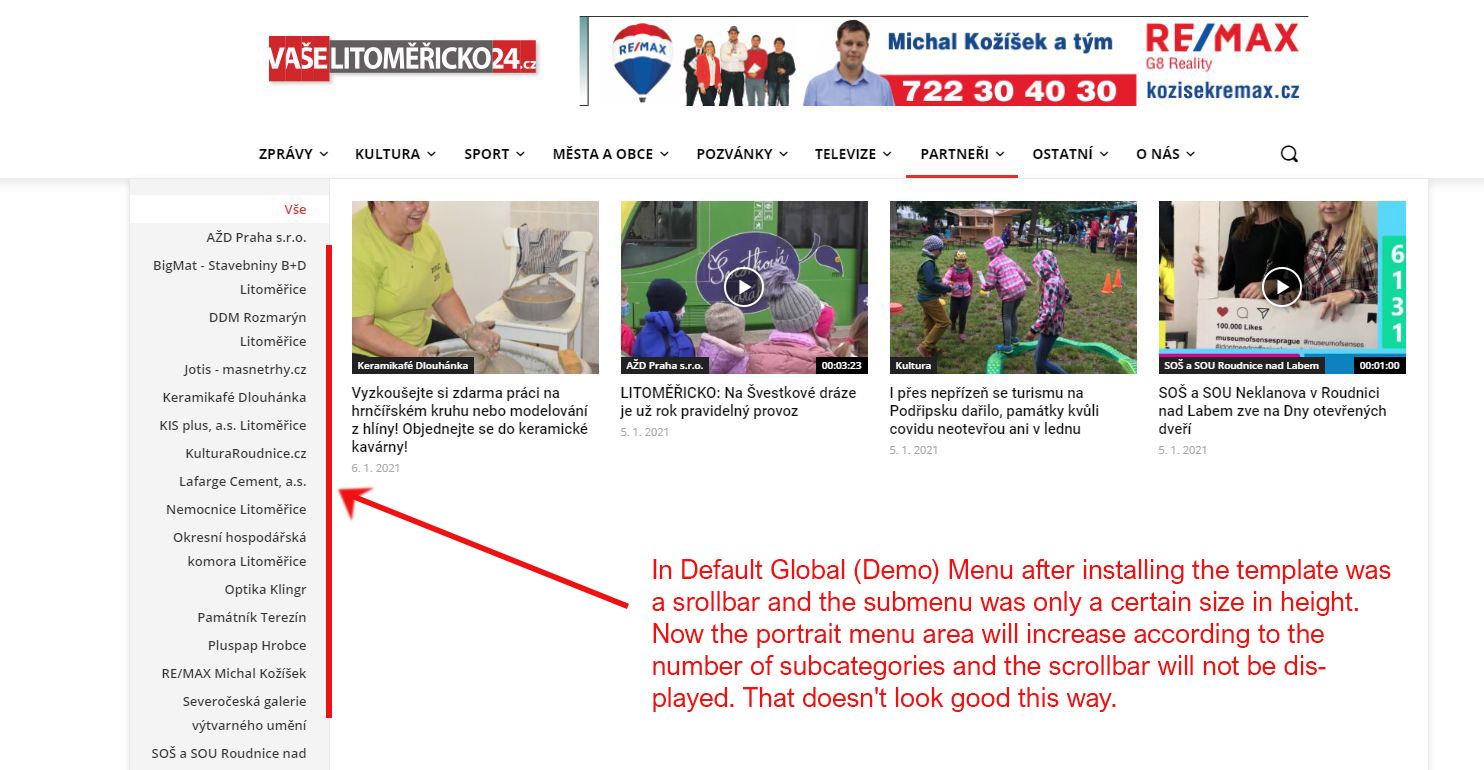
I’m sorry to react so late, but only now is my problem really current. The point is that after setting my own form of the header from the cloud, the scrollbar disappeared from the Mega menu.
In Default Global (Demo) Menu after installing the template was a srollbar and the submenu was only a certain size in height. Now the portrait menu area will increase according to the number of subcategories and the scrollbar will not be displayed. That doesn’t look good this way. My web: https://litomericko24.cz/
 Sportconity
Hi, i just bought a Newspaper them, i was working on my future website, i made some changes but suddenly my website don’t affichate any picture…
I don’t know how to repair it…
I download a new demo to test if it’s working but it’s still the same… i can see the website and i can make changes but i can’t see the pictures…
Can you help me please?
Thanks
 Bettina
 Hello!
Please tell me in which demo you saw this layout.
Thank you!
Bettina Hello!
You can install any demo you want from Newspaper -> Prebuilt Websites. There you can find the Tech News Pro demo also and install with content or not.
Note that for this demo you will need to install also the tagDiv Newsletter plugin.
Hope that helps you!
Thank you!
 anggagilang
 Thanks for your answer, but i dont want add margin top on element/widget but i want add top space when my sidebar is sticky. So the sidebar when user scrolling up doesnt crash with sticky menu. I have seen this implementation on demo newspaper magazine pro.
I hope you know what i mean. So can i add this top space margin when sidebar is sticky? Because i need 100px top margin, if i added it on element. The design will look bad when sidebar is’t sticky.
I am waiting for your reply, thankyou
Calin Hi Lubo,
You can achieve similar websites, maybe not using only the theme, but using the theme with other ads plugins.
Normal on a PRO Demo (Pre-build Website) you can use tagDiv Composer and set the ads using the ad box element. The ad box has 3 sections for ads: using theme panel ads -> https://i.imgur.com/KFa9ibl.png, using images/banners -> https://i.imgur.com/MfAPTaE.png and custom code -> https://i.imgur.com/2rh8SuD.png
Thank you for your understanding!



