
No search results were found in Documentation!
 findbitter
Hi,
I try to add video for background but not work https://demo.tagdiv.com/newspaper_interior_designer_pro/ – https://www.youtube.com/embed/L0G1Mb9VErU?autoplay=1&loop=1&mute=1&showinfo=0&controls=0&start=2&playlist=L0G1Mb9VErU& and can i upload some own media section (video) for background
Thank you
 conanfx
How to enable fast image loading?
I imported the free news demo.
Link:
dfwreview.com
 Bettina
 Hello Caro!
Did you install the EastCoast Check Pro demo with content?
For this demo, you have to add Locations taxonomies under My directories. For each listing, you can choose the taxonomies: https://app.screencast.com/CR7Bx9yJnMT60
In the tagdiv Composer, you can display them like this: https://app.screencast.com/bmFCLIGBTKlmO
For the shortcode CPT Location Display, you need to have a Google Maps API key: https://forum.tagdiv.com/use-google-maps-api/
Thank you!
 okwiseguy
Is there a SHORT way to set this. I have downloaded what looks like a working template… yet nothing works and all of the DEMO copy… A SIMPLE Fix would be great for people that believe in the look of your Theme… but can’t get it to work as the demo works.
HELP QUICKLY Please!
 mikisan
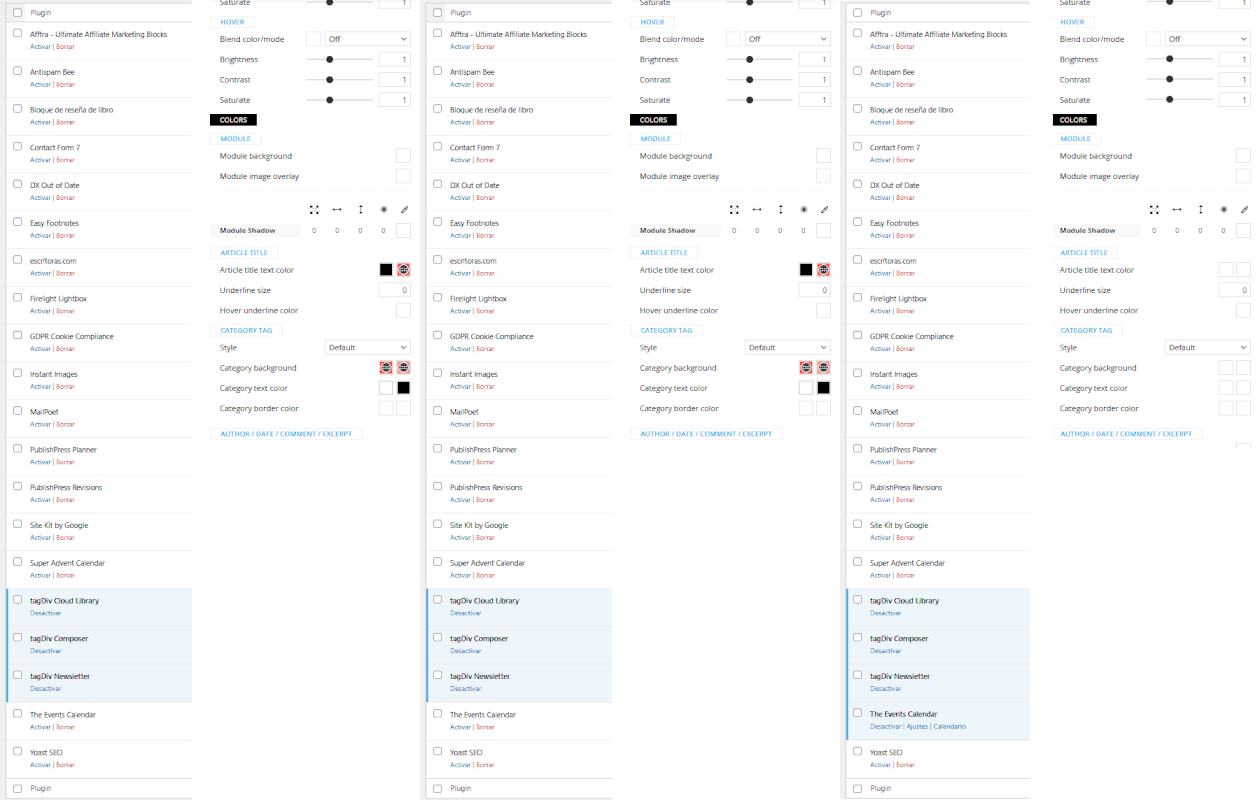
 In my case when deactivate all plugins, but the TagDiv ones, and I enable the Events Calendar plugin, I lose the color picker.
All plugins are up to date, WordPress and Newspaper theme too; Mintyside PRO demo.
 a1-hbg1
Hi i have a clean new install of Newspaper Theme with Metropolitan PRO Demo. My Problem, i can´t see the settings for the selected element, there is in most cases just blank space. What can i do?
a1-hbg1Hi i have a clean new install of Newspaper Theme with Metropolitan PRO Demo. My Problem, i can´t see the settings for the selected element, there is in most cases just blank space.What can i do?
 haroldhare
Hello, what page layout is this? How can I use this page as my own? https://demo.tagdiv.com/newspaper_momentum_pro/tdtax_services/branding-visual-design/
I can’t locate it in the pre-designed templates cloud library.
Thank you!
Bettina Hello!
That’s strange! Did you install a demo or only a category template? Can you please provide an example?
Thank you!
 lpecchiproper
 Ok, that’s what I’ve already done, however I’m using ACF, which I’ve never used before, because it’s included in the Doctor Pro demo and it works great in many other cases.
I would suggest you add support also for that kind of field as well.
Thanks, Luca
Bettina Hello!
Now, you shouldn’t use anything like extra plugins. But you can build your form for booking. We also have a new demo with a booking form like : https://demo.tagdiv.com/newspaper_cassio_lovo_pro/reserve/
Thank you!
 Anamaria
 Hi,
The Revolution Slider that we provide is a Bundled Plugins in our theme. No need to activate it, simply ignore the activation messages and you can use it for the sliders that our theme is providing -> https://forum.tagdiv.com/import-revolution-sliders-on-demos/.
What is a bundled plugin?
– https://help.market.envato.com/hc/en-us/articles/213762463-Bundled-Plugins
The license is only for the theme; if you want to have the premium version of the plugin, then you need to buy a license for it.
Thank you!
mikisanI am using Newspaper theme 12.6.8 with the Mintyside PRO demo as a base.
I can’t find a way to delete empty inner columns nor the column that contains them. When I hover there is no trash bin icon and the contextual menu shows the delete option as disabled.
https://imgur.com/a/7WbphBY

Is there any other way to delete them?
Thanks :o)
mikisanI am using Newspaper theme 12.6.8 with the Mintyside PRO demo as a base.
The Mintyside PRO demo does not seem to include a Pages template, so to create a Terms & Conditions page I go to WP admin and write the text on a new Page, then I open it and edit it with TagDiv Composer.
The thing is, I would like it to look like the Mintyside PRO Single Template for posts, is there a way to duplicate that template and assign it to all Pages I create? even if it is on a page by page basis? I know I could design a page from a blank template, but I can’t find how to insert the content of a WordPress Page inside an element, plus, I am not sure I would be able to replicate in a Mintyside style (maybe this is easier than I think), for instance the basic structure, the main container to hold all the elements.
Thanks :O)
mikisanI am using Newspaper theme 12.6.8 with the Mintyside PRO demo as a base.
I can’t get the Pinterest element to work, what am I doing wrong?
I input “user/board_id” => “welovecuteanimals/we-love-animals/” but get an error.
pinterest data error: Pinterest data is not set for <em>welovecuteanimals/we-love-animals/</em>, please check the <em>user/board_id</em>

I’ve tried with multiple users and boards to no avail.
Thanks :o)
mikisanI just installed the Newspaper theme 12.6.8 and started customizing it. I used the Mintyside PRO demo as a base.
I just want to share the issues I encountered just in case someone else faces them; specially if anyone finds that images do not load on the frontend, or some things don’t seem to work in TagDiv Composer.
The Events Calendar Plugin interferes, at least, with the color picker in the TagDiv Composer. Since, so far, I haven’t seen any problem on the frontend, I just disable the Events Calendar Plugin before using the TagDiv Composer; so,
in my case, it is not a problem, just an inconvenience.
The AMP Plugin interferes, with the TagDiv Composer and the frontend javascript; the search form does not open, neither the hamburguer menu and it prevents the lazy loading from loading any image. Since this plugin it is not really valuable nowadays (contrary to popular belief neither AMP pages nor the official plugin are deprecated; it’s just that it looks like AMP pages will not be of any importance from now on), I just deleted it.
Bettina Hello Guido!
Every demo has another structure for the logo there. The first one is a SVG logo, and the other one is only a text there. The time of loading is not the same.
Thank you!
Anamaria Hi,
The Revolution Slider that we provide is a Bundled Plugins in our theme. No need to activate it, simply ignore the activation messages and you can use it for the sliders that our theme is providing -> https://forum.tagdiv.com/import-revolution-sliders-on-demos/.
What is a bundled plugin?
– https://help.market.envato.com/hc/en-us/articles/213762463-Bundled-Plugins
The license is only for the theme; if you want to have the premium version of the plugin, then you need to buy a license for it.
Thank you!
 DanielV
Hi,
I just installed the theme Newspaper on my new domain in WordPress but I can´t install a pre-build demo.
I have never had this issue before.
When hover on a demo the button “Install” and “Include Content” should be visible. I can´t see these buttons. When pressing the image it just takes me to the “Preview” href.
I have tried on several computers with the same issue.
Could it be some setting at my end our is there a issue with the latest version available on Themeforest?
Br
 srendell
I am using below demo for my website.
https://demo.tagdiv.com/newspaper_magazine_pro/
I want to ask here in demo like home, global, lifestyle, more submenu has menuitem icons.
From where these icons are coming is it icon library where it is called and how I can change and edit?
Where I can find?
Please help us on it
 Vinod Tiwari
 Vinod Tiwari
Dec 30, 2024 at 1:20 pm
Hello Bettina,
I am experiencing an issue with the layout of my website, which is working fine on desktop but does not display the same layout on mobile as the theme’s demo does. The website URL is: http://sumantvhindi.itpeople4u.com/.
On the desktop view, it is displaying correctly just like the theme purchase demo but on mobile the layout does not match the one shown in the theme demo. Here is the demo URL of my theme for reference: https://demo.tagdiv.com/newspaper_week_pro/.
The desktop view is displaying as expected, but on mobile it shows a different layout. Could you please check and advise how to fix this issue?
Please find below the admin credential
http://sumantvhindi.itpeople4u.com/wp-admin
Looking forward to your assistance.
-
This reply was modified 1 year by Bettina. Reason: Please don't share credentials via forum
Vinod Tiwari Hello Bettina,
I am experiencing an issue with the layout of my website, which is working fine on desktop but does not display the same layout on mobile as the theme’s demo does. The website URL is: http://sumantvhindi.itpeople4u.com/.
On the desktop view, it is displaying correctly just like the theme purchase demo but on mobile the layout does not match the one shown in the theme demo. Here is the demo URL of my theme for reference: https://demo.tagdiv.com/newspaper_week_pro/.
The desktop view is displaying as expected, but on mobile it shows a different layout. Could you please check and advise how to fix this issue? If you need the WordPress admin details to investigate further, I am happy to provide them.
Looking forward to your assistance.
Anamaria Hello,
Do you use Ubuntu 22.04?If yes you need to update the security packages:
apt update && unattended-upgrade -d
Then re-issue Lets Encrypt Cert on a site-by-site basis
Also, please check this guide https://wpastra.com/docs/fix-for-curl-error-51-ssl-no-alternative-certificate-subject-name-matches-target-host-name-websitedemos-net/ and topic https://stackoverflow.com/questions/20842970/curl-fix-curl-51-ssl-error-no-alternative-certificate-subject-name-matches
Thank you!
 ALM
ALMWe are using your Newspaper 12 and NewsMag5 themes on some of websites.
Lately we have added the Real Estate PRO Plugin, however it doesn’t look or function as on your demos.
We urgently need the variables (shortcodes), tags to be able to display and link sections of those pages like Location (city, country), For Sale, Rent.
Please reply at your earliest.
 RukkyGreat