
- NewsmagSocial counter styles on Newsmag
- NewsmagNewsmag documentation
- NewsmagtagDiv Social Counter tutorial
- NewsmagIntroduction
- NewsmagCategory grid styles
- NewsmagTheme colors introduction
- NewsmagPage templates
 infogate2020
Hi,
Our site is up and running, but we have just one detail that we haven’t resolve it yet.
How can we get an custom Sort order for Big Grid Flex?
For example, “Last 24 hours”,”latest posts starting from 6th position”.
thanks
Best regards,
 Calin
Calin Hi Godwana2020, you can use the option indicate by AliAhmadi on flex blocks, also you can use the general option from theme panel -> https://i.imgur.com/ERDI8j6.png
Hope this will help you!
 Mark Gilbert
 Hi Vlad – I didn’t realise different code for each circumstance. It is the Flex Block 1 at the top of https://jazzjournal.co.uk, with custom title “Three items from the last seven days at Jazz Journal”
[tdc_zone type="tdc_content"][vc_row][vc_column][td_flex_block_1 modules_on_row="eyJhbGwiOiIzMy4zMzMzMzMzMyUiLCJwaG9uZSI6IjEwMCUifQ==" limit="3" hide_audio="yes" show_btn="none" show_cat="none" image_floated="" f_title_font_family="fs_3" f_title_font_size="21" f_ex_font_family="fs_7" f_ex_font_size="14" f_title_font_weight="600" f_ex_font_weight="500" tdc_css="eyJhbGwiOnsiYmFja2dyb3VuZC1jb2xvciI6IiNmOWY5ZjkiLCJkaXNwbGF5Ijoibm9uZSJ9LCJsYW5kc2NhcGUiOnsiZGlzcGxheSI6Im5vbmUifSwibGFuZHNjYXBlX21heF93aWR0aCI6MTE0MCwibGFuZHNjYXBlX21pbl93aWR0aCI6MTAxOSwicG9ydHJhaXQiOnsiZGlzcGxheSI6Im5vbmUifSwicG9ydHJhaXRfbWF4X3dpZHRoIjoxMDE4LCJwb3J0cmFpdF9taW5fd2lkdGgiOjc2OCwicGhvbmUiOnsiZGlzcGxheSI6Im5vbmUifSwicGhvbmVfbWF4X3dpZHRoIjo3Njd9" category_id="" sort="random_7_day" image_alignment="4" mc1_el="20" custom_title="Three items from the last seven days at Jazz Journal" header_text_color="#000000" block_template_id="td_block_template_7" modules_gap="25" f_header_font_family="fs_3" f_header_font_size="18" modules_divider="" modules_divider_color="" image_height="100" show_excerpt="" author_txt_hover="#000000" author_txt="#595959" show_review="none" meta_padding="10px 0px 0px 0px" art_title="0px 0px 6px 0px" art_excerpt="10px 0px 0px 0px"][/vc_column][/vc_row][vc_row gap="10" tdc_css="eyJhbGwiOnsibWFyZ2luLXRvcCI6Ii0yMCIsImRpc3BsYXkiOiIifX0="][vc_column width="2/3" tdc_css="eyJhbGwiOnsibWFyZ2luLWJvdHRvbSI6Ii0yMCIsImRpc3BsYXkiOiIifX0="][vc_row_inner tdc_css="eyJhbGwiOnsiZGlzcGxheSI6IiJ9fQ=="][vc_column_inner tdc_css="eyJhbGwiOnsibWFyZ2luLWJvdHRvbSI6Ii0yMCIsImRpc3BsYXkiOiIifX0="]
Thanks
 xochipelli
This is a snippet from my home page:
https://www.screencast.com/t/PvE4SRFJkZ
And the settings and content length for the Flex Block 4 containers:
https://www.screencast.com/t/3mooo2lWaVtU
Excerpt length is currently set to 50 words (the short column in the screenshot is 54 words)
This has happened on a few different occasions, in other locations as well.
Excerpts were working on the homepage earlier, until I mass disabled and selectively enabled plugins, to help document and log issues for separate issues to a 3rd party plugin vender.
No caching in is present wordpress, and varnish is disabled on the server until until after I’ve done testing and modding setup.
I’ve killed off posts and recreated with no change.
As a test, I’ve also attempted utilizing a 3rd party plugin WPKUBE – Advanced Excerpt where is excerpt length is set to 10 words. Any other options offered by the plugin are not being recognized (ie custom “read more” link).
 Etoimos
The Big Grid Flex 5 block shows four article images, all pulled from the same category. Is it possible to have the large 50% segment on the left pull the latest article from category A, the larger top element from the right half to pull from category B, and have the two smallest elements on the bottom right pull from categories C and D?
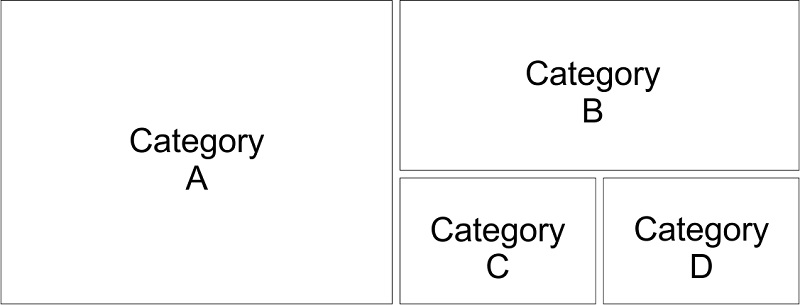
If this is not possible in the Big Grid Flex 5 block, is there a way to do this within the Newspaper theme?
 marclaude
Dear TagDiv Team,
I’m working on a brand new layout for my movie magazine, based on Style Pro cloud templates. Results are amazing, I hope to launch the new version soon and working on cloud templates allowed me to leave the website online without importing a full new Demo Style overwriting the News Magazine style.
But I found some color issues, I hope you can help me with these:
1) CATEGORY GRID 1 doesn’t allow me to choose Review Stars Color in Style Tab, so in Layout Tab I can choose to show Review Stars, but then I cannot change colors in Style Tab, and actually they are black so they are invisible. That is quite annoying.
2) FLEX BLOCK 2: The same – no possibility to choose Review Stars color after you select to show them – happens in FLEX BLOCK 2. They are actually white, so at least I can see them, anyway I want them blue for the whole website so it represents an issue.
Please find enclosed some screenshots about the missing Review Star color option in CATEGORY GRID 1 and FLEX BLOCK 2:
https://ibb.co/ccT0b2g
https://ibb.co/JzkSdcJ
Waiting your courteous reply,
Best Regards,
Marco
 slivertorp
 Hello Vlad,
I am not using : “Flex Block”
Let me explain you with the following drawing I did for you, it will help you to answer properly:
https://imgur.com/rq7NidW
– I have 3 inner rows
– Each of them contains 1 “Single Image” and “1 Image info box”
– Underneath each inner rows, there is quite a big space / gap.
The question is : How to reduce the the gap between each inner row?
Link if you want to check the source code: https://tinyurl.com/yatyq43k
Thank you in advance, it is really important to me.
Kind regards,
-
This reply was modified 6 years by
slivertorp.
 digitalmanojar
Hi, I have also posted some other request for support yesterday but no answer yet. (https://gp24.ro)
Meanwhile, I ran into other problems that may be (or not) be related.
The speed of TD Composer is like very slow, to not say ridiculously slow.
When we make changes to the main page with TD Composer in many occasions when we go to see the result and come back we get all sorts of errors that seem only to be resolved if we delete cache on the page as well as in the browser. I am sure that this is not the normal way…
At this very moment I am trying to resolve a banner placement (this I have been trying ALL WEEKEND, just so you can imagine my mood after all this wasted time) But it seems that whatever I do is not working. (this apart from the time it takes for TD Composer to actually place a block I usually refresh the page if it takes more than 10 (!!!!!) minutes let alone to save in case I get to make an actual change) We have similar positions on the main page, the first one is the Flex Block 1 called Video-Popular with a banner underneath. A bit further down we have a similar situation 9or at least we want it to be the same) with a Flex Block 1 called Moto-Popular and also a banner underneath. But no matter what settings we try we can not get it to work in a way that it shows this banner, On the live website it keeps showing the Flex Block and it kinda scrolls with the website instead of staying put.
In regard to banners we noticed that the theme came with Slider Revolution, but also this works so slow that we (temporarily) installed Soliloquy-Lite (which works fine in terms of requirements) What is the best option for the theme?
To avoid questions about my internet speed and o the server speed:
Internet Digi Romania Gigabit, with actual speed never below 800Mbps Down and 500Mbps Up.
Contabo VPS L-SSD Package (8 core, 30GB Ram, 800GB SSD, 600Mbit Uplink)
Bitcatcha server score slightly better than Tagdiv.com 🙂
Other Issues I want to resolve are related to site caching, Image Optimization and Multi Language.
What are the theme compatible best performing plugins for this?
For Caching and Image Optimization we have premium versions of WP_Rocket and Imagify but maybe this is not working well.
(Our Google Pagespeed Insights scores have never been so low, not even when we were using Magbook on shared hosting!)
The change from Magbook to Newspaper mixed up a lot of the multi language things such as menus etc. Currently we are on a free version of Polylang, but we are thinking of going back to premium version of WPML, but prefer to be sure to know what is the best option for the Newspaper theme.
Quite a few questions and the way things are going now there might be more 🙁
I hope you guys can help us out as we did have very high expectation of the best News Theme, but so far it has been a bumpy ride.
 Topfgartenwelt
Is there a way to deactivate images on Flex Blocks? Could you ad the option none for Flex Blocks?
Greetings Kathrin
 Sophia_FACES
Hi,
My website is showing the following error in Mozilla and Edge browsers on all posts.
Warning: getimagesize(): SSL operation failed with code 1. OpenSSL Error messages: error:14090086:SSL routines:SSL3_GET_SERVER_CERTIFICATE:certificate verify failed in /home2/qzj6hn7y/public_html/wp-content/plugins/td-cloud-library/shortcodes/header/tdb_header_logo.php on line 792
Warning: getimagesize(): Failed to enable crypto in /home2/qzj6hn7y/public_html/wp-content/plugins/td-cloud-library/shortcodes/header/tdb_header_logo.php on line 792
Warning: getimagesize(https://facesoman.com/wp-content/uploads/2019/11/FACES-LOGO-In-Red-272-x-90.png): failed to open stream: operation failed in /home2/qzj6hn7y/public_html/wp-content/plugins/td-cloud-library/shortcodes/header/tdb_header_logo.php on line 792
Also I have just noticed that flex box 2, now does not have ‘no of columns’ option.
This is is on my site – Related Posts and latest posts
https://facesoman.com/unicef-oman-initiatives-during-covid-19/
And this is your template – Related posts and latest posts
https://demo.tagdiv.com/newspaper_medicine_pro/2020/04/08/td-post-anxiety-research-your-nose-itches-allergies-flu-or-covid19/?edit_url=null
 yasinnar
 Hi again
Could you please give me exact solutions.
1- Big Grid Flex 2 looks faulty, wrong in my web site’s mobile view
Desktop view: https://prnt.sc/sq6vyk
Mobile view: https://prnt.sc/sq6wwj It should be like that https://prnt.sc/sq703s
Could you please tell me how can Big Grid Flex 2 seem like that https://prnt.sc/sq703s ?
2-I read 4-5 times everything over and over again in this link: https://forum.tagdiv.com/big-grid-flex-settings (https://prnt.sc/sq7upd)
But I couldn’t find a solution to my 1st question. I think this link is not enough for me to make a new layout for a grid for mobile and desktop view.
3-You say “Big Grid Slide is a rubbish for me because I set my web site’s width 1200px”.
:))) Good really good. It is nonsense
Ok. Never mind 3rd problem. Please just give me exact solution for 1st and 2nd question?
Calin Hi,
1. In this way was build to look, the second modules can be slide on mobile, please note that the layout and functions are not the same in Newspaper and Newsmag, Newspaper has a different layout and more options.
2. All the settings for big grid flex can be find here -> https://forum.tagdiv.com/big-grid-flex-settings/ also you can check the flex settings too -> https://forum.tagdiv.com/big-grid-flex-settings/
3. If you change the row (you stretch the content), please use only flex blocks and grids, these will adapt to the size selected, standard blocks and grids can not adapt for bigger size.
Thank you!
Calin Hi,
Yes, you can exclude the nepali category using this option -> https://i.imgur.com/xXy34JE.png -> https://i.imgur.com/JTw4PTm.png -> https://i.imgur.com/9wwBATC.png -> https://forum.tagdiv.com/flex-block-settings-guide/ unfortunately on posts loop you need to enter the post ids you want to exclude -> https://i.imgur.com/FXi4MAu.png this element do not has an option for categories, or if you are using latest articles from page template -> https://i.imgur.com/DXEugG9.png
Thank you!
yasinnarI have 3 questions
1- I see following grid elements has problem in mobile view.
Big Grid Flex 2, Big Grid Flex 3, Big Grid Flex 4, Big Grid Flex 5 and almost all Big Grid elements and Big Grid Slide.
I want to use Big Grid Flex 2 in web site but it doesn’t work properly and looks faulty in mobile view.
https://prnt.sc/spwuuy
Your the other theme Newsmag uses a grid similar to Big Grid Flex 2 https://demo.tagdiv.com/newsmag and it looks perfect in mobile view too. https://prnt.sc/spwkno
Will you solve this serious problem?
2-Can we change sizes of Grid Flex’s sizes? Newsmag’s Big Grid Flex 2 has amazing height and width size.
I think we can edit grids.
3-I set “Row Stretch: Stretch row and 1200px content” for all rows in my web site. I use a Big Grid Slide in my web site. When I set “Row Stretch: Stretch row and 1200px content” for Big Grid Slide’s row, I have that problem: https://prnt.sc/spv6pr
How to solve this problem?
Calin Hi,
For that you’ll need to make video posts -> https://forum.tagdiv.com/featured-image-or-video/ and if you are using that demo the posts with featured video will play in a popup.
This option can be enable on flex blocks using tagDiv Composer -> https://i.imgur.com/LVHKeUe.png
Thank you!
Sophia_FACES Me too waiting for a fix.
Meanwhile I have just noticed that flex box 2, now does not have ‘no of columns’ option.
This is is on my site – Related Posts and latest posts
https://facesoman.com/tdb_templates/single-post-template-medicine-pro/
And this is your template – Related posts and latest posts
https://demo.tagdiv.com/newspaper_medicine_pro/2020/04/08/td-post-anxiety-research-your-nose-itches-allergies-flu-or-covid19/?edit_url=null
 Vlad S
 Hello !
The excerpt can be found in the Flex Blocks as you can see here: https://www.screencast.com/t/rFT9jPUKl7We
Thank you !
Calin Hi,
The Read More Button can be set on flex block 1 -> Read More Button and this will be display on each post in part, this button is not available on blocks/flex blocks –
-. https://i.imgur.com/G7xHrWb.png -> https://i.imgur.com/dKv7prm.png -> https://forum.tagdiv.com/flex-block-settings-guide/
also using a pro demo or cloud templates you can edit the whole with tagDiv Composer.
Thank you for your understanding!
 gsw1011
 NO ANSWER???
THANK YOU FOR SUPPORT, VERY HELPFUL
I SOLVED BY MYSELF BY EDITING CSS
.td-module-container {-webkit-box-orient: horizontal !important;
-webkit-box-direction: row !important;
-webkit-flex-direction: row !important;
-ms-flex-direction: row !important;
display: flex !important;
}
Vlad S Hello !
For Blocks you will have to use css coding:
h3 > a {

color:Red;

}
The code must be inserted here: https://www.screencast.com/t/J1Nxw5s5
We recommend you to use Flex Blocks.
Thank you !
Calin Hi,
Is possible to be set some offset on the first block from you page -> https://i.imgur.com/VNylQaY.png pelase edit the page with tagDiv Composer and check the settings from that flex block.
Let me know the reulsts!
Thank you!
 martinlangmaid
Please see https://peplink.ninja
Latest Posts in the footer shows ‘Frontier’s Pepwave Bonding Solution for Larian Studios’ as latest post – this is right.
I have a ‘Latest Posts’ Flex block near the top of the page – it is not showing that post.
How do I trouble shoot that?
 vaviato
Big Grid Flex 5, Block 14, how do I add subtitles here? Like a text, description under the title.
Calin Hi,
Please make sure that you make the update as in our guide from here -> https://tagdiv.com/update-newspaper-theme/ also do not forget to activate the theme plugins, this will solve the shortcode problem -> https://i.imgur.com/Pja6U3I.png
I think that you want to set a big grid that has the layout of block 17, because there is no Big Grid Flex 17 in our theme, this can be achieve using the flex block 3 -> https://i.imgur.com/555eHc6.jpg -> https://i.imgur.com/yVrhI8w.png
If there is still a problem, please provide some more details and some screenshots.
Thank you!
Calin Hi,
If you want to remove only the categories from big grid on mobile, you can try this custom css
.page .td-big-grid-flex .td-post-category{

display: none;

}
The code need to be set in theme panel> custom code> custom css.
Thank you!



