
- Apitd_api_header_style::delete
- Apitd_api_header_style::update_key
- Apitd_api_header_style::update
- Apitd_api_header_style::add
- ApiAPI – Header style – Introduction
- Apitd_api_top_bar_template::update_key
- Apitd_api_top_bar_template::update
- Apitd_api_top_bar_template::add
- ApiAPI – Top Bar Template – Introduction
- Apitd_api_single_template::update_key
- Apitd_api_single_template::update
- Apitd_api_single_template::add
- ApiAPI – Single Template – Introduction
- Apitd_api_footer_template::update_key
- Apitd_api_footer_template::update
- Apitd_api_footer_template::add
- ApiAPI – Footer Template – Introduction
- Apitd_api_smart_list::update_key
- Apitd_api_smart_list::update
- Apitd_api_smart_list::add
 knthdgd
Hi.
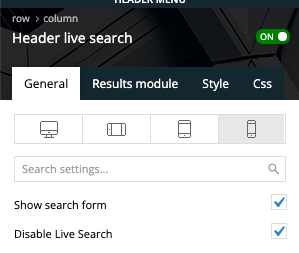
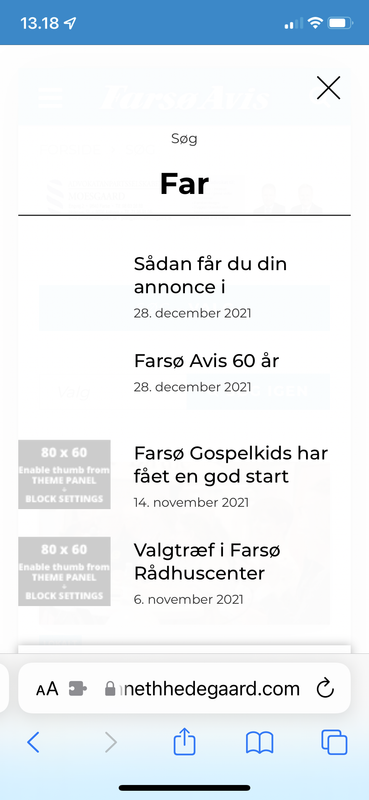
Have a little issue with the header search on mobile devices – but only on mobile devices.
Even if live search is disabled:
 Anamaria
 Hello,
1. This issue can be caused by a plugin conflict, or, did you use any plugins to optimize your images?
Did you use WP Bakery? If yes, we strongly recommend using only one of those plugins with our theme (WP Bakery or tagDiv Cloud Library, but not both).
2. You can change the background color for mobile header from Theme Panel -> Theme Colors -> Mobile Menu => https://i.imgur.com/mbGT1D5.png
Thank you!
Anamaria Hello Daniel,
The link provided my colleague works, but this is the answer from that topic “To change the background image, you need to select the row on the header menu element, and the tab CSS you can remove/change the image => https://www.screencast.com/t/ciUKXdLTWi -> https://www.screencast.com/t/7Oxv2GfK ”
Also, for the media library please check this topic https://forum.tagdiv.com/topic/tagcomposer-plugin-causing-issues-media-library-not-showing/?view=all#post-407011 and this article https://wpengine.com/resources/troubleshooting-wordpress-media-library/
Thank you!
Anamaria Hello,
You need to change the background color for mobile header from Theme Panel -> Theme Colors -> Mobile Menu => https://www.screencast.com/t/Ou8CBHm25
If this is not what you mean, please provide some more details, screenshots.
Thank you!
 Avispa Midia
Hi there! I’m working on a news website and i’m facing a problem. I need a block that displays blog entries from specific categories that are chosen by the site user. So we are using FLEX BLOCK 1 with Header template: Block Header 4. We’ve also set the filter type as “categories”.
This gave us a solution for our needs, but we’ve discovered that there’s no way of styling the Ajax categories dropdown, except for the Block Font settings.
Is there a way for styiling this? Or is there any other way to achieve the same functionality with a configurable Ajax categories dropdown? We want to ensure the visibility of the dropdown and we want to do this using different colors for the Font, the background ande maybe the hover setting for the dropdown categories.
We attach a screen capture of our current look of the block: https://imgur.com/a/x52a64l
We aprecciate your guidance. Thanks for your attention!
 Danibell
 Hi Bettina,
Your link to the romania news pro header gives a 404 ??
Altough I figured it out, when I remove the example and try to insert a new picture, I come to the “insert media” showing that there is nothing there. But I have a lot of media already in(existing site with previous with visual composer) and inserting a new picture, it stays turning and nothing happens. At the end, when I quit and go to the “media” in WP, it seems the picture is there. The only way to get the picture on the page is by using the url, then it works fine. But why don’t I see my pictures or shouldn’t it be better to show a url field instead of an uploading icon
https://snipboard.io/wJeKtg.jpg
https://snipboard.io/f5RInZ.jpg
https://snipboard.io/uj9Y5T.jpg
Greetings,
Daniel
 scohen
 Thank you for responding. can i send you credentials to take a look? the flyout menu and search bar is gone as well as the sign in locker/registration on the right side of the header. I need them back. also i am not clear on how to set up that flyout menu and modal popup. can you point me to where the directions are? thank you! what email should i give siteground to grant you access? contact@tagdiv?
 xmirz0Anamaria
 Hello,
Please check if you don’t have set from Manager to No header -> https://i.imgur.com/oCYsipz.jpg
Sometimes, the issue can be from a plugin conflict or a cache issue, that’s why, please deactivate ALL plugins except tagDiv ones, also if you are using a cache plugin, deactivate it, clear all cache and try again.
Hope that helps you!
Thank you!
 kimstipguide
 hi
Anamaria
Let’s create a header with reference to it.
thank you.
 fla971
 The logo has been uploaded to the theme panel, both in the header and in the footer, as you can see from the attachments. These are obviously present in the wordpress file library
https://drive.google.com/file/d/172lg_gOHCF4dpE0JLC9eTagfcDdnde8N/view?usp=sharing
https://drive.google.com/file/d/171mpFmXxWl722eEkJSwuacdUSigo9O_L/view?usp=sharing
 sanjeevkk
Hi,
This is my site URL: https://www.ournethelps.com/
The Header and Logo of the site does not appear on the Desktop and the tagDiv composer is also not working. I have done every step that mentions here in the forum.
Please tell me in detail how can I fix this.
Thanks
 cfasencio
Hi my site displays way different on mobile phones, i’ve used the tools available on wordpress and my theme to change it but it doesn’t work. When i try to preview how the site will look on mobile through my desktop (by using the responsiveness of my browser for example) it displays fine, as it should.
Here is how it displays mobile on my desktop (correct or intended way)
https://imgur.com/u6X4LwW
https://imgur.com/tvqeSRj
Here is how it looks on mobile phones (not correctly), nav menu is empty and colored wrong, header is grey, footer is on the wrong place, areas of the front page not showing.
https://imgur.com/nsY6O7S
https://imgur.com/j0gaWnl
scohenhello, the search icon has stopped working in the header template and the login/register icon keeps disappearing. can someone take a look? thank you!
 tksenthil
I have just bought the theme. After installation, I have gone to prebuilt website and installed the design + content. But, the homepage is blank with only header without any content and footer. When I try to edit the homepage with Tagdiv composer, I am getting this error message:
Error at zones: 6(models) : 5(dom). The model does not match the content Current state has involved an issue. You could try an UNDO operation (CTRL+Z / CTRL+SHIFT+Z)
Anamaria Hello,
You can import the footer and header template from tagDiv Cloud Library or this is the settings for menu and footer https://www.screencast.com/t/gvUKq9Ty
Thank you!
Anamaria Hello,
Please try to create the header like in this video https://www.screencast.com/t/674o2rS3
Thank you!
 Bettina
 Hello @estcos!
You can use flex block instead of posts loop. Explore the filters here: https://forum.tagdiv.com/flex-block-settings-guide/
Choose only one category from the filter settings and it will display the posts which have that category.
I’m not sure if I understand correctly, but you can add a button and place the category url in that button element. So, when you click on that button it will leads you to the category you need from homepage.
I can see that you have the same sticky header for posts and categories too. Make sure you assigned the right header to all templates.
For more details, please provide a screenshot/video.
A solution for sending a screenshot/video is this:
Download, capture, send: https://www.techsmith.com/jing-tool.html
After making the screenshot, you will have a link, paste it here.
Thank you!
Bettina Hello!
You can access the homepage and edit them with the TagDiv Composer(scroll till down for the footer). From the Website Manager, you can choose which footer and header to use if you have both templates installed. You have the possibility to assign a header for a page and other header for another page.
Documentation here:
– https://forum.tagdiv.com/cloud-library-templates/
– https://forum.tagdiv.com/design-post-pages-using-cloud-library-templates/
– https://forum.tagdiv.com/cloud-library-category-templates/
Check also our video tutorials here: https://www.youtube.com/c/tagdivThemes/videos
Hope that helps you!
Thank you!
kimstipguide hi
Anamaria
The Cloud Templates names are as follows.
200 New – Global Header Cloud Template – Tech News Pro
—
It doesn’t go any further.
Please refer to the URL below.
https://kimstipguide.com/wp-content/uploads/2021/12/21-12-28-200.jpg
 Siebren10
Dear Sir/Madam,
Suddenly, there are issues with the layout of my website (https://www.streamwijzer.nl/). The social counter, social sharing widget, header, etc. are not depicted correctly anymore.
The issues are not solved when I shut off plugins and only seem to be present in widgets and areas of the theme.
Do you know how to solve this issue?
Warm regards,
Siebren
Anamaria Hello,
To create a header, please check this article https://forum.tagdiv.com/header-manager/
Also, please edit the mobile version (responsive or mobile page) select the row and set the layout to 1/3 + 1/3+1/3 and set the width of the column like in this video https://www.screencast.com/t/xMSF1ACLU and after you can add the elements in columns.
Thank you!
kimstipguideHI~!
I want to make header like below url.
https://kimstipguide.com/wp-content/uploads/2021/12/header-12.jpg
—
Cloud Templates I do not know.
Please tell me the easy way.
thank you.
 Calin
Calin Hi,
If you are referring to style, then you can edit it with tagDiv Composer and select the font that you want to use also the elements can be set on left or right.
But to make the entire website RTL, you’ll need to set it in WordPress, unfortunately, if you use that option there can be problems with our theme, because this is not entire RTL.
How do you want to look the cloud header ?
Thank you!
 Demir
DemirHi,
All pages, sub-pages and articles on our site work with templates that we download from “Cloud Templates” which maked changes according to our wishes. Header and Footer work the same way. The “Header 2 Overlay” title we use on the homepage is also used for other article templates.
It was working fine until I updated it to 11.4 which is the latest version of Newspaper theme. After the update the Mega menu structure was broken as seen here. Although the same menu is defined for this template, there is no corruption here.
When I open the homepage with tagDiv composer, there is no corruption in the menu, as can be seen here.
When I open the homepage in a browser where we are logged in with the admin user, there is still no corruption as seen here.
I tried many ways. First, I opened the homepage with tagDiv composer and saved it again. I did the same for Header. I cleared all cache on server and browsers; the problem is not solved.
What do you recommend?
Our Web address: Arthenos.com
Thanks in advance for your interest and help.
Best regards!



