
- TutorialsDefault Block Settings Guide
 Calin
Calin Hi,
It will be need to add some content to your pages so the pages of the website will have some content and the footer will not be right under the header. The website is not only this https://i.imgur.com/rQ3xTHY.png, so there is no place where the menu can be extended to be displayed. On the homepage, where there is content, the menu is coming over the content.
Thank you!
Calin Hi,
Please try this custom css:
    .td-header-desktop-wrap  {

        display: block;

    }
.td-header-desktop-wrap .tdc_zone .tdc-row {
display: none;
}
.td-header-desktop-wrap .tdc_zone #tdi_17.tdc-row {
display: block;
}
Can the CSS be set in the theme panel > custom code> advance css > phone – https://i.imgur.com/r2gFvDQ.png
 iancollins
This relates to this site https://airtekbroadcast.com/ for which i have purchased a new subscription (actually reallocated it). I have a cloud header template set as default and all page headers set to global. The menus look correct. I have a Solutions item on the menu and i have a “Main” menu setup with x6 sub items. From the home page I can see the Solutions drop down showing all six items. When I click any sub item it takes me to a page like this https://airtekbroadcast.com/solutions/state-radio-remote-stations/ which is correct. However, the page title on that page is not visible suggesting that it is not pointing to my page. I have checked the slugs are correct. Oh and from that page, only one item is visible in the Solutions menu drop down. It appears that you only get the full set of items when at the home page. There is one exception. From the home page if you select Solutions – Private Commercial Stations, when that page renders you can see all items. Please can you help?
Calin Hi,
Use tagDiv Composer to change the logo https://i.imgur.com/HgCpJ5P.png select the element and check the text and svg logo – https://i.imgur.com/aC8gVlR.png https://i.imgur.com/8NILLxD.png check it on mobile header too – https://i.imgur.com/2xn9Bba.png
Thank you!
Calin Hi,
Usually that should be a cloud header and you should be using tagDiv Composer to edit the page, select the elements, and you can use the right click on the theme to remove them.
IN case that you use a standard header, then you can remove the socials from the theme panel – https://i.imgur.com/9MkfgIK.png
Thank you!
Calin Hi,
If that code should be run only once in the page ,I think it will not be easy to make the code to work in the header, since the theme is using 2 separate headers, one for desktop and one for mobile.
Please set the code on the desktop version and please provide a link to the website. I will try to see if I can create a custom css to display that row on mobile (please add a custom class on that row to be easier to be trigger – https://i.imgur.com/hofM57F.png ).
Thank you!
 bluedot
Hello,
I am creating a page that will require several modal popups (for various newsletter signups). However, when I add the modal popup button to a page with a header, it either does not “click” or does not “click” consistently. Sometimes if I hover near the button I get a tooltip reading “Please fill out this form field.”
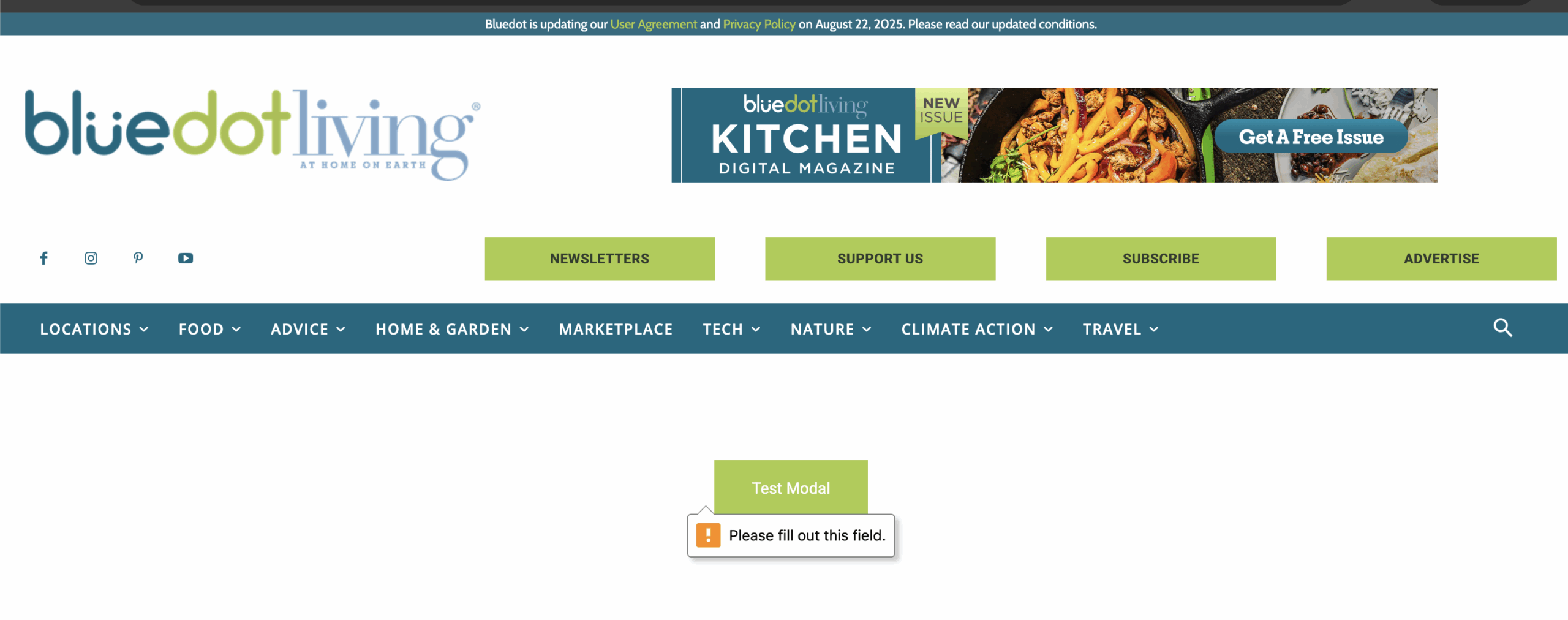
When I remove the header from the page, the button/modal popup seem to work fine. But ultimately this page will need a header. Is there anything else I can try?
Sample Page: https://bluedotliving.com/modal-test-page/
Password: modal
Thanks,
Kelsey at BluedotLiving.com
 silverchalk
Hi,
I’m using Newsmag and have the big header image active- this use to be featured image. I changed the category name to main header and since then, the article that appears there is any recent article rather than based on the category. How do i assign a category that section.
 jaumemerca2
Hello,
I’m having a problem adding a row in my header. I amusing TagDiv composer and looks ok and works OK in the desktop/tablet version but when I switch to mobile version the row doesn’t appear … and If I add manually a copy of that row in the mobile version then the row stops working in my desktop tablet version because the code that is in an element of that row can only be executed once per page.
How can I do that the same row is shown in mobile and desktop versions?
its a custom topbar with a news ticker.
Calin Hi,
What you did was not saving the cloud header instead, you saved a section from the header as an element in the TagDiv Composer. You can access this from the TagDiv elements panel; it should appear after the last elements in the Composer (in the left sidebar).
If you want to have more cloud headers, you can import them from the Cloud Library or duplicate an existing cloud header. These will then be displayed in the header manager. Also, you can set a global header to apply across all pages and templates on your website, and only change it if you need a different header for a specific page.
https://forum.tagdiv.com/header-manager/
Thank you!
 cloverjim
 GulfAiMagazine
 I saved the header as an element and the theme asked me for a name for the shortcode. Now how do I load the saved header on another page? On another page, If click the manager, the import header option only lists the cloud headers. Not the customized header I saved.
Calin Hi,
Yes, that one is a standard header. To use a cloud header, you need to have tagDiv Cloud Library installed, and you can edit it using tagDiv Composer.
But what you can do is to enable the boxed version for the website, and this will adjust the ad on your current header https://forum.tagdiv.com/background-introduction/, just set a background color, for example, white.
Thank you!
Calin Hi,
Please check it now. The problem has been caused by the slider that has been set in the header section. It was necessary to create a different header without that slider to resolve the problem.
Thank you!
Calin Hi,
Can you provide a link to the new website? IS the new website using a standard header or a cloud header? If it is a cloud header, you can adjust the row width using tagDiv Composer https://i.imgur.com/DwBSDBm.jpeg. It is possible to have a cloud header and the row to be stretched to 1200px instead of the default.
Thank you!
Calin Hi,
If you like a section from your website and you want to reuse it on other pages or templates, you can use the right click on that element/row and you can save it in tagdiv Composer as a new element – https://i.imgur.com/zo723Dh.png
Also, templates can be saved and used as individual or global, for example, a cloud header can be set globally, from 3 places, theme panel https://i.imgur.com/go50ftC.png or cloud templates https://i.imgur.com/8QLfPOu.png or when you are on a page or template from manager https://i.imgur.com/tE96Hgr.png to set a header individualy it can be done from tagDiv Composer using the manager and slecting the text of the cloud header, this will become green https://i.imgur.com/ZKHlyR2.png
I hope this will help you!
Thank you!
GulfAiMagazineI imported a cloud header and customized it. How can it saved as a reusable and importable header template on other pages of the site? Can other sections of the page also be saved as reusable templates like in Elementor or divi?
 duck1970
Hi, I display a banner in my header on all pages. My question is: How can I make it fit the size of the website and not overhang it?
I’ve attached a photo. Thanks.
https://www.radiomarcabarcelona.com/goodnews-design/header-baner.png
Calin Hi,
If you have a cloud header, then you can edit it using tagDiv Composer and you an add a text element in the place where you want to set the title.
Thank you!
 pinxuan
Hi, I’m using WordPress with the Newspaper theme, and I’m currently building my website using TagDiv Composer.
I encountered a problem when trying to set a different header image for each category page (e.g., Health Tips, Recipes, etc.). I’ve tried using Edit with TagDiv Composer on the Category Template (Cloud Template – Nomad), but:
1. When I select a new image via the row or column background settings, save, and refresh — the image either doesn’t appear or reverts to the default one (a mountain photo).
2. I want each category page to show a different header image, but all pages still display the same global image, except for one that somehow stayed different — I can’t figure out how.
3. I don’t know how to apply individual background images per category without touching code (I’m not a developer).
Here is one of the category pages for reference:
🔗 https://nong70life.com/category/camellia-oil-wellness/
I would really appreciate your guidance on how to fix this — or if there’s a better way to assign different images per category. Thank you so much!
Warm regards,
Enid
Calin I see, this situation is because on mobile, a different header is used with a different menu.
For mobile version you can use this custom css:
.tdb_mobile_horiz_menu .btn a .tdb-menu-item-text {

    color: transparent;

}
I hope this will help you!
Calin Hi,
The zones refer to the header/content/footer zone.
Most of the time, the problem is from a shortcode that is not compatible with our theme; therefore, after you set it with tagDiv Composer and save the page, the next time you try to edit it, you’ll get that error. The simplest and fastest way to resolve it is to use a page revision – https://wordpress.com/support/page-post-revisions/
Also, please check our guide from here at point 5 -> https://forum.tagdiv.com/tagdiv-composer-not-working/ also after trying the steps from our guide you do not get any good results, you can send us an email at contact@tagdiv.com and provide wp-admin login, as well as cPanel and credentials. We will take a look. Include a link to this topic in the email.
Thank you!
Calin Hi,
It appears that the banner is set as background image on the element from menu, so to resolve this the best way will be to set the text transparent:
.tdb_header_menu .tdb-menu .btn a .tdb-menu-item-text {

    color: transparent;

}
Please set the css in the theme panel > custom code > custom css.
I hope this will help you!
 andiarif
Hey currently I am trying to edit one LI menu in header menu, where in the menu I put a small banner instead of text like the rest, but the problem is the text from the original menu appears over the banner, like this:

And the website url: https://keuangannews.id/, please how to achive that, I just want to remove the text that appears on the small banner, I have tried many things to change the menu (li), i just can’t find the right CSS to only modify that specific li menu, what I am planning to do to set its font-size: 0px so there’s no text appear over the banner.
rthank you
 Romi
RomiHei guys I want to change the text on menu on header into clickable small banner, i have managed to place the banner on one of menus, but the problem is the text of the original menu appears on the banner, how to remove it, I tried to set the font-size: 0px, but I failed to find the specific css for the li menu, can anyone help?



