- Apitd_api_header_style::delete
- Apitd_api_header_style::update_key
- Apitd_api_header_style::update
- Apitd_api_header_style::add
- ApiAPI – Header style – Introduction
- Apitd_api_top_bar_template::update_key
- Apitd_api_top_bar_template::update
- Apitd_api_top_bar_template::add
- ApiAPI – Top Bar Template – Introduction
- Apitd_api_single_template::update_key
- Apitd_api_single_template::update
- Apitd_api_single_template::add
- ApiAPI – Single Template – Introduction
- Apitd_api_footer_template::update_key
- Apitd_api_footer_template::update
- Apitd_api_footer_template::add
- ApiAPI – Footer Template – Introduction
- Apitd_api_smart_list::update_key
- Apitd_api_smart_list::update
- Apitd_api_smart_list::add
 fox100
my code generally works in the header for other themes and I can’t figure out why.
 RandomLeeKind
The video no longer plays in this theme header. Even in your demo. See here.
https://demo.tagdiv.com/newspaper_construction/
 tanteidee
 Calin, thanks again.
I have been using Newspaper for a long time, but you should make me understand how to select the Content in the Gadget Pro Demo, I am attaching a screen of a new page from scratch, you can see the header and footer, but I cannot identify which is the area Content where drag-and-drop element! https://ibb.co/G0rM33D
 melhorweb
Hello,
How to align logo at center of header in mobile devices ?
See below:

Thank you.
 oliverbock
Hi,
I’ve tried changing the color of Race Mag though some of the changes don’t seem to take effect.
In the image below I’ve marked the colors that I want to change. For the current blue I think the parameter is found at Main “Menu -> Menu Background Color” and for the yellowI assumed “Main Menu -> Active & Hover Color”. For the yellow I want to change it everywhere the yellow is used.

Greetings from Germany
Oliver
 webmastermetrozita
Hello,
I just installed NP 10 with the default demo.
As header menu I choose in the WP settings our menu.
But now I see this in wordpress appearing double on desktop.
Once in the black topmenu and once below in the white part.
The black topmenu should only be used on mobile.
how to accomplish this?
Thanks!
 Calin
Calin Hi,
The shortcode for rev slider is still in header -> https://i.imgur.com/hTWKcbR.jpg maybe you added it in theme panel or using some plugins.
If you want I can take a look, send us an email at contact@tagdiv.com and provide admin login. Include a link to this topic in the email.
Thank you!
Calin Hi pmartines,
If you are using a standard header you can use this option from theme panel -> https://i.imgur.com/MK3qQUO.png or if you are using a cloud header or a pro demo you can edit the header with tagDiv Composer -> https://i.imgur.com/B5EEOLm.png -> https://i.imgur.com/Px5wuxN.png
On mobile theme plugin for the moment you can not set this option.
Hope this will help you!
Thank you!
 Mark Gilbert
I notice that since updating to 10.3 from 9.2.2, when I post a link to a Newspaper post in Facebook, Facebook now draws part of the header image instead of the post image. See here, posts of 1 March before update and posts of today, 4 March – https://www.facebook.com/pg/JazzJournal/posts/?ref=page_internal.
Has some coding in Newspaper 10.3 caused site header image to be preferred over post image? It’s not ideal, at all.
Thanks
Mark Gilbert
Mark GilbertI created in the Top Bar (in 9.2.2) a text “Login, logout or check JJ account” linking to https://jazzjournal.co.uk/my-jj-account/
This has disappeared with 10.3 and I cannot find in Theme Panel/Header/Top Bar how to recreate it. Can you advise? For now I have activated Sign In/Join but it’s not suitable.
 Sophia_FACES
 Hi Calin,
Thank you for the reply. However I DO NOT want so many google ads on my site especially on posts as it tends to spoil the look of the post.
I have alloted Header ad, Sidebar ad and Footer top ads only, still I can see many google ads. How do I disable these.
Regards,
Calin Hi,
You can set a category number limit on mega menu if you are using a cloud header from tagDiv Cloud Library, edit it with tagDiv Composer and set the limit number -> http://prntscr.com/oxid1x
Hope this will help you!
Thank you!
 dyschneider
Hi,
I change my footer and the headers are all over the place – not properly alligned. Also two footer title I can’t find to edit or to erase. Any pointers?
See screenshot: https://snipboard.io/mcUDzs.jpg
Calin Hi,
So if this is still the l’histoire header, then the row should look like this -> https://i.imgur.com/F9E28jq.png each column have set a a number in % for width -> https://i.imgur.com/KG2Z5uY.png -> https://i.imgur.com/yv5Nf1q.png in first column is set the logo after that in the second one are set the search, login and these are set inline -> https://i.imgur.com/RBsQnzA.png and the Newsletter, so in order to set it there, click on the element and drag it like this -> https://i.imgur.com/kUCtKur.png you need to set the element after the login element -> https://i.imgur.com/sDSiIkc.png the results should be -> https://i.imgur.com/OLzjQfo.png after that all you need to do is to adjust the elements to look nice.
Thank you!
 geraldinetay27
 Hi Calin,
I removed with rev slider in the Cloud Templates > Header and only added Rev Slider to Home Page from Pages > Home Page.
Yet, the rev slider is still showing up in every page and even on the Cloud Template > Header. Its strange because I added the revslider to the page and not the header. Could you please help me?
Calin Hi,
If you choose header style 7, 8 or 10 then you can set the size you want for the logo https://i.imgur.com/7SZvpfc.png -> https://i.imgur.com/qm5LYeR.png -> https://i.imgur.com/BWZ8IkK.jpg
Thank you!
 cannamaps.reviews
When Newspaper theme switched to Cloud Templates it broke my child theme customizations. Specifically I had custom subtitle fields added to the header section. see below for example. How can I fix this using cloud templates?
<header class=”td-post-title”>
<?php echo $td_mod_single->get_category(); ?>
<?php echo $td_mod_single->get_title();?>
<—-Custom code start——>
<?php if (!empty($td_mod_single->td_post_theme_settings[‘td_genetics’])) { ?>
<p class=”td-post-sub-title”><?php echo $td_mod_single->td_post_theme_settings[‘td_genetics’];?></p>
<?php } ?>
<?php if (!empty($td_mod_single->td_post_theme_settings[‘td_breeder’])) { ?>
<p class=”td-post-breeder-header”><?php echo $td_mod_single->td_post_theme_settings[‘td_breeder’];?></p>
<?php } ?>
<—-Custom code End——>
<div class=”td-module-meta-info”>
<?php echo $td_mod_single->get_author();?>
<?php echo $td_mod_single->get_date(false);?>
<?php echo $td_mod_single->get_views();?>
<?php echo $td_mod_single->get_comments();?>
</div>
</header>
cannamaps.reviews Basically I need to add 2 custom field subtitles to the header template just below the title but above the meta data.
cannamaps.reviews I need to add my own custom fields to the header of post template. I use to have my website set up this way with child but it broke with latest cloud updates. How can I fix this?
<header class=”td-post-title”>
<?php echo $td_mod_single->get_category(); ?>
<?php echo $td_mod_single->get_title();?>
<—-Enter custom fields here—->
<div class=”td-module-meta-info”>
<?php echo $td_mod_single->get_author();?>
<?php echo $td_mod_single->get_date(false);?>
<?php echo $td_mod_single->get_views();?>
<?php echo $td_mod_single->get_comments();?>
</div>
</header>
 ebms
ebms Hi Calin,
Thank you for the detailed and helpful answer. I made some changes in the child theme:
loop-single-5.php
single_template_7.php
includes/modules/td_module_2.php
includes/modules/td_module_16.php
parts/header/header-style-8.php
Have these files changed in version 10 or can I apply my changed templates 1:1?
Otherwise, which version would be the last possible to which I can update without having to readjust these files?
Best regards
Eugen
 Sebastian Escobar
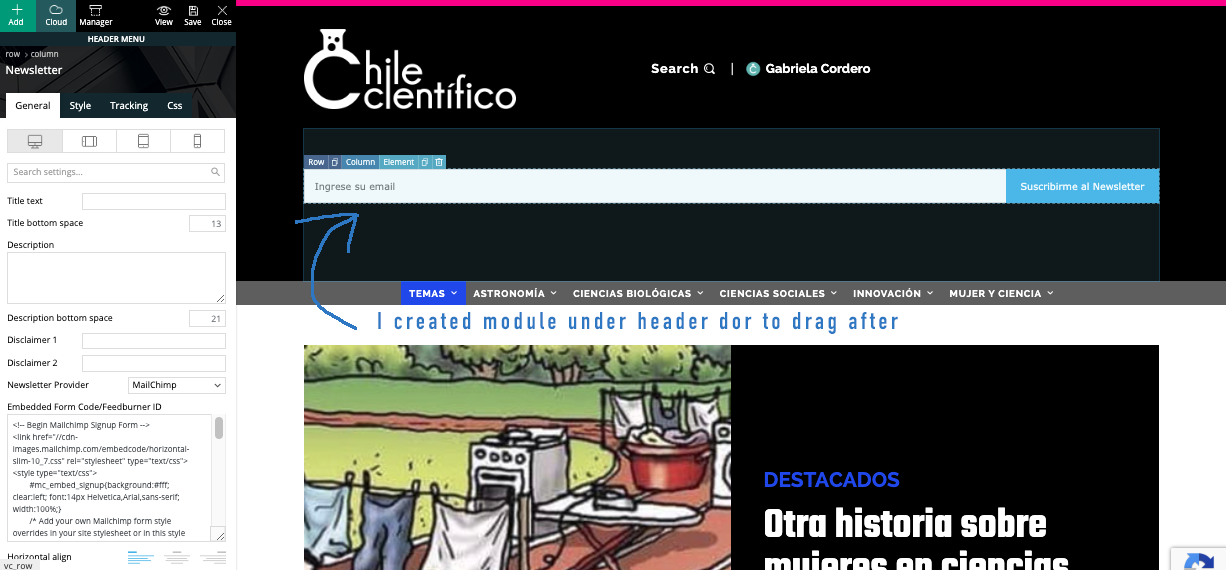
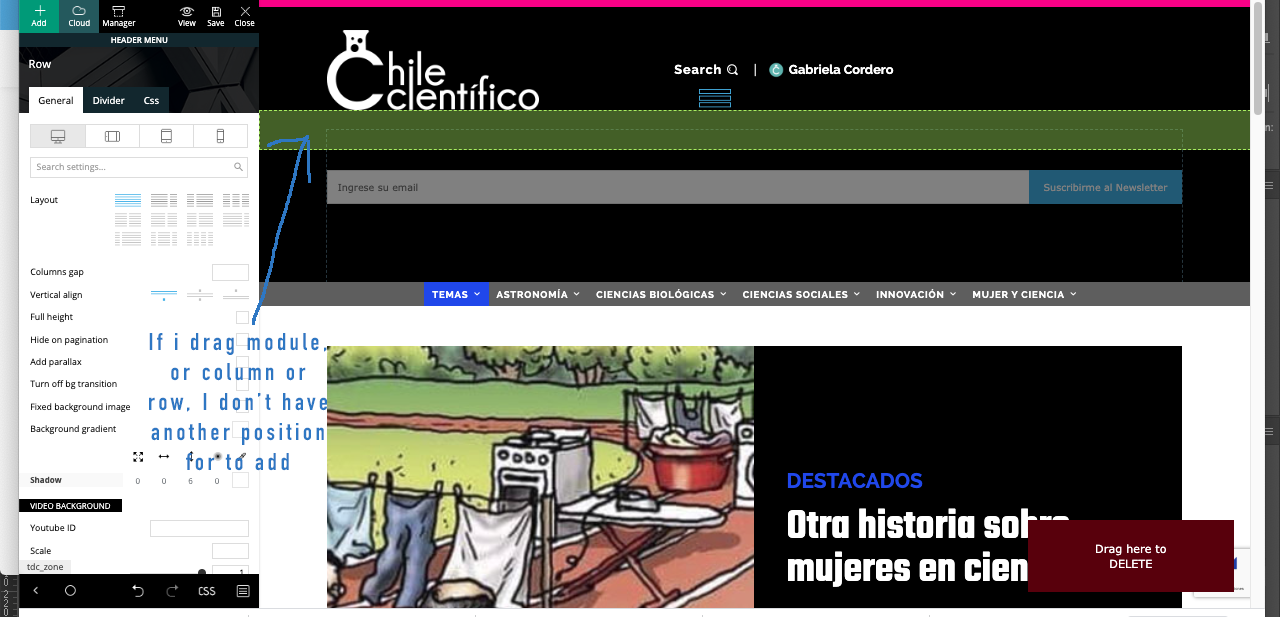
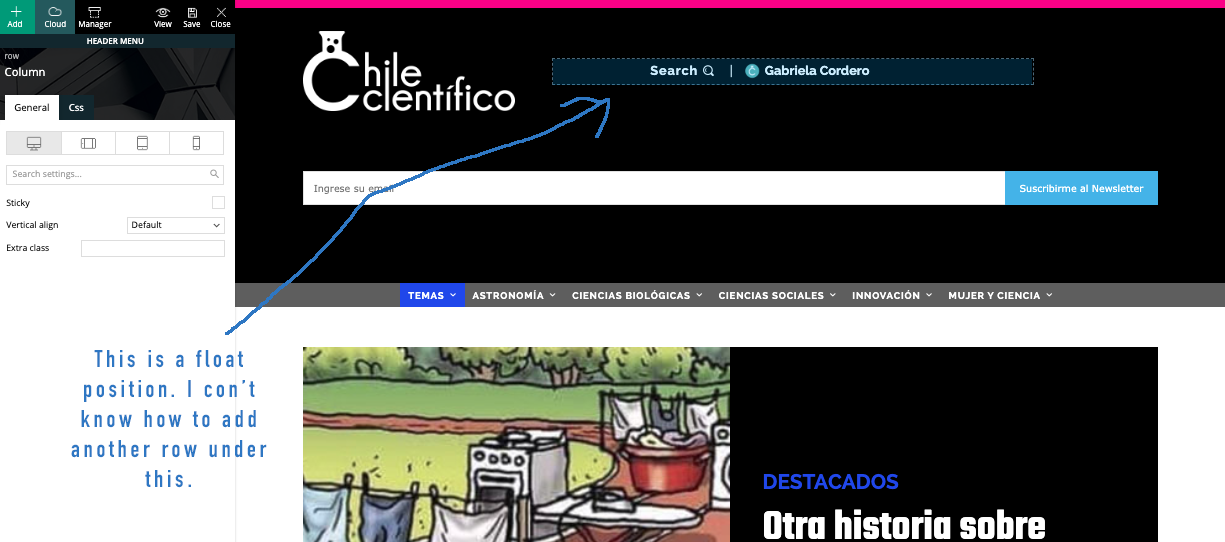
 My problem is with positioning of module. I created module in a row in header for to drag it after, because really I don’t know if I need a new row with subscrube module or is only a new module in the same row of search/login. I send you screenshots: https://www.compone.cl/wp-content/uploads/2020/03/newsletter-module1.png > https://www.compone.cl/wp-content/uploads/2020/03/newsletter-module2.png > https://www.compone.cl/wp-content/uploads/2020/03/newsletter-module3.png
Calin Hi,
The slider is the same because is set in the header, to remove it you need to edit the header with tagDiv Composer, you can do it like this https://imgur.com/URD07tP -> https://imgur.com/CqsIAMl -> https://imgur.com/Sywz5hw you can use drag and drop to move the elements or the right click to delete or copy/save the element.
Thank you!
Calin Hi,
The header can be edited using tagDiv Composer and you can make the logo or the subscriber smaller, or you can change the place where to be display -> https://i.imgur.com/6vKlmAd.png
Hope this will help you!
Thank you!
 quanguous
Hello,
Maximum logo size in HEADER STYLE 10 (272 x 90px) is too small for my need.
I would to add to my a header a logo/banner with the following size : 728 x 210.
How can i remove the logo size limitations?
thanks
tanteidee Thanks Vlad, request submitted.
A further small question, it is the first time that I have difficulty with Newspaper, I am using Gadgets PRO, and I cannot find the correct way to drag the elements into the Content area, every time I drag some element it hooks up or to the header, or to the footer, what technique to identify the Content?