
- TutorialsDefault Block Settings Guide
 Bettina
 Hello!
The path is this one: td-cloud-library\shortcodes\header\tdb_mobile_horiz_menu.php
Thank you!
 petar777
 Hey there, I fixed it by adding specific paddings to the right side of the menu and now it looks great.
I checked the elements you suggested for the posts but I want to find a way to make them look the same as the header at the categories. That would bring consistency to the design of the website. Is it possible for such a feature to be considered in future updates as it will be useful for everyone? A lot of news websites have such headers and it increases the page depth of views if made properly.
 gmc
gmcThe header menu every time you click flashes.
This happens with Firefox browser! Version 133.0.3
Safri Chrome Edge is normal.
Video: https://app.screencast.com/kRLmD9M6fQp08
Thanks for a solution
Guido
Bettina Hello!
Please follow the video to see where you can find and edit/build your sticky header on mobile and desktop, too: https://www.screencast.com/t/l6v2Belt
I hope that helps you!
Thank you!
 bigmoves
Hello Team ,
When we enable sticky header for rows in header section its not working. Can you please help me to fix that issue?
Thanks and Regards,
Big Moves
 Anamaria
 Hello,
You can change the font size using a custom code CSS
.td-post-template-default .td-post-header header .entry-title

{

font-size: 40px;

}
The css should be set in the theme panel > custom code> advance css > phone section.
Thank you!
 grillingmachine
Dear Support Team,
I recently updated the Newspaper Theme on my WordPress site (https://histaminentzug.de/) from version 12.6.6 to 12.6.8. Unfortunately, the update has completely broken my website’s design.
All pre-configured design settings are gone.
The header logo is missing.
I did not create a backup before performing the update, so I am unsure how to restore the previous design.
Could you please advise on the best course of action to resolve this issue? Any guidance on retrieving the lost settings or troubleshooting steps would be greatly appreciated.
Thank you in advance for your help.
Best regards,
Xaver
 cherryannwilliams
I updated the website domain (from dailyscoopslu.com to saintluciadailypost.com) in DreamHost using the domain update tool. It seems to have worked everywhere except in the header background image which still uses the old domain. As a result, the image path is broken. I have been trying unsuccessfully to fix this using TagDiv Composer but the particular area can not be selected. As such, the background image can not be added to the correct div. I checked the code and the code below is where it should be updated, but I can not find a place I can click on the page to access this div, not can I figure out where it is in the database. How can I fix this?
<div class=”tdi_29_rand_style td-element-style”><div class=”td-element-style-before”><style>.tdi_29_rand_style>.td-element-style-before{content:”!important;width:100%!important;height:100%!important;position:absolute!important;top:0!important;left:0!important;display:block!important;z-index:0!important;background-image:url(“https://www.dailyscoopslu.com/wp-content/uploads/2024/11/xxx_menu-bg_xxx.jpg”)!important;background-position:center center!important;background-size:cover!important}</style></div><style>.tdi_29_rand_style{background-color:#f9f9f9!important}</style></div>
Bettina Hello!
Unfortunately, there is no option to add any new field because it is a shortcode with default fields.
Check this topic: https://forum.tagdiv.com/topic/change-link-on-theme-header-login-to-something-custom/
Thank you!
 simchris
 make sure you have proper open graph tags (‘og tags’) in the header of your posts; this is usually done with something like Yoast, Rank Math, etc.
 meremetia
Hello, I am facing a strange issue.
I am building a header, and suddenly whatever I put in “text” shows as gibberish/coded in the front-end. See image below. Even if I leave it empty, it still shows something in the front-end.
I cannot see any reason for that – it happened suddenly while I was editing (not after installing/modifying any plugins etc), and I cannot get it fixed no matter what I do now.
Things I tried to do but they didn’t work:
– Clone the Header Template (the issue was carried over to the cloned template)
– Clone the Element within the same template (the issue was carried over to the cloned element)
– Reset style

 helderbsousa77
Hi, when i update theme the site create a error in header and in newsletter.
see in: https://36aproces.aproces.org
 College Info Nepal
My Website: http://www.collegeinfonepal.com
On my website, the google adsense ads appear only on the home page. Also, when I try to connect my website with google tag manger and I try to add the code in the header and body (in header.php), it is not showing in Tag Manager. Are there any crawlable issues on my website? Further, when I tried to apply for AdSense and paste the code provided by Google in header.php, I showed no code found and I needed to add an ad.txt plugin to verify my website.
 in2town
Hi when I use https://www.seoreviewtools.com/html-headings-checker/ to check my h1 headers etc, I get a lot of strange code showing in h3. can you please check the below and let me know what the error is please
 Alex harper
 – wp-content/plugins/td-composer/legacy/Newspaper/parts/register.php
– wp-content/plugins/td-composer/legacy/Newspaper/parts/header/td-login-modal.php
– wp-content/plugins/td-cloud-library/parts/tdb-login-modal.php
deleted all codes from this 3 file now extra code has removed
 asiandrama
 Project: TheThinkingConservative.com
Old Theme: Living Mag Prebuilt Website
New Theme: Free News Prebuilt Website
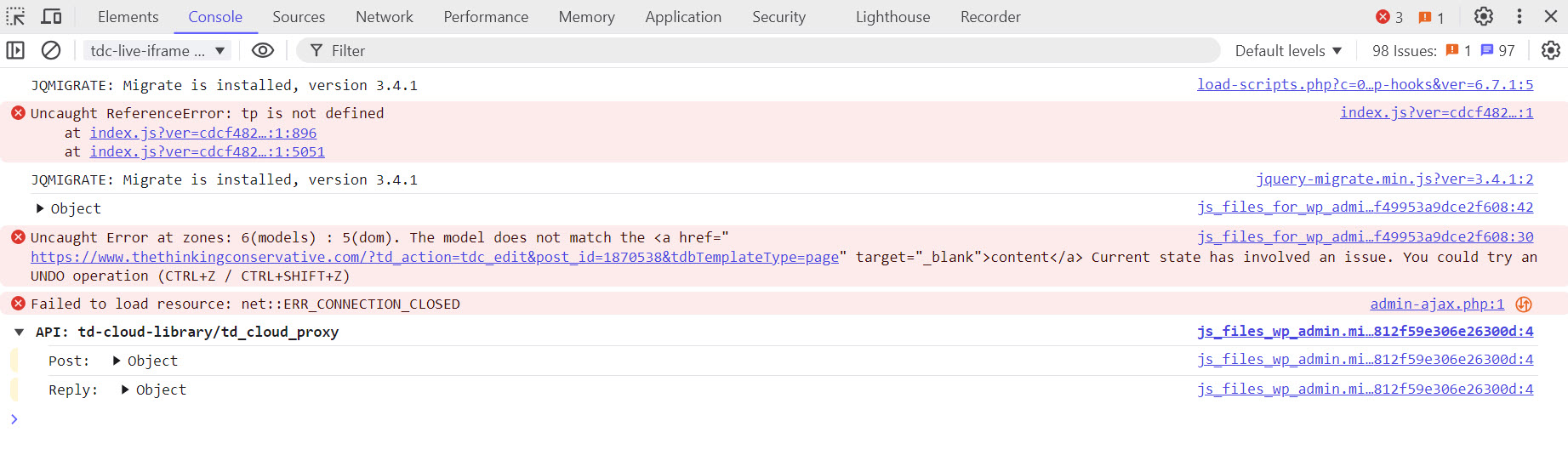
I just spent 2 days and one night updating my website from the Living Mag Prebuilt Website to the Free News Prebuilt Website. I figured everything out and the last thing I attempt to do was update TagDiv Social Counter info. When I went to save the page I got the following error message :
Error at zones: 6(models) : 5(dom). The model does not match the content Current state has involved. You can try an UNDO operation (CTRL+Z / CTRL +Z
Now my entire home page content disappeared except for the header. Please advise ASAP!!!
I have attached two images, one of the home page as it currently looks and a developer tools console screenshot. Please advise ASAP.
Is the home page content permanently gone. I can’t leave the site down like this.
Please advise ASAP!!!
Chrome Developer Console Screenshot
 Jinlabs
Hello Support Team,
https://grolife.in/
This is our website.
Issue 1:
I’m trying to add Home Icon in Menu Bar instead of word ‘Home’.
For Example-https://theprint.in/
Pls guide how to do it.
Issue 2:
In Header Main Menu element, I dont want drop down icon to appear for “Home”. Other categories have sub categories which should and are showing in drop down menu.
But, there are no subcats for Home. How can I exclude Home from getting drop down sub menu icon applied..?? Pls guide.
Issue 3:
Inspite of Not selecting Mega Menu in Header Main Menu, entire Home page is appearing like Mega Menu under Home Tab. Pls guide how to remove it..??


Thanks,
Grolife Team
Jinlabs Hello Support Team,
https://grolife.in/
This is our website.
Issue 1:
I’m trying to add Home Icon in Menu Bar instead of word ‘Home’.
For Example-https://theprint.in/
Pls guide how to do it.
Issue 2:
In Header Main Menu element, I dont want drop down icon to appear for “Home”. Other categories have sub categories which should and are showing in drop down menu.
But, there are no subcats for Home. How can I exclude Home from getting drop down sub menu icon applied..?? Pls guide.
Issue 3:
Inspite of Not selecting Mega Menu in Header Main Menu, entire Home page is appearing like Mega Menu under Home Tab. Pls guide how to remove it..??
Thanks,
Grolife Team
petar777Hey there,
I wanted to achieve a specific thing with my header.
I want to attach a small row on mobile view on different categories that would allow users to browse easily. The idea is the following I want to have a dropdown menu for the parent categories and a sliding single row menu that shows the current parent category subcategories.
So far I did this – for all my 7 parent categories I created custom headers from the manager menu and I created 7 custom menus that I would use. So far so good.
This is how it looks (check on mobile view tho) – https://eurocom.bg/category/bulgariya/
There is one problem – the single line horizontal menu doesn’t scroll until the end and one category isn’t getting displayed. Check this video I made here so that you can see what I mean – https://www.loom.com/share/b04bed87c3204ead863883ee1fad07f6?sid=538719f5-6ffd-4396-92dc-a55aa83b17a2
So my questions are – is there a smarter way to do this? Instead of creating all these menus? Also I want to try to achieve that on my single post pages too but in that case – how can I call the current parent category and its subcategories?
I would be really thankful if you help me doing this! It is a great feature to have on a news website.
Anamaria Hello,
You need to edit the header template with tagdiv Composer, and select the element like this https://i.imgur.com/OE06HhB.png there you can edit it.
Thank you!
Bettina Hello!
Ensure your cloud header is global and that you assign the correct header to the Website Manager https://forum.tagdiv.com/tagdiv-composer-website-manager/ . If you use a mobile page, you should also convert the header and footer and assign them to the mobile page https://tagdiv.com/newspaper-10-3-7-update-brings-customizable-and-fast-mobile-pages/ .
Thank you!
 ilouie
Hi, I am trying to use the Header Lifestyle Pro, and it has a “Slide” element on it. could someone please tell me where to edit the Slide element. I want to make the white background where the title is transparent. Right now is White and I can’t find where and how to edit it. Thanks in advance.
 Hamet
HametHello, I have a problem with the header and footer of the mobile version of my site. They don’t display in the design I’ve created.
https://www.dropbox.com/scl/fi/m9gupspb8uhj9irr7sp5b/Capture-d-cran-118.png?rlkey=kiimrg69vxi56pct0mg0c9si2&st=2o6najxt&dl=0
 vignesh
Hi,
The ‘Register’ button is not appearing in the Header Login element.” In Header, Login button only displayed. Please check it and let me know.
Anamaria Hi,
To change the logo please edit with tagDiv Composer,select the header logo and change it => https://i.imgur.com/cR7F0v4.png -> https://www.youtube.com/watch?v=HXQQygkCCJo -> https://forum.tagdiv.com/add-logo-newspaper/
For mobile please edit with tagDiv Composer, select the viewport on phone, select the header logo and change it => https://i.imgur.com/cR7F0v4.png
Please provide some screenshots.
Thank you!



