
- Apitd_api_header_style::delete
- Apitd_api_header_style::update_key
- Apitd_api_header_style::update
- Apitd_api_header_style::add
- ApiAPI – Header style – Introduction
- Apitd_api_top_bar_template::update_key
- Apitd_api_top_bar_template::update
- Apitd_api_top_bar_template::add
- ApiAPI – Top Bar Template – Introduction
- Apitd_api_single_template::update_key
- Apitd_api_single_template::update
- Apitd_api_single_template::add
- ApiAPI – Single Template – Introduction
- Apitd_api_footer_template::update_key
- Apitd_api_footer_template::update
- Apitd_api_footer_template::add
- ApiAPI – Footer Template – Introduction
- Apitd_api_smart_list::update_key
- Apitd_api_smart_list::update
- Apitd_api_smart_list::add
 mqkhilji
Hey there,
I am using the latest version of the Newspaper with JS Composer (Not TD Composer). I want to reduce the White Spaces between Menu and body. I want to know how I can I remove or reduce white space gap between header and the page? It can be done with TD Composer but I am having problem with JS Composer (WP Bakery). I want to install builtin FULL WIDTH themes but it seems they are compatible with TD Composer only. Please help!
Link to Screenshot: https://prnt.sc/nr0nhj
Thank you!
Qasim
 Kluge
Kluge Hi,
tnahsk for your reply.
Yes! I have imported the header template and checked the “inline elements” from Submenu categories. This change the submenu appearance just below the navigation buttons (right-left arrows) but not in the way I have posed my question that means: allocate the submenu “inline arranged” (as cheked) just below the main menu items so that the main menu and submenu (please have a look at this site for the requested result: http://www.risk.net)
 bformhals
I need my header area to be a sticky header from the nav bar up. I also need a custom footer page so the sponsors are not shown against a black background. Ive tried to do this for days and it is much more time consuming and technical then the good ole page builder.
Im sure it is not that hard and someone here probably be done in 20 minutes. I just need to launch the site way behind.
 Andreas
Hi,
I have installed the FastNews demo theme which I’m trying to customize and I have an issue with the categories page.
When I click on a category I get all articles from that category below the header but above the sub-header bar with buttons following the homepage.
Check screenshot here: https://pasteboard.co/IfA7Mwi.jpg
I tried editing the template but nothing.
What do I need to edit and make it exactly like the FastNews demo theme categories page?
Regards,
Andreas
 Simion C.
 Hi,
Which ad are you referring to? I see an ad in the header – http://prntscr.com/nqy5mh the others are the default demo ads. Let me know.
An issue I observed is that some of the images seem to not load
– http://prntscr.com/nqy69w
This could be a lazyload issue, I see you use the Jetpack lazyload. Note that the theme also has a lazyload feature, so having both active could result in problems. Try disabling either the Jetpack lazyload or the theme lazyload – http://prntscr.com/nqy7k6
Thanks
 dennisjpitocco
 Hi Simion:
As mentioned above, we are using Google Ads and we see the ads loading in our Header from all browsers. Our Adsense account was approved six years ago and works fine. Can send you a screenshot if possible. Please see our issue above, as it’s strictly limited to Sidebar for Individual Posts.
 Calin
Calin Hi,
Did you import the header template to edit it? -> https://www.screencast.com/t/6QyqPlyzYCBc
The only way to achieve that is to use the use a header template and edit the mega menu.
All you need to do is to check the inline elements from mega menu for subcategories -> https://www.screencast.com/t/WZZ1U6Jj -> https://www.screencast.com/t/RuKum1L7hyVX
Thank you!
Simion C. Hi,
What kind of ads are you using? I have checked the website, for me no ads are loading at the moment, no header ad and no sidebar ads – http://prntscr.com/nqxfnv – http://prntscr.com/nqxftz
If you use normal Adsense ads and the codes are entered in the theme panel or ad boxes, they should load accordingly. But only if the Adsense account is approved
– https://support.google.com/google-ads/answer/1722120
You could check if the account is approved as a first step. Also try their troubleshooter
– https://support.google.com/adsense/troubleshooter/7049023
Thanks
Calin Hi,
You can make some changes for css in theme panel -> https://www.screencast.com/t/bgCjB87LXfat
You can check in wp-content/plugins/td-composer/legacy/Newspaper/assets/css/td_legacy_main.css
-> https://www.screencast.com/t/vWFcykn5d4J
I will make some more tests with the custom header.
Thank you!
Andreas I cannot select the header. I edit the page Home with the TD where I can modify everything but I cannot select the header.
 Vlad S
 Hello !
In order to change the colors of the header you will have to use the Header Manager from the tagDiv Composer and select what color you want like here: https://www.screencast.com/t/tYU88G9TOP
Thank you !
 Catalin
 Hi,
If you want to manage this section, our recommendation is to use the Header Manager which allows you to manage the Mega Menu section as you wish, like this -> http://prntscr.com/nqvk5p
For more details about header manager, please check here -> https://tagdiv.com/newspaper-theme-customize-the-header-manager/
Hope this helps!
Thank you!
 mikkeltvhelseno
 Some error messages of any help?
PHP Fatal error: Uncaught Error: Call to undefined function get_header() in /home/4/t/tv-helse/www/wp-content/themes/Newspaper/index.php:6
PHP Fatal error: Cannot redeclare tdc_on_remove_core_updates() (previously declared in /home/4/t/tv-helse/www/wp-content/plugins/td-composer/includes/tdc_main.php:283) in /home/4/t/tv-helse/www/wp-content/plugins/td-composer/includes/tdc_main.php on line 282
Simion C. Hi,
I could take a look to see if there is anything wrong with the header, please post a link to the website where the issue is happening.
Thanks
Calin Hi,
Please do not post your privet login here on forum.
Also the header template 4 is working now.
-> https://www.screencast.com/t/7jSoIwNww
Thank you!
Calin Hi,
From what I can see your header ad is very big -> https://www.screencast.com/t/QZPIY3KzD -> https://www.screencast.com/t/4FL8wOIBpO7 please try to set that banner ad to 728 x 90px like in our demos -> https://www.screencast.com/t/XdE4m6aPLbj
Hope this will help you!
Thank you!
Simion C. Hi,
That would be possible. If you use cloud templates you can choose what is displayed in them. So for example if you have a few posts in which you don’t want ads, use a cloud post template for them – https://cloud.tagdiv.com/#/load/Single
– https://forum.tagdiv.com/tagdiv-cloud-library-plugin/
Cloud post templates won’t display the article ads entered in the theme panel, they will display ads entered in the template itself – http://prntscr.com/nqtr50 so if no ads are entered there, the post content will have no ads.
Cloud templates can be used for almost if not everything: header, posts, categories, author pages, archives etc.
Or you could use the Adrotate plugin, I believe with it you can control where the ads are displayed. Some info about the plugin here
– http://www.wpbeginner.com/plugins/how-to-manage-ads-in-wordpress-with-adrotate-plugin/
Thanks
Catalin Hi,
Sorry for the inconvenience, but please note that was a problem in our theme and this issue will be fixed in future updates. Until this, you will have to remove the following code from the header.php, like this -> https://www.screencast.com/t/676unzuEA6IK
Thank you!
 Timestar
Hello,
I want to add a 970px wide banner to the top of my post, below the header. Your header ad box only supports 728px how can i show a larger banner? Or do i have to hard code it?
Rich
Simion C. Hi,
@giovanni114 That is a different header style. For the website you provided try something like this – http://prntscr.com/nqtlpz
@media (min-width: 767px) {

.td-book-club-demo .td-header-sp-logo {

padding-top: 0;

padding-bottom: 0;

}}
Thanks
Vlad S Hello !
We are sorry for the inconvenience !
Please add this code to the custom css box locate in here: https://www.screencast.com/t/wWLLtpwWn42
.td-header-style-9 .td-logo-wrap-full .td-logo {

   line-height: 130px;

}
Thank you !
Catalin Hi,
I have checked your website and I saw that you managed to change the header background -> https://www.screencast.com/t/AyXmQwZV8XHi If you have any questions about our theme, please let us know.
Thank you!
 MadhurKotharay
 Not sure if this is the same error I am facing but the 4 column format has an error in the 3rd column, only in the portrait viewport (third from the left).
If you have say, 4 buttons, placed in 4 columns, everything looks nice in desktop and landscape viewports. But when you go to portrait viewport, the 3rd column element gets hidden somewhere or goes smaller than the first two, depending on the column spacing set. So you see only button 1, button 2 and button 3 (columns 1,2,4).
When you switch the display to mobile viewport, it again becomes proper, with the 4 buttons shown one below the other.
Noticed the same effect even in the Cloud templates that use this format. And noticed this while designing with TD Developer as well as in the final page displayed on the website (after saving in TDD).
Faulty Templates having this problem:
Pages templates: Services Page – Construction
Sections: Hero Header Services – Construction
Sections: Latest Projects – Construction
I have not tested other templates but probably the problem will be in the other ones too.
Any way around? For the time being, I have switched to 3 buttons (using 3 columns) format. Thanks,
Vlad S Hello !
I pressume you want to center it. For doing that you can apply this code.td-header-sp-logo img {
margin: unset;
}
Thank you !
 evolvepolitics
A large number of submenus on the theme panel are refusing to load, simply rotating the lazy load symbol for eternity.
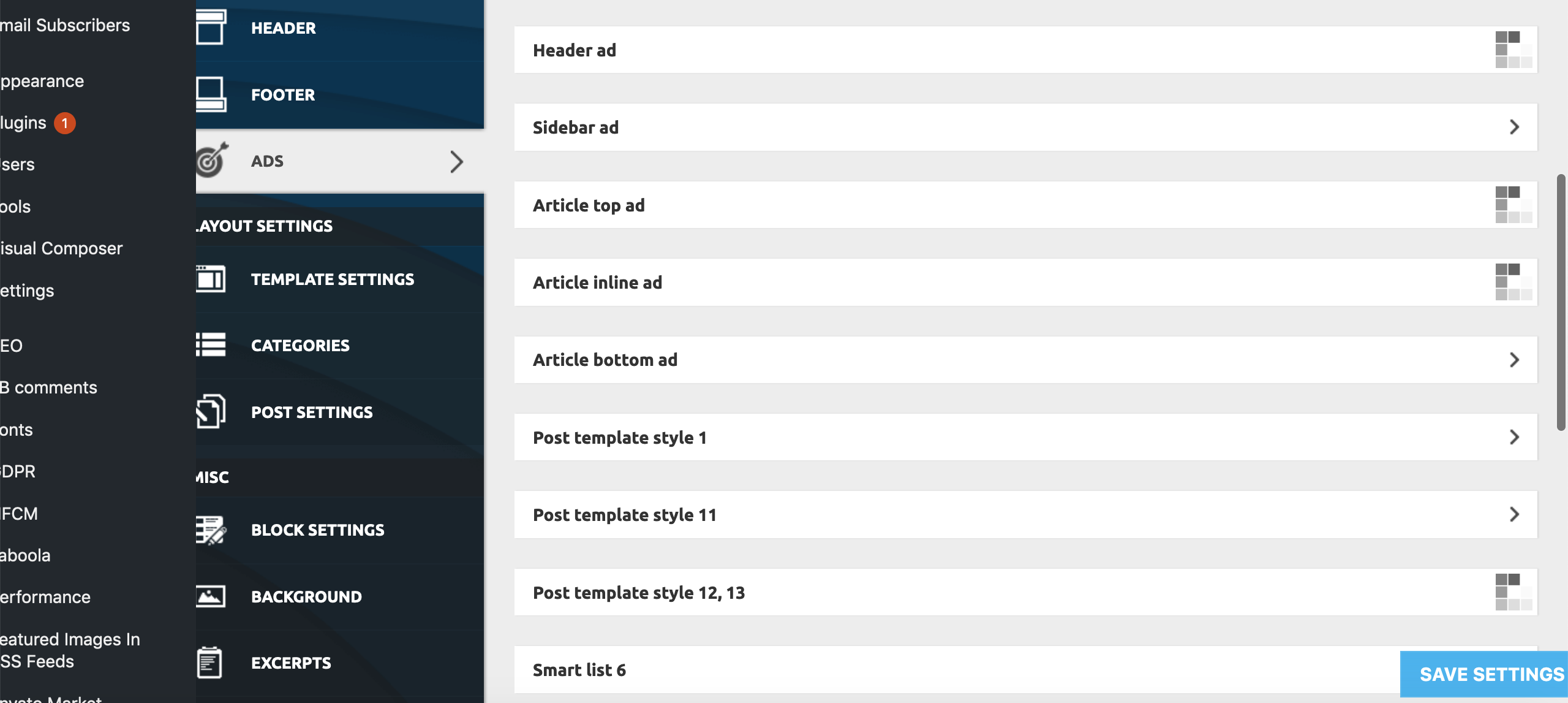
This only appears to be happening on:
Theme Panel > Ads > All submenus bar ‘Background click Ad’
Theme Panel > Theme Colors > All submenus bar Header>Header, Footer>Footer, Footer>Sub-Footer
Theme Panel > Theme Fonts > All ‘Font Settings’ Submenus
Theme Panel > Translations > Translations
Theme Panel > CPT & Taxonomy > All submenus
All other Theme Panel menus and submenus appear to be working correctly.
To try and resolve the issue I have already unsuccessfully tried:
– individually deactivating all Plugins
– deactivating all the essential theme plugins and reactivated the theme
– Reinstalling WP
– Replacing Core Files
– Deactivating all Lazy Load settings (as per a previous thread on a similar problem)
None of these measures has had any effect on the problem as yet.
Furthermore, we are encountering the problem on all browsers we’ve tested (Firefox, Chrome, Opera, Safari), and on all Windows, Mac, Android and iPhone devices we’ve tested, as well as on different IP addresses from a number of locations throughout the country.
Both myself and our tech guy are completely stumped. We now need help! Pleeeasee!

