
No search results were found in Documentation!
 burnuchyan
I have a problem with the mobile version.
1. Mobile theme plugin is not working and I can not create a different mobile homepage. I had to disable the plugin.
2. The mobile logo does not work with or without plugin. Clicking on it opens a picture instead of homepage.
 Rhonda
Could you tell me how to edit the latest articles that are appearing in full content at the bottom of my homepage please?
Thank you.
 msakande
 Dear,
I have serious problem with my website about the mobile version.
I create mobile version of homepage, single, category,…
But when I browse the website in a mobile device I get another version, not the good mobile version I created.
– Good version of mobile I create
https://www.owonews.info/wp-content/uploads/2022/04/mobile-page.png
https://www.owonews.info/wp-content/uploads/2022/04/mobile-page-ok.png
– Bad mobile version I get when I browse the website with mobile device
https://www.owonews.info/wp-content/uploads/2022/04/bad-mobile-version.png
– Theme panel mobile setting
https://www.owonews.info/wp-content/uploads/2022/04/Mobile-selected.png
Note: I don’t want AMP, just the mobile version I created.

 Bezukhof
 1. What does old theme version mean? Shouldn’t I get this updated?
2. I tried editing from the homepage, still can’t trigger the menu area to appear on the scroll up, which is what happens when not logged in.
 tgarmon032071
Is there a way to alter the order of blocks on the homepage when people view the site in mobile devices? I am not using the mobile theme option, as it generates a critical error on users browsers when used. I have a headline post on the page (large image at the top), but when viewed in mobile browsers, that post is below other blocks. I need that headline block to be at the top of the mobile browsers. Right now it is third.
 Bettina
 Hello!
Edit the homepage with TagDiv Composer, click on the mobile viewport: https://www.screencast.com/t/XDQJedlggSB ; there you can see your mobile version and you can edit the logo there.
Thank you!
 Calin
Calin Hi,
The problem from the homepage appears only when you are not logged it? If is so, then it is possible to be from some cache.
If the problem persist, when you are logged in, then please make a test using only tagDiv plugins and see if the problem is still there.
Let me know the results!
Calin Hi,
So if you want to add this -> https://i.imgur.com/WKlFHR1.png on the sticky header, then you need to use a plugin, for this you can try our guide from here https://forum.tagdiv.com/add-cryptocurrency-price-ticker-widget/ after you create the shortcode, edit the homepage with tagDiv Composer -> https://i.imgur.com/QRHnKql.jpg then set a column text or text with title in the zone that you want to add the shortcode, set it in this place https://i.imgur.com/E1gHCZr.png save the changes and click on manager, then enable the sticky header -> https://i.imgur.com/iuB9Zrd.jpg
I hope this is what you need!
Calin Hi,
The option mentioned by Bettina appears only in the latest updates, and you are using an old theme version.
I think that you can assign the header to homepage, then edit the homepage and set on the mobile view port and scroll down, then the sticky header should be displayed (when you edit only the cloud header, in old versions, the sticky option is not displayed because there is no content under the header).
I hope this will help you!
 mita
mita Hi,
I sent the pass through a secure link
I just checked and your login credentials are working
User: bogdan@tagdiv.com
Pass: https://sendpass.app/c/3UZE3L
1. The font is set up in mobile theme template but for some reason it’s not processed. Please acess to that link with a smartphone and see by your self. Compare it with the desktop version. You can also log in and open the composer to check
6. I attached an image that clearly shows a duplicate post despite Unique article is enable.
First Article (featured article) https://snipboard.io/t1r7Ym.jpg
Block below the first article
https://snipboard.io/H98cjE.jpg
Unique articles ENABLED
https://snipboard.io/zk2mOb.jpg
That examples proves there’s something wrong. When “Unique article” is enable on that page (homepage) some unique articles dissapear and duplicate posts are kept. Please, explain how can that happen? The rule applied by “unique article” should give the opposite result.
We were forced to disbale it until we find what’s wrong
Thank you!
 grezako
Hello.
We have serious issues with the layout of our mobile homepage:
1 – When we try to modify the “Header” and the “Footer” with “Composer TagDiv“, it is completely impossible (as you can see on this screenshot: https://imgur.com/a/KQ2sXZq).
So how do we properly modify our Mobile Home Page “Header” and “Footer” to look like the normal Web Home Page ???
2 – When we try to move our Slide circled in Blue (on this screenshot: https://imgur.com/a/EQ4iWm1) to the “Empty Column” (circled in orange on the same screenshot) just above to fill the gap in this column, the slide is no longer displayed at all as you can see on the following screenshot: https://imgur.com/a/P7FnywX.
How then, to make the Slide appear moved in the “column above” since it disappears immediately after having moved it in this empty column located above ???
3 – How to resize the Slide so that it takes the whole width of the space exactly like on this screenshot: https://imgur.com/a/q7lNsOe where we notice the blue lines covering the whole line ???
Please answer us step by step if possible with screenshot examples.
Awaiting your reply.
 sinowells
 hey, thanks!!! now i installed the theme, but new problem is all pictures are blank and also the homepage, please check and help.
https://next.vivosun.com/growing_guide/
https://next.vivosun.com/growing_guide/category/know-how/
 Anamaria
 Hello,
Please check this topic with the same problem -> https://forum.tagdiv.com/topic/tagdiv-composer-does-not-save-only-content-of-homepage/
Thank you!
Calin Hi,
That is an image that I think it has not been correctly imported in the cloud header, that image is set on mobile header, so you’ll need to edit the homepage with tagDiv Composer and set the mobile view port, then select the row from header and remove the image from the css tab https://i.imgur.com/8fHbxaV.png -> https://i.imgur.com/rPrfxD7.jpg -> https://i.imgur.com/qiKynHn.png -> https://i.imgur.com/uiNRpqB.png
I hope this will help you!
Calin Hi,
This can be done by using tagDiv Composer and flex blocks, edit the homepage and select a block, then check the filter tab, there you can choose the category that you want to be filtered -> https://i.imgur.com/dz3JKOv.png the post limit can be set from general tab -> https://i.imgur.com/r30IFha.png
I hope this will help you!
mitaHi,
We recently went live with newspaper theme and I have questions regarding some issues and errors
1- There’s an error with font “Almendra display” Please debug and provide information “JA – Category Opiniao” ‹ Jornal do Algarve — WordPress
2- Video Popup and autoplay is enabled at tagdivcomposer but it’s not working. Why?
3- We noticed that mobile pages are extremely slow. Could you take a look and give us some feedback? How can we improve loading time on that page? To improve performance what’s the recommended option for “Content Preloading”?
4- Is it possible to change and customize video play button? We’d like to Turn it square and determine position over image (Bottom left or right, Top lef right?
5- How can we set a block to display exclusive articles but not only the exclusive ones? In our news site, any category can have exclusive posts and for that reason, I need to determine if an article will display exclusive label when that post is being published and edited. At post level and not at block level. We don’t want to group exclusive content into a spcific block but rather serve the, cronologicaly, through different blocks. How can we achive that?
5- We need to avoid the repetition of Featured articles on other blocks (homepage). How can we achieve that?
We’ve set the first block on our homepage to display only featured articles but there’s a problem. Those articles are always classifed as featured plus another category, for obvious reasons. We can’t find, in tagdiv composer, an option to avoid the repetition of an article at different blocks and that is a problem. If I use filtering options to exclude feature category from other blocks (avoiding the repetition on that article) they won’t be shown anywhere in the homepage. Using offset posts to avoid the repetition of feature article won’t work either because featured article It’s not the last post published. The only viable solution is to have, like other themes do, an option to avoid the repetition os posts from the different blocks that compose the homepage.
6- In “Post Loop” block there’s no option to exclude posts by categories. How can we achieve that? Example: Exclude category: -3, -47107, -24,
Warm Regards,
Marta Reis
 Breinblik
Hi! Sorry if this question has been asked before in the forum but i could’t find a similar topic.
I now have a boxed layout homepage but i would like my homepage to be full width. How do i enable this?
Thanks!
 ashishag
Hi,
Please check – https://www.jantakareporter.com/?s=
Post images are overlapping and not resizing correctly. I was facing this issue with some of the modules on homepage as well while creating post blocks.
Website is on OLS server, with Tagdiv Standard Pack and Composer activated. I can’t activate Cloud templates because it makes my website slower.
Deactivating Standard Pack solves this issue but messes up with website layout
 Ibalex
 In fact, I should mention that the tagDiv Composer is not always available I am not sure why. I read somewhere that tagDiv works with cloud templates. Not sure of the implication of this for my post that I created by myself. I cannot edit them using tagDiv because that editor is almost always not available even as Editor and Admin of the site. The tagDiv appears only available when editing the home page. It disappears when I navigate away from the homepage. See screenshot  of a single post template without tagDiv editing feature

 ionutm
 Hello,
I could use your support with some issues on my mobile pages. My website has most of its pages built using tagDiv Composer (and not the responsive version), but I’ve noticed the following behavior when these pages are accessed, namely:
– when a visitor accesses them, they are displayed in the responsive version (which has some design issues)
– when a user accesses them (so after login), they show up as they were designed with tagDiv Composer
Something like this 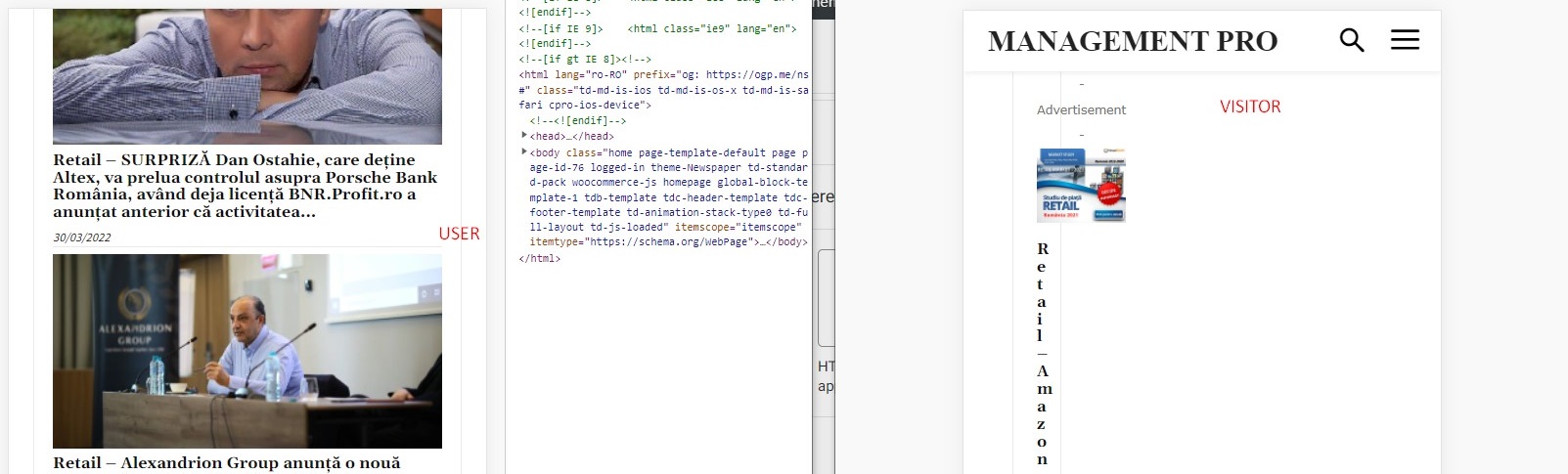
After some debugging, I’ve tracked down these issues to be related to the Wordfence plugin, which is set up in learning mode; the problem is that if I disable Wordfence, I’m losing other page settings like sticky menu setting, login menu setting, colors, etc.
Could you help me further debug it or recommend a solution? I can provide admin login if needed.
Best,
Ionut
-
This reply was modified 4 years by
ionutm.
Calin Hi,
Yes, this can be done if you are using two footers, one that will be set as global in the theme panel and will be without links and a footer cloud that will be assigned individual with tagDiv Composer on homepage -> https://i.imgur.com/6WyF5hn.png -> https://i.imgur.com/OGEJiIp.jpg
Thank you!
Calin Hi,
This can be done by excluding the category that it is used for the posts on the blog.
For this you’ll need to edit the homepage with tagDiv Composer and set for each block/grid to exclude that category -> https://i.imgur.com/kOyEBiq.png -> https://prnt.sc/0wYC9GJr09JS
I hope this will help you!
 ajmanand
jebam.in homepage has alignment issue with error messages. there is no update / any changes except the ssl certificate assigned last week. kindly help as the site looks bad in the layout.
 speakeasy
Hi,
I recently added a mobile hamburger icon to our homepage (https://inspite.thedev.ca/).
Is there any way to edit the screen the hamburger icon redirects visitors to? It shows a “Sign in” button at the top as well as Facebook, Instagram, and Twitter icons.

How can I remove/edit these things?
Best,
Ari
 troller
Hi,
I suddenly have some issues regarding the “Load More” Buttons below a list of posts… in other words:
I display 5 latest posts on the homepage, below I show the “Load More” option button. After I click on it, I only see the spinning “wheel” and nothing loads anymore.
Is it because I use a caching plugin? If so, do I have to exclude anything from being cached?
Thanks a lot



