- TutorialsFrom WPBakery to tagDiv Composer
 Bruno Riggs
Hello,
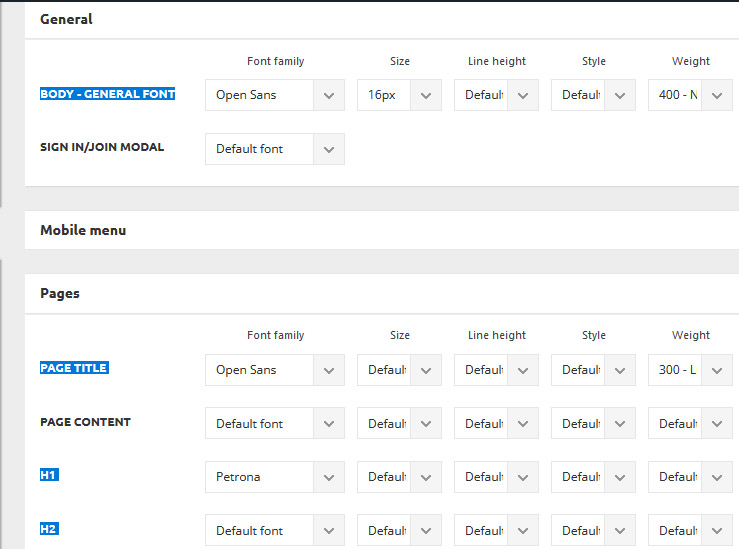
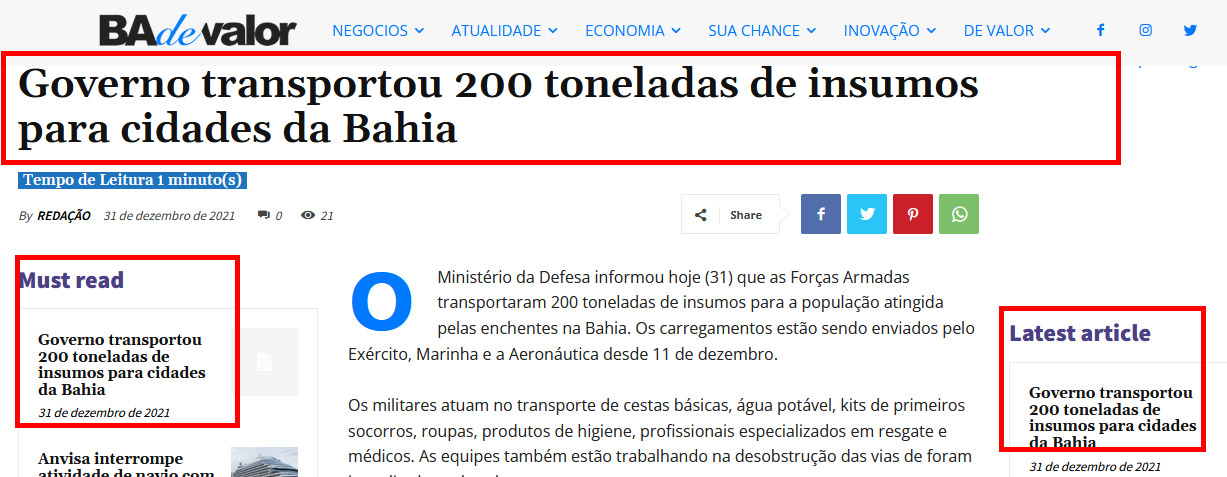
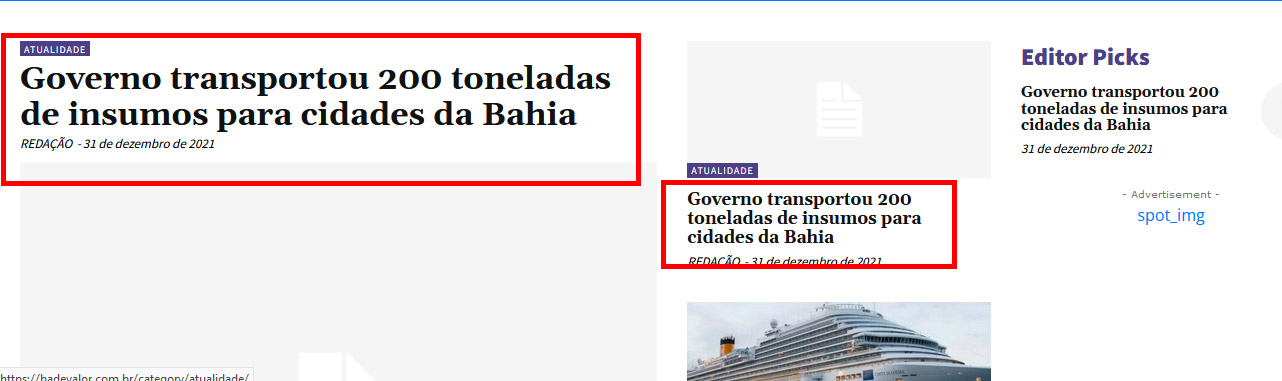
I can change the font of the content when I change it in GENERAL – Body – General font, but when I change the font of H1, H2…. in PAGEs – H1, H2,…. nothing happens.
see, in the images marked in red, I can’t change these fonts.
 andreabacci7
 Thanks for the exhaustive answer.
I just realised that I have no mobile page template, so that’s probably why I don’t see the page content when I use the mobile version.
I love the mobile plugin homepage, but I need to see my pages. The problem is that I didn’t figure out a way to recreate it using the mobile template, yet.
You suggested to deactivate the mobile theme plugin from the plugin page, I have a question about that: will I loose all my setting when I deactivate it?
Thank you very much, you have been incredibly helpful.
 Anamaria
 Hello,
Using our theme you can choose from 3 mobile versions
-> mobile responsive => https://www.screencast.com/t/oJ2ShOp47
-> mobile theme plugin => https://forum.tagdiv.com/the-mobile-theme/
-> mobile page => https://tagdiv.com/newspaper-10-3-7-update-brings-customizable-and-fast-mobile-pages/
If you created the mobile pages with tagDiv Composer, then when you install the Mobile Theme plugin, your pages will be overwritten by the plugin (the mobile theme comes with its templates for page, post, category, etc so your current templates from the desktop theme will get converted to the mobile theme layout, the page content is made without builders in mobile editor => https://www.screencast.com/t/xbgZG8kH also, the options that are provided to edit the mobile theme version are limited (this keeps the things simple)).
This is a video about Responsive Newspaper Theme, AMP & Mobile Theme, Mobile Pages & Templates -> https://www.youtube.com/watch?v=SpGkOnJeNZY
So, the mobile responsive is what you see then that you select the viewport on phone => https://www.screencast.com/t/matV17hH, so some settings may apply for each viewport(where is the border blue), and others are not(where the border is black).
The mobile page has the mobile templates from Cloud Library => https://www.screencast.com/t/YCcZ8rL8
Mobile responsive version of the theme and the mobile page editor can be edit with tagDiv Composer, the mobile theme plugin not.
For example, you can have the mobile theme plugin activate and use the mobile page/mobile responsive version for the homepage/pages, but for the categories pages/404 page you can’t use the mobile page/mobile responsive version if you have the mobile theme plugin activate.
So, if you want to design the pages with tagDiv Composer, you can use the mobile page or mobile responsive version.
Better deactivate the mobile theme plugin and see the results, and assign the mobile page for page, like this => https://www.screencast.com/t/lektAhyjd
Also, clear your cache.
Hope this helps you!
Thank you!
 Bettina
 Hello @sun!
Please edit the 404 page with the TagDiv Composer and change the url link for that button into your homepage and see the results!
Thank you!
Bettina Hello Karen!
What you mean about number of boxes? Please provide more information or some screenshots, so I can help you efficiently. It seems that you use the Mobile Theme on your homepage and to customize it you have only some settings from the theme panel -> Mobile theme.
Thank you!
 sun
sunMy site’s 404 page’s “Go to the homepage” points to https://demo.tagdiv.com/newspaper_pro/, why is this? How to amend it?
 howmanywon
Theme: Royal pub
Wesbite URL: howmanywon.com
1. Global logo
Using edit with tagdiv composer, if I update the ‘Logo text’ and ‘Logo text tagline’ it only applies to the page on which I edit it. How can I get this to apply to every page?
2. Hide author
E.g. first article ‘Strawberry Daiquiri’, author is showing as ‘Howmanywon@gmail.com’. Can I hide this?
3. Hide post date
Similar to aboe, want to hide the date
4 and 5. remove sections
On the homepage, I would like to remove the entire ‘Video recipes’ section, and the entire ‘Subscribe to our newsletter’ section so that the footer is just the left half of the current footer.
Thank you!
 AndreaPagani
Hi! I’m trying to show the excerpt in a post, but I can do this just in amp version…
Example:
Normal post (no excerpt) https://www.officina.news/abbigliamento-da-lavoro-invernale-u-power-punta-sul-total-look/
AMP post (with excerpt “La giacca Space, la felpa Rainbow etc.” https://www.officina.news/abbigliamento-da-lavoro-invernale-u-power-punta-sul-total-look/?amp=1
I was able to show it just in the homepage blocks…
Thanks!
Andrea
 Tim4962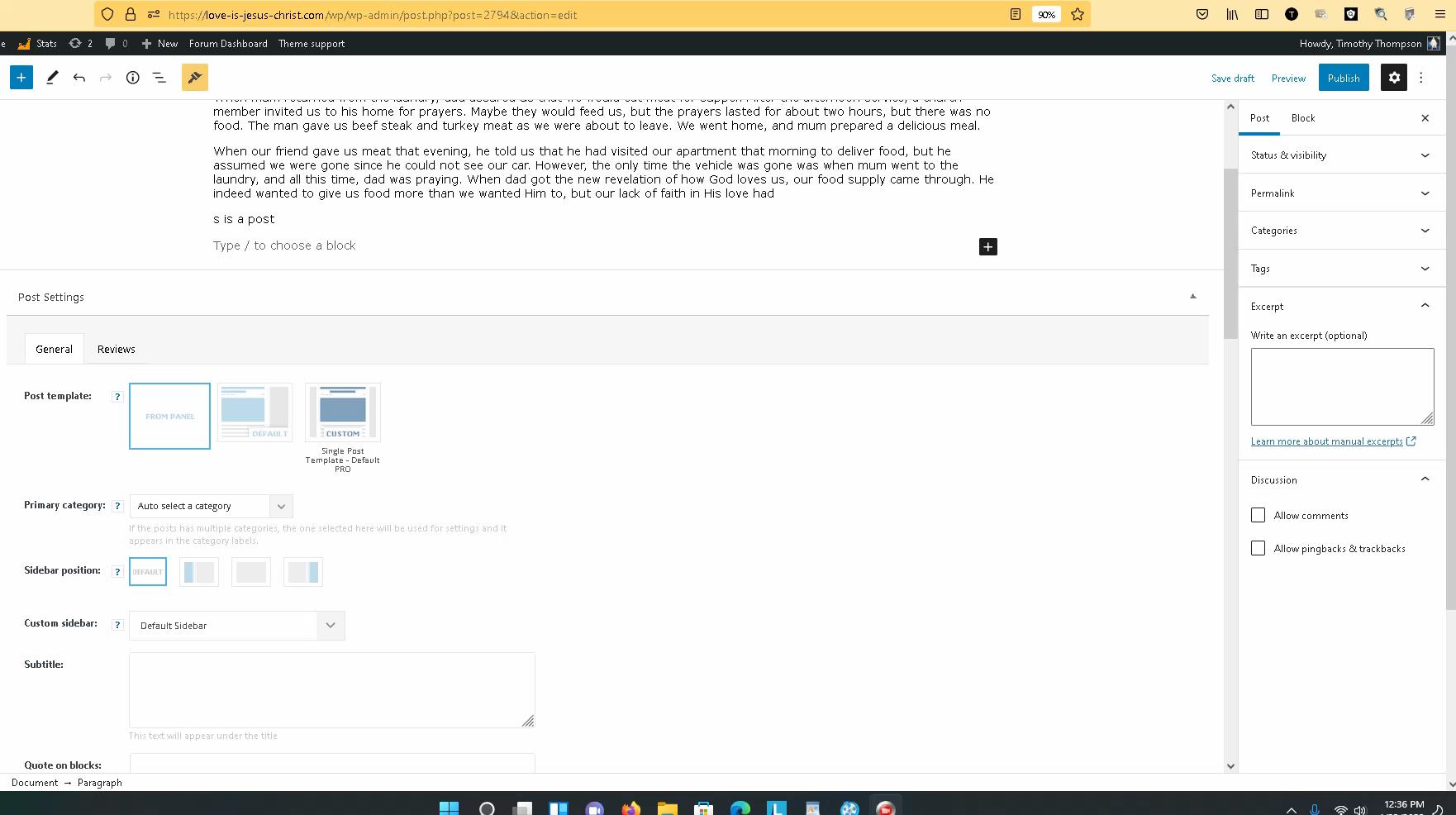
I have created well over 100 articles and have added many plugins. The last update was about two weeks ago. I have done a lot since then.
THE PROBLEM: The problem is when I try to create a “NEW POST”. Now as I create the post articles using the sidebar admin menu. I no longer see the area where I can add an image. Maybe I am having a really bad day. I could really use your sincere help in this matter.
I tried reinstalling WordPress, no luck. I deactivated all plugins except the Newspaper theme and still made no difference. I do understand that I can add an image on any part of the article, but that image would not show up on the front page, homepage newspaper theme. You can see my page here, My Home Page
Maybe reinstalling the newspaper theme? I am just trying not to lose my work. But as I wait for your response I am going to back up the site again.
So again, nothing on the side panel where I can add an image. Don’t see this, (Select or Upload Media)
Thanks for your help!
Timothy Thompson
 Lalit
LalitHi,
Today, I found that Date not showing in the Article meta info across all module (flex block, post loop) on homepage, category pages, tags, author archive pages and so on.
Watch it: https://drive.google.com/file/d/1GqclXZBNnxwR1gbdUCHruLQYjTmKJ4Hz/view?usp=sharing
Is it a bug?
What I have done to find the issue?
1. Deactivated all plugins and reactivated one by one.
2. Switched back to Newspaper parent from the child theme.
3. Deactivated, deleted, and reinstalled only default newspaper plugins – td composer, cloud library, and newsletter.
4. Removed all plugins except the newspaper default.
Please help soon. I am using Newspaper Tech news demo
Regards,
 zoldfulu
 I repeat, that plugin is no longer “tested”.
It is a disaster now.
The site does not load the latest version of an article (including the homepage), unless you accept the cookie consent.
But you need to click several times, and even then the page loads only after a while.
It makes a very-very unprofessional impression.
This plugin does not work at all with the theme now.
It would be useful to recommend a plugin that works…
This is an essential plugin.
Bettina Hello @zlobica!
For homepage, please use “Column text” and “text with title” elements which have a button called “edit content” and if you click on that button, the WP Editor will open and you can add the code there. Close the WP Editor from X, save the changes from Composer and view the page to see the changes.
The Single External Shortcode works only on single post templates. Also, you can set for this one https://prnt.sc/26gwigr in the CSS tab a margin:0 at the bottom to take off that space.
Thank you!
 Louis
Louis In the homepage there is no problem, it is in the categories pages that not all the articles are not showed as you can see below.
current display 1
current display 2
current display 3
editor display 1
editor display 2
editor display 3
editor display 4
thank you for your quick answer Anamaria !
Louis
-
This reply was modified 4 years by
Louis.
Anamaria Hello,
If you want to use a mobile theme plugin also, on the homepage, then enable it, edit the page in editor -> https://imgur.com/OTAJQSS
Also, please check this topic where I explained each mobile version -> https://forum.tagdiv.com/topic/mobile-version-not-working-properly-2/
Thank you!
 Bennettheyn
Hi, is there any way to show users the most relevant blogs based on their cookies/website browsing behavior? Like if someone visits a bunch of golf sites, then my site would show them the golf articles I wrote?
Thanks
 abbey4biz1
Hi, pls mobile theme not working when I try to access my site homepage: smedigest.com.ng
But when I go through other articles, it loads up.
Anamaria Hi Karin,
So, your client uses the mobile theme plugin, but the mobile theme is disabled on the homepage, right?
Also, she created a mobile menu for the posts and pages where the mobile theme is enabled and she set the menu in Theme Panel -> Mobile Theme -> Header -> https://i.imgur.com/8dAeJRZ.png, so you can set the other menu for the homepage in Theme Panel -> Header -> Main Menu -> https://i.imgur.com/onc8Lik.png if she uses a standard template for header from Theme Panel or you can set it with tagDiv Composer on the viewport for phone -> https://i.imgur.com/T9gLYs1.png
Hope this helps you!
Thank you!
 Calin
Calin Hi Bennettheyn, when you import only the demo settings, then indeed this will not look like in our demos. When you import it with content then are imported pages and posts, for example, when it is installed without content there are no pages and no posts. Now you have your own posts, but you need the homepage. I think that we can try like this. Keep the demo imported without content and take from here the homepage code. Just copy it and past it in a new page, after that set it as your static homepage and set te page template like this https://i.imgur.com/ukGVV07.png. Then you’ll need to edit it with tagDiv Composer and change the filters from the blocks using your categories.
Then all you need to do is to add widgets for sidebar -> https://i.imgur.com/qsmHgJw.png
I hope this will help you!
Bennettheynhttps://imgur.com/BHNsfsu This is a picture of my home page. In order to make the site look like the theme, I will have to manually go in and change everything according to this: https://forum.tagdiv.com/topic/installing-newsmag-theme-on-new-site/
I would think that installing it without content (https://i.imgur.com/yGrGRgU.png) would reformat the website to look like the template but just with my content. Would it be easiest to reinstall it with the content turned on so I have the original? If I did, how can I replace the content on the homepage with my content?
I was thinking to just edit each article that is on the homepage with my content but I saw this ***Important notice: If you choose to install a pre-built website with content, do not edit the content and use it as your site content, because the pre-built website content will be removed when uninstalling or switching pre-built website.
I need a lot of help. Is there a chat we can use to go back and forth. I have too many questions for this forum lol
 alicestudio
Hello,
I just setup a mobile homepage https://imgur.com/a/9ocfdog, but it is not showing when I try to access the website via a mobile device. I mean, from a mobile device I see a different layout.
Am I supposed to enable my mobile template elsewhere?
thank you
 kjervert
 Might I ask one more question. My client wants the mobile menu to be different on the default header. She created a new mobile menu that is easily activated with the pages that have the mobile theme active, but on the homepage and the pages where the default header is, I don’t see a way to indicate a change to a different menu when on mobile device there.
It there any way to do this?
Karin
 marcorroma
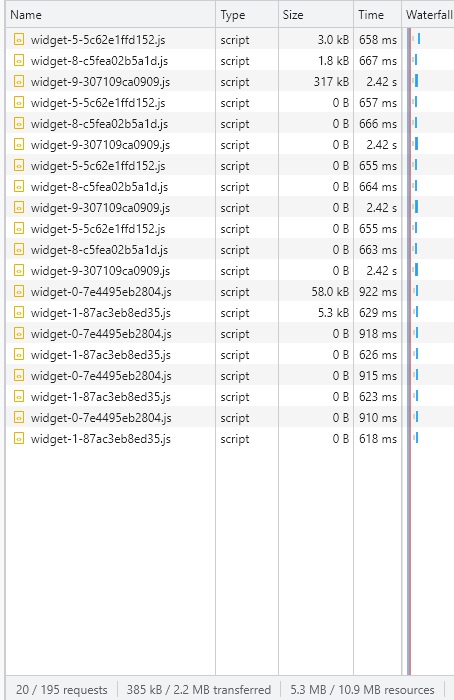
Hi, I have 4 Soundcloud players on my homepage.
This involves loading many soundcloud site widgets. About 385kb of .js uploads for these podcasts alone.
Screenshot:
https://i.ibb.co/tpdfZw3/widg.jpg
Is it possible to delay the loading of these scripts? Lazy load?
Currently, this script is loaded when accepting cookies.
I await support.
Thank you
Bettina Hello @ikaris!
Normally, if you use a cloud/PRO template, then you can edit the homepage for example with the tagdiv Composer and you can edit the elements in header and footer too.
If you use a default header, then you can’t edit it with the TagDiv Composer. So, you need to import a cloud one from Cloud Templates: https://tagdiv.com/how-to-use-the-header-builder-and-tagdiv-cloud-header-templates/. You can do it from scratch also: https://www.youtube.com/watch?v=SoGQ0d5kIBg
Thank you!
 breaking white
 Hi!
For example it is possible to insert a URL for Blocks. So, when people click on the title they will be forwarded to the respective URL: https://i2.paste.pics/FP6RB.png
Since I am using column titles on the homepage (), I would like to set a URL for the column title, so when people click on it they will be forwarded to the selected URL: https://i2.paste.pics/e446a35ca8c642886a3d0a528257bca4.png
How is this possible?
Kr
Janik
 DamianSiecz